
Oleafly
What Oleafly is
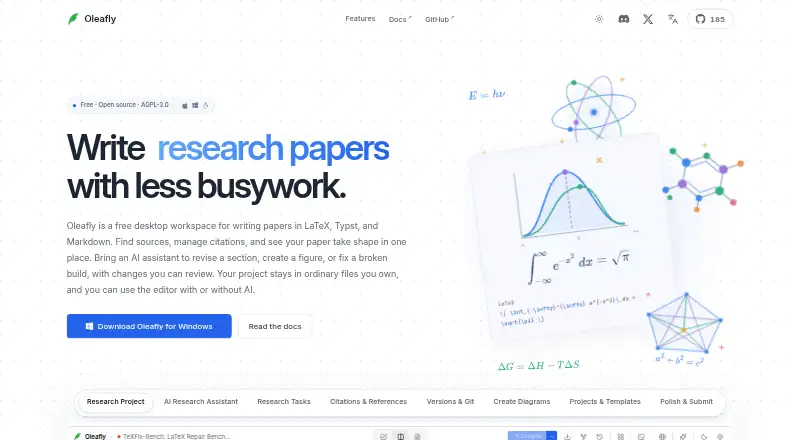
Oleafly is a free desktop workspace for technical documents such as papers, theses, and resumes. It combines writing, PDF preview, references, and an optional AI assistant, with support for LaTeX, Typst, and Markdown projects. Users can connect hosted AI providers, local Ollama models, custom OpenAI-compatible endpoints, or supported command-line agents such as Claude Code and Codex. Research search covers alphaXiv and OpenAlex, and citations can be verified against Crossref. Local spelling and grammar checks use Hunspell and Harper and focus on prose rather than LaTeX commands or math. Without AI, writing, local compilation, PDF review, and proofreading work offline, provided packages, fonts, and tools were downloaded first. Projects can be imported from folders or ZIPs and exported as PDF, DOCX, HTML, Markdown, or source ZIP files. Oleafly supports GitHub push and pull and Git-based collaboration, but real-time co-editing, comments, and managed sync are not currently in the app. The desktop app is open source under AGPL-3.0 for macOS, Windows, and Linux.
Who it suits
Oleafly may suit people writing technical documents in LaTeX, Typst, or Markdown who want PDF review, reference tools, and optional AI connections. It also fits users who can collaborate through Git rather than real-time co-editing.
What it does well
- Supports LaTeX, Typst, and Markdown projects.
- Works offline for writing, compilation, PDF review, and proofreading.
- Imports multiple reference-library formats.
- Exports PDF, DOCX, HTML, Markdown, and source ZIP files.
- Available for macOS, Windows, and Linux.
What to know first
- Real-time co-editing is not currently available.
- Comments and managed sync are not currently available.
- Offline use requires downloading packages, fonts, and tools first.
- Paid AI providers may charge for usage.
Limits
The desktop app has no subscription, though paid AI providers may charge for usage. Offline writing and review depend on having required packages, fonts, and tools downloaded beforehand; real-time co-editing, comments, and managed sync are not currently available.
Plans
| Plan | Billed and limits | Price |
|---|---|---|
| Free | Desktop app · no Oleafly subscription · paid AI-provider usage may apply · local Ollama does not require paid API | Free |
As oleafly.com lists them, read 15 Oct 2026. The maker's own page has the final word.
Getting started
- Visit Oleafly’s website and get the desktop app for macOS, Windows, or Linux.
- Import a project folder or ZIP archive, or start a LaTeX, Typst, or Markdown project.
- Download the packages, fonts, and tools needed for offline work.
- Import references from BibTeX, RIS, EndNote XML, or Zotero RDF if needed.
- Connect an AI provider, local Ollama model, custom endpoint, or supported CLI agent if desired.
- Use GitHub push and pull or Git-based collaboration as needed.
Oleafly is a free desktop workspace for papers, theses, resumes, and other technical documents. It suits writers and researchers who want source editing, references, PDF review, and optional AI in one local application. It is a strong fit for individual work and Git-based workflows, but not for teams that require built-in live collaboration.
Overview
Oleafly brings LaTeX, Typst, and Markdown projects into one visual desktop workspace. It combines writing, PDF preview, citation handling, proofreading, submission checks, and integrations with developer tools. The result is broader than a conventional LaTeX editor, especially for projects that move between source formats and publication deliverables.
The local-first approach is central. The maker says project files remain on your machine, Oleafly has no account or telemetry, and hosted AI receives only the context you elect to send. Writing, local compilation, PDF review, and proofreading continue without AI, provided packages, fonts, and other required tools were downloaded before going offline.
Key features
Writing and file conversion
Projects can use LaTeX, Typst, or Markdown, and you can import project folders and ZIP files, including exports from online LaTeX editors. Export targets include PDF, DOCX, HTML, Markdown, and source ZIP files. That range is useful when a manuscript must be submitted in different formats or handed to someone using another tool. It remains a desktop workflow, however, rather than a browser editor built around shared documents.
Research, references, and proofreading
Search covers alphaXiv and OpenAlex, while Crossref can verify citations. Reference libraries can be brought in from BibTeX, RIS, EndNote XML, and Zotero RDF. Local Hunspell and Harper checks address spelling and grammar in prose, deliberately avoiding LaTeX commands and mathematical content. Oleafly therefore helps clean surrounding text and organize sources, but equation-heavy writing still needs specialist review.
AI and automation
AI is optional rather than tied to the free app. You can connect hosted providers, local Ollama models, custom OpenAI-compatible endpoints, or supported command-line agents including Claude Code and Codex. This flexibility suits users with an existing model subscription, local hardware, or a preferred agent. Paid AI providers may charge separately for usage, so the free application does not mean every AI workflow is free.
Checks, integrations, and collaboration
Submission preflight can check compilation, venue requirements, ATS concerns, accessibility, references, and privacy. The maker does not promise an ATS score, so these checks should support a submission process rather than replace a hiring platform's evaluation. GitHub push and pull, Git-based collaboration, MCP tools, Ollama, AI providers, and installed CLI agents extend the workspace for technical users.
Real-time co-editing, comments, and managed synchronization are not in the current app. Collaboration uses Git, which is appropriate for people comfortable with branches and repositories but adds process for colleagues expecting shared editing.
Pricing
Free — free. The desktop app has no subscription. There is no free trial because the product is free, and paid AI providers can still bill for their own usage. Every core workspace feature described above is available without a recurring Oleafly charge, making it suitable for students, researchers, and independent writers who can manage their own tools and repositories.
Platforms
Oleafly runs on macOS, Windows, and Linux. It is a desktop application with visual editing, offline editing, and Git integration. Offline work requires advance downloads of packages, fonts, and tools; AI-dependent workflows are not available offline unless you use a local option such as a prepared Ollama setup.
Who it's for
Choose Oleafly for a solo author, student, researcher, or technical team already using Git that wants writing, references, PDF inspection, and export options together. It is particularly suitable when privacy, local files, multiple markup formats, or optional local AI matter. Look elsewhere if collaborators need comments, managed sync, or simultaneous editing without Git knowledge.
Pros and cons
- Pros: One workspace covers LaTeX, Typst, and Markdown; imports and exports span common project and document formats.
- Pros: Local citation verification, broad reference-library imports, and prose-focused proofreading reduce tool switching.
- Pros: No Oleafly account or telemetry is required, and AI connections can use local models or custom endpoints.
- Pros: Submission preflight includes compilation, accessibility, reference, privacy, venue, and ATS-oriented checks.
- Cons: Live co-editing, comments, and managed synchronization are absent; collaboration is Git-based.
- Cons: Offline preparation requires downloading packages, fonts, and tools in advance.
- Cons: Hunspell and Harper focus on prose, not LaTeX commands or mathematics, and external AI usage may cost extra.
Alternatives
For a broader comparison, see LaTeX Editors.
- JianTeX is a free, open-source choice with desktop, online, and self-hosted options across Linux, macOS, Windows, and the web.
- VerbTeX is better when you need mobile and web access, though its free plan limits local and cloud projects, documents, and uploads.
- Gummi is a free cross-platform editor with no stated paid plans or usage limits.
- Kile is a free downloadable desktop application with source code available.
- LyX is free GPL software for users who prefer that licensing model.
- Papeeria is a web and mobile freemium option whose free Epsilon plan allows one private project and unlimited public projects and collaborators.
- Texmaker is a free LaTeX editor, but a LaTeX distribution is required separately.
- Texpile is a free offline desktop editor for a straightforward local workflow.
Verdict
Oleafly is the right choice for technical writers who value a private, cross-platform desktop workspace with multiple markup formats, serious reference handling, PDF review, and configurable AI. Its main reason to choose it is the breadth of that local toolkit at no subscription cost. Its main reason to look elsewhere is collaboration: teams wanting comments, managed sync, or real-time co-editing will find Git an unnecessary barrier.
Verdict
Oleafly combines technical writing, PDF review, citations, and optional AI integrations in a free desktop app. Collaboration currently relies on Git, and offline use depends on preparing required tools and packages in advance.
Questions
How much does Oleafly cost?
The Free plan is listed as free, with no subscription for the desktop app. Paid AI providers may charge for usage.
Which operating systems does it support?
Oleafly supports macOS, Windows, and Linux.
Can Oleafly be used offline?
Writing, local compilation, PDF review, and proofreading work without AI. Required packages, fonts, and tools must be downloaded before going offline.
Is Oleafly open source?
Yes. It is open source under the AGPL-3.0 license.
Which AI services and agents can it connect to?
It can connect to hosted AI providers, local Ollama models, custom OpenAI-compatible endpoints, and supported CLI agents such as Claude Code and Codex.
Does Oleafly support real-time collaboration?
No. Collaboration currently uses Git; real-time co-editing, comments, and managed sync are not currently in the app.
Facts from Oleafly's own pages
- AI options
- Users can connect hosted AI providers, local Ollama models, custom OpenAI-compatible endpoints, or supported CLI agents such as Claude Code and Codex. · oleafly.com, 30 Sept 2026
- AI providers
- Users can connect hosted model providers, any OpenAI-compatible endpoint or a local Ollama model. · github.com, 15 Oct 2026
- Beta status
- The GitHub README labels Oleafly beta and says research tasks and CLI-agent support are beta features. · github.com, 15 Oct 2026
- Citation search
- Citation Search queries arXiv, Semantic Scholar, Crossref, PubMed and OpenAlex and can save BibTeX entries. · oleafly.com, 15 Oct 2026
- CLI agents
- The editor supports command-line agents including Claude Code, Codex CLI, Gemini CLI, Pi, OpenCode, Cline, Cursor and others. · github.com, 15 Oct 2026
- Collaboration limit
- Real-time co-editing, comments, and managed sync are planned but are not currently in the app; collaboration currently uses Git. · oleafly.com, 30 Sept 2026
- Collaboration server
- Teams can run Oleafly Server on their own Linux machine or cloud account for shared projects, accounts, roles and live collaboration. · oleafly.com, 15 Oct 2026
- Compilation engines
- Tectonic, Typst and Pandoc are bundled, while users can switch to latexmk with TeX Live, MacTeX, MiKTeX or TinyTeX. · github.com, 15 Oct 2026
- Desktop limitation
- Intel Macs and Windows on ARM do not have native packages listed in the installation documentation. · oleafly.com, 15 Oct 2026
- Desktop requirements
- Native releases target macOS Apple Silicon, Windows x64, Linux x64 and Linux ARM64; Linux requires glibc 2.39 or newer. · oleafly.com, 15 Oct 2026
- Diagram tools
- A visual diagram canvas can produce editable TikZ, Typst or Mermaid source, with AI-assisted figure creation available. · oleafly.com, 15 Oct 2026
- Editor and preview
- The app combines source editing, document navigation and PDF preview, with source-to-PDF navigation through SyncTeX. · github.com, 15 Oct 2026
- Import and export
- Users can import project folders and ZIPs, including exports from online LaTeX editors, and export PDF, DOCX, HTML, Markdown, and source ZIP files. · oleafly.com, 30 Sept 2026
- Import options
- Users can import ZIP archives, GitHub repositories, Word, Markdown, HTML, Typst, arXiv source bundles and PDFs reconstructed as editable LaTeX. · oleafly.com, 15 Oct 2026
- Independent-source documentation depth
- The repository README links guides, build-from-source instructions, server deployment, compilation-engine documentation and contribution paths. · github.com, 15 Oct 2026
- Independent-source extensibility
- The repository documents a local MCP server, external CLI agents, hosted model endpoints and Ollama as extension paths. · github.com, 15 Oct 2026
- Independent-source product description
- GitHub describes Oleafly as a local-first AI-assisted research workspace for scientific writing and publishing. · github.com, 15 Oct 2026
- Independent-source repository metrics
- The GitHub organization page lists the main repository as TypeScript under AGPL-3.0 and displays 21 stars and 11 forks at the time captured. · github.com, 15 Oct 2026
- Independent-source support channel
- The GitHub project invites bug reports, feature requests, code contributions, template contributions and documentation contributions. · github.com, 15 Oct 2026
- Integrations
- The product supports GitHub push and pull, Git-based collaboration, Ollama, MCP tools, and connections to AI providers and installed CLI agents. · oleafly.com, 30 Sept 2026
- Licence
- The GitHub project identifies the desktop app as AGPL-3.0-or-later. · github.com, 15 Oct 2026
- Limit: collaboration release scope
- The GitHub README states that live co-editing and background device sync were not shipped in that release. · github.com, 15 Oct 2026
- Maker
- The project says it is built by Prajwal Murthy and contributors; its citation metadata names Prajwal S. Venkateshmurthy and the Oleafly contributors. · github.com, 15 Oct 2026
- Maker location
- The Oleafly GitHub organization lists the organization location as the United States of America. · github.com, 15 Oct 2026
Where Oleafly stands on Freedom251
- LaTeX Editors#2 of 32