Gummi
What Gummi is
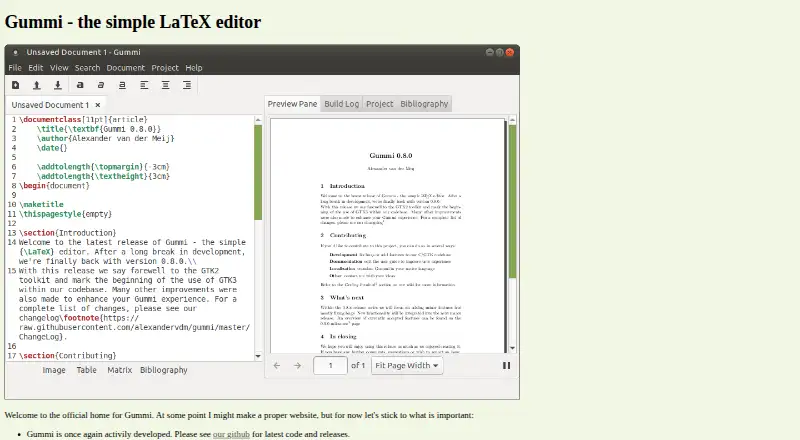
Gummi is a free desktop LaTeX editor for writing and organizing documents. As you edit, a preview pane reflects changes almost immediately, and syntax highlighting distinguishes LaTeX commands from surrounding text. You can choose another editor colour scheme or add custom styles in `~/.config/gummi/styles`. For recurring LaTeX structures, command snippets can be inserted with shortcut keys or command text, and some examples are preconfigured. Wizards can add LaTeX for images, tables, matrices, and bibliography files; documents can also be saved as templates. Project support groups documents and stores compilation settings and file locations in a plain-text file. PDF export is among the documented file operations. The install guide lists packages for Ubuntu, Debian, Gentoo, Arch, Slackware, OpenBSD, macOS/NetBSD, and Windows. Developers can compile Gummi from source, though the guide describes that code as the latest untested development code. The home page says Gummi is actively developed again and points to GitHub for current code and releases. A wiki links to troubleshooting and frequently asked questions, and invites contributions through development, translations, and testing.
Who it suits
Gummi suits people who write LaTeX documents and want an editor with a near-immediate preview, syntax highlighting, and helpers for common document elements. It can also suit users who want to group documents into projects or create reusable snippets and templates.
What it does well
- Preview document changes almost immediately while editing.
- Syntax highlighting distinguishes LaTeX commands from other text.
- Wizards insert LaTeX for images, tables, matrices, and bibliographies.
- Projects store compilation settings and file locations in plain text.
- PDF export is among the documented file operations.
- Free desktop editor with packages listed for multiple operating systems.
What to know first
- Spell checking is off by default and requires gtkspell and a selected language.
- Source build instructions describe the development code as untested.
Plans
| Plan | Billed and limits | Price |
|---|---|---|
| Gummi | No paid plans or usage limits stated | Free |
As alexandervdm.github.io lists them, read 8 Oct 2026. The maker's own page has the final word.
Getting started
- Visit the Gummi website.
- Choose an installation package listed for your operating system or distribution.
- Install Gummi and open a LaTeX document.
- Use the preview pane while editing, or start a project to group documents and compilation settings.
- Optionally configure a language and gtkspell if you want spell checking.
Gummi is a free desktop editor for writing LaTeX documents. It best suits people who want a focused Linux, macOS, or Windows workspace with a live preview and helpers for common document structures. Its strength is a straightforward editing workflow; spell checking takes extra setup.
Overview
Gummi puts the source and a near-immediate preview side by side, so writers can check how edits render as they work. That is useful for anyone who wants feedback during drafting, while project files keep documents, compilation settings, and file locations together. The approach favors a local desktop workflow over web access.
Key features
Syntax highlighting separates LaTeX commands from surrounding text, and users can choose another editor colour scheme or add styles under ~/.config/gummi/styles. These options help make a code-heavy document easier to scan, though the customization is about the editor’s appearance rather than its capabilities.
Command snippets can be inserted with shortcut keys or command text; some are preconfigured. Wizards generate LaTeX for images, tables, matrices, and bibliography files, and documents can be saved as templates. These helpers cut down on repeated setup for familiar structures while leaving the writer in control of the source.
Project support records compilation settings and file locations in a plain-text file, which makes it practical to keep related documents organized together. Gummi also supports exporting to PDF. Spell checking is less immediate: it is off by default and needs both gtkspell and a selected language.
The project is described as actively developed again, with current code and releases on GitHub. The wiki also points to troubleshooting and frequently asked questions, and invites contributions to development, translations, and testing.
Pricing
Gummi is free: its Gummi plan costs nothing, with no paid plans or usage limits stated. There is no free trial because the product is already offered as a free plan. That makes it a sensible choice for writers who want a desktop LaTeX editor without a subscription.
Platforms
Gummi is a desktop application for Linux, BSD, macOS/NetBSD, and Windows. The install guide lists packages for Ubuntu, Debian, Gentoo, Arch, Slackware, OpenBSD, macOS/NetBSD, and Windows. Developers can compile it from source, though the guide describes that code as the latest untested development code.
Who it's for
Gummi is a good fit for students, researchers, and other LaTeX writers who prefer a local editor, want a preview while drafting, and value project organization and reusable document helpers. Writers who depend on spell checking should account for the gtkspell installation and language selection before choosing it.
Pros and cons
- Pros: The live preview makes rendered changes visible during editing, and PDF export supports a direct path from source to a shareable document.
- Pros: Wizards, templates, snippets, and project settings help with repeated document work without adding a subscription cost.
- Cons: Spell checking requires extra setup, so it is less convenient for writers who expect it to work by default.
- Cons: Gummi is a desktop editor, which makes it a poorer fit for people seeking a web-based workflow.
Alternatives
Browse LaTeX Editors for more options. JianTeX is another free choice if you want desktop, web, or self-hosted access. VerbTeX may suit users who want mobile and web versions alongside desktop apps, though its free plan caps local and cloud projects, documents, and uploads. Kile is another free desktop application, with source code available. LyX is free software released under the GPL. Oleafly is a free desktop option without a subscription, though paid AI providers may charge for usage. Papeeria offers web access and a free plan with one active private project plus unlimited public projects and collaborators. Texmaker is a free desktop editor, with a LaTeX distribution required separately. Texpile is a free offline desktop editor.
Verdict
Choose Gummi if you want a free desktop LaTeX editor that shows a live preview and includes project support, reusable snippets, and document wizards. Its clearest limitation is spell checking, which needs gtkspell and a selected language; writers who need that feature ready by default should look elsewhere.
Verdict
Choose Gummi if you want a free LaTeX editor with a live preview, document helpers, and project support. Look elsewhere if you need spell checking without extra setup; Gummi requires gtkspell and a selected language for that feature.
Questions
Is Gummi free?
Yes. Gummi is listed as free, with no paid plans or usage limits stated.
Which platforms does Gummi support?
Gummi supports Linux, BSD, macOS/NetBSD, and Windows. The install guide lists packages for Ubuntu, Debian, Gentoo, Arch, Slackware, OpenBSD, macOS/NetBSD, and Windows.
Does Gummi include spell checking?
Spell checking is off by default. It requires selecting a language and having gtkspell installed.
Can Gummi export documents to PDF?
Yes. PDF export is among Gummi’s documented file operations.
Can I build Gummi from source?
Yes. The guide describes compiling it from source, and labels that code the latest untested development code.
Does Gummi have a preview while editing?
Yes. Changes appear almost immediately in a preview pane.
Facts from Gummi's own pages
- Command snippets
- Users can assign shortcut keys or command text to commonly used LaTeX blocks; some examples are preconfigured. · github.com, 8 Oct 2026
- Development status
- The official home page says Gummi is once again actively developed and points readers to GitHub for current code and releases. · alexandervdm.github.io, 8 Oct 2026
- Document helpers
- Wizards can insert LaTeX for images, tables, matrices, or bibliography files, and users can save documents as templates. · github.com, 8 Oct 2026
- Editor themes
- Users can choose alternative editor colour schemes, and custom styles can be placed in ~/.config/gummi/styles. · github.com, 8 Oct 2026
- Export
- The documented file operations include exporting to PDF. · github.com, 8 Oct 2026
- Live preview
- Changes to a document appear almost immediately in a preview pane. · github.com, 8 Oct 2026
- Product
- Gummi is described as a simple LaTeX editor. · github.com, 8 Oct 2026
- Projects
- Project support groups documents and stores compilation settings and file locations in a plain-text file. · github.com, 8 Oct 2026
- Source build
- The guide says developers can compile Gummi from source and describes that code as the latest untested development code. · github.com, 8 Oct 2026
- Spell checking
- Spell checking is off by default and requires selecting a language and having gtkspell installed. · github.com, 8 Oct 2026
- Support and involvement
- The wiki links to troubleshooting and frequently asked questions and invites contributions through development, translations, and testing. · github.com, 8 Oct 2026
- Supported packaging
- The install guide lists packages for Ubuntu, Debian, Gentoo, Arch, Slackware, OpenBSD, macOS/NetBSD, and Windows. · github.com, 8 Oct 2026
- Syntax highlighting
- LaTeX commands are highlighted separately from the rest of the text. · github.com, 8 Oct 2026
Where Gummi stands on Freedom251
- LaTeX Editors#5 of 32