LaTeXiT
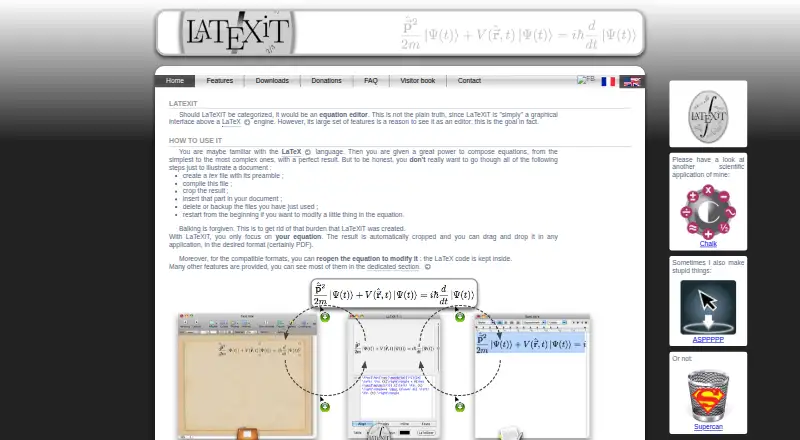
What LaTeXiT is
LaTeXiT is a free macOS desktop application for composing equations through a graphical interface to a LaTeX engine. It renders and automatically crops equations, which users can drag into other applications. PDF is the default export; MathML and SVG are also available, though MathML is experimental and SVG export requires pdf2svg. The editor includes syntax coloring, a dictionary, keyboard shortcuts, document templates and analysis of LaTeX-engine logs for errors. Equations are saved in a history, and users can organize equation libraries. You can choose the LaTeX engine, include packages, change the preamble and run custom scripts during generation. In compatible formats, exported equations can retain their LaTeX code for reopening. LinkBack-compatible software can send a dropped equation back to LaTeXiT for editing and update it in the target application. macOS Services can transform equations in compatible apps, and Automator can batch-convert them. LaTeXiT is open source under the CeCILL license. It requires macOS 10.9 or later and a separately installed LaTeX engine; its interface is designed for equations rather than multipage documents.
Who it suits
LaTeXiT suits macOS users who need to create equations and insert them into other applications. It is less suited to people seeking a multipage document editor.
What it does well
- Automatically crops rendered equations for drag and drop
- Exports to PDF, with MathML and SVG also available
- Saves equation history and supports equation libraries
- Supports LinkBack editing in compatible software
What to know first
- Requires a separately installed LaTeX engine
- MathML export is experimental
- SVG export requires pdf2svg
- Designed for equations, not multipage documents
Limits
The free plan costs nothing. It requires macOS 10.9 or later and a separately installed LaTeX engine; the interface is designed for equations rather than multipage documents. MathML is experimental, SVG requires pdf2svg, and LaTeX code may be truncated in TIFF, PNG, and JPEG metadata.
Plans
| Plan | Billed and limits | Price |
|---|---|---|
| LaTeXiT | Free · macOS 10.9+ · Requires a separately installed LaTeX engine | Free |
As chachatelier.fr lists them, read 9 Oct 2026. The maker's own page has the final word.
Getting started
- Use the LaTeXiT website to find the app.
- Use a Mac running macOS 10.9 or later.
- Install a LaTeX engine separately.
- Launch LaTeXiT and compose an equation in its editor.
- Export the equation or drag it into another application.
Verdict
LaTeXiT focuses on equation creation and transfer, with several export and editing workflows. Note the separate engine requirement and the limitations of MathML and SVG export.
Questions
How much does LaTeXiT cost?
LaTeXiT is free. There is no free trial because the plan is free.
Which platforms does it support?
LaTeXiT supports macOS 10.9 and later.
Does it include a LaTeX engine?
It requires a separately installed LaTeX engine.
What export formats are available?
PDF is the default, and MathML and SVG are also available. MathML is experimental, while SVG requires pdf2svg.
Is LaTeXiT open source?
Yes. It is available under the CeCILL license.
Who makes LaTeXiT?
The site credits Pierre Chatelier as its maker.
Facts from LaTeXiT's own pages
- Customization
- Users can choose their LaTeX engine, include packages, change the preamble, and run custom scripts during equation generation. · chachatelier.fr, 9 Oct 2026
- Editing tools
- The editor includes syntax coloring, a dictionary, LaTeX-engine log analysis for errors, keyboard shortcuts, and document templates. · chachatelier.fr, 9 Oct 2026
- Equation storage
- LaTeXiT automatically saves equations in a history and lets users manage equation libraries. · chachatelier.fr, 9 Oct 2026
- Equation workflow
- It automatically crops rendered equations and lets users drag and drop them into other applications. · chachatelier.fr, 9 Oct 2026
- Export limitation
- The FAQ says LaTeX code may be truncated in TIFF, PNG, and JPEG metadata, preventing some exported equations from being reopened. · chachatelier.fr, 9 Oct 2026
- Exports
- Equations export to PDF by default, with MathML and SVG also available; MathML is experimental and SVG requires pdf2svg. · chachatelier.fr, 9 Oct 2026
- Integrations
- macOS Services can transform equations in other applications when those applications support replacing text with an image, and Automator can batch convert equations. · chachatelier.fr, 9 Oct 2026
- License
- The maker says LaTeXiT is open source and available under the CeCILL license. · chachatelier.fr, 9 Oct 2026
- LinkBack
- In LinkBack-compatible software, users can reopen a dropped equation in LaTeXiT, edit it, and update it in the target application. · chachatelier.fr, 9 Oct 2026
- Maker
- The site credits Pierre Chatelier as the maker of LaTeXiT. · chachatelier.fr, 9 Oct 2026
- Notable limit
- The maker says the interface is designed for equations rather than multipage documents. · chachatelier.fr, 9 Oct 2026
- Purpose
- LaTeXiT is a graphical interface above a LaTeX engine for composing equations. · chachatelier.fr, 9 Oct 2026
- Re-editing
- For compatible formats, the generated equation can be reopened with its LaTeX code retained. · chachatelier.fr, 9 Oct 2026
- Security and trust
- The FAQ says macOS may block launch because the developer is not identified and recommends checking the download hash. · chachatelier.fr, 9 Oct 2026
- Support
- The maker says he cannot promise a fast response to email, though users are usually satisfied with the service. · chachatelier.fr, 9 Oct 2026
Where LaTeXiT stands on Freedom251
- LaTeX Editors#13 of 32