Freedom251 › AI Whiteboard Software
Overboard
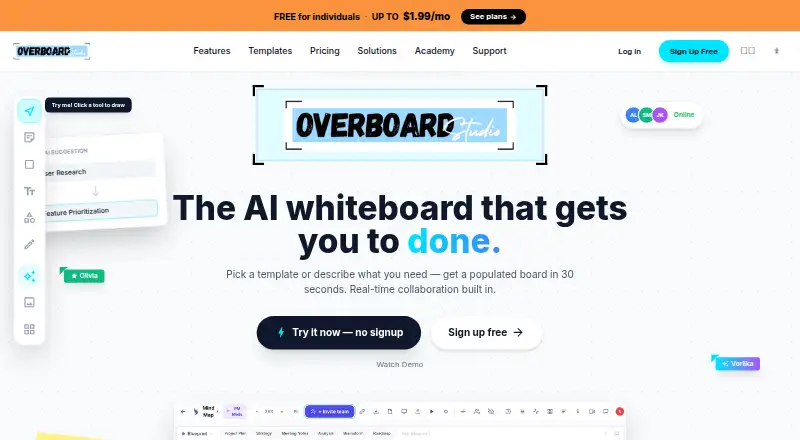
What Overboard is
Overboard is an AI whiteboard for teams to develop ideas, plan work, and collaborate in real time. Users can describe an idea in plain text to generate flowcharts, mind maps, org charts, and other diagrams. The canvas includes sticky notes, shapes, text, connectors, tables, and charts, and the service offers more than 100 templates for activities such as brainstorming, strategy, and retrospectives. Teams can work with live cursors and presence; the product describes collaboration for up to 500 teammates. Boards can be shared through links that viewers can open without an account, or exported as PNG, PDF, SVG, or PowerPoint. Vorlika is described as an AI agent for brainstorming, joining meetings, editing board content, and suggesting next steps. Missions support multi-phase goal tracking, while Blueprints are for interactive prototypes. Listed integrations include Slack, Jira, Figma, GitHub, Notion, Monday, Linear, Google Drive, Miro, Asana, Dropbox, Teams, Airtable, and Outlook. Overboard is listed for Android, iOS, macOS, web, and Windows. The free plan allows three boards and one collaborator per board. Pro costs $0.99 a month and allows unlimited boards and five collaborators per board.
Who it suits
Overboard suits research and development, consulting, marketing, sales, design, and product teams that want a shared visual workspace. Its diagrams, planning features, prototypes, and task exports address different kinds of team workflows.
What it does well
- Generate diagrams from plain-text descriptions.
- Share boards with viewers who do not have accounts.
- Export boards as PNG, PDF, SVG, or PowerPoint.
- Free plan includes AI board generation and real-time collaboration.
- Available on Android, iOS, macOS, web, and Windows.
What to know first
- Free plan allows three boards.
- Free plan allows one collaborator per board.
- Pro costs $0.99 a month.
Limits
The Free plan is billed at $0 forever and allows three boards and one collaborator per board; it includes one Blueprint prototype and basic Missions. Pro costs $0.99 per month and allows five collaborators per board, while unlimited collaborators are included in Enterprise at $1.99 per month.
Plans
| Plan | Billed and limits | Price |
|---|---|---|
| Free | 3 boards · 1 collaborator per board · all canvas objects and templates · AI board generation · basic Missions · 1 Blueprint prototype · real-time collaboration | Free |
| Enterprise | annually · Everything in Pro · unlimited collaborators · AI Teammate advisors · analytics dashboard · MCP integration · Monday.com import · priority support | $19.90 a year |
| Pro | annually · Unlimited boards · 5 collaborators per board · unlimited Blueprints · AI Coach Missions · PDF and PNG export · version history · all templates · email support | $9.90 a year |
As overboard.studio lists them, read 15 Oct 2026. The maker's own page has the final word.
Getting started
- Open the Overboard website or use one of its listed platforms.
- Choose the Free, Pro, or Enterprise plan.
- Create a board and add canvas objects or start from a template.
- Invite collaborators for real-time work, or share a live link for viewers.
- Use integrations to send board objects as tasks if needed.
- Download the desktop widget for macOS Apple Silicon or Windows x64 if desired.
Overboard is a real-time team whiteboard that extends from visual ideation into diagrams, goal tracking, task handoff, and clickable prototypes. It is most compelling for product, design, consulting, marketing, sales, and R&D groups that want those activities connected. The main qualification is capacity: the free tier is generous with tools but small for sustained multi-person work.
Overview
Overboard puts a broad set of board primitives—notes, shapes, text, connectors, flowcharts, tables, and charts—on one shared canvas. That makes it suitable for both unstructured workshops and more formal planning, while more than 100 templates provide starting points for brainstorming, strategy, retrospectives, and related sessions.
Its differentiator is the way visual work can continue into execution. Boards can become tasks in Monday.com, Jira, Linear, or Asana; Missions add phased objectives, milestones, XP rewards, AI coaching, and health indicators; and Blueprints turn board work into interactive prototypes. This range is useful when one team needs a common space from idea through delivery, but may be more than a team seeking only a lightweight sketchpad.
Key features
Plain-language prompts generate flowcharts, mind maps, org charts, and other diagrams. That gives teams a fast first structure for an idea, with the canvas tools available for refinement. Real-time collaboration includes live cursors and presence and can accommodate up to 500 teammates, while a share link lets people view a board without creating an account.
Vorlika is positioned as an AI teammate rather than a simple generator: it can brainstorm, join meetings, create or edit board content, and propose next steps. AI capabilities are therefore relevant to teams that want assistance during the session, not just an initial diagram. Enterprise is required for AI Teammate advisors.
Blueprints support screens, hotspots, transitions, device frames, and full-screen preview, making them appropriate for communicating an interaction concept before implementation. The desktop widget captures sticky notes and synchronizes them to boards; downloads are offered for macOS Apple Silicon and Windows x64. Integrations span Slack, Jira, Figma, GitHub, Notion, Monday, Linear, Google Drive, Miro, Asana, Dropbox, Teams, Airtable, and Outlook, extending Overboard into existing workflows.
Pricing
Free — free, billed $0 forever. This tier includes three boards, one collaborator per board, all canvas objects and templates, AI board generation, basic Missions, one Blueprint prototype, and real-time collaboration. It is a good way for an individual or very small pair to assess the workspace, but the one-collaborator cap prevents a normal project team from working together on a board.
Pro — $0.99 a month. Pro removes the board ceiling, permits five collaborators per board, and makes Blueprints unlimited. It adds Missions with AI Coach, PDF and PNG export, version history, all templates, and email support. This is the practical fit for small teams; larger groups still face the five-person board limit, and SVG and PowerPoint export are not specifically included in the plan description.
Enterprise — $1.99 a month. Enterprise includes Pro, then adds unlimited collaborators, AI Teammate advisors, an analytics dashboard, MCP integration, Monday.com import, and priority support. Choose it when board participation or advanced AI and administration matter more than keeping the subscription at the lower tiers.
Overboard is freemium and offers a free trial. The published paid pricing starts at $0.99 per month.
Platforms
Overboard runs on the web and supports Android, iOS, macOS, and Windows. The floating widget has dedicated macOS Apple Silicon and Windows x64 downloads, while browser access covers teams working across device types.
Who it's for
Product and design teams can combine diagrams, prototypes, and task export; consultants and facilitators can use templates, guest viewing, and live presence for workshops; and marketing, sales, R&D, and planning groups can connect Missions with their delivery tools. Solo users or pairs get the most from Free. Teams with more than five active collaborators per board should move directly to Enterprise rather than treating Pro as a long-term solution.
Pros and cons
Pros
- One workspace from concept to handoff: diagrams, Missions, Blueprints, and exports cover distinct stages of a project.
- Strong AI scope: diagram generation and the Vorlika agent address both creation and follow-through.
- Broad connectivity: numerous integrations and direct task export reduce copying work into project systems.
- Flexible sharing: viewers can open live links without accounts, and exports include PNG, PDF, SVG, and PowerPoint.
Cons
- Free collaboration is tightly capped: three boards and one collaborator per board limit real team use.
- Pro remains team-size constrained: five collaborators per board may be insufficient for workshops or larger squads.
- Top AI and administration are gated: AI Teammate advisors, analytics, MCP, and unlimited collaborators require Enterprise.
Alternatives
Choose Boardmix instead if you need self-hosting or a free workspace with three editable boards, 100 objects per board, and 1 GB of storage. Copera Whiteboards suits teams wanting Linux support and unlimited members on its always-free Whiteboards plan.
FigJam is the better fit when three editable files with unlimited collaborators are enough, or when a $3-per-month professional collaboration seat matches your budget. Pick HuddleIQ for a smaller free setup capped at three members, three whiteboards, and 200 objects per board.
Miro is preferable when its Free plan’s 7,000-plus templates and 250-plus integrations matter more than Overboard’s Missions and Blueprints. MURAL offers unlimited members and view-only visitors, with three editable murals on Free. Collaboard provides three whiteboards, five participants per board, and more than 200 templates at no cost. Conceptboard is an alternative for a free three-board setup with 100 objects per board and 250 MB of storage.
For a wider comparison, see AI Whiteboard Software.
Verdict
Overboard is a strong choice for teams that want AI-assisted visual work tied directly to goals, prototypes, and task systems. Its main reason to choose it is that breadth in one collaborative canvas; its main reason to look elsewhere is the sharp collaborator limits below Enterprise.
Verdict
Overboard combines a collaborative canvas with diagram generation, planning tools, and interactive prototypes. The free plan has board and collaborator limits; paid plans add capacity and features.
Questions
How much does Overboard cost?
Overboard has a free plan billed at $0 forever. Pro is $0.99 per month, and Enterprise is $1.99 per month.
What does the free plan include?
It includes three boards, one collaborator per board, all canvas objects and templates, AI board generation, basic Missions, one Blueprint prototype, and real-time collaboration.
Which platforms are supported?
The listed platforms are Android, iOS, macOS, web, and Windows. Desktop widget downloads are listed for macOS Apple Silicon and Windows x64.
Can people view a board without an account?
Yes. Boards can be shared through live links that viewers can open without an account.
Which integrations are available?
Listed integrations include Slack, Jira, Figma, GitHub, Notion, Monday, Linear, Google Drive, Miro, Asana, Dropbox, Teams, Airtable, and Outlook.
Which plans include unlimited collaborators?
Enterprise includes unlimited collaborators. The Free plan allows one collaborator per board, and Pro allows five collaborators per board.
Facts from Overboard's own pages
- Academy
- Overboard Academy offers free lessons on collaborative whiteboarding, AI diagram generation, retrospectives and visual thinking. · overboard.studio, 15 Oct 2026
- AI diagram generation
- Users can describe ideas in plain text and generate flowcharts, mind maps, org charts and other diagrams. · overboard.studio, 15 Oct 2026
- AI diagrams
- Users can describe an idea in plain text and generate flowcharts, mind maps, org charts, and other diagrams. · overboard.studio, 1 Oct 2026
- AI teammate
- Vorlika is described as an AI agent that brainstorms, joins meetings, creates and edits board content, and suggests next steps. · overboard.studio, 1 Oct 2026
- audience
- The site lists research and development, consulting, marketing, sales, design, and product teams as target teams. · overboard.studio, 1 Oct 2026
- Blueprints
- Blueprints let users prototype interactive apps with device frames, hotspots, transitions and full-screen previews. · overboard.studio, 15 Oct 2026
- Built-in communication
- The canvas includes comments and video calls for live collaboration. · overboard.studio, 15 Oct 2026
- canvas
- The canvas supports sticky notes, shapes, text, connectors, flowcharts, tables, and charts. · overboard.studio, 1 Oct 2026
- Canvas tools
- Boards support sticky notes, shapes, text, connectors, flowcharts, tables and charts. · overboard.studio, 15 Oct 2026
- collaboration
- The product supports real-time collaboration with up to 500 teammates and live cursors and presence. · overboard.studio, 1 Oct 2026
- Company description
- LinkedIn describes Overboard Studio as a software company building an AI-first collaborative and execution platform for modern teams. · linkedin.com, 15 Oct 2026
- Company size
- LinkedIn lists the company size as 2–10 employees. · linkedin.com, 15 Oct 2026
- Desktop widget
- A floating desktop widget captures sticky notes and syncs them to boards in real time. · overboard.studio, 15 Oct 2026
- Enterprise extensibility
- The Enterprise plan explicitly includes MCP integration and Monday.com import. · overboard.studio, 15 Oct 2026
- Free access
- The service advertises a free-forever option with AI access and no credit card requirement. · overboard.studio, 15 Oct 2026
- Industry
- LinkedIn categorizes Overboard Studio under Software Development. · linkedin.com, 15 Oct 2026
- Integrations
- The integrations list includes Slack, Jira, Figma, GitHub, Notion, Monday, Linear, Google Drive, Miro, Asana, Dropbox, Teams, Airtable and Outlook. · overboard.studio, 15 Oct 2026
- Language claim
- A company LinkedIn update claims the whiteboard is available in 20 languages. · linkedin.com, 15 Oct 2026
- Limit: board allowance
- The free plan is limited to three boards, while Pro removes that board limit. · overboard.studio, 15 Oct 2026
- Limit: ecosystem size
- The product's own 2026 comparison says its template library is smaller than Miro's and that it has a newer, smaller ecosystem with fewer integrations. · overboard.studio, 15 Oct 2026
- macOS installation
- The site says macOS may block the unsigned widget and instructs users to clear its quarantine attribute with xattr before opening it. · overboard.studio, 15 Oct 2026
- Missions
- Missions provide multi-phase goals, milestones, XP rewards, AI coaching and a progress health indicator. · overboard.studio, 15 Oct 2026
- Notable news
- Overboard's comparison article dated April 2026 ranked it first among five whiteboard products with a score of 9.4 out of 10. · overboard.studio, 15 Oct 2026
- Ownership
- LinkedIn identifies Overboard Studio as privately held. · linkedin.com, 15 Oct 2026
Where Overboard stands on Freedom251
- AI Whiteboard Software#19 of 27