Freedom251 › Disk Cloning Software
OSFClone
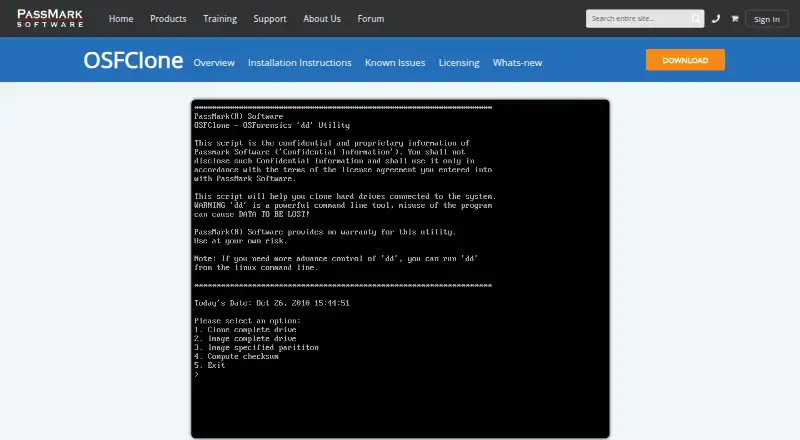
What OSFClone is
OSFClone is a free self-booting disk imaging utility that creates or clones exact raw disk images without depending on the installed operating system. It also supports imaging to AFF, EWF, and dc3dd formats. The maker says images retain unused sectors, slack space, file fragmentation, and undeleted file records. Users can compare a clone with its source using MD5 or SHA1 hashes, compress images, and record case and evidence numbers, examiner name, description, and checksum as forensic metadata. The product page describes cloning FAT, NTFS, and USB-connected drives. OSFClone can boot from CD/DVD or USB flash drives; the listed current download is a 373 MB ZIP for version 1.4.1000, and USB installation needs a drive of at least 2 GB. Some UEFI systems may not boot it, for which the maker suggests switching to CSM boot mode. The maker also warns that hardware, driver, and disk-state differences may cause evidence contamination. For ext2/3/4 drives, connection during startup may alter superblock values. OSFClone is licensed under GPL v3.0.
Who it suits
OSFClone suits people creating disk images for examination or cloning, including those who need hash comparison and forensic metadata. Its bootable media options may suit workflows independent of the installed operating system.
What it does well
- Creates raw, AFF, EWF, and dc3dd images
- Supports MD5 or SHA1 clone comparisons
- Can save forensic case and examiner metadata
- Boots from CD/DVD or USB flash drives
What to know first
- May fail to boot on some UEFI systems
- Ext2/3/4 startup connection may alter superblock values
- The listed ZIP download is 373 MB
- USB installation needs a drive of at least 2 GB
Limits
USB installation requires a drive of at least 2 GB. OSFClone may fail to boot on some UEFI systems; ext2/3/4 filesystem superblock values may change if an evidence drive is connected during startup.
Plans
| Plan | Billed and limits | Price |
|---|---|---|
| OSFClone | Free self-booting disk imaging utility · current version v1.4.1000 · USB installation requires a drive of at least 2 GB | Free |
As osforensics.com lists them, read 4 Oct 2026. The maker's own page has the final word.
Getting started
- Download the 373 MB ZIP for version 1.4.1000.
- Prepare CD/DVD or a USB flash drive; USB installation requires a drive of at least 2 GB.
- Boot OSFClone from the prepared media.
- Use a write blocker when evidence integrity is critical, or connect ext2/3/4 evidence drives after startup.
- If booting fails on a UEFI system, switch the boot mode to CSM.
- Mount created images with OSFMount or analyze them with OSForensics.
OSFClone is a free, bootable utility for creating or cloning disk images outside the installed operating system. It suits evidence-preservation and integrity-conscious imaging workflows; its format and verification options are useful, but critical work calls for a write blocker and careful handling.
Overview
OSFClone captures exact raw disk images, including unused sectors, slack space, file fragmentation and undeleted file records. That makes it a better fit for preserving a drive’s contents than a file-copying approach. It can also image to AFF, EWF and dc3dd formats, though it is a focused imaging utility rather than a general-purpose disk-management suite.
The maker describes cloning FAT, NTFS and USB-connected drives. Images can be mounted with PassMark OSFMount and analyzed with PassMark OSForensics, giving the imaging step a place in a broader forensic workflow.
Key features
- Hash comparison: OSFClone compares MD5 or SHA1 hashes of a clone and its source drive. This gives integrity-conscious users a way to check that the clone matches its source.
- Compression and case metadata: It can compress images and save a case number, evidence number, examiner name, description and checksum. Those fields help keep image files associated with their case records.
- Bootable media: It boots from CD/DVD or USB flash drives. The current download is a 373 MB ZIP for version 1.4.1000, and USB installation requires a drive of at least 2 GB.
- Integrity precautions: Hardware, driver and disk-state differences create a small chance of evidence contamination, according to the maker. For work where integrity is critical, it recommends a write blocker. Imaging an ext2/3/4 drive while it is connected during startup may also alter filesystem superblock values; the maker recommends a write blocker or connecting the drive after boot.
- Boot compatibility: OSFClone may not boot on some UEFI systems. Switching the system boot mode to CSM is the maker’s suggested workaround, but that limitation makes it less straightforward on affected machines.
- License: The software is licensed under GPL v3.0.
Pricing
OSFClone is free: the OSFClone plan costs nothing and provides a self-booting disk-imaging utility, with current version v1.4.1000. There is no paid tier to weigh against the free edition. The main practical requirements are a USB drive of at least 2 GB for USB installation and appropriate precautions for sensitive evidence imaging.
Platforms
OSFClone is described for Linux and Windows workflows, with supported platforms including Windows 10 and Windows 11; older versions are available for some earlier Windows releases. It boots from optical media or USB, but may fail to start on some UEFI systems unless the boot mode is switched to CSM.
Who it's for
Choose OSFClone if you need a free, bootable way to make sector-preserving disk images, compare source and clone hashes, and attach basic forensic case metadata. It is less suitable when you need a boot process that works consistently across UEFI systems or when you cannot manage the contamination and ext2/3/4 precautions the maker describes.
Pros and cons
- Pro: It preserves slack space, unused sectors, fragmentation and undeleted file records, which matters when an image must retain more than visible files.
- Pro: MD5 or SHA1 comparison, compression and case metadata support a more traceable imaging workflow without a paid plan.
- Con: The maker warns that hardware, driver and disk-state variations can risk contamination, so integrity-critical work needs a write blocker.
- Con: ext2/3/4 drives may have superblock values altered if connected during startup, and some UEFI systems may not boot OSFClone.
Alternatives
For mounting disk images rather than creating them, Arsenal Image Mounter offers a free mode with temporary write support, BitLocker tools, and CLI and PowerShell access; its 1 Year Plan costs $907 a year. ExpanDrive is a better fit for personal access to cloud services and protocols: its free plan is billed forever and covers up to 10 users or devices per year, rather than bootable disk imaging.
libguestfs is a free open-source library and tools option for users who want that toolset instead of OSFClone’s bootable imaging utility. RaiDrive is another alternative. Alcohol 52% offers a Windows-focused alternative. CDEmu is a free Linux optical drive and disc emulator, while DAEMON Tools Lite and gBurner Virtual Drive are alternatives for virtual-drive use.
Browse Disk Cloning Software for more cloning options or Virtual Drive Software for image-mounting tools.
Verdict
OSFClone is a sound choice for users who need free, bootable disk imaging with hash comparison and case metadata, particularly when preserving sectors beyond ordinary files matters. Look elsewhere if your workflow depends on reliable UEFI booting or if you cannot use a write blocker and manage the stated filesystem risks.
Verdict
OSFClone combines bootable imaging with hash comparison, compression, and forensic metadata. If image integrity is critical, note the maker's warning about contamination and its advice to use a write blocker; ext2/3/4 handling also needs care.
Questions
Is OSFClone free?
Yes. OSFClone has a free plan and costs nothing.
Which image formats does OSFClone support?
It supports raw images and imaging to AFF, EWF, and dc3dd formats.
Which operating systems does OSFClone support?
The listed platforms are Linux and Windows. Supported operating systems are listed as Linux; supported Windows versions include Windows 10 and Windows 11, with older versions available for some earlier releases.
Is OSFClone open source?
OSFClone is licensed under GPL v3.0.
How can I boot OSFClone?
It can boot from CD/DVD or USB flash drives. USB installation requires a drive of at least 2 GB, and some UEFI systems may need boot mode changed to CSM.
What tools work with images created by OSFClone?
Created images can be mounted with PassMark OSFMount and analyzed with PassMark OSForensics.
Facts from OSFClone's own pages
- Boot limitation
- OSFClone may fail to boot on some UEFI systems; the maker suggests switching the system boot mode to CSM. · osforensics.com, 4 Oct 2026
- Boot media
- OSFClone can boot from CD/DVD or USB flash drives; the listed current download is a 373 MB ZIP for version 1.4.1000. · osforensics.com, 4 Oct 2026
- Compatible drive types
- The product page describes cloning FAT, NTFS, and USB-connected drives. · osforensics.com, 4 Oct 2026
- Compression and metadata
- It offers image compression and can save case number, evidence number, examiner name, description, and checksum as forensic metadata. · osforensics.com, 4 Oct 2026
- Disk imaging
- OSFClone creates or clones exact raw disk images independently of the installed operating system. · osforensics.com, 4 Oct 2026
- Founded
- 1998 · osforensics.com, 28 Sept 2026
- Hash verification
- OSFClone can compare MD5 or SHA1 hashes of a clone and its source drive. · osforensics.com, 4 Oct 2026
- Headquarters
- Sydney, Australia · osforensics.com, 28 Sept 2026
- Image formats
- It supports raw images and imaging to AFF, EWF, and dc3dd formats. · osforensics.com, 4 Oct 2026
- Integrity caveat
- The maker warns that hardware, driver, and disk-state variations can cause a small chance of evidence contamination and recommends using a write blocker when integrity is critical. · osforensics.com, 4 Oct 2026
- Known filesystem issue
- The maker reports that imaging ext2/3/4 drives may alter filesystem superblock values if the evidence drive is connected during startup, and recommends a write blocker or hot-plugging after boot. · osforensics.com, 4 Oct 2026
- Licensing
- The maker states that OSFClone software is licensed under GPL v3.0. · osforensics.com, 4 Oct 2026
- Maker headquarters
- PassMark Software Pty Ltd lists its Australian head office at Level 5, 63 Foveaux St, Surry Hills, NSW 2010, Australia. · osforensics.com, 4 Oct 2026
- Preserved data
- The maker says images preserve unused sectors, slack space, file fragmentation, and undeleted file records. · osforensics.com, 4 Oct 2026
- Related tools
- The maker says created images can be mounted with PassMark OSFMount and analyzed with PassMark OSForensics. · osforensics.com, 4 Oct 2026
Where OSFClone stands on Freedom251
- Disk Cloning Software#9 of 26