Freedom251 › Virtual Drive Software
gBurner Virtual Drive
What gBurner Virtual Drive is
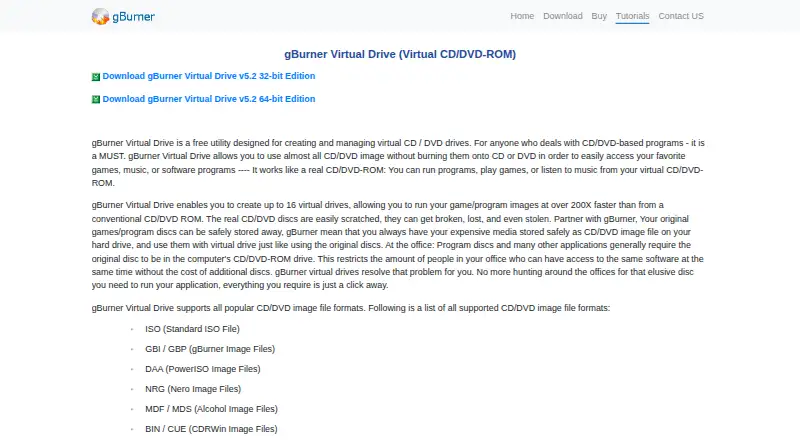
gBurner Virtual Drive is a Windows utility for creating and managing virtual CD/DVD drives, allowing users to access disc images without burning them to physical discs. It can create up to 16 virtual drives and lists support for formats including ISO, GBI/GBP, DAA, NRG, MDF/MDS, BIN/CUE, UIF, ISZ, DMG, IMG, and VCD. To mount an image, users open the virtual-drive tray menu, choose the mount command, select a file, and confirm; the same menu includes an unmount command. The download page lists Windows versions from 98 through 11, including 32-bit and 64-bit editions. The free utility is listed as free, and gBurner Free is described as free for personal and business use. However, the download comparison marks mounting an image file to a virtual drive as a gBurner Pro feature rather than a gBurner Free feature. Pro is listed at $39.95, paid once. The maker says game and program images can run at over 200 times the speed of a conventional CD/DVD-ROM.
Who it suits
It may suit Windows users who need to create virtual optical drives and work with disc image files. Check the edition distinction if mounting images is the main requirement.
What it does well
- Supports up to 16 virtual drives
- Lists numerous optical image formats
- Supports 32-bit and 64-bit Windows editions
- Free for personal and business use
What to know first
- Image mounting is marked as a Pro feature
- gBurner Pro costs $39.95, paid once
- Available only for Windows
Plans
| Plan | Billed and limits | Price |
|---|---|---|
| gBurner Virtual Drive | Free utility · up to 16 virtual drives | Free |
| gBurner Pro | Mount image file to virtual drive · Install Windows to USB drive · License removes startup dialogue and all limits | $39.95, paid once |
As gburner.com lists them, read 7 Oct 2026. The maker's own page has the final word.
Verdict
gBurner Virtual Drive lists broad image-format support and a free utility, but the download comparison assigns image mounting to Pro. Check the edition details before choosing it for mounting images.
Facts from gBurner Virtual Drive's own pages
- Edition distinction
- The gBurner download comparison marks mounting an image file to a virtual drive as a gBurner Pro feature, not a gBurner Free feature. · gburner.com, 7 Oct 2026
- Free edition
- gBurner Free is described as free for personal and business use. · gburner.com, 7 Oct 2026
- Image formats
- Supported formats listed include ISO, GBI/GBP, DAA, NRG, MDF/MDS, BIN/CUE, UIF, ISZ, DMG, IMG, and VCD. · gburner.com, 7 Oct 2026
- Mounting workflow
- To mount an image, users right-click the virtual-drive tray icon, choose Mount Image File to Drive, select an image, and click OK. · gburner.com, 7 Oct 2026
- Payment
- The maker says gBurner Pro can be purchased through PayPal, accepts major credit cards and PayPal, and offers offline ordering methods. · gburner.com, 7 Oct 2026
- Platform
- The download page lists support for Windows 11, 10, 8/8.1, 7, Vista, XP, 2000, Me, and 98. · gburner.com, 7 Oct 2026
- Purpose
- gBurner Virtual Drive is a free utility for creating and managing virtual CD/DVD drives, letting users access disc images without burning them to physical discs. · gburner.com, 7 Oct 2026
- Speed
- The maker says game and program images can run at over 200 times the speed of a conventional CD/DVD-ROM. · gburner.com, 7 Oct 2026
- Support
- Technical support is available by email; the maker asks licensed users to include their registration name. · gburner.com, 7 Oct 2026
- Trial
- The download page describes gBurner Pro as free for trial, but does not state a trial duration. · gburner.com, 7 Oct 2026
- Unmounting workflow
- To unmount an image, users right-click the virtual-drive tray icon and choose Unmount Drive. · gburner.com, 7 Oct 2026
- Updates
- Registered users are entitled to free product updates when available. · gburner.com, 7 Oct 2026
- Virtual drive limit
- The utility can create up to 16 virtual drives. · gburner.com, 7 Oct 2026
Where gBurner Virtual Drive stands on Freedom251
- Virtual Drive Software#8 of 24
- ISO Creation Software#15 of 33