Freedom251 › Org Chart Software
OrgChartBuilder
What OrgChartBuilder is
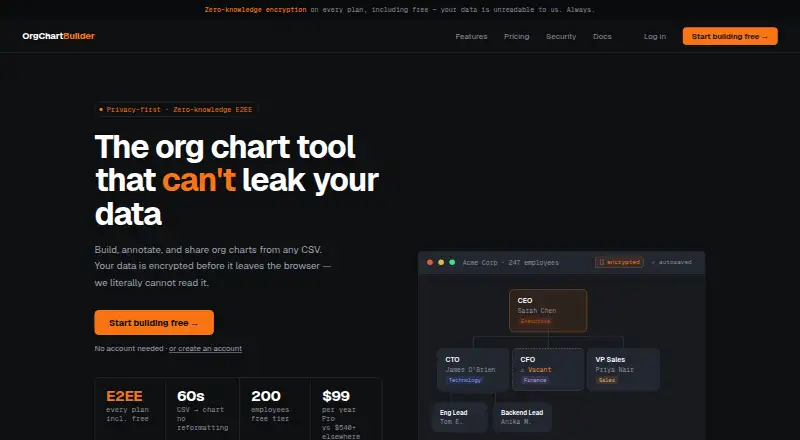
OrgChartBuilder builds, annotates and shares organization charts in a browser using CSV data. Its import tool can recognize columns in HRIS exports and save mappings for repeat imports; documented formats include Workday, BambooHR, HiBob, Personio and plain spreadsheets. Scenario modelling lets teams prepare private restructure drafts, compare changes side by side with colour coding, and examine redundancy costs. Charts can be exported as multi-page PDFs or CSV data; SVG export is available on Pro and higher plans. Advanced mode includes vacant roles as chart nodes and supports role sharing and interim appointments. Team and Company plans allow collaborative editing, with one editor at a time and read-only access for others. Charts are encrypted in the browser, and the server stores encrypted bytes. Plans range from Free, with 200 employees and one user, to Company, which supports unlimited employees and users. Free-plan data is deleted after 90 days without login. Pro starts at $99 a year.
Who it suits
It suits HR and people-operations teams that build and update organizational charts, including smaller startups. Teams planning restructures may find the private drafts and cost analysis useful.
What it does well
- Imports CSV and named HRIS export formats.
- Models private restructures with cost analysis.
- Exports multi-page PDFs and CSV data.
- Browser encryption; server stores encrypted bytes.
- Company plan supports self-hosting and unlimited employees.
What to know first
- Free data is deleted after 90 days without login.
- SVG export requires Pro or a higher plan.
- Free plan is limited to 200 employees and one user.
- HRIS sync is not available.
Limits
Free supports 200 employees and one user, and its encrypted data is deleted after 90 days without login. Pro supports 1,000 employees and one user, with unlimited data retention; SVG export is available on Pro and higher plans.
Plans
| Plan | Billed and limits | Price |
|---|---|---|
| Free | forever. No gimmicks. No ads. 100% free · 200 employees · 1 user · 90-day inactivity retention | Free |
| Team | per year · up to 10 users · excl. tax · 5,000 employees · up to 10 users · unlimited data retention | $499 a year |
| Company | per year · unlimited users · excl. tax · Unlimited employees · unlimited users · unlimited data retention | $5,999 a year |
| Pro | per year · ~$8.25/month · excl. tax · 1,000 employees · 1 user · unlimited data retention | $99 a year |
As orgchartbuilder.app lists them, read 1 Oct 2026. The maker's own page has the final word.
Getting started
- Open orgchartbuilder.app in a browser.
- Choose the Free, Pro, Team, or Company plan based on employee and user limits.
- Import a CSV or spreadsheet, or use a compatible HRIS export.
- Review detected columns and save mappings for later re-imports.
- Create, annotate, and share an organization chart; use exports available on your plan.
OrgChartBuilder turns CSV data into annotated, shareable organizational charts in a browser. It is aimed at HR and people-ops teams, though its charting and restructure planning can also suit a small startup. Its strongest case is combining scenario analysis with encrypted storage; the main trade-offs are no HRIS sync and tight user limits on lower plans.
Overview
This is more than a way to publish the current reporting structure: private restructure drafts, vacancy tracking and redundancy cost analysis make it useful when teams are weighing changes. CSV import is practical for organizations whose HRIS exports match its supported formats, but it does not keep charts synchronized with an HR system.
Key features
CSV import detects columns in HRIS exports and saves mappings for one-click re-imports. Supported inputs include Workday, BambooHR, HiBob, Personio and plain spreadsheets. That can simplify recurring updates, though someone still needs to import fresh data; directory sync is available, but HRIS sync is not.
Scenario modelling creates private restructure drafts with side-by-side, colour-coded differences and redundancy cost analysis. This gives HR teams a way to compare proposed changes rather than relying on a chart of the current structure alone. Vacant roles are first-class nodes, and role sharing and interim appointments help represent open positions and temporary coverage.
Exports include multi-page PDF and CSV, with scalable SVG on Pro and higher plans. Free users therefore lose SVG, which may matter when a chart needs to scale cleanly. Team and Company plans add collaborative editing, but only one person can edit at a time; others get read-only views. That supports review, not simultaneous work.
Charts are encrypted in the browser with XChaCha20-Poly1305 using Argon2id-derived keys, and the server stores encrypted bytes. Share-link decryption keys sit after the URL hash, which browsers do not send to servers. Those are meaningful safeguards for sensitive organization data, though they do not remove the need to consider access and sharing practices.
Pricing
The Free plan costs nothing, billed forever, and includes 200 employees, one user and community support. Encrypted data is deleted after 90 days without login, with warning emails on days 75 and 88. It is suitable for a small, active chart, but the inactivity cutoff makes it a poor home for a record that may be left untouched.
Pro costs $99 a year, billed yearly at about $8.25/month, excluding tax. It raises the cap to 1,000 employees, retains data without an inactivity limit and adds email support; it remains limited to one user. This is the natural step up for an individual maintainer who needs a larger chart or durable retention.
Team costs $499 a year, billed yearly, excluding tax, for up to 10 users and 5,000 employees. It adds collaborative editing, subject to the one-editor-at-a-time rule, while keeping unlimited data retention and email support. It fits teams that need shared viewing and occasional editing, not concurrent editors.
Company costs $5,999 a year, billed yearly, excluding tax. It provides unlimited users, employees, data retention and version history, plus self-hosting, SSO/SAML, Microsoft Entra ID import and priority support. This is aimed at larger organizations with those deployment and identity needs; its price is a substantial jump from Team. There is no free trial.
Platforms
OrgChartBuilder runs on the web and can be self-hosted. Self-hosting is a Company-plan feature, so organizations that require it need to budget for that tier.
Who it's for
Choose it if HR or people-ops needs to import structured employee data, represent vacancies and compare restructuring options. A 10-person startup can also use the simpler charting workflow, especially on Free if its 200-employee and one-user limits are enough. Look elsewhere if live HRIS synchronization or several simultaneous editors are essential.
Pros and cons
- Pro: Saved CSV mappings make repeat imports simpler for teams using the named HRIS exports or spreadsheets.
- Pro: Private scenarios, cost analysis and vacancy nodes support planning as well as chart presentation.
- Pro: Browser-side encryption and encrypted server storage address confidentiality concerns for organizational charts.
- Con: No HRIS sync means updates are not continuously reflected from an HR system.
- Con: Free data is removed after 90 days of inactivity, and Free permits only one user.
- Con: Team collaboration allows just one editor at a time, while SVG exports start at Pro.
Alternatives
For more org-chart options, browse Org Chart Software.
Org Chart Studio is a web-based freemium option: its free plan supports up to 250 people with watermarked PNG, while a one-time 1.00 USD purchase provides clean exports for 24 hours. Consider it for occasional small-chart exports rather than OrgChartBuilder’s restructure analysis.
orgchart.live is another web-based freemium option, made by Hivetivity. Its free plan offers unlimited people and charts with spreadsheet, CSV and Excel import, so it may suit users whose priority is broad free chart capacity.
OrgNice offers a free Basic plan capped at five projects and a Standard plan at $20 a month, billed annually, with Google Sheets connection, sharing and embedding. It is worth considering when those connected-sheet and publishing features are more important than scenario modelling.
Our Org Chart has a free plan with CSV import and export, PNG export, a Google Workspace add-on and AI assistance when available. It may suit users who want that Google Workspace-oriented workflow.
SharePoint Smart Org Chart & Directory is a free, MIT-licensed SharePoint Online web part with no per-user licensing. Choose it when a SharePoint-based deployment is the priority.
The Org offers web, API and extension access, with a free plan limited to organization views, one seat and 10 credits per seat per month; extra credits cost $0.05 each. It may fit users who need its API or extension access and can work within a credit model.
Organimi has a free plan capped at 25 employees, one admin user and one org chart. It may be a fit for a smaller single-chart use case.
TeamGraph is a free web and self-hosted option.
Verdict
OrgChartBuilder is a strong choice for HR and people-ops teams that need to model restructures alongside maintaining a chart, particularly when encrypted storage matters. Choose a paid plan according to employee and user needs, and look elsewhere if live HRIS sync or simultaneous editing is a requirement.
Verdict
OrgChartBuilder combines chart building and scenario planning, with plans for individual users and larger teams. Check the employee and user limits, retention terms, and export needs against the plan before choosing.
Questions
Is OrgChartBuilder free?
Yes. The Free plan is listed as free and supports 200 employees and one user.
How much does Pro cost?
Pro is listed at $99 a year, excluding tax, for one user and up to 1,000 employees.
Does OrgChartBuilder offer a free trial?
No. The listed free-trial status is no.
Which HRIS exports can it import?
The documented compatible exports include Workday, BambooHR, HiBob, and Personio, plus plain spreadsheets.
Can OrgChartBuilder be self-hosted?
Yes. The Company plan offers self-hosting, SSO/SAML, Microsoft Entra ID import, unlimited employees, and unlimited version history.
How does chart collaboration work?
Team and Company plans provide collaborative editing with one editor at a time; other users can have read-only views.
Facts from OrgChartBuilder's own pages
- Collaboration
- Team and Company plans provide collaborative editing with one editor at a time and read-only views for others. · orgchartbuilder.app, 1 Oct 2026
- CSV and HRIS import
- CSV import auto-detects columns from HRIS exports and saves mappings for one-click re-imports. · orgchartbuilder.app, 1 Oct 2026
- Exports
- The product exports multi-page PDF, scalable SVG and CSV data; SVG is available on Pro and higher plans. · orgchartbuilder.app, 1 Oct 2026
- Free-plan retention
- Free-plan encrypted data is deleted after 90 days without login, with warning emails sent on days 75 and 88. · orgchartbuilder.app, 1 Oct 2026
- Headquarters
- Victoria, Australia · orgchartbuilder.app, 23 Sept 2026
- Intended users
- The service is positioned for HR teams and people-ops teams, while also being simple enough for a 10-person startup. · orgchartbuilder.app, 1 Oct 2026
- Purpose
- OrgChartBuilder builds, annotates and shares org charts from CSV data in a browser. · orgchartbuilder.app, 1 Oct 2026
- Scenario modelling
- Scenario modelling creates private restructure drafts with side-by-side, colour-coded diffs and redundancy cost analysis. · orgchartbuilder.app, 1 Oct 2026
- Security
- Org charts are encrypted in the browser with XChaCha20-Poly1305 using Argon2id-derived keys, and the server stores only encrypted bytes. · orgchartbuilder.app, 1 Oct 2026
- Self-hosting
- The Company plan offers self-hosting with SSO/SAML, Microsoft Entra ID import, unlimited employees and unlimited version history. · orgchartbuilder.app, 1 Oct 2026
- Share links
- Share-link decryption keys are placed after the URL hash, which browsers do not send to servers. · orgchartbuilder.app, 1 Oct 2026
- Support
- Support channels are community for Free, email for Pro and Team, and priority support for Company. · orgchartbuilder.app, 1 Oct 2026
- Supported HRIS exports
- Documentation names Workday, BambooHR, HiBob and Personio as compatible HRIS exports, plus plain spreadsheets. · orgchartbuilder.app, 1 Oct 2026
- Vacancy tracking
- Advanced mode treats vacant roles as first-class nodes and supports role sharing and interim appointments. · orgchartbuilder.app, 1 Oct 2026
Where OrgChartBuilder stands on Freedom251
- Org Chart Software#2 of 21