Freedom251 › Org Chart Software

orgchart.live
What orgchart.live is
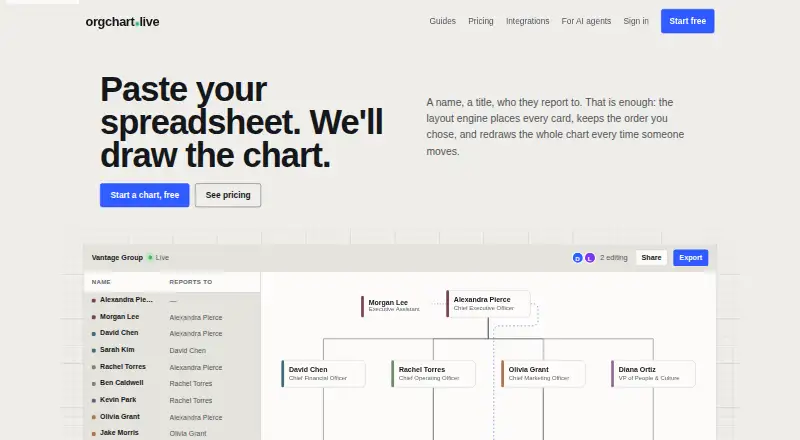
orgchart.live is a web tool for turning spreadsheet files, pasted rows, PDFs, and screenshots into organizational charts. Its layout engine redraws charts as people move, with the aim of limiting overlaps and crossed lines. Shared links let viewers follow the same live chart and see cursors; viewing does not require an account, while editing requires sign-in. CSV and Excel files are parsed in the browser, without sending the original spreadsheet to the service. PDF and screenshot imports use model-based extraction, and the import dialog discloses this before selection. Export options listed include PNG, PDF, SVG, and editable PowerPoint; free PNG exports include a footer line. The Free plan costs nothing and includes unlimited people and charts, spreadsheet import, live editing, and PNG export. A 3-day pass is $4.99, paid once, Pro is $49 a year, and Business is $199 a year. Business adds scheduled HR and directory sync. Hivetivity makes the service and lists Atlanta, Georgia as its location.
Who it suits
It suits people who need to build or share organizational charts from spreadsheets or other source material. Teams that need HR-system synchronization can consider Business; viewers can access shared charts without accounts, but editing requires sign-in.
What it does well
- Free plan includes unlimited people and charts.
- CSV and Excel files are parsed in the browser.
- Shared links support live viewing with cursors.
- Exports include PNG, PDF, SVG, and editable PowerPoint.
- Business syncs with listed HR systems and directories.
What to know first
- Free PNG exports carry a footer line.
- Editing shared charts requires sign-in.
- PDF and screenshot imports are sent for model-based extraction.
- Business sync runs every six hours, or on change or manual sync.
Limits
The Free plan includes PNG export with a footer line. The 3-day pass unlocks its features for 72 hours; Pro and Business are annual plans.
Plans
| Plan | Billed and limits | Price |
|---|---|---|
| Free | Unlimited people · unlimited charts · spreadsheet/CSV/Excel import · live editing · PNG with “built with” line | Free |
| Business | per year · Everything in Pro · six-hour sync from four HR systems and two directories · overrides · API keys/webhooks in build | $199 a year |
| Pro | per year · Pass features all year · public org pages · editable PowerPoint/SVG · live embeds · AI-agent access in build | $49 a year |
| 3-day pass | once · Everything unlocked for 72 hours · clean 3× PNG · PDF · SVG · PowerPoint · share links · Claude-powered PDF/screenshot import | $4.99, paid once |
As orgchart.live lists them, read 1 Oct 2026. The maker's own page has the final word.
Getting started
- Visit https://orgchart.live/ in a web browser.
- Create a chart from a CSV or Excel file, pasted rows, a PDF, or a screenshot.
- Sign in to edit a chart; viewers can open shared links without an account.
- Use the Free plan, or choose the 3-day pass, Pro, or Business plan for its listed features.
orgchart.live is a web tool for turning spreadsheets, pasted rows, PDFs and screenshots into organizational charts. It is best suited to teams that want to share a changing chart or keep it synchronized with HR and directory systems. Its free plan removes limits on people and charts, but clean exports and ongoing synchronization require a paid plan.
Overview
When someone moves, the layout engine redraws the chart to reduce overlaps and crossed lines. That is useful for organizations that change regularly, though the product is focused on org charts rather than broader people-management work.
CSV and Excel files are parsed in the browser; the original spreadsheet is not sent to the service. PDF and screenshot imports use model-based extraction, and the import dialog indicates this before selection. That makes spreadsheet import the clearer choice when keeping the source file off the service matters.
Key features
Shared links show a live chart with cursors, and viewers do not need an account. Editing does require sign-in, so it is convenient for distributing a chart to a broad audience but less frictionless when many occasional collaborators need to revise it.
The free plan includes PNG export, but the image carries a “built with” line. Paid options include clean PNG, PDF, SVG and editable PowerPoint; Pro adds editable PowerPoint and SVG, public org pages and live embeds. Those tiers make sense when charts need to look polished or appear on other pages, while a basic internal chart can remain on Free.
Business connects to Gusto, BambooHR, HiBob, Oracle Fusion Cloud HCM, Microsoft Entra ID and Google Workspace. Sync runs every six hours, when a connected system reports a change, or on demand. It reads name, title, department, manager and employment type; chart titles and department overrides survive synchronization. The defined field set and preserved overrides help keep a chart useful without surrendering all local customization. API keys and webhooks are in build, as is access for AI agents; the planned MCP connection is intended for Claude, ChatGPT and Cursor.
Pricing
There is no free trial. The Free plan costs nothing and includes unlimited people and charts, spreadsheet/CSV/Excel import, live editing and PNG exports with a “built with” line. It is a substantial starting point for users who can accept branded images and do not need the paid import or export options.
The 3-day pass costs $4.99, paid once, billed once. It unlocks everything for 72 hours, including clean 3× PNG, PDF, SVG, PowerPoint, share links and Claude-powered PDF/screenshot import. It suits a short project or a one-off presentation, but its window makes it a poor fit for recurring access.
Pro costs $49 a year, billed per year. It carries the pass features all year, plus public org pages, editable PowerPoint/SVG, live embeds and AI-agent access in build. Choose it for regular chart publishing and cleaner exports; it does not include the Business synchronization tier.
Business costs $199 a year, billed per year. It includes everything in Pro plus six-hour sync from four HR systems and two directories, overrides, and API keys/webhooks in build. It is the relevant tier for keeping charts aligned with connected systems; readers who only need occasional exports pay for more than they need.
Platforms
orgchart.live runs on the web. That suits browser-based sharing and editing, but it is not a desktop or mobile app in the listed platform lineup.
Who it's for
Choose it for spreadsheet-led chart creation, account-free viewing, and—at Business level—scheduled synchronization with supported HR and directory systems. It is less compelling for teams that need free clean exports, frequent editing by people unwilling to sign in, or a broader HR suite.
Pros and cons
- Pros: Free has unlimited people and charts, so chart size alone does not force an upgrade.
- Pros: Browser-side CSV and Excel parsing keeps the original spreadsheet from being sent to the service.
- Pros: Shared live links need no viewer account, lowering friction for people who only need to consult the chart.
- Cons: Free PNG exports carry a “built with” line, so presentation-ready imagery requires payment.
- Cons: Editing requires sign-in, limiting the convenience of shared links for casual co-editors.
- Cons: PDF and screenshot imports use model-based extraction, a different handling route from browser-parsed spreadsheets.
Alternatives
For a broader comparison, see Org Chart Software. Consider Org Chart Studio for a free chart capped at 250 people or a 1.00 USD one-time day pass for clean exports. OrgChartBuilder is an option if self-hosting matters: its free plan allows 200 employees, one user and 90-day inactivity retention. For a free WordPress option, TeamGraph is available on WordPress.org. SharePoint Smart Org Chart & Directory is a free, MIT-licensed SPFx web part with no sign-up or per-user licensing, making it the more direct fit for that setup.
Organimi offers a free tier for 25 employees, one admin user and one chart. Workleap Pingboard has Android, iOS, API and web platforms, with annual plans starting at 4,999.00 USD. Team Chart is a paid web option with monthly per-user pricing from the 51st user. OrgNice offers Google Sheets connection, sharing and embedding on its Standard plan, at $20 a month billed annually.
Verdict
orgchart.live is a strong fit for teams that need uncapped chart creation, easy viewing links and a route to HR-system synchronization. Its main advantage is the combination of browser-parsed spreadsheets and paid live sync; look elsewhere if you need clean exports at no cost or want collaborators to edit without signing in.
Verdict
orgchart.live combines spreadsheet-based chart creation, live sharing, and several export formats in a web tool. The Free plan covers unlimited people and charts, while paid tiers add clean exports, extended access, and Business synchronization.
Questions
Is orgchart.live free?
Yes. Its Free plan costs nothing and includes unlimited people and charts, spreadsheet imports, live editing, and PNG export with a footer line.
What do the paid plans cost?
The 3-day pass costs 4.99 USD once. Pro costs $49 a year, and Business costs $199 a year.
Which platforms does orgchart.live support?
It is available on the web.
Can people view or edit a chart without an account?
Viewing a shared chart link does not require an account. Editing requires sign-in.
What does Business add?
Business includes six-hour synchronization from Gusto, BambooHR, HiBob, Oracle Fusion Cloud HCM, Microsoft Entra ID, and Google Workspace, plus overrides. Sync also runs when a connected system reports a change or the user presses Sync.
Who makes orgchart.live?
The site says it is made by Hivetivity, which lists Atlanta, Georgia as its location.
Facts from orgchart.live's own pages
- AI agent connection
- The planned MCP connection is marked in build and is intended for Claude, ChatGPT and Cursor. · orgchart.live, 1 Oct 2026
- AI import
- PDF and screenshot imports are sent for model-based extraction, with the import dialog indicating this before selection. · orgchart.live, 1 Oct 2026
- Automatic layout
- The layout engine redraws the chart when people move and aims to avoid overlaps and crossed lines. · orgchart.live, 1 Oct 2026
- Collaboration
- Shared links let people view the same live chart with cursors; viewing needs no account and editing requires sign-in. · orgchart.live, 1 Oct 2026
- Exports
- The pricing page lists PNG, PDF, SVG and editable PowerPoint export options, with free PNG carrying a footer line. · orgchart.live, 1 Oct 2026
- Headquarters
- Atlanta, Georgia, United States · orgchart.live, 28 Sept 2026
- HR integrations
- Business syncs with Gusto, BambooHR, HiBob, Oracle Fusion Cloud HCM, Microsoft Entra ID and Google Workspace. · orgchart.live, 1 Oct 2026
- Maker
- The site says orgchart.live is made by Hivetivity. · orgchart.live, 1 Oct 2026
- Maker location
- Hivetivity describes itself as an Atlanta studio and lists Atlanta, Georgia in its footer. · hivetivity.com, 1 Oct 2026
- Spreadsheet import
- CSV and Excel files are parsed in the browser, and the original spreadsheet file is not sent to the service. · orgchart.live, 1 Oct 2026
- Support
- The site publishes [email protected] as its contact email. · orgchart.live, 1 Oct 2026
- Synced fields
- The integration reads name, title, department, manager and employment type, while chart title and department overrides survive synchronization. · orgchart.live, 1 Oct 2026
- Sync schedule
- Integration sync runs every six hours, plus when a connected system reports a change or the user presses Sync. · orgchart.live, 1 Oct 2026
- What it does
- orgchart.live turns spreadsheets, pasted rows, PDFs or screenshots into organizational charts. · orgchart.live, 1 Oct 2026
Where orgchart.live stands on Freedom251
- Org Chart Software#5 of 21