Freedom251 › Video Customer Support Software
OnSight RVX
What OnSight RVX is
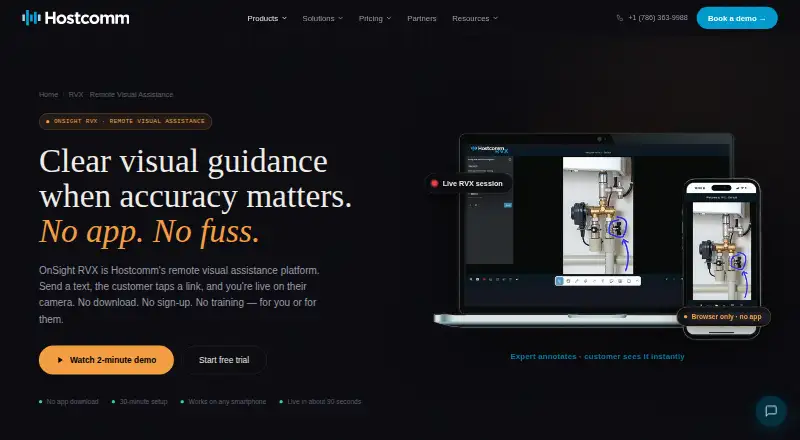
OnSight RVX is a remote visual assistance platform that lets an expert view a customer’s or field worker’s phone camera and provide live guidance. A customer joins from a text link in a phone browser without installing an app, creating an account or signing in. During the session, the expert can draw, circle, point and add text over the live video. RVX captures high-resolution stills and uses OCR to extract text from meters, data plates and serial numbers. It can record sessions and produce PDF reports containing annotated screenshots, measurements, timestamps and notes. The AR ruler uses iPhone Pro LiDAR for centimeter-accurate measurements; other iPhones and Android devices use camera estimates. Customers can complete structured self-surveys, with AI extracting, tagging and classifying results. Plans start at $29 per month, with a 30-day trial.
Who it suits
It suits field-service, HVAC, solar, heat-pump, property, insurance, utility and manufacturing teams that guide people remotely. Browser joining can help customers participate without installing an app.
What it does well
- Customers join through a browser link
- Live video supports drawings, pointers and text
- OCR reads meters and serial numbers
- Sessions produce annotated PDF reports
- Recordings and photos use encrypted AWS storage
What to know first
- No free plan
- API and webhooks require Enterprise
- Non-LiDAR devices use camera-based measurements
- Starter limits storage to 5 GB
Limits
Starter costs $29 per month and includes 100 session minutes and 5 GB of storage. The Business plan provides unlimited session minutes and 10 GB of storage; API and webhooks are listed on Enterprise.
Plans
| Plan | Billed and limits | Price |
|---|---|---|
| Starter | $29 per month; billed monthly · 100 session minutes · 5 GB storage · all core features · standard support | $29 a month |
| Business | $59 per month; billed monthly · Unlimited session minutes · 10 GB storage · priority support · detailed reporting | $59 a month |
| Enterprise | $90 per month; billed monthly · Everything in Business · account manager · custom branding · API and SSO | $90 a month |
As hostcomm.net lists them, read 9 Oct 2026. The maker's own page has the final word.
Getting started
- Open the Hostcomm RVX website
- Choose a plan or start the 30-day free trial
- Send a session text link to the customer or field worker
- Have the customer open the link in a phone browser
- Guide the live camera view with annotations, captures, or measurements
Verdict
OnSight RVX combines browser-based remote guidance with capture, OCR, measurements and reporting. Its plan structure offers core assistance from $29 per month, while API access and larger business features require higher tiers.
Questions
How much does OnSight RVX cost?
Starter is $29 a month, Business is $59 a month, and Enterprise is $90 a month. A 30-day free trial is available.
Do customers need to install an app or create an account?
No. Customers can join through a text link in their phone browser without downloading an app, creating an account, or signing in.
Which platforms does RVX support?
RVX supports Android, iOS, and web access.
What does the Starter plan include?
Starter includes 100 session minutes, 5 GB of storage, all core features, and standard support.
Which integrations are listed?
The listed integrations are Simpro, Talkdesk, Persona, and a REST API with webhooks on the Enterprise plan.
How are recordings and photos stored?
They are stored on AWS in the account’s region, encrypted in transit and at rest, with a retention period controlled by the customer.
Facts from OnSight RVX's own pages
- Browser access
- The customer joins through a text link in their phone browser without downloading an app, creating an account, or signing in. · hostcomm.net, 9 Oct 2026
- Capture and OCR
- The platform captures high-resolution stills and can extract text from meters, data plates, and serial numbers using OCR. · hostcomm.net, 9 Oct 2026
- Company history
- Hostcomm says OnSight remote visual assistance has been in production since 2014. · hostcomm.net, 9 Oct 2026
- Data security
- The page says recordings and photos are stored on AWS in the account’s region, encrypted in transit and at rest, with a retention period the customer controls. · hostcomm.net, 9 Oct 2026
- Founded
- 2004 · hostcomm.net, 28 Sept 2026
- Headquarters
- Miami, Florida, US · hostcomm.net, 28 Sept 2026
- Integrations
- The page lists Simpro, Talkdesk, Persona, and a REST API with webhooks; it says API and webhooks are on the Enterprise plan. · hostcomm.net, 9 Oct 2026
- Intended users
- The page names field-service companies, HVAC, solar and heat-pump installers, social-housing and property teams, insurers, utilities, and manufacturers as users. · hostcomm.net, 9 Oct 2026
- Live guidance
- Experts can draw, circle, point, and add text on live video, which the customer sees in real time. · hostcomm.net, 9 Oct 2026
- Measurement
- Its AR ruler uses the iPhone Pro LiDAR sensor for centimeter-accurate measurements, while other iPhones and Android use camera-based estimation. · hostcomm.net, 9 Oct 2026
- Personal data
- The page says no personal data is required to run a session. · hostcomm.net, 9 Oct 2026
- Purpose
- OnSight RVX lets an expert see through a customer’s or field worker’s phone camera in real time and guide them remotely. · hostcomm.net, 9 Oct 2026
- Reports and recordings
- RVX can record sessions and generate PDF reports with annotated screenshots, measurements, timestamps, and session notes. · hostcomm.net, 9 Oct 2026
- Self-survey
- Customers can complete a structured survey on their own, with AI extracting, tagging, and classifying the results. · hostcomm.net, 9 Oct 2026
- Support
- Hostcomm says it replies to product questions within one business day and offers phone support. · hostcomm.net, 9 Oct 2026
- Trial
- Hostcomm says a 30-day free trial is available and also describes a free trial on a live session. · hostcomm.net, 9 Oct 2026
Where OnSight RVX stands on Freedom251
- Video Customer Support Software#9 of 26