Freedom251 › Tab Management Software

OneTab
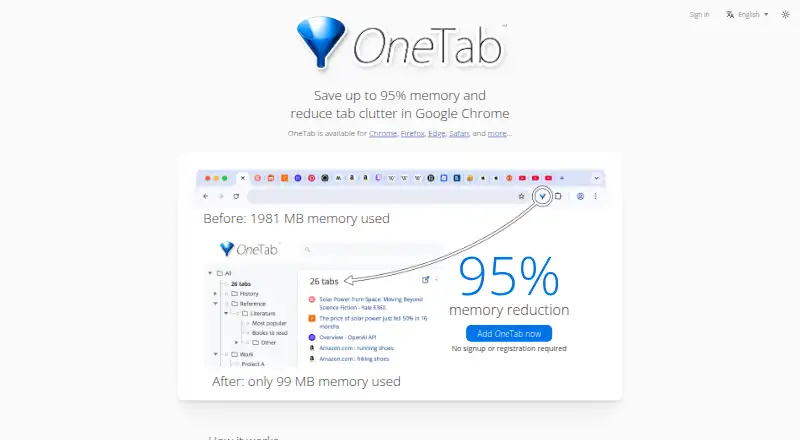
What OneTab is
OneTab turns open browser tabs into a saved list that you can restore individually or all at once. It is available for Chrome, Firefox, Edge, Safari, and other browsers, as an extension on macOS and Windows. The maker says reducing the number of open tabs can save up to 95% of memory. Saved tabs can be organized into folders, reordered, merged into groups, or managed with quick lists, search, tasks, and stars. You can import or export lists and share them as web pages. The tab-saving and organization features are free, with no signup required. Optional Backup & Sync encrypts data on the device before upload and uses end-to-end AES-256 encryption, according to the maker. It syncs saved tabs and settings, not browsing history or currently open tabs. A single license covers multiple computers, browsers, and profiles, up to 100. OneTab remains accessible offline, and offline changes sync when you are online again. Uninstalling it causes the browser to delete stored tabs.
Who it suits
OneTab suits people who want to reduce open tabs, save lists for later, or organize tabs into groups. Backup & Sync may suit users who need encrypted synchronization of saved tabs and settings across multiple computers, browsers, or profiles.
What it does well
- Free tab saving and organization; no signup required.
- Lists can be restored individually or all at once.
- Supports folders, search, tasks, and stars.
- Works offline, with changes syncing when online.
- Backup & Sync uses end-to-end AES-256 encryption.
What to know first
- Sync excludes browsing history and currently open tabs.
- One license covers at most 100 browsers or profiles.
- Uninstalling OneTab causes stored tabs to be deleted.
Limits
The free plan covers tab saving and organization. Backup & Sync covers saved tabs and settings, but not browsing history or currently open tabs; one license covers up to 100 browsers or profiles.
Plans
| Plan | Billed and limits | Price |
|---|---|---|
| OneTab | No signup required; tab saving and organization features | Free |
| Backup & Sync | 1 license per user · up to 100 browsers or profiles · sync and encrypted cloud backup | On request |
As one-tab.com lists them, read 11 Oct 2026. The maker's own page has the final word.
Getting started
- Visit the OneTab website.
- Add the extension for a supported browser: Chrome, Firefox, Edge, Safari, or another browser.
- Save open tabs to a OneTab list and organize them with folders or groups.
- Use the free plan without signing up for tab saving and organization.
- Choose Backup & Sync if you want encrypted backup and sync for saved tabs and settings.
OneTab turns a crowded browser session into a restorable list, making it a strong fit for people who collect pages for later and need to reclaim working memory. The free core is practical and broad across browsers, while encrypted backup is a separate purchase and does not mirror every kind of browser activity.
Overview
OneTab replaces open tabs with a list you can restore individually or all at once. That suits researchers, shoppers, project workers, and anyone who routinely leaves dozens of pages open: you can clear the window without discarding the links. The maker says this reduction can save up to 95% of memory. Treat that as a potential benefit rather than a promised result, since the actual effect depends on how many tabs you close and what they were doing.
OneTab works as an extension on Chrome, Firefox, Edge, Safari, and other browsers, with support for macOS and Windows. Saved lists remain accessible offline. If Backup & Sync is enabled, edits made without a connection sync when you are online again. A significant operational risk is uninstalling the extension: the browser deletes stored tabs, so removing it is not a harmless troubleshooting step. Restarting the browser is the maker's advised response to loading problems.
Key features
Organization goes beyond a single dump of links. You can put saved tabs in folders, reorder entries, merge groups, and use a quick list, search, tasks, and stars to surface or mark important pages. Those controls make OneTab more suitable for ongoing collections than a one-time tab-clearing button, although the product remains centered on tab lists rather than a complete browsing-history system.
Import and export let you move tab lists, and sharing can publish a list as a web page. Privacy is strongest when lists stay inside OneTab: the maker says tab URLs are not transmitted or disclosed unless you choose that web-page sharing option. Sharing therefore provides a useful hand-off, but it is also the explicit point at which links leave the private workflow.
Backup & Sync encrypts data on the device before upload and uses end-to-end AES-256 encryption, according to the maker. It backs up saved OneTab tabs and settings, not browsing history or tabs that are currently open. One license covers multiple computers, browsers, and profiles, up to 100 in total. Teams can purchase additional licenses with centralized billing, while each member's data remains private from the purchaser. This is meaningful protection for distributed use, but it is not a full cross-device browser-state sync.
Pricing
OneTab
The free plan costs nothing, requires no signup, and includes tab saving and organization. It is the right choice for individuals who mainly want to reduce tab clutter and maintain local lists. There is no stated seat or list quota for these core functions.
Backup & Sync
Backup & Sync has custom pricing. It provides one license per user, coverage for up to 100 browsers or profiles, encrypted cloud backup, and synchronization of saved tabs and settings. Choose it when retaining lists across machines or recovering them from cloud backup matters; do not buy it expecting history or currently open tabs to follow you.
Platforms
OneTab is offered as a browser extension for macOS and Windows. Browser support includes Chrome, Firefox, Edge, Safari, and other browsers, giving it wider reach than a single-browser tab utility.
Who it's for
It is best for people who accumulate tabs, want a free way to close them, and value folders and searchable saved collections. It also fits teams that need encrypted list backup with private member data. It is a weaker choice for users seeking full browser-history synchronization, automatic preservation of currently open tabs, or a workflow that remains safe after uninstalling the extension.
Pros and cons
Pros
- Free core with no signup: saving and organizing tabs cost nothing and can be used immediately.
- Broad browser coverage: support for Chrome, Firefox, Edge, Safari, and other browsers makes it practical in mixed-browser households and workplaces.
- Deep list organization: folders, merging, search, tasks, and stars help maintain large collections instead of abandoning them after one session.
- Privacy-conscious default: tab URLs are not transmitted or disclosed unless you deliberately share a list as a web page.
- Offline access: lists remain usable without a connection, with later synchronization when online.
Cons
- Uninstall can delete saved tabs: removing the extension risks losing stored lists, so maintenance requires care.
- Sync is limited in scope: Backup & Sync excludes browsing history and currently open tabs.
- Cloud pricing is custom: the paid option's cost cannot be assessed in advance from a published price.
- Memory claim is not universal: up to 95% is a stated potential, not a guaranteed saving for every browser session.
Alternatives
For broader Desktop Organization Software or more tab-focused tools, compare the relevant directories. Tab Management Software is the more direct category when tab workflows are your priority.
Desktop Broom is a free macOS and Windows option with no ads, signup, or premium tier; choose it when desktop cleanup matters more than browser-tab lists. iTop Easy Desktop is Windows-only freemium software with a free three-box tier and paid Pro plans; pick it for desktop grouping and wallpaper features. Nimi Places is free on Windows for non-commercial use, making it preferable when that license fits your desktop organization needs.
Tabbles offers freemium tagging across an API, extension, and Windows client, with its free plan capped at 5,000 items, 500 files, 15 rules, and 100 emails; choose it for broader file-and-tag organization. AutoShelf targets macOS folder automation, with one free rule and a 19.99 USD one-time unlimited-rules plan; select it when folder rules, not browser tabs, are central. BitDock, DeskBox, and DeskMakeover are Windows desktop alternatives with free offerings; consider them when you want desktop docks, containers, or a free MIT-licensed makeover rather than tab-list management.
Verdict
Choose OneTab if your priority is clearing browser clutter while preserving organized, restorable links at no cost. Its broad browser support, offline access, and privacy stance are compelling, and Backup & Sync adds encrypted list backup for users who accept its narrower scope and custom pricing. Look elsewhere if you need synchronized browsing history or live open-tab state, or if uninstalling an extension cannot risk deleting your saved work.
Verdict
OneTab focuses on saving and organizing browser tabs, with optional encrypted sync for saved tabs and settings. Before uninstalling, account for the stated risk that stored tabs will be deleted.
Questions
Is OneTab free?
Yes. The OneTab plan is free, and no signup is required for tab saving and organization.
Which browsers does OneTab support?
It is available for Chrome, Firefox, Edge, Safari, and other browsers.
What does Backup & Sync include?
It syncs saved OneTab tabs and settings, not browsing history or currently open tabs. The maker says it encrypts data on the device before upload and uses end-to-end AES-256 encryption.
How many browsers or profiles can one Backup & Sync license cover?
One license covers multiple computers, browsers, and browser profiles, up to a maximum of 100.
Can I use OneTab offline?
Yes. OneTab remains accessible offline, and changes made offline sync the next time you are online.
What happens to saved tabs if I uninstall OneTab?
The browser deletes the tabs stored by OneTab when you uninstall it.
Facts from OneTab's own pages
- Browser availability
- OneTab is available for Chrome, Firefox, Edge, Safari, and other browsers. · one-tab.com, 11 Oct 2026
- Core use
- OneTab converts open browser tabs into a list that can be restored one at a time or all at once. · one-tab.com, 11 Oct 2026
- Data-loss limitation
- Uninstalling OneTab causes the browser to delete stored tabs, so the maker advises restarting the browser to troubleshoot loading problems. · one-tab.com, 11 Oct 2026
- Encrypted sync
- Backup & Sync encrypts data on the device before upload and uses end-to-end AES-256 encryption, according to the maker. · one-tab.com, 11 Oct 2026
- Headquarters
- Harrow, United Kingdom · one-tab.com, 28 Sept 2026
- Import and export
- OneTab can import and export tab lists and share a list as a web page. · one-tab.com, 11 Oct 2026
- License limit
- A single Backup & Sync license covers multiple computers, browsers, and browser profiles up to a maximum of 100. · one-tab.com, 11 Oct 2026
- Memory reduction
- The maker says OneTab can save up to 95% of memory by reducing the number of open tabs. · one-tab.com, 11 Oct 2026
- Offline use
- OneTab remains accessible offline, and changes made offline sync the next time the user is online. · one-tab.com, 11 Oct 2026
- Organization
- Users can organize saved tabs into folders, reorder and merge groups, and use a quick list, search, tasks, and stars. · one-tab.com, 11 Oct 2026
- Privacy
- The maker says tab URLs are not transmitted or disclosed, except when a user chooses to share a list as a web page. · one-tab.com, 11 Oct 2026
- Support
- The maker accepts bug reports, feature requests, and other feedback through its contact form. · one-tab.com, 11 Oct 2026
- Sync scope
- Backup & Sync covers saved OneTab tabs and settings, not browsing history or currently open tabs. · one-tab.com, 11 Oct 2026
- Team use
- Teams can buy additional licenses with centralized billing, and each team member's data remains private from the license purchaser. · one-tab.com, 11 Oct 2026
Where OneTab stands on Freedom251
- Tab Management Software#1 of 27
- Chrome Extensions#7 of 26
- Desktop Organization Software#14 of 47
- Browser Extensions#9 of 19
- Extensions#13 of 23