Freedom251 › Tab Management Software
tabExtend
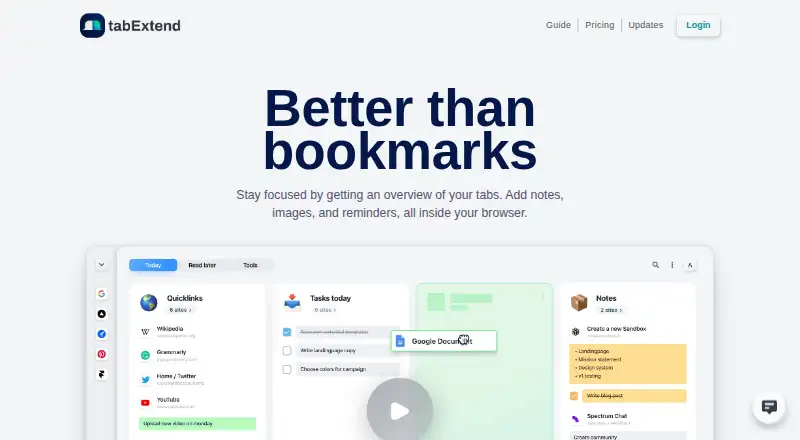
What tabExtend is
tabExtend is a browser-based visual tab manager for saving and organizing tabs alongside notes, images, to-dos, and reminders. Users can save, close, and reopen tab groups with drag-and-drop or right-click actions, then use search or create groups from bookmarks and most-visited sites. Workspaces and categories can be shared publicly or privately, with colleagues invited to collaborate in real time. Cloud sync makes workspaces available across devices; tabExtend says stored data is end-to-end encrypted and backed up twice daily. Browser extensions are available for Chrome, Brave, and Edge, alongside native iPhone, iPad, and Android apps. The free plan includes basic features, up to 30 saves, unlimited use, and no account requirement. Pro costs $8/mo and includes unlimited saved items, multiple workspaces, daily backups, and reminders. Team costs $21/mo for three seats, with additional seats at $7 per seat. The extension can replace the new-tab page and read browsing history; downloads, bookmarks, and most-visited URLs are optional permissions.
Who it suits
tabExtend suits people who want to group and revisit browser tabs, keep notes or reminders with them, and access workspaces across devices. Shared workspaces may also suit colleagues who want to collaborate in real time.
What it does well
- Save, close, and reopen tab groups.
- Search and create groups from bookmarks.
- Share workspaces and collaborate in real time.
- Cloud sync works across devices.
- Free plan allows up to 30 saves.
What to know first
- Free plan is limited to 30 saves.
- Extension can read browsing history.
- Team plan costs $21/mo for three seats.
Limits
The Free plan allows up to 30 saves. Pro is listed at $8 a month and adds unlimited saved items, multiple workspaces, daily backups, and reminders.
Plans
| Plan | Billed and limits | Price |
|---|---|---|
| Free | unlimited time · basic features · up to 30 saves · no account needed | Free |
| Team plan | monthly; yearly billing saves 25% · 3 seats · additional seats $7 each · all Pro features · team management area · priority support | $21 a month |
| Pro plan | monthly; yearly billing saves 25% · unlimited items saved · multiple workspaces · daily backups · reminders | $8 a month |
As tabextend.com lists them, read 15 Oct 2026. The maker's own page has the final word.
Getting started
- Open tabExtend's website or get the browser extension through the Chrome Web Store, Brave extensions, or Edge Add-ons.
- Alternatively, install the Android app through Google Play or the iPhone/iPad app through the App Store.
- Start with the free plan, which does not require an account, or choose a paid plan.
- Save a tab group, then add notes, to-dos, or reminders as needed.
- Create or share workspaces and invite colleagues if you want real-time collaboration.
tabExtend is a visual tab manager for people who want to keep browser research, notes and follow-up tasks together. Its combination of synced workspaces and collaboration stands out; the free plan’s 30-save cap is the clearest reason to look elsewhere if you save heavily.
Overview
Rather than leaving useful tabs scattered across sessions, tabExtend lets you save, close and reopen tab groups, then attach notes, to-dos and reminders to sites or items. Search and group creation from bookmarks and most-visited sites help bring existing browsing into the system. Session restore is supported, but tab suspension is not, so it helps organize tabs rather than reduce the resource demands of open ones.
Workspaces sync through the cloud for access across devices. tabExtend says its stored data is end-to-end encrypted and backed up twice a day. You can also export current data as a JSON file to the downloads folder, offering a portable fallback.
Key features
Tab groups, notes and reminders
Drag-and-drop and right-click actions give users two ways to save, close and reopen groups. Colored notes, to-dos and reminders add lightweight task tracking to saved browsing, though the product is an organizer rather than a full project-management system.
Shared workspaces
Workspaces and categories can be shared privately or publicly, and colleagues can be invited to collaborate in real time. This makes tabExtend more relevant to shared research and team workflows than a strictly personal session manager. Team management and priority support are reserved for the Team plan.
Browser access, privacy and export
The extension can replace the new-tab page and read browsing history. Downloads, most-visited URLs and bookmarks are optional permissions. That access enables features such as bookmark-based groups, but may not suit users who prefer extensions with narrower browser permissions.
tabExtend says it does not sell or rent personal information, does not store payment-card details, and uses Plausible for anonymous website analytics. Stripe handles payments; tabExtend says Stripe is PCI-certified and encrypts card numbers with AES-256. General support is available by email, and a full refund is offered within 30 days.
Pricing
The Free plan costs nothing and includes basic features, up to 30 saves, unlimited time and no account requirement. It is a low-commitment way to try the workflow, but the save cap limits its usefulness as a long-term archive for active tab collectors.
The Pro plan costs $8 a month, billed $8/mo. It removes the saved-item limit and adds multiple workspaces, daily backups and reminders. Pro is the practical choice for an individual whose saved material exceeds Free’s cap or who needs multiple workspaces; it gives up the Team plan’s team management area and priority support.
The Team plan costs $21 a month, billed $21/mo, for 3 seats, with additional seats at +$7 per seat. It includes all Pro features, a team management area and priority support, making it the fit for small groups that need shared browser work and a defined team space. Its per-seat cost matters as a team grows. All paid plans can be refunded in full within 30 days.
Platforms
tabExtend is available on web, Android, iOS and as a browser extension. Native iPhone and iPad apps are available through the App Store, and the Android app through Google Play. The extension is available for Chrome, Brave and Edge. The combination suits people who want to move between desktop browsing and mobile access, though the extension’s new-tab and history permissions are worth weighing before installation.
Who it's for
tabExtend suits researchers, planners and other users who want saved tabs to carry their notes and reminders across devices. Its shared workspaces also make it a reasonable option for colleagues organizing browser-based research together. It is less suited to anyone primarily seeking tab suspension, or to a solo user who needs more than 30 saves but does not want a paid plan.
Pros and cons
- Pro: Saved tab groups can be combined with notes, to-dos and reminders, keeping follow-up context alongside the pages it concerns.
- Pro: Automatic cloud sync and sharing support both cross-device access and real-time collaboration.
- Pro: Free access has no time limit and requires no account, while settings allow JSON export.
- Con: Free is capped at 30 saves, which can force frequent pruning or an upgrade for ongoing use.
- Con: The extension can replace the new-tab page and read browsing history, permissions some users may not want to grant.
- Con: There is no tab suspension, so tabExtend does not address memory use from open tabs.
Alternatives
For a wider comparison, browse Tab Management Software. Tabblar is worth considering if a free plan with unlimited tabs and five workspaces matters more than tabExtend’s notes, reminders and shared workspaces. Workona is another freemium option, with free individual accounts but limited spaces and sections and no free team or organization accounts.
Pinako offers a free extension with local backups, rich-text notes and tab and bookmark trees, so it may suit users who prefer that tree-based organization. Toby has a free Starter plan capped at 60 saved tabs and a paid Productivity plan at $6 a month per member, an option to compare if that saved-tab allowance or member-based pricing better fits your needs. Tabox offers free core collections, restore, folders and Google Drive sync.
Raft is free across every feature and open source under the MIT License, making it a choice for users who want an extension without a paid tier. Session Buddy offers its current features free without an account, with an opt-in paid cloud-collections feature for access across devices and browser profiles. Sidebery is a free Firefox extension that accepts donations.
Verdict
Choose tabExtend if you want saved tabs to function as shared, synced workspaces with notes and reminders, rather than as isolated browser sessions. Its strongest case is the connection between saved browsing and follow-up work; its main drawbacks are the 30-save free ceiling, paid access to unlimited saved items and collaboration features, and the extension permissions it requests.
Verdict
tabExtend combines tab grouping with notes, reminders, shared workspaces, and cross-device sync. The free plan has a 30-save limit; Pro and Team add paid features.
Questions
Is there a free plan?
Yes. Free includes basic features, up to 30 saves, unlimited time, and no account requirement.
What do the paid plans cost?
Pro is $8 a month. Team is $21 a month for three seats, with additional seats at 7 USD each.
Which platforms are available?
Platforms listed are Android, iOS, browser extension, and web. Extensions are available for Chrome, Brave, and Edge.
Does tabExtend sync across devices?
Yes. Workspaces sync automatically to the cloud for access across devices.
Can teams collaborate?
Yes. Workspaces and categories can be shared privately or publicly, and colleagues can be invited for real-time collaboration. Team plans include a team management area and priority support.
Who makes tabExtend?
tabExtend is headquartered in Sollentuna, Sweden.
Facts from tabExtend's own pages
- Apple App Store availability
- The iPhone app is free and Apple says it has not received enough ratings or reviews to display an overview. · apps.apple.com, 15 Oct 2026
- Apple privacy disclosure
- Apple's listing says the developer reports collection of user content that is not linked to the user's identity, and notes the disclosure is unverified by Apple. · apps.apple.com, 15 Oct 2026
- Apple system requirements
- The App Store listing requires iOS 13 or later; its Mac build requires macOS 11 or later and an Apple M1 or later. · apps.apple.com, 15 Oct 2026
- Bookmarks and top sites
- The product can generate groups from browser bookmarks and most-visited sites. · tabextend.com, 15 Oct 2026
- Browser support
- The extension is available through the Chrome Web Store, Brave extensions and Edge Add-ons. · tabextend.com, 30 Sept 2026
- Chrome Web Store listing
- The listing shows version 3.4.3, a 3.04 MiB package, 10 languages and 20,000 users. · chromewebstore.google.com, 15 Oct 2026
- Cloud sync
- The home page says workspaces synchronize to the cloud for access across devices. · tabextend.com, 15 Oct 2026
- Data export
- Settings can export current data as a JSON file to the download folder. · tabextend.com, 30 Sept 2026
- Developer identity
- The Chrome Web Store identifies the publisher as Aconiti Interfaces AB and lists an address in Sollentuna, Sweden. · chromewebstore.google.com, 15 Oct 2026
- Export and import
- The changelog documents HTML and CSV workspace export and later workspace import from settings. · tabextend.com, 15 Oct 2026
- Headquarters
- Sollentuna, Sweden · tabextend.com, 28 Sept 2026
- Installation
- The getting-started guide directs users to Chrome, Brave or Edge web stores and says all features work without an account. · tabextend.com, 15 Oct 2026
- Integration evidence
- GetApp identifies Google Chrome as the only integration mentioned by reviewers, rated 5.0 from two reviewer mentions. · getapp.com, 15 Oct 2026
- Limit: browser dependence
- A Capterra reviewer notes that changing browsers or avoiding extensions would remove the organizational benefits because the product depends on the extension. · capterra.com, 15 Oct 2026
- Limit: free tier
- A Capterra reviewer says the free tier does not expose the product's full capabilities, while another says the 30-save limit is restrictive for heavy users. · capterra.com, 15 Oct 2026
- Limit: missing features
- Capterra reviews request password-manager integration, tab-change monitoring, better stacking of groups and improved long-name handling. · capterra.com, 15 Oct 2026
- Limit: reliability outage
- A Trustpilot reviewer reported the service repeatedly failing to load and showing blank placeholders in August 2021. · trustpilot.com, 15 Oct 2026
- Mobile apps
- The pricing page lists iOS and Android apps for accessing and saving notes and sites. · tabextend.com, 15 Oct 2026
- Notes and reminders
- The product supports notes, to-dos, reminders for sites and items, and colored notes. · tabextend.com, 30 Sept 2026
- Notes and to-dos
- Users can write notes, add colors and convert notes into to-do items. · tabextend.com, 15 Oct 2026
- Payments
- Payments are handled by Stripe, which the pricing page says is PCI-certified and encrypts card numbers with AES-256. · tabextend.com, 30 Sept 2026
- Permissions
- Required permissions include replacing the new-tab page and reading browsing history; downloads, most-visited URLs and bookmarks are optional permissions. · tabextend.com, 15 Oct 2026
- Praise: ease of use and support
- Trustpilot reviewers commonly describe the extension as simple to adopt, productivity-improving and supported by responsive help. · trustpilot.com, 15 Oct 2026
- Praise: organization
- Capterra reviewers repeatedly praise the visual organization of tabs, bookmarks, notes and to-do lists as a productivity aid. · capterra.com.au, 15 Oct 2026
Where tabExtend stands on Freedom251
- Tab Management Software#4 of 27
- Extensions#14 of 23