Freedom251 › Tab Management Software
Sidebery
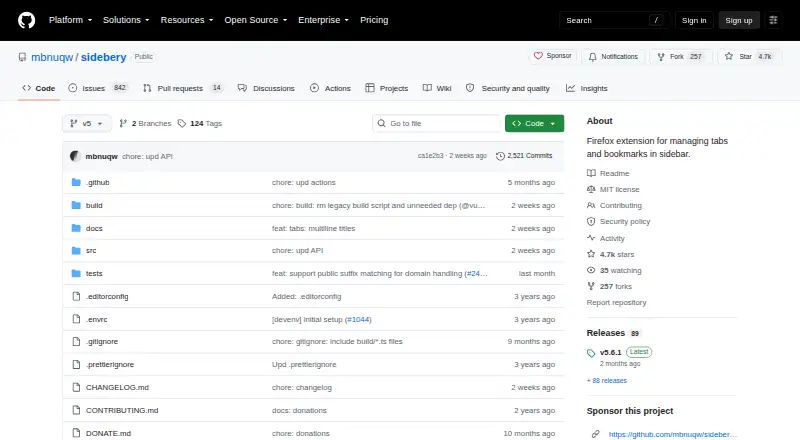
What Sidebery is
Sidebery is a Firefox extension for organizing tabs and bookmarks in a sidebar. Its panels can show tabs, bookmarks, or browsing history, with tabs arranged as a flat list or tree. You can group tabs under custom names, color and sort them, and automatically unload tabs in folded branches or inactive panels. Tab search, session restore, suspension, and workspaces are also listed capabilities.
Container tools can bind a container to a tab panel, reopen tabs in a chosen container based on URL, and set proxy and User-Agent configurations for container tabs. You can customize menus, mouse and keyboard controls, drag-and-drop behavior, and sidebar and group-page styling, including with custom CSS. Snapshots can save information about open windows and tabs. Data is local by default; optional sync uses Firefox Sync or Google Drive, with selected settings and tab data configurable. Sidebery is free; donations are accepted.
Who it suits
Sidebery suits Firefox users who want to manage tabs, bookmarks, and browsing history from a configurable sidebar. Its container controls and optional sync may also suit people who organize browsing across containers or devices.
What it does well
- Panels cover tabs, bookmarks, and browsing history.
- Tabs can use trees, groups, colors, and sorting.
- Includes tab search, session restore, and suspension.
- Optional sync supports Firefox Sync and Google Drive.
What to know first
- May conflict with add-ons that move or sort tabs.
- Firefox extensions cannot hide the native horizontal tab bar.
Limits
Sidebery is available for Firefox as an extension. Firefox does not allow extensions to hide its native horizontal tab bar, and add-ons that reposition, move, or sort tabs may cause conflicts or unexpected tab behavior.
Plans
| Plan | Billed and limits | Price |
|---|---|---|
| Sidebery | Firefox extension · donations accepted | Free |
As github.com lists them, read 4 Oct 2026. The maker's own page has the final word.
Getting started
- Open Sidebery's GitHub project page.
- Install the Firefox extension.
- Choose and customize panels for tabs, bookmarks, or browsing history.
- Set tab layouts, controls, and styles to suit your preferences.
- Enable Firefox Sync or Google Drive if you want optional synchronization.
Verdict
Sidebery offers extensive tab organization and customization in a free Firefox extension. Check its compatibility warning and native tab-bar limitation if either affects your setup.
Questions
How much does Sidebery cost?
Sidebery is free. Donations are accepted.
Which browser does Sidebery support?
Sidebery is a Firefox extension.
Is Sidebery open source?
The project repository identifies its license as MIT.
Does Sidebery sync across devices?
Optional synchronization is available through Firefox Sync or Google Drive. Users can choose which settings and selected tab data are synchronized.
Where does Sidebery store data?
Data is stored locally by default. When sync is enabled, data is sent only to the selected provider.
Can Sidebery hide Firefox's native tab bar?
No. Firefox does not allow extensions to hide the native horizontal tab bar.
Facts from Sidebery's own pages
- Compatibility limit
- The project warns Sidebery may conflict with add-ons that position, move, or sort tabs, potentially causing unexpected behavior or broken tab state at initialization. · github.com, 4 Oct 2026
- Containers
- Container features include binding a container to a tabs panel, reopening tabs in a target container by URL, and setting proxy and User-Agent configuration for container tabs. · addons.mozilla.org, 4 Oct 2026
- Customization
- Users can customize the context menu, mouse and keyboard controls, drag-and-drop behavior, and sidebar and group-page styles with variables and custom CSS. · addons.mozilla.org, 4 Oct 2026
- License
- The repository identifies the project license as MIT. · github.com, 4 Oct 2026
- Native tabs limit
- The add-on page says Firefox does not allow extensions to hide the native horizontal tab bar and points users to userChrome.css workarounds. · addons.mozilla.org, 4 Oct 2026
- Panels
- It provides customizable panels for tabs, bookmarks, and browsing history. · addons.mozilla.org, 4 Oct 2026
- Permissions
- Required permissions are access to recently closed tabs and browser tabs; additional permissions are optional and support features such as bookmarks, history, proxy settings, and snapshot export. · addons.mozilla.org, 4 Oct 2026
- Privacy
- The privacy policy says Sidebery does not engage in ad targeting or data collection, stores data locally by default, and sends data only when sync is enabled and only to the selected provider. · github.com, 4 Oct 2026
- Purpose
- Sidebery is a Firefox extension for managing tabs and bookmarks in a sidebar. · github.com, 4 Oct 2026
- Security reporting
- The security policy supports the latest version published on addons.mozilla.org and directs vulnerability reports to [email protected]. · github.com, 4 Oct 2026
- Snapshots
- Snapshots can be configured to save information about open windows and tabs. · addons.mozilla.org, 4 Oct 2026
- Support
- The maker invites users to create a GitHub Discussion or email the developer with questions about the privacy policy; the add-on lists [email protected] as its support email. · github.com, 4 Oct 2026
- Sync data
- Users can choose which settings, context-menu configuration, keybindings, custom styles, and selected tab data are synchronized. · github.com, 4 Oct 2026
- Synchronization
- Optional sync providers named in the privacy policy are Firefox Sync and Google Drive. · github.com, 4 Oct 2026
- Tab layouts
- Tabs can be shown as a flat list or a tree, grouped with custom names, colored, sorted, and automatically unloaded in folded branches or inactive panels. · addons.mozilla.org, 4 Oct 2026
Where Sidebery stands on Freedom251
- Tab Management Software#7 of 27