Freedom251 › Desktop Organization Software
BitDock
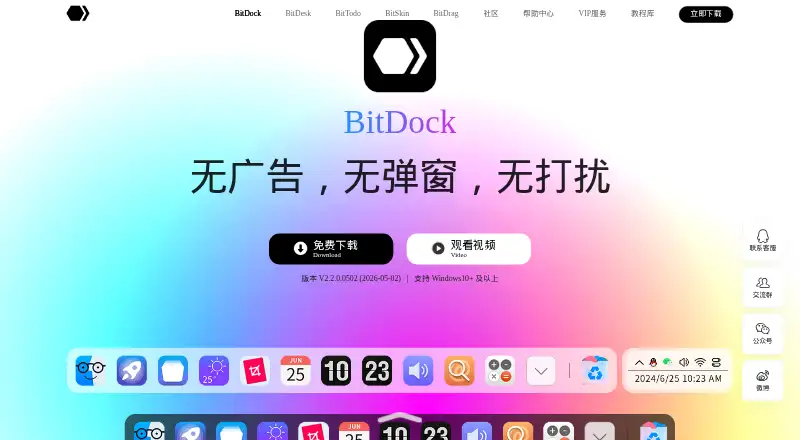
What BitDock is
BitDock is a Windows desktop management tool that can replace toolbar functions or sit alongside the desktop as an assistant. Its free service includes the Dock, weather, search, and more than 20 core functions. Users can customize icons with ICO, PNG, JPG, SVG, GIF, and BMP files. Assistant, Efficient, and Minimal modes offer different ways to work; Efficient and Minimal hide the system taskbar and let the Dock handle task switching and tray display. The Dock can show running tasks and previews. BitDesk widgets cover clocks, calendars, weather, system status, media, and notes. Paid VIP memberships add cloud backup, exclusive widgets, and human support, with privileges across the Bit software series. Listed options are 2 CNY a month, 20 CNY a year, and 99 CNY, paid once. The privacy policy says clipboard contents used for link collection or copy and paste are accessed locally and are not uploaded to the maker’s servers. The policy also describes encryption for some services, data isolation, masking, access controls, and multi-factor authentication. The site links to installation help and customer service.
Who it suits
BitDock suits Windows users who want a dock to manage apps, tasks, tray icons, and desktop widgets. The free service covers core functions, while VIP memberships are for users seeking the listed cloud backup, widget, and support benefits.
What it does well
- Free service includes more than 20 core functions.
- Supports six listed image formats for icons.
- Efficient and Minimal modes can hide the system taskbar.
- Widgets include clocks, calendars, weather, and notes.
- Clipboard contents are accessed locally, not uploaded.
What to know first
- Available only for Windows.
- VIP benefits require a paid membership.
- Some security controls apply to some services.
Limits
The free 基础服务 includes the Dock, weather, search, and more than 20 core functions. VIP privileges, cloud services, exclusive widgets, and human support are included in paid memberships, starting at 2 CNY a month.
Plans
| Plan | Billed and limits | Price |
|---|---|---|
| 基础服务 | Dock 栏、天气、搜索等 20+ 核心功能 | Free |
| Free basic service | 永久免费 · Dock栏 · 天气 · 搜索 · 20+核心功能 | Free |
| 月会员 | 页面显示 ¥2 / ¥3;30天使用权限 · VIP云服务 · VIP特权功能 · VIP功能图标 · VIP专享桌面组件 · 比特系列软件VIP特权 · 专属人工服务 · VIP标识 | 2 CNY a month |
| 年会员 | 页面显示 ¥20 / ¥29;365天使用权限 · VIP云服务 · VIP特权功能 · VIP功能图标 · VIP专享桌面组件 · 比特系列软件VIP特权 · 专属人工服务 · VIP标识 | 20 CNY a year |
| VIP annual | 365天使用权限 · VIP云服务 · VIP功能 · VIP图标 · VIP桌面组件 · 比特系列软件通用权限 · 专属人工服务 · VIP标识 | 2,029 CNY a year |
| VIP monthly | 30天使用权限 · VIP云服务 · VIP功能 · VIP图标 · VIP桌面组件 · 比特系列软件通用权限 · 专属人工服务 · VIP标识 | 23 CNY a month |
| 终身会员 | 页面显示 ¥99 / ¥129;永久使用权限 · VIP云服务 · VIP特权功能 · VIP功能图标 · VIP专享桌面组件 · 比特系列软件VIP特权 · 专属人工服务 · VIP标识 | 99 CNY, paid once |
| VIP lifetime | 永久使用权限 · VIP云服务 · VIP功能 · VIP图标 · VIP桌面组件 · 比特系列软件通用权限 · 专属人工服务 · VIP标识 | 99,129 CNY, paid once |
As bitdock.cn lists them, read 4 Oct 2026. The maker's own page has the final word.
Getting started
- Visit https://bitdock.cn/.
- Use the Windows version.
- Start with the free 基础服务, which includes the Dock, weather, search, and 20+ core functions.
- Choose Assistant, Efficient, or Minimal mode.
- Use the installation help center or customer service linked from the site.
BitDock is a Windows desktop manager built around a configurable Dock, task controls and desktop widgets. It is strongest for people who want taskbar-like controls in a dock while keeping a free starting point.
Overview
BitDock can sit alongside the Windows desktop or take over some taskbar duties. Its three work modes give users a choice between an assistant and a more complete dock-based setup. The trade-off is that the two replacement-oriented modes hide the system taskbar, so they are not for users who want to keep that familiar control surface visible.
Key features
The free service includes the Dock, weather, search and more than 20 core functions. Icon customization accepts ICO, PNG, JPG, SVG, animated or static GIF, and BMP files, a useful range for people bringing their own artwork into a launcher.
Assistant mode works alongside the desktop. Efficient and Minimal modes hide the taskbar and move task switching and tray display into the Dock; they can show running tasks and previews and manage system tray icons. That makes BitDock more than a launcher, but also makes the Dock central to everyday window and tray management.
BitDesk widgets cover clocks, calendars, weather, system status, media and notes. VIP adds exclusive widgets. The privacy policy says clipboard contents used for link collection or copy and paste are accessed locally rather than uploaded to the maker’s servers. It also describes SSL encryption for some services, data isolation, masking, access controls and multi-factor authentication. Personal information collected and generated in mainland China operations is stored in China, subject to stated legal, consent and cross-border-service exceptions.
Pricing
The 基础服务 plan costs nothing and includes the Dock, weather, search and more than 20 core functions. It is the practical place to start for users who want the main desktop controls without a membership.
Paid plans add VIP cloud services, VIP features and icons, exclusive desktop widgets, VIP privileges across Bit software, dedicated human support and a VIP identifier. 月会员 costs 2 CNY a month for 30 days of access; 年会员 costs 20 CNY a year for 365 days; 终身会员 costs 99 CNY, paid once for permanent access. The pricing display also shows ¥2 / ¥3, ¥20 / ¥29 and ¥99 / ¥129 respectively. Readers should choose based on the membership period they need; the free plan gives up the VIP extras, while the longer terms avoid renewing month by month.
Platforms
BitDock supports Windows only, which rules it out for people seeking a shared desktop setup across operating systems.
Who it's for
BitDock suits Windows users who want customizable app icons, widgets and a choice between a companion dock and a taskbar replacement. Its free core makes it a sensible option for those who do not need VIP extras. Users who depend on the Windows taskbar remaining visible, or need macOS support, should look elsewhere.
Pros and cons
- Pros: The free tier combines the Dock, weather, search and 20-plus core functions, so basic use does not require membership.
- Pros: Efficient and Minimal modes provide task previews and tray management while replacing the taskbar, and Assistant mode preserves a alongside-desktop approach.
- Pros: Broad image-format support and widgets spanning clocks, calendars, system status, media and notes offer meaningful customization.
- Cons: Efficient and Minimal hide the Windows taskbar, which may not suit users who want to keep using it.
- Cons: The product is Windows-only, and exclusive widgets, cloud services and human support require VIP membership.
Alternatives
Desktop Broom is a better fit for users who want a free option spanning macOS and Windows, with no ads, sign-up or premium tier. iTop Easy Desktop may suit Windows users who want desktop boxes and wallpapers: its free plan is limited to 3 boxes and limited wallpapers, while Pro plans are available for one device. DeskBox is another free Windows choice, with a permanently free direct-install version for Windows 10 21H2 or later and Windows 11 on x64 or ARM64.
Deskora offers a free, no-subscription, ad-free and registration-free Windows option. Desktop Fences+ is a free, MIT-licensed portable Windows 10/11 option for organizing user-writable locations. Desktop Frames+ is free and open source, portable, and supports Windows 10/11. Desktop Organizer is a macOS alternative with a free download and in-app purchases. DesktopBox is a free portable single-file app for 64-bit Windows 10/11. Browse more options in Desktop Organization Software.
Verdict
Choose BitDock if you want a free Windows Dock that can either complement the desktop or take on task switching and tray duties, with widgets and extensive icon-format support. Look elsewhere if you need macOS compatibility or want to retain the Windows taskbar while using the replacement-oriented modes; consider VIP only if its cloud services, exclusive extras or support justify the membership cost.
Verdict
BitDock offers a free Windows dock with multiple work modes, icon customization, and a range of widgets. Users considering VIP should check the listed membership term and price that match their needs.
Questions
Is BitDock free?
Yes. The 基础服务 plan is listed as free and includes the Dock, weather, search, and more than 20 core functions.
What do VIP memberships cost?
The listed options are 2 CNY a month, 20 CNY a year, and 99 CNY, paid once.
Which platform does BitDock support?
BitDock is listed for Windows only.
What does a VIP membership include?
The VIP page says membership covers the Bit software series and includes cloud backup, exclusive widgets, and human support.
Who makes BitDock?
The About page identifies Shenzhen Bit Idea Technology Co., Ltd. (深圳比特创想科技有限公司) as its maker.
How does BitDock handle clipboard contents used for link collection or copy and paste?
Its privacy policy says those contents are accessed locally and are not uploaded to the maker’s servers.
Facts from BitDock's own pages
- Backup documentation
- Help documentation says Dock settings can be exported locally to a .bt file and restored by importing that file. · help.bitdock.cn, 15 Oct 2026
- BitBar
- BitBar is a floating menu-bar-like tool for managing applications above windows. · bitdock.cn, 15 Oct 2026
- BitDesk backup
- BitDesk supports one-click backup and restore of widget data when upgrading systems or changing computers. · desk.bitdock.cn, 15 Oct 2026
- BitDesk editing
- BitDesk widgets can be arranged visually without code, with adjustable size, color and font settings. · desk.bitdock.cn, 15 Oct 2026
- BitDesk integration
- The BitDesk site says BitDesk is already included in BitDock and can be enabled from Dock settings instead of installed separately. · desk.bitdock.cn, 15 Oct 2026
- BitDesk widgets
- BitDesk supplies clock, calendar, weather, system-status, media and note widgets. · bitdock.cn, 15 Oct 2026
- Clipboard handling
- For link collection and copy-and-paste functions, clipboard contents are accessed locally and are not uploaded to the company’s servers. · bitdock.cn, 15 Oct 2026
- Company legal name
- The service terms identify Shenzhen Bit Idea Technology Co., Ltd. (深圳比特创想科技有限公司) as the owner and operator. · bitdock.cn, 15 Oct 2026
- Core features
- The maker says the free service includes the Dock, weather, search, and more than 20 core functions. · bitdock.cn, 4 Oct 2026
- Core service
- The vendor says its permanently free basic service includes the Dock, weather, search and more than 20 core functions. · bitdock.cn, 15 Oct 2026
- Data location
- The privacy policy says personal information collected and generated in mainland China operations is stored in China, except for listed legal, consent, or cross-border-service cases. · bitdock.cn, 4 Oct 2026
- Data security
- The privacy policy describes encryption such as SSL for some services, data isolation, masking, access controls, and multi-factor authentication. · bitdock.cn, 4 Oct 2026
- Documentation
- The help center provides BitDock, BitDesk and BitTodo documentation plus FAQs for installation, uninstalling, backups, data directories, Dock modes and icon problems. · help.bitdock.cn, 15 Oct 2026
- Functional icons
- The Dock can add utility icons such as weather, calendar, clock, volume and system monitoring. · bitdock.cn, 15 Oct 2026
- Grid and list menus
- Grid and list menus organize Dock icons into categorized collections. · bitdock.cn, 15 Oct 2026
- Headquarters
- The company lists an address in Longgang District, Shenzhen, Guangdong, China. · bitdock.cn, 15 Oct 2026
- Icon customization
- Users can customize icons with ICO, PNG, JPG, SVG, animated or static GIF, and BMP formats. · bitdock.cn, 4 Oct 2026
- Icon formats
- Custom icons may use ICO, PNG, JPG, SVG, animated GIF, static GIF or BMP files. · bitdock.cn, 15 Oct 2026
- Icon management
- Users can add, move and remove application icons by dragging them with the mouse. · bitdock.cn, 15 Oct 2026
- Independent feature report
- An independent review describes BitDock as a Mac-style dock for Windows that accepts applications, folders, URLs and documents by drag and drop. · sites.google.com, 15 Oct 2026
- Independent feature report: LaunchPad
- The same independent review says LaunchPad opens a full-screen grid of installed applications through a shortcut or pointer trigger. · sites.google.com, 15 Oct 2026
- Independent feature report: utilities
- An independent reviewer lists built-in search, screenshot annotation, eye-protection mode, color picker and power tools among more than 20 utilities. · sites.google.com, 15 Oct 2026
- LaunchPad
- LaunchPad presents installed applications for organization and supports folders. · bitdock.cn, 15 Oct 2026
- Licence
- The vendor publishes no open-source licence or source-code repository for the BitDock product; it is distributed as proprietary downloadable software. · bitdock.cn, 15 Oct 2026
Where BitDock stands on Freedom251
- Desktop Organization Software#3 of 47