Freedom251 › Desktop Organization Software

Coodesker
What Coodesker is
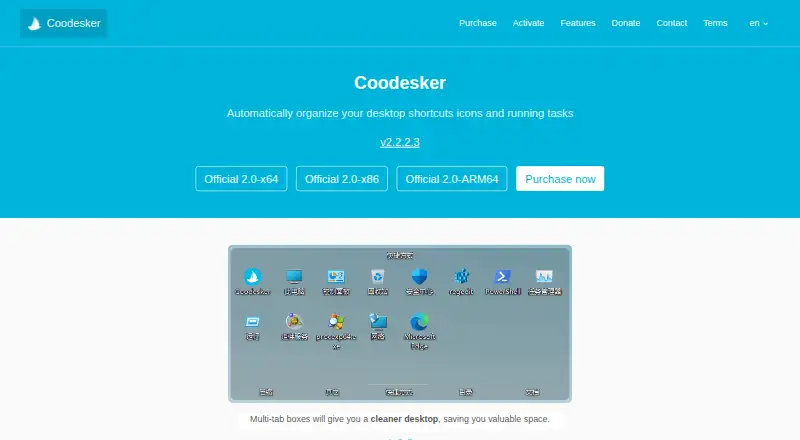
Coodesker is a Windows utility that organizes desktop shortcuts, icons, and running tasks into multi-tab boxes. The boxes group items to save desktop space, and the software can hide file names so only icons appear. Users can create rules that sort new icons into selected boxes, or mirror a PC folder onto the desktop as a box. The software is designed to use little hardware resource and supports hardware-accelerated rendering. It runs on Windows 7 and later, with x64, x86, and ARM64 installers available. Both the Download and Steam versions cover three computers and lifetime updates; the listed one-time prices are $5.70, paid once and $8.70, paid once, respectively. One license can be activated on three devices simultaneously. Offline activation is supported, though an offline activation code cannot be unbound. The privacy policy says Coodesker does not collect personally identifiable information but does collect hardware identifiers for product activation. Support is available by email, QQ, and a user forum.
Who it suits
Coodesker suits Windows users who want to sort desktop items into configurable boxes or display mirrored folders on the desktop. It supports Windows 7 and later.
What it does well
- Organizes items in multi-tab desktop boxes.
- Rules can sort new icons automatically.
- Can mirror PC folders onto the desktop.
- Three-computer licenses include lifetime updates.
- x64, x86, and ARM64 installers are listed.
What to know first
- Available only for Windows.
- Offline activation codes cannot be unbound.
- Hardware identifiers are collected for product activation.
Plans
| Plan | Billed and limits | Price |
|---|---|---|
| Download version | one-time purchase · Windows 7+ · 3 computers · lifetime updates | $5.70, paid once |
| Steam version | one-time purchase · Windows 7+ · 3 computers · lifetime updates | $8.70, paid once |
As coodesker.com lists them, read 1 Oct 2026. The maker's own page has the final word.
Verdict
Coodesker offers several ways to organize a Windows desktop, with one-time purchase options covering three computers. Consider its offline activation restriction and hardware-identifier collection before choosing it.
Facts from Coodesker's own pages
- Activation limit
- One license can activate three devices simultaneously. · coodesker.com, 1 Oct 2026
- Automatic sorting
- Users can define rules that automatically sort new icons into selected boxes. · coodesker.com, 1 Oct 2026
- Data storage
- The privacy policy says personal information collected in China is stored in China. · coodesker.com, 1 Oct 2026
- Folder portals
- Coodesker can mirror any folder on a PC onto the desktop as a box. · coodesker.com, 1 Oct 2026
- Icon display
- Coodesker can hide file names and display only icons. · coodesker.com, 1 Oct 2026
- Installers
- The download page provides x64, x86, and ARM64 Windows installers. · coodesker.com, 1 Oct 2026
- Multi-tab boxes
- Multi-tab boxes organize desktop items while saving desktop space. · coodesker.com, 1 Oct 2026
- Offline activation
- Offline activation is supported, but an offline activation code cannot be unbound. · coodesker.com, 1 Oct 2026
- Performance
- Coodesker supports hardware-accelerated rendering and is designed to use very little hardware resources. · coodesker.com, 1 Oct 2026
- Privacy collection
- The privacy policy says Coodesker does not collect personally identifiable information but collects hardware identifiers for product activation. · coodesker.com, 1 Oct 2026
- Purpose
- Coodesker automatically organizes desktop shortcuts, icons, and running tasks. · coodesker.com, 1 Oct 2026
- Support
- Coodesker provides support through email, QQ, and a user forum. · coodesker.com, 1 Oct 2026
- Target users
- The maker says Coodesker was created to arrange desktop icons more intuitively because existing apps had poor performance or lacked needed features. · coodesker.com, 1 Oct 2026
- Windows support
- The software runs on Microsoft Windows 7 and later. · coodesker.com, 1 Oct 2026
Where Coodesker stands on Freedom251
- Desktop Organization Software#4 of 47