Freedom251 › Desktop Organization Software

DeskBox
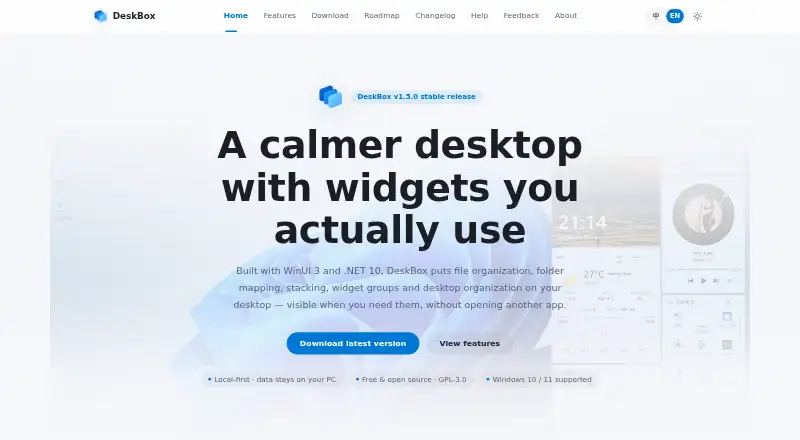
What DeskBox is
DeskBox organizes a Windows desktop with file boxes, mapped folders, stacks, and groups. Boxes let you drag, rename, delete, or open items and locate them in File Explorer. Mapped folders appear on the desktop without moving their original contents. Similar files can be stacked manually or automatically, and grouped boxes can be switched with the mouse wheel or Ctrl+Tab. A cleanup flow lets you choose files individually, include the public desktop, and continue an interrupted cleanup. The product page also describes built-in boxes for files, to-dos, notes, and music controls. DeskBox says files, to-dos, notes, and cache stay on the computer and are not uploaded to the cloud by default. Built-in boxes have no feature restrictions, ads, or subscriptions; the software is listed under GPL-3.0-only with free personal use. It supports Windows 10 version 21H2 or later and Windows 11, though some materials and animations are reduced on Windows 10. Direct installers are available for x64 or ARM64 and include the matching Windows App Runtime for offline installation.
Who it suits
DeskBox suits Windows users who want desktop items arranged into boxes and stacks while keeping mapped folders in their original locations. It may also suit users who prefer local data handling and an app with no built-in-box restrictions or subscriptions.
What it does well
- Files can be handled with familiar Windows operations
- Mapped folders keep their original locations
- Similar files can be stacked automatically
- Cleanup can resume after an interruption
What to know first
- Windows-only
- Some materials and animations are reduced on Windows 10
- Supports Windows 10 version 21H2 or later
Limits
The direct-installer plan is listed as free, billed permanently free. Some materials and animations are reduced on Windows 10.
Plans
| Plan | Billed and limits | Price |
|---|---|---|
| 官网直装版 | 永久免费 · Windows 10 21H2+ / Windows 11 · x64 or ARM64 | Free |
| Direct installer | Free · Windows 10/11 · x64 or ARM64 · offline installer | Free |
| Microsoft Store | Paid; price not stated · Windows Store installation and updates · same features as open-source version | On request |
As deskbox.fun lists them, read 29 Sept 2026. The maker's own page has the final word.
Getting started
- Open the DeskBox website.
- Choose the direct installer for x64 or ARM64.
- Run the installer, which includes the matching Windows App Runtime for offline installation.
- Use the checksum file with the same name to check the installer.
- Organize desktop files with boxes, mapped folders, stacks, groups, or cleanup.
Overview
DeskBox is a desktop workspace for people who want to bring order to a busy Windows desktop without relocating their folders. It will appeal most to users who prefer arranging files visually and keeping their data on their own computer. Its breadth of built-in tools is unusually generous for a free app, though it is strictly for Windows.
Key features
File boxes let you drag and drop items, rename or delete them, open them, and locate them in File Explorer. That makes boxes useful for day-to-day file work, not just decorative boundaries around icons. Folder mapping provides another route: folders appear on the desktop while their contents remain in their original locations, so you can change how you reach files without changing where they live.
DeskBox can stack similar files manually or automatically. Grouped boxes switch with the mouse wheel or Ctrl+Tab, while saved layouts and multi-monitor support suit people who arrange work across different tasks or screens. These tools offer meaningful flexibility, but the product’s focus remains desktop organization rather than a broader, cross-platform file workspace.
The cleanup flow is more considered than a one-shot clear-out: you can select files individually, include the public desktop, and resume an interrupted cleanup. Built-in boxes also cover to-dos, notes, and music controls, extending the desktop beyond file storage.
User files, to-dos, notes, and cache stay on the computer and are not uploaded to the cloud by default. That is a sensible fit for users who want local data handling, but it does not provide a shared cloud workspace.
Pricing
The 官网直装版 costs nothing, billed 永久免费. It includes all built-in boxes without feature restrictions, ads, or subscriptions, making it the obvious choice for personal users who want the complete desktop organizer without an ongoing cost. The about page identifies GPL-3.0-only licensing and free personal use.
A Microsoft Store supporter edition has the same features as the open-source version; its price is custom pricing. Since the free direct installer already includes the built-in features without restrictions, the Store edition is for supporters rather than users seeking additional functionality.
Platforms
DeskBox supports Windows 10 version 21H2 or later and Windows 11. Some materials and animations are reduced on Windows 10, so Windows 11 is the better fit if those visual elements matter. The direct installer supports x64 and ARM64 and includes the matching Windows App Runtime for offline installation; each installer also comes with a same-name .sha256 checksum file. Mac and Linux users will need another option.
Who it's for
DeskBox suits Windows users who want a customizable desktop arrangement, quick access to mapped folders, or a selective way to tidy desktop files. Its local-by-default data handling and unrestricted free edition are especially appealing for personal use. It is a poor fit for anyone who needs a shared cloud workspace or support beyond Windows.
Pros and cons
- Pros: File boxes retain familiar Windows file operations, while mapped folders preserve original locations.
- Pros: Manual and automatic stacking, grouped-box switching, saved layouts, and multi-monitor support give users several ways to organize work.
- Pros: The free edition has no feature restrictions, ads, or subscriptions, and built-in boxes include to-dos, notes, and music controls.
- Cons: Windows-only support rules it out for users who need the same tool on other desktop platforms.
- Cons: Some visual materials and animations are reduced on Windows 10.
Alternatives
iTop Easy Desktop is worth considering if you want a free Windows option with a stated three-box limit and limited wallpapers, or a paid Pro tier with Pro features for one device.
Deskora is another free Windows desktop organizer.
Desktop Fences+ is a free, portable, MIT-licensed open-source option for Windows 10/11, with user-writable locations only.
Desktop Frames+ is a free, portable, open-source Windows 10/11 alternative.
DesktopBox is a free portable single-file app for 64-bit Windows 10/11.
Portals: Desktop Organization offers a pay-what-you-want license with a free option.
Coodesker is a freemium Windows alternative with free and paid versions.
FileMap Desktop is worth a look if cross-platform support matters: it runs on macOS and Windows and has a free Starter tier and a Studio tier priced at $15 a month with collaboration, Google Drive integration, and advanced previews.
Browse more options in Desktop Organization Software.
Verdict
Choose DeskBox if you want a free, locally oriented Windows desktop organizer with flexible boxes, mapped folders, and cleanup controls. Its strongest case is the combination of practical file handling and unrestricted built-in features at no cost. Look elsewhere if you need macOS or Linux support, or a cloud-based shared workspace.
Verdict
DeskBox offers several ways to organize desktop files, with built-in boxes and a cleanup flow. Its stated support is limited to Windows, so check the version requirement before installing.
Questions
How much does DeskBox cost?
The direct installer plan is listed as free, billed permanently free.
Which Windows versions does it support?
DeskBox supports Windows 10 version 21H2 or later and Windows 11. Some materials and animations are reduced on Windows 10.
Does DeskBox upload files to the cloud?
DeskBox says files, to-dos, notes, and cache stay on the computer and are not uploaded to the cloud by default.
Is DeskBox open source?
It is listed under GPL-3.0-only, with free personal use.
Are there restrictions on built-in boxes?
The help page says all built-in boxes are available without feature restrictions, ads, or subscriptions.
How can I contact the maker?
The maker directs questions and suggestions to its feedback channel and 大雨实验室 public account.
Facts from DeskBox's own pages
- API and SDK
- No public web API, SDK or plugin-extension interface is documented; the project is distributed as a Windows application and source repository. · github.com, 15 Oct 2026
- Automatic organization
- New desktop files can be organized after downloads or extraction settle, with a configurable dwell period up to 12 hours. · github.com, 15 Oct 2026
- Backup
- Settings can be backed up locally, while todos, quick captures and widget styles can optionally be scheduled to a user-controlled WebDAV server. · github.com, 15 Oct 2026
- Capsule mode
- Widgets can collapse into capsules that expand on click or hover, and capsules can be arranged into movable bars. · deskbox.fun, 15 Oct 2026
- Commercial version
- The Microsoft Store version is described as a supporter edition with the same features as the open-source version; its price is not stated on the download page. · deskbox.fun, 29 Sept 2026
- Desktop cleanup
- The Organize Desktop workflow previews files, allows per-file selection, can include Public Desktop items and resumes interrupted runs. · deskbox.fun, 15 Oct 2026
- Developer documentation
- The repository includes architecture, article, release and test documentation plus build scripts for x64 and ARM64 packages. · github.com, 15 Oct 2026
- Documentation
- The help center provides feature guides, quick-start instructions, settings guidance, backup topics, installation notes and FAQs. · deskbox.fun, 15 Oct 2026
- Download requirements
- The direct installer supports x64 or ARM64 and includes the matching Windows App Runtime for offline installation. · deskbox.fun, 29 Sept 2026
- Everything integration
- File search can use the separate Everything local index through IPC; Everything is not bundled and must be installed separately. · github.com, 15 Oct 2026
- File operations
- File widgets support native drag and drop, copy, cut, paste, rename, delete, opening and Explorer location actions. · deskbox.fun, 15 Oct 2026
- File widgets
- Widgets can collect files into managed storage or map existing folders without moving their originals. · deskbox.fun, 15 Oct 2026
- Folder mapping
- Mapped folders appear on the desktop without changing the original folder location. · deskbox.fun, 29 Sept 2026
- Installation
- Full Native AOT installers bundle the Windows App Runtime and can install offline without a separate .NET runtime. · deskbox.fun, 15 Oct 2026
- Integrity check
- Each installer is accompanied by a same-name .sha256 checksum file. · deskbox.fun, 29 Sept 2026
- License
- Current releases use the GPL-3.0-only license; earlier MIT releases remain available and were not relicensed retroactively. · github.com, 15 Oct 2026
- License and ads
- The help page says all built-in boxes are available without feature restrictions, ads, or subscriptions; the about page lists GPL-3.0-only and free personal use. · deskbox.fun, 29 Sept 2026
- Limit: default move behavior
- Techno360 warned that dropping a file into a new widget moves it into that widget’s folder by default, which may surprise users. · techno360.in, 15 Oct 2026
- Limit: separate search dependency
- Techno360 noted that whole-PC file search requires installing Everything separately because DeskBox does not bundle it. · techno360.in, 15 Oct 2026
- Limit: unsigned installer
- Techno360 reported that the installer was not code-signed and could trigger a Windows SmartScreen warning. · techno360.in, 15 Oct 2026
- Limit: Windows-only
- JustGeek describes DeskBox as available for Windows 10 and Windows 11, with x64 and ARM64 installers and no other platform listed. · justgeek.fr, 15 Oct 2026
- Local data
- DeskBox says user files, to-dos, notes, and cache stay on the computer and are not uploaded to the cloud by default. · deskbox.fun, 29 Sept 2026
- Maker
- DeskBox was started and is maintained by Tianyu Zhu, a product manager who describes the project as a solo after-work effort. · deskbox.fun, 15 Oct 2026
- Multi-monitor support
- Widget layouts are associated with displays and restored when monitors reconnect or configurations change. · github.com, 15 Oct 2026
Where DeskBox stands on Freedom251
- Desktop Organization Software#1 of 47