Freedom251 › Desktop Organization Software
Desktop Fences+
What Desktop Fences+ is
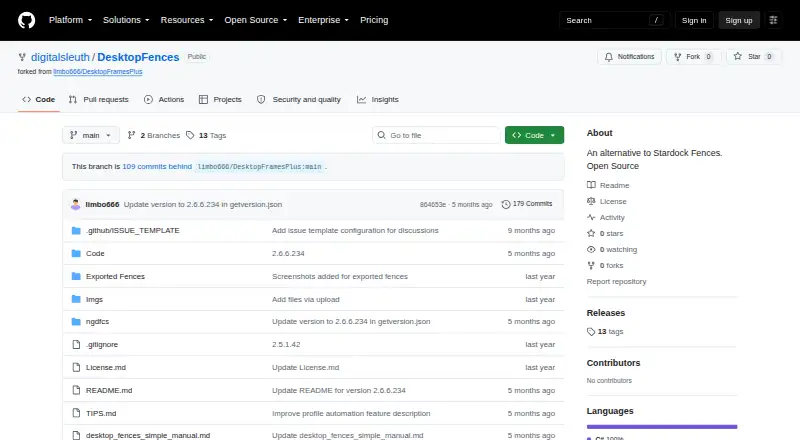
Desktop Fences+ is a free Windows utility for arranging desktop shortcuts, files, folders, and icons into virtual areas. It provides data fences, portal fences that reflect folder contents, and note fences for text. Appearance options include preset colors, borders, title styling, icon sizes, spacing, and launch effects. A search pane finds shortcuts across data fences. Profiles can be managed, switched automatically when programs activate, or called up with hotkeys. Smart Desktop rules can move files into portal fences or folders. The manual describes backup and restore, and fences can be exported and imported between systems. Supported items include Windows shortcuts, web links, folders, documents, and network targets; the changelog also mentions Spotify URI shortcuts and basic Microsoft Store app support. The project is portable and compatible with Windows 10 and 11, but must be kept in a user-writable location and requires .NET Framework support. The digitalsleuth repository has no releases listed; its README points to the original limbo666 repository for the latest release package.
Who it suits
Desktop Fences+ suits Windows users who want to group desktop items and create rules for organizing files. Its portable setup and profile features may appeal to users managing different desktop layouts.
What it does well
- Supports data, portal, and note fences.
- Profiles can switch automatically when programs activate.
- Fences can be exported and imported.
- Free and MIT-licensed.
What to know first
- Windows 10/11 only.
- Requires a user-writable location.
- Requires .NET Framework support.
- No releases are listed in the digitalsleuth repository.
Plans
| Plan | Billed and limits | Price |
|---|---|---|
| Desktop Fences+ | MIT-licensed open-source software · Windows 10/11 · portable · user-writable locations only | Free |
As github.com lists them, read 30 Sept 2026. The maker's own page has the final word.
Getting started
- Open the project website on GitHub.
- Use the README to locate the latest release package in the original limbo666 repository.
- Place the portable application in a user-writable location on Windows 10 or 11.
- Read the manual and advanced usage tips before starting an issue.
Verdict
Desktop Fences+ offers multiple fence types, profiles, and file-moving rules for organizing a Windows desktop. The README points to another repository for the latest release package.
Questions
How much does Desktop Fences+ cost?
The listed plan is free.
Which systems does it support?
It is compatible with Windows 10 and 11.
Is Desktop Fences+ open source?
Yes. The project provides an MIT license, whose text says the software is provided as is without warranty.
Where can I get the latest release package?
The digitalsleuth repository has no releases listed. Its README points to the original limbo666 repository for the latest release package.
What can I place in fences?
Supported items include Windows shortcuts, web links, folders, documents and network targets. The changelog also mentions Spotify URI shortcuts and basic Microsoft Store app support.
Facts from Desktop Fences+'s own pages
- Backup and portability
- The manual describes backup and restore, and the project README says fences can be exported and imported to move them between systems. · github.com, 30 Sept 2026
- Desktop organization
- The changelog describes Smart Desktop rules for moving files to specific portal fences or folders. · github.com, 30 Sept 2026
- Distribution status
- The digitalsleuth repository’s Releases page says there are no releases there, while the README points to the original limbo666 repository for the latest release package. · github.com, 30 Sept 2026
- Fence types
- It provides data fences, portal fences that mirror folder contents, and note fences that display text. · github.com, 30 Sept 2026
- Integrations and supported items
- The manual lists Windows shortcuts, web links, folders, documents, and network targets as supported items; the changelog also mentions Spotify URI shortcuts and basic Microsoft Store app support. · github.com, 30 Sept 2026
- Maintainer credit
- The README credits Nikos Georgousis as the project’s enhancer and maintainer and credits HakanKokcu for the original BirdyFences project. · github.com, 30 Sept 2026
- Platform requirements
- The README says it is compatible with Windows 10/11, is portable, and requires a user-writable location; the manual also lists .NET Framework support as a requirement. · github.com, 30 Sept 2026
- Profiles
- The project changelog lists profile management, automatic profile switching based on program activation, and profile hotkeys. · github.com, 30 Sept 2026
- Purpose
- Desktop Fences+ creates virtual desktop fences to group and organize icons, shortcuts, files, and folders. · github.com, 30 Sept 2026
- Search
- The manual says its search pane searches shortcuts across all data fences. · github.com, 30 Sept 2026
- Security and license
- The project identifies itself as open source and provides an MIT license; the license text says the software is provided “AS IS” without warranty. · github.com, 30 Sept 2026
- Support and development
- The README asks users to consider donations to support development and directs them to read the manual and advanced usage tips before starting an issue. · github.com, 30 Sept 2026
- Visual customization
- Fence appearance can be customized with preset colors, border and title styling, icon sizes, spacing, and launch effects. · github.com, 30 Sept 2026
Where Desktop Fences+ stands on Freedom251
- Desktop Organization Software#9 of 47