Nestalgia
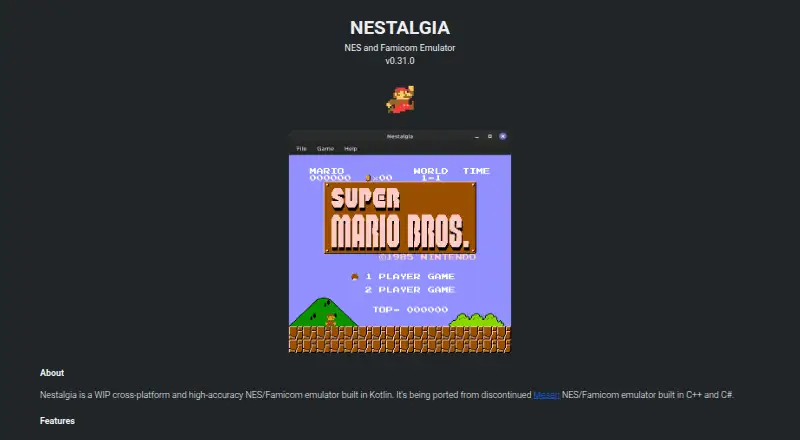
What Nestalgia is
Nestalgia is a free, open-source emulator for NES and Famicom systems, built in Kotlin and available for Windows, Linux, and macOS. It also emulates Famicom Disk System, Dendy, Vs. System, NSF, and NSFe, and the project reports support for more than 300 mappers, listing 305. Features include save states, battery saves, overclocking, cheat codes, fullscreen display, and screenshots. The project lists support for over 20 controllers, including the NES Controller, Zapper, Power Pad, and Four Score. Audio, video, controller, and emulation settings can be configured. The project lists passing CPU, video, audio, mapper, and input accuracy tests. Windows, Linux, and Mac downloads require Java 21 or newer. Android appears as a possible future platform, with no current availability stated. Developers can add the core library through JitPack using Gradle instructions in the repository README. Nestalgia implements the emulator but does not include debugging tools. The repository identifies the project as GPL-3.0 licensed.
Who it suits
Nestalgia may suit people looking for a desktop emulator for NES, Famicom, and the other listed systems. It is also relevant to developers who want to add its core library through JitPack.
What it does well
- Emulates NES, Famicom, and several related systems.
- Lists support for 305 mappers.
- Includes save states, battery saves, and cheat codes.
- Supports over 20 controllers.
- Lists passing CPU, video, audio, mapper, and input tests.
What to know first
- Running downloads requires Java 21 or newer.
- Android is listed as a possible future platform.
- The project does not include debugging tools.
- The project is described as work in progress.
Plans
| Plan | Billed and limits | Price |
|---|---|---|
| Free | No pricing or plan limits stated | Free |
As tiagohm.github.io lists them, read 8 Oct 2026. The maker's own page has the final word.
Getting started
- Visit the Nestalgia website.
- Download the build for Windows, Linux, or Mac.
- Install Java 21 or newer.
- Run the downloaded build.
- For library use, follow the repository README's Gradle instructions for JitPack.
Nestalgia is a free, open-source NES and Famicom emulator for Windows, Linux and macOS. It best suits players who want broad system support, flexible controller options and save-state features. Its wide compatibility claims are appealing, though its work-in-progress status and Java requirement may rule it out for some.
Overview
Built in Kotlin, Nestalgia emulates NES and Famicom, as well as Famicom Disk System, Dendy, Vs. System, NSF and NSFe. The project reports support for 305 mappers and says it passes CPU, video, audio, mapper and input accuracy tests. That breadth makes it a capable option for players with varied NES-era software; those who need debugging tools should look elsewhere, since the project implements the emulator only.
Developers can add Nestalgia's core library to a project through JitPack and Gradle. The project is GPL-3.0 licensed, a relevant consideration for anyone incorporating the code into their own work.
Key features
Save states and battery saves cover quick-session progress and persistent game saves. Overclocking and cheat codes give players more control over how games run, while fullscreen and screenshots support a focused display and basic capture. Audio, video, controller and emulation configuration offer further adjustment.
More than 20 controllers are supported, including the NES Controller, Zapper, Power Pad and Four Score. The first detected gamepad becomes Standard Controller 1 and the second becomes Standard Controller 2. Buttons are also mapped to screenshots and save-state controls, which may be convenient for a quick setup but is worth bearing in mind when configuring a pad.
Pricing
Nestalgia is free, with no paid plan or free trial. The free plan has no stated seat or usage caps. Open-source availability and the GPL-3.0 license make it especially suitable for players who want a no-cost emulator and developers who are comfortable with that license.
Platforms
Downloads are provided for Windows, Linux and macOS. They require Java 21 or newer, so users without a compatible Java installation need to account for that before running the emulator. Android appears as a possible future platform, but its status is uncertain and it is not a current option.
Who it's for
Nestalgia fits players who want to explore several NES and Famicom-related systems, use a wider range of controllers, or rely on save states, battery saves and cheats. Its configurable audio, video and emulation settings also suit people who want more control over playback. It is a weaker fit for anyone seeking debugging tools or a finished project, and the Java 21 requirement adds setup for desktop users.
Pros and cons
- Pros: Emulates several related systems and reports support for 305 mappers, giving players broad coverage.
- Pros: Save states, battery saves, overclocking and cheat codes support different play styles.
- Pros: More than 20 supported controllers, including the Zapper and Power Pad, offer options beyond a standard gamepad.
- Cons: The project is a work in progress, which may not suit users who prioritize a mature, finished emulator.
- Cons: Java 21 or newer is required to run the desktop builds.
- Cons: It has no debugging tools, limiting its use for development and debugging work.
Alternatives
Browse NES Emulators for more options. Choose GoNES if web access matters, since it supports Linux, macOS, Windows and the web. NESER also has web support and is MIT-licensed. binjnes is another free option for Linux, macOS and the web, with web and build-from-source versions.
FCEUX may suit users who want NES, Famicom, Famicom Disk System and Dendy emulation across Linux, macOS and Windows. HalfNES supports the same desktop platforms and requires Java 8 or newer, but it has no save states. Developers looking for an open-source JavaScript NES emulator library can consider JSNES, which supports Linux and the web. Nestopia Undead Edition is a free, open-source choice for Linux, macOS and Windows, with a GPL-2.0 license. NET-NES is another free option for those platforms, under the MIT License.
Verdict
Choose Nestalgia if you want a free desktop emulator with broad NES-era system and controller support, plus save states, battery saves and cheats. Its mapper coverage and accuracy-test results strengthen the case, while the work-in-progress status and Java 21 requirement are the clearest reasons to choose another emulator.
Verdict
Nestalgia offers a broad set of emulated systems and controller support alongside save and cheat features. Check the Java requirement and work-in-progress status before choosing it.
Questions
Is Nestalgia free?
Yes. The listed plan is Free, and the project is open source under GPL-3.0.
Which platforms are available?
Download builds are provided for Windows, Linux, and macOS. Android is listed with a possible future availability note.
What systems does Nestalgia emulate?
It emulates NES, Famicom, Famicom Disk System, Dendy, Vs. System, NSF, and NSFe.
Does it support save states and cheats?
Yes. Save states and cheat codes are listed, along with battery saves and overclocking.
What does Nestalgia require to run?
The download builds require Java 21 or newer.
Does it include debugging tools?
No. The project implements the emulator and does not include debugging tools.
Facts from Nestalgia's own pages
- Accuracy tests
- The site lists CPU, video, audio, mapper and input test ROM results, with the displayed tests marked Pass. · tiagohm.github.io, 8 Oct 2026
- Android
- The page lists Android with the note “Coming soon...or not :(”. · tiagohm.github.io, 4 Oct 2026
- Android status
- An Android entry appears with the status “Coming soon...or not :(”. · tiagohm.github.io, 8 Oct 2026
- Capture and display
- Fullscreen and screenshot support are listed. · tiagohm.github.io, 8 Oct 2026
- Compatibility
- The site lists support for NES, Famicom, Famicom Disk System, Dendy, Vs. System, NSF and NSFe emulation. · tiagohm.github.io, 8 Oct 2026
- Configuration
- Audio, video, controller and emulation configuration are supported. · tiagohm.github.io, 8 Oct 2026
- Controllers
- The site says more than 20 controllers are supported, including NES Controller, Zapper, Power Pad and Four Score. · tiagohm.github.io, 8 Oct 2026
- Downloads
- The download section links Windows, Linux and Mac versions. · tiagohm.github.io, 8 Oct 2026
- Features
- Features include save states, battery saves, overclocking, cheat codes, fullscreen and screenshots. · tiagohm.github.io, 4 Oct 2026
- Gamepad behavior
- The first detected gamepad is used as Standard Controller 1 and the second as Standard Controller 2; buttons are mapped to screenshots and save-state controls. · tiagohm.github.io, 8 Oct 2026
- Library
- The repository README gives Gradle instructions for adding Nestalgia's core library through JitPack. · github.com, 4 Oct 2026
- License
- The GitHub repository identifies the project as GPL-3.0 licensed. · github.com, 4 Oct 2026
- Limitations
- The repository README says Nestalgia implements only the emulator and has no debugging tools. · github.com, 4 Oct 2026
- Maker
- The GitHub profile identifies the account as Tiago and lists Itajubá, Minas Gerais, Brazil. · github.com, 4 Oct 2026
- Mappers
- The site claims support for over 300 mappers and lists 305 as supported. · tiagohm.github.io, 8 Oct 2026
- Product
- Nestalgia is a work-in-progress, cross-platform, high-accuracy NES and Famicom emulator built in Kotlin. · tiagohm.github.io, 8 Oct 2026
- Runtime requirement
- The site says Java 21 or newer should be installed before running the download. · tiagohm.github.io, 8 Oct 2026
- Save and cheat features
- Features include save states, battery saves, overclocking and cheat codes. · tiagohm.github.io, 8 Oct 2026
- Supported systems
- It emulates NES, Famicom, Famicom Disk System, Dendy, Vs. System, NSF and NSFe. · tiagohm.github.io, 4 Oct 2026
Where Nestalgia stands on Freedom251
- NES Emulators#12 of 26