HalfNES
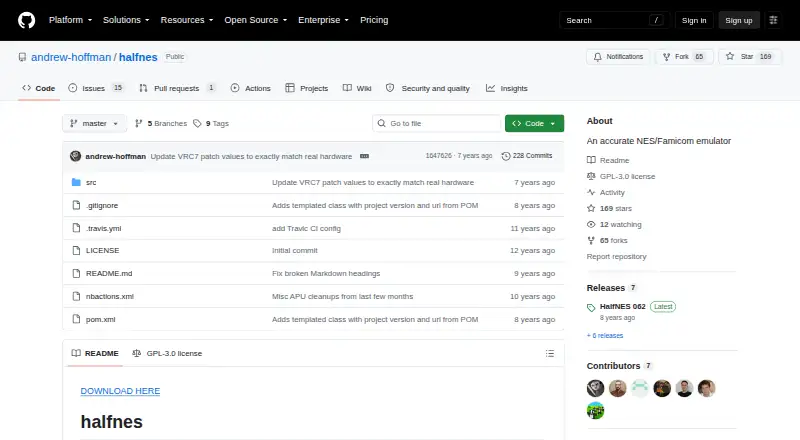
What HalfNES is
HalfNES is a free NES and Famicom emulator for Windows, Linux, macOS, and other Java-compatible platforms. Its supported mapper numbers are listed in the README, which says almost all US releases will start, though some may show graphics problems or freeze. Audio features include a sound core and an NSF player; display options include full-screen mode and an NTSC filter. You can remap controls in Preferences, and connect joysticks through DirectInput or xInput. HalfNES supports battery saves, but not savestates. GitHub releases provide a Windows executable and a JAR for other platforms; both require Java 8 or newer. Linux users need to set execute permissions on the JAR. A gamepad must be connected before a game loads to be detected, and its buttons cannot be configured. PAL games are supported, though they may have more issues; select PAL in Preferences to run them. The README says all games require a 2 GHz Athlon 64 or better for full-speed play, and the NTSC filter needs much more processing power.
Who it suits
HalfNES suits players looking for a free emulator for NES or Famicom games on a supported desktop platform. It may also suit users who want remappable controls, battery saves, and an NSF player, but do not need savestates.
What it does well
- Free plan is available.
- Supports Windows, Linux, macOS, and Java-compatible platforms.
- Controls are remappable through Preferences.
- Includes an NSF player and NTSC filter.
- Supports battery saves and joysticks.
What to know first
- Savestates are not supported.
- Requires Java 8 or newer.
- Gamepad buttons cannot be configured.
- Some games may show graphics corruption or freeze.
Limits
The free HalfNES plan has no savestates and requires Java 8 or newer. Some games may show graphics corruption or freeze; PAL games may have more issues.
Plans
| Plan | Billed and limits | Price |
|---|---|---|
| HalfNES | No savestates · Requires Java 8 or newer | Free |
As github.com lists them, read 4 Oct 2026. The maker's own page has the final word.
Getting started
- Visit https://github.com/andrew-hoffman/halfnes
- Download the Windows executable or the JAR for other platforms from GitHub releases.
- Install or use Java 8 or newer to run the package.
- On Linux, set execute permissions on the JAR.
- Connect a gamepad before loading a game if you want it detected.
- For PAL games, select PAL in Preferences.
Overview
HalfNES is a free emulator for Nintendo Entertainment System and Famicom games, best suited to players comfortable running Java desktop software and using traditional in-game saves. Its audio and display options add useful flexibility, but the lack of savestates and limits on gamepad setup will rule it out for some.
Key features
HalfNES supports the mapper numbers described in its README and says almost all US releases will start. That is a broad starting point for a library, not a promise of flawless play: some games may still show graphics corruption or freeze. PAL games are supported, though they may have more issues; select PAL in Preferences to run them.
An accurate sound core and NSF player serve both game play and NES music listening. Full-screen mode, an NTSC filter, and remappable controls give players a degree of control over presentation and input. Shader and cheat support are also included. The NTSC filter is the costly option: HalfNES says all games require a 2 GHz Athlon 64 or better to run at full speed, and the filter needs much more processing power.
Battery saves preserve progress in games that support them, but there are no savestates. Players who want save-anywhere checkpoints should choose another emulator. Joysticks work through DirectInput and xInput, but gamepad buttons cannot currently be configured, and a controller must be connected before loading a game to be detected. That is a notable constraint for players who expect to adjust every button or connect a pad after starting.
Pricing
HalfNES: free. The free plan includes the emulator, with no free trial. It gives players the same core tradeoff as the software itself: no purchase cost, but no savestates and a Java 8 or newer requirement. The plan is a fit for players who accept those limits rather than needing checkpoint saves or a self-contained runtime.
Platforms
HalfNES supports Windows, Linux, and other Java-compatible platforms. GitHub releases provide a Windows executable and a JAR for other platforms; both require Java 8 or newer. Linux users must set execute permissions on the JAR, an extra setup step compared with simply launching a packaged application.
Who it's for
HalfNES makes sense for players seeking a free NES or Famicom emulator with an NSF player, remappable controls, and basic display choices, particularly if battery saves are enough. It is less suitable for players who rely on savestates, need configurable gamepad buttons, or want PAL play without accepting the possibility of additional issues. The performance guidance also makes it a less certain choice on lower-powered hardware, especially with the NTSC filter enabled.
Pros and cons
- Pros: Free to use, with an accurate sound core, NSF playback, shader and cheat support, and both battery saves and control remapping.
- Pros: Supports nearly all US releases according to the project, with PAL support as well, giving players a wide range to try.
- Cons: No savestates, so players cannot rely on save-anywhere checkpoints.
- Cons: Gamepad buttons are not configurable, and controllers must be connected before a game loads.
- Cons: Java 8 or newer is required, Linux JAR setup needs an execute-permission change, and the NTSC filter demands significantly more processing power.
Alternatives
Compare NES emulators if you want to weigh HalfNES against other options. GoNES is another free choice for Linux, macOS, Windows, and the web. NESER offers a free MIT-licensed alternative across those same platforms. Nestalgia is a free option for Linux, macOS, and Windows. binjnes may suit players looking for a web-based emulator or a build-from-source option. FCEUX is a free, open-source alternative for NES, Famicom, Famicom Disk System, and Dendy emulation, with Win32 and Qt/SDL ports. JSNES is a free open-source JavaScript NES emulator library for Linux and web use. Nestopia Undead Edition is another free choice for Linux, macOS, and Windows, under GPL-2.0. NET-NES is free software under the MIT License for Linux, macOS, and Windows.
Verdict
Choose HalfNES if you want a free NES and Famicom emulator with music playback, remappable controls, and useful display options, and can run Java 8 or newer. Its main appeal is that breadth of features at no cost; look elsewhere if savestates or configurable gamepad buttons are essential.
Verdict
HalfNES offers NES and Famicom emulation with several audio, display, and control options at no cost. Check its Java requirement and lack of savestates before choosing it, and note the stated performance needs for full-speed play and the NTSC filter.
Questions
Does HalfNES cost anything?
No. HalfNES is free, with a listed plan price of $0.
Which platforms can run HalfNES?
It supports Windows, Linux, macOS and other Java-compatible platforms. GitHub releases include a Windows executable and a JAR for other platforms.
Does it support savestates?
No. HalfNES supports battery saves but does not support savestates.
What does HalfNES require to run?
Both release packages require Java 8 or newer. Linux users need to set execute permissions on the JAR.
Is HalfNES open source?
The repository identifies its license as GPL-3.0.
Facts from HalfNES's own pages
- Audio
- The listed features include an accurate sound core and an NSF player. · github.com, 4 Oct 2026
- Controller support
- It supports joysticks through DirectInput and xInput. · github.com, 4 Oct 2026
- Controls
- Controls are remappable through the Preferences dialog. · github.com, 4 Oct 2026
- Display
- The README lists full screen mode and an NTSC filter. · github.com, 4 Oct 2026
- Downloads
- The README directs users to GitHub releases, which include a Windows executable and a JAR for other platforms. · github.com, 4 Oct 2026
- Game compatibility
- It supports the mapper numbers listed in the README and says almost all US released games will start, though some still have graphics corruption or freezing. · github.com, 4 Oct 2026
- Gamepad limitation
- Gamepad buttons are currently not configurable, and the controller must be plugged in before a game is loaded to be detected. · github.com, 4 Oct 2026
- License
- The repository identifies its license as GPL-3.0. · github.com, 4 Oct 2026
- Linux setup
- Linux users need to set execute permissions on the JAR. · github.com, 4 Oct 2026
- PAL support
- PAL games are supported but may have more issues, and users should select PAL in Preferences to run them. · github.com, 4 Oct 2026
- Performance
- The README says a 2 GHz Athlon 64 or better is required to run all games at full speed, and the NTSC filter requires much more processing power. · github.com, 4 Oct 2026
- Purpose
- HalfNES is an accurate NES/Famicom emulator. · github.com, 4 Oct 2026
- Runtime requirement
- Java 8 or newer is required to run either package. · github.com, 4 Oct 2026
- Save support
- It supports battery saves but explicitly says it has no savestates. · github.com, 4 Oct 2026
Where HalfNES stands on Freedom251
- NES Emulators#5 of 26