Dendy
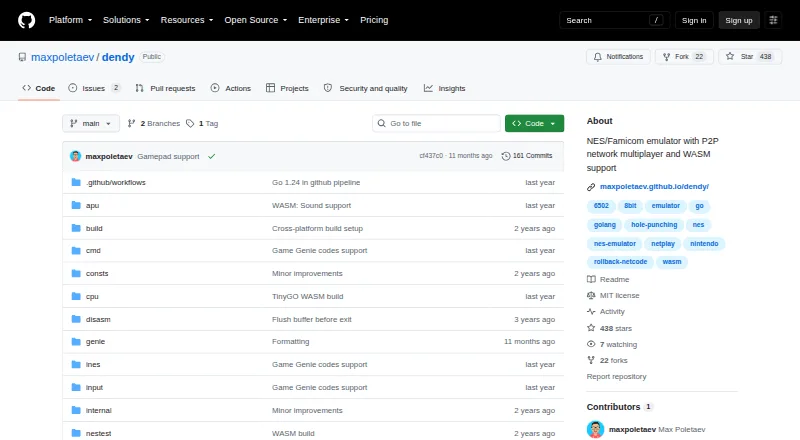
What Dendy is
Dendy is a free NES/Famicom emulator written in Go, with desktop versions for Windows, macOS, and Linux and a WebAssembly version for modern browsers. The desktop app has no graphical interface: you launch it from the command line with a .nes ROM file. Player one can use a keyboard or detected gamepad, and a mouse can emulate the Zapper light gun. Options include save states, rewind, screenshots, CRT effects, and Game Genie codes. Dendy supports network multiplayer through rollback networking and peer-to-peer connections. A public relay can help players behind NATs find each other and connect, though it cannot help when both are behind symmetric NATs; users can also run a relay built from source. The browser version does not support netplay. The maker cautions that compatibility and accuracy are not intended to match established emulators, so some games may not run. Sound emulation is still in progress and may produce pops and crackles. The project is MIT-licensed.
Who it suits
Dendy suits players looking for a free NES/Famicom emulator who are comfortable launching software from the command line. It also suits people interested in multiplayer or browser play, provided they note that browser netplay is unavailable.
What it does well
- Free to use, with an MIT license
- Supports save states, rewind, and Game Genie codes
- Network multiplayer uses rollback and peer-to-peer connections
- Runs on desktop systems and modern browsers
What to know first
- Desktop version has no graphical interface
- Browser version does not support netplay
- Some games may not run
- Sound emulation may produce pops and crackles
Limits
The browser edition currently does not support netplay. The public relay approach will not work when both players are behind symmetric NATs, and the maker cautions that some games may not run or may have issues.
Getting started
- Choose the Windows, macOS, or Linux pre-built binary, or follow the documented Go installation or source-build route
- Launch the desktop emulator from the command line with a .nes ROM file
- Use a keyboard or detected gamepad for player one, or a mouse for Zapper emulation
- For multiplayer, use the desktop version and the public relay, or build and run your own relay
Dendy is a free NES/Famicom emulator for desktop and modern browsers. It suits players comfortable launching software from a terminal, especially those interested in rollback netplay and emulator options such as rewind. Its compatibility and unfinished sound emulation make it a less dependable choice for a polished, broad-coverage setup.
Overview
Dendy takes a command-line approach on desktop: you start it with a .nes ROM file rather than choosing games through a graphical interface. Pre-built binaries are available for Windows, macOS, and Linux, and the project also documents installation with Go or building from source. That flexibility helps technically comfortable users, but the lack of a desktop GUI is a real barrier for anyone who expects a menu-driven setup.
A WebAssembly build runs in modern browsers, but it does not support netplay. The project is MIT-licensed. The maker cautions that Dendy is not intended to match established emulators in accuracy or compatibility, and some games may not run or may have issues. Sound emulation remains a work in progress and may pop or crackle.
Key features
Rollback multiplayer
Desktop netplay uses peer-to-peer connections and rollback networking, giving players a way to play together remotely. Players behind NATs can use a public relay for peer discovery and UDP hole punching, but the method will not work if both players are behind symmetric NATs. The maker hosts a relay and says users can build and run their own relay binary if needed; that fallback is useful for self-sufficient users, though it requires building and operating the service.
Controls and options
Player one can use a keyboard or a detected gamepad, while a mouse can emulate the Zapper light gun. Command-line options include save-state control, rewind, screenshots, CRT effects, and Game Genie codes. These provide meaningful flexibility for players who want more than basic playback, but they do not offset the compatibility caveat for anyone whose priority is running a particular game reliably.
Pricing
Dendy is free, with no free trial. There are no paid plans to weigh against the free version, and the MIT license permits use under its terms.
Platforms
Desktop builds cover Windows, macOS, and Linux; modern browsers can run the WebAssembly version. Desktop downloads include pre-built binaries, with Go installation and source-build instructions as alternatives. Choose desktop for netplay; the browser build currently omits it.
Who it's for
Dendy is best suited to terminal-comfortable NES players who value rollback multiplayer, rewind, save states, or Game Genie support and can tolerate imperfect compatibility and sound. It is not the strongest fit for newcomers seeking a graphical desktop library, players who need dependable support for a broad game collection, or browser users who want online multiplayer.
Pros and cons
Pros
- Free and MIT-licensed: there is no paid tier to unlock the emulator.
- Desktop rollback netplay: peer-to-peer networking and relay support make remote play possible, with the option to run a relay independently.
- Useful play options: save states, rewind, screenshots, CRT effects, Game Genie codes, and Zapper mouse control cover several distinct use cases.
- Multiple entry points: desktop binaries, Go installation, source builds, and a browser version provide different ways to run it.
Cons
- No desktop GUI: launching games from a command line is less approachable than a menu-based emulator.
- Compatibility is not the goal: some games may fail or have issues, so Dendy is a risky primary emulator for a specific collection.
- Sound is unfinished: pops and crackles can detract from play.
- Netplay has boundaries: browser builds lack it, and the relay-assisted method will not work when both peers are behind symmetric NATs.
Alternatives
For more choices, browse NES Emulators. Consider these alternatives when their platform or licensing details better match your needs:
- NESER is another free, MIT-licensed option spanning Linux, macOS, Windows, and the web.
- Nintengo is a free option for Linux, macOS, Windows, and the web.
- Geolith is free for Linux, macOS, and Windows if you do not need a browser build.
- binjnes is free and has Linux, Windows, and browser availability, including a web version and build-from-source option.
- puNES is a free option for Linux and Windows.
- Jnes is freeware for Windows; its stated terms prohibit commercial sale or distribution.
- KuroganeNES is a free, MIT-licensed browser-only option.
- FCEUX is a free, open-source option for Windows, macOS, and Linux.
Verdict
Choose Dendy if you want a free, command-line NES emulator with desktop rollback netplay and useful play options, and are willing to accept rough edges. Look elsewhere if graphical desktop use, reliable compatibility, cleaner sound, or browser netplay matters more.
Verdict
Dendy offers classic console emulation, command-line options, and network multiplayer across desktop and browser builds. Its command-line interface, compatibility limits, and unfinished sound emulation are important considerations.
Questions
Is Dendy free?
Yes. Dendy is free and the repository identifies its license as MIT.
Which platforms can run Dendy?
Dendy has pre-built binaries for Windows, macOS, and Linux, plus a WebAssembly version for modern browsers.
Does Dendy have a graphical interface?
The desktop emulator has no GUI and runs from the command line with a .nes ROM file.
Can I play multiplayer with Dendy?
The desktop version supports network multiplayer with rollback networking and peer-to-peer connections. The browser version currently does not support netplay.
Can players connect if they are behind NATs?
A public relay can support peer discovery and UDP hole punching, but it will not work if both players are behind symmetric NATs. Users can also build and run their own relay.
What should I know about game and audio compatibility?
The maker says Dendy is not intended to match established emulators in accuracy or compatibility, so some games may fail or have issues. Sound emulation is a work in progress and may produce pops and crackles.
Facts from Dendy's own pages
- Audio
- Sound-chip emulation is described as work in progress and may produce pops and crackles. · github.com, 29 Sept 2026
- Browser version
- A WebAssembly version runs in modern browsers, but it does not currently support netplay. · github.com, 28 Sept 2026
- Command line
- The emulator has no GUI and is run from the command line with a .nes ROM file. · github.com, 28 Sept 2026
- Compatibility limits
- The author says the emulator is not intended to match existing emulators in accuracy or compatibility and may not run some games. · github.com, 28 Sept 2026
- Controls
- The emulator supports keyboard controls, likely detects connected gamepads, and emulates the Zapper with a mouse. · github.com, 29 Sept 2026
- Dependencies
- The project lists Raylib Go bindings for graphics and audio and kcp-go for netplay. · github.com, 28 Sept 2026
- Downloads
- Prebuilt binaries are available for Windows, macOS, and Linux, though the maker says they are not guaranteed to work on Windows. · github.com, 29 Sept 2026
- Features
- Command-line options include save-state control, CRT-effect toggle, screenshots, rewind, and Game Genie codes. · github.com, 29 Sept 2026
- Interface
- The desktop emulator has no GUI and is run from the command line with a .nes ROM file. · github.com, 29 Sept 2026
- License
- The GitHub repository identifies the project as MIT licensed. · github.com, 29 Sept 2026
- Limitations
- The maker cautions that Dendy is not intended to match established emulators in accuracy or compatibility, and lists tested games that fail or have issues. · github.com, 29 Sept 2026
- Maker
- The GitHub profile identifies Max Poletaev as the maker and lists Belgrade, Serbia. · github.com, 29 Sept 2026
- Multiplayer
- Network multiplayer uses rollback networking, and the maker reports that ping up to 150 ms felt playable in testing. · github.com, 29 Sept 2026
- NAT traversal
- Players behind NATs can use a public relay for hole punching; the approach does not work when both players are behind symmetric NATs. · github.com, 29 Sept 2026
- Product
- Dendy is a NES/Famicom emulator written in Go with network multiplayer. · github.com, 29 Sept 2026
- Relay hosting
- The maker hosts a public relay server and says users can build and run their own dendy-relay binary if it goes down. · github.com, 29 Sept 2026
- Relay option
- The README says the author hosts a public relay and that users can run their own relay binary built from source. · github.com, 28 Sept 2026
- Security and integrations
- The README describes no security or compliance certifications and names Raylib Go for graphics/audio and kcp-go for netplay as dependencies. · github.com, 29 Sept 2026
- Web version
- A WebAssembly version runs in modern browsers and currently does not support netplay. · github.com, 29 Sept 2026
Where Dendy stands on Freedom251
- NES Emulators#4 of 26