
binjnes
What binjnes is
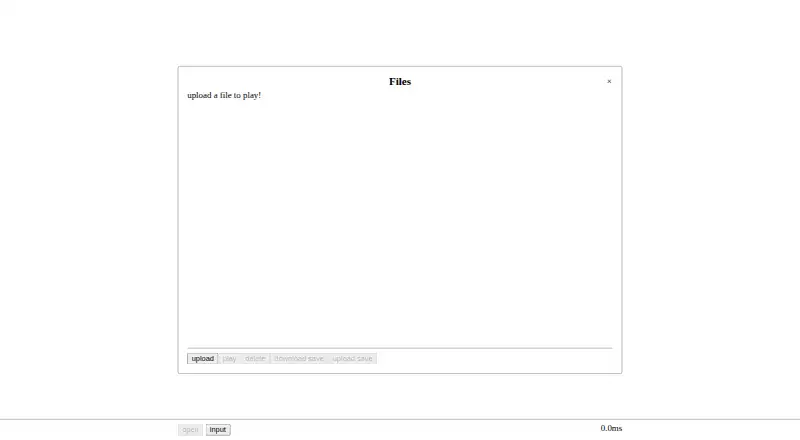
binjnes is a free NES emulator written in C, available in a browser and as source for Linux and macOS builds. Its emulation is cycle accurate and passes many timing tests. It supports numerous cartridge mappers through a built-in database, with extra audio channels for mappers 19, 24, and 26. You can save and load battery backup data and emulator state files, pause, advance one frame, rewind, or seek to a particular cycle. The browser version runs as WebAssembly and lets you upload a file to play. Desktop build instructions use make or CMake; building requires CMake and sokol, while the WebAssembly build also requires Emscripten. A Python test harness uses hashes to validate tests. The source is distributed under the MIT License. The project lists Linux, macOS, and web support, but its GitHub releases page has no packaged downloads, so desktop users need to build from source. The free plan is listed as free.
Who it suits
It suits people who want to play NES games in a browser or build an emulator for Linux or macOS. Its save, rewind, frame-step, and cycle-seeking controls may appeal to users who want playback control.
What it does well
- Cycle-accurate emulation passes many timing tests
- Supports numerous mappers with a built-in database
- Save states and battery backup data are supported
- Browser version lets users upload a file
- MIT-licensed source code
What to know first
- No packaged downloads are listed
- Desktop use requires building from source
- Build requires CMake and sokol
Limits
The Free plan provides the NES emulator. No packaged downloads are available from the GitHub releases page; desktop builds require CMake and sokol, and WebAssembly builds also require Emscripten.
Plans
| Plan | Billed and limits | Price |
|---|---|---|
| Free | NES emulator; web and build-from-source versions | Free |
As binji.github.io lists them, read 2 Oct 2026. The maker's own page has the final word.
Getting started
- Open the linked browser version to play using an uploaded file.
- For Linux or macOS, obtain the source and follow the project's build instructions.
- Install CMake and sokol for a desktop build.
- For a WebAssembly build, also use Emscripten.
- Use make or CMake as described in the build instructions.
binjnes is a free NES emulator for browser play and for desktop users on Linux or macOS who are comfortable compiling software. It suits players who value precise playback controls and mapper support; its main drawback is that desktop users must build it themselves.
Overview
Binjnes pairs cycle-accurate emulation with a browser version, giving users a way to play without setting up a desktop build. Its careful timing and fine-grained playback controls make it more compelling for users interested in examining or revisiting gameplay than for someone seeking only the simplest route to launch a game.
Key features
The emulator passes many timing tests and supports numerous cartridge mappers, with a built-in cartridge database to help identify cartridges. It also adds audio channels for mappers 19, 24 and 26. That combination gives binjnes useful breadth for users whose cartridges depend on mapper support, though no broader compatibility claim follows from it.
Save and load support covers both battery backup data and emulator state files. Playback controls include pausing, advancing one frame, rewinding and seeking to a specific cycle. These options suit deliberate replay and close inspection; casual play may not call for that level of control.
The WebAssembly version lets players upload a file in the browser. Desktop builds have a higher setup cost: Linux and macOS instructions use make or CMake, and building requires CMake and sokol. WebAssembly builds also require Emscripten. There are no packaged downloads on the GitHub releases page, so desktop users should expect to compile the project rather than install a ready-made release.
A Python test harness uses hashes to validate tests, and the source code is distributed under the MIT License.
Pricing
The Free plan costs nothing and covers the NES emulator in web and build-from-source versions. There is no free trial. The price is the same across those forms, but the convenience is not: browser play avoids a desktop build, while desktop use requires the build tools and dependencies.
Platforms
Binjnes supports Linux, macOS and web through WebAssembly. The browser option is the most direct way to start; desktop users must build from source. Windows is not among its supported platforms.
Who it's for
Choose binjnes if you want a free NES emulator with cycle-level playback controls, save-state support and broad mapper support, and especially if browser play fits your needs. It is a less suitable choice if you need a packaged desktop download or a Windows build.
Pros and cons
- Pros: Browser play avoids desktop compilation, while save states, rewinding and cycle seeking serve users who want close control over playback.
- Pros: Numerous mappers, a cartridge database and extra audio channels for three specified mappers give users several compatibility-focused features.
- Cons: Linux and macOS desktop users must compile the program and obtain its build requirements; there are no packaged releases.
- Cons: Windows is not supported, limiting its fit for users who need that platform.
Alternatives
Browse NES emulators to compare other options. NESER is another free option for Linux, macOS, web and Windows users. Consider HalfNES if Linux, macOS or Windows support matters more than save states; it requires Java 8 or newer and has no savestates. NET-NES is a free MIT-licensed alternative for Linux, macOS and Windows. Jnes is a Windows-only freeware option, but it cannot be sold or distributed through commercial channels. KuroganeNES is a free web alternative. Dendy and Nintengo are free alternatives for Linux, macOS, web and Windows. Geolith is a free option for Linux, macOS and Windows.
Verdict
Binjnes is a strong fit for users who want free browser-based NES play with precise playback controls, saves and mapper support. Look elsewhere if you need a ready-to-install desktop release or Windows support; for Linux and macOS desktop use, choose it only if building from source is acceptable.
Verdict
binjnes offers browser play and detailed playback controls, along with mapper and save support. Desktop users should be prepared to build it themselves.
Questions
Does binjnes cost anything?
The listed Free plan costs $0.00 per free. The project describes the emulator as free.
Which platforms can run binjnes?
It supports Linux, macOS, and web use through WebAssembly.
Can I use it in a browser?
Yes. The linked browser version lets users upload a file to play.
Can it save game data and emulator states?
It can save and load battery backup data and emulator state files.
Is binjnes open source?
Its source code is distributed under the MIT License.
Are desktop downloads available?
The GitHub releases page states there are no packaged downloads. Linux and macOS users can build from source using the project's instructions.
Facts from binjnes's own pages
- Accuracy
- The emulator is cycle accurate and passes many timing tests. · github.com, 2 Oct 2026
- Audio
- Additional audio channels are supported for mappers 19, 24, and 26. · github.com, 2 Oct 2026
- Build requirements
- Building requires CMake and sokol; the WebAssembly build instructions also require Emscripten. · github.com, 2 Oct 2026
- Desktop builds
- The README gives Linux and Mac build instructions using make or CMake. · github.com, 2 Oct 2026
- Download availability
- The GitHub releases page states that there are no releases packaged for download. · github.com, 2 Oct 2026
- License
- The source code is distributed under the MIT License. · github.com, 2 Oct 2026
- Mapper support
- It supports numerous cartridge mappers and includes a built-in cartridge database. · github.com, 2 Oct 2026
- Playback controls
- The emulator supports pausing, stepping one frame, rewinding, and seeking to a specific cycle. · github.com, 2 Oct 2026
- Purpose
- binjnes is a simple NES emulator implemented in C that also runs in a browser. · github.com, 2 Oct 2026
- Save support
- Users can save and load battery backup data and emulator state files. · github.com, 2 Oct 2026
- Testing
- The repository includes a Python test harness that uses hashes to validate tests. · github.com, 2 Oct 2026
- Web use
- The project can be built as a WebAssembly module, and its linked browser version lets users upload a file to play. · github.com, 2 Oct 2026
Where binjnes stands on Freedom251
- NES Emulators#1 of 26