KuroganeNES
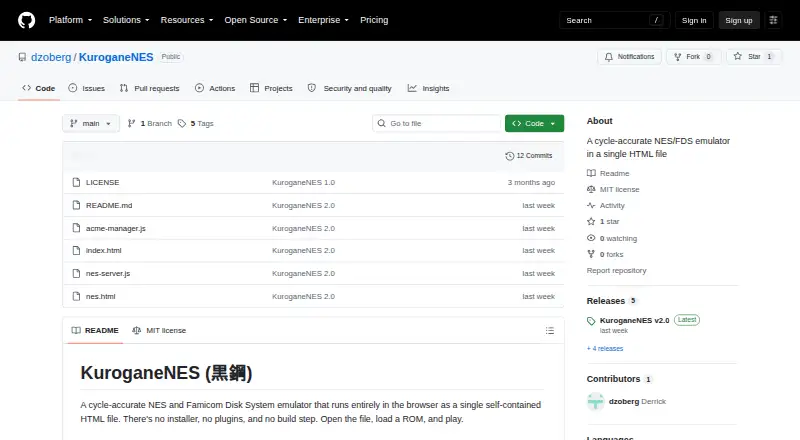
What KuroganeNES is
KuroganeNES is a browser emulator for NES and Famicom Disk System games, packaged as a self-contained HTML file. For single-player, open nes.html and load a ROM; no installer, plugin, build step, or server is required. The project describes its emulation as cycle-accurate and modeled on the NES-001, with verification against several test suites and four CPU/PPU clock alignments. It supports 561 mappers and uses ROM fingerprints to choose settings for thousands of known games. Video and audio features include NTSC and PAL timing, composite-video modeling, and expansion audio. Players get save states, rewind, fast-forward, local multiplayer, and online play for two or four players. Supported peripherals include the Zapper, Power Pad, keyboards, Oeka Kids tablet, and Famicom microphone. Other tools include Game Genie cheats, ROM patching, an NSF music player, a TAS studio, and CPU/PPU debugging. Remote multiplayer requires Node.js, a TLS certificate, and port 8888 reachable by default. Version 1.x save states, TAS movies, and netplay sessions are incompatible with v2.0.
Who it suits
It suits people who want to play NES or Famicom Disk System games in a modern web browser, including those interested in local or online multiplayer. Remote multiplayer is for users able to set up the stated Node.js and network requirements.
What it does well
- Single-player needs no installer or server
- Supports 561 mappers
- Includes save states, rewind, and fast-forward
- Local and online multiplayer included
- Includes debugging and ROM-patching tools
What to know first
- Remote multiplayer requires Node.js and a TLS certificate
- Remote play needs port 8888 reachable by default
- Version 1.x saves and sessions do not work with v2.0
Limits
No pricing or usage limits are stated. Version 1.x save states, TAS movies, and netplay sessions are incompatible with v2.0.
Plans
| Plan | Billed and limits | Price |
|---|---|---|
| KuroganeNES | No pricing or usage limits stated; MIT-licensed | Free |
As github.com lists them, read 30 Sept 2026. The maker's own page has the final word.
Getting started
- Open the KuroganeNES project page.
- Use a modern web browser.
- For single-player, open nes.html and load a ROM.
- For remote multiplayer, set up Node.js and a TLS certificate, then make port 8888 reachable through the firewall and router by default.
Verdict
KuroganeNES combines browser-based play with multiplayer, peripheral support, and emulation tools. Single-player setup is simple, while remote multiplayer has additional server and network requirements.
Questions
How much does KuroganeNES cost?
It is free; no pricing or usage limits are stated.
Which platforms does it support?
It runs in modern web browsers.
Does single-player play require a server or installation?
No. Open nes.html and load a ROM; single-player use needs no installer, plugin, build step, or server.
What is required for remote multiplayer?
Remote multiplayer requires Node.js, a TLS certificate, and port 8888 reachable through the firewall and router by default.
What license does KuroganeNES use?
KuroganeNES is released under the MIT License; bundled components retain their own licenses.
Can version 1.x saves and sessions be used with v2.0?
No. Save states, TAS movies, and netplay sessions from version 1.x are incompatible with v2.0.
Facts from KuroganeNES's own pages
- Compatibility limit
- The v2.0 changelog says save states, TAS movies, and netplay sessions from version 1.x are not compatible with v2.0. · github.com, 30 Sept 2026
- Emulation
- The project says its emulation is modeled on the NES-001 and verified against blargg tests, nestest, and the AccuracyCoin suite across four CPU/PPU clock alignments. · github.com, 30 Sept 2026
- Game support
- It supports 561 mappers and uses CRC32 ROM fingerprinting to select mapper, mirroring, timing region, and peripherals for thousands of known games. · github.com, 30 Sept 2026
- Integrations
- Online multiplayer optionally uses a zero-dependency Node.js WebSocket relay; local and single-player use do not need it. · github.com, 30 Sept 2026
- License
- KuroganeNES is released under the MIT License, while bundled components retain their own licenses. · github.com, 30 Sept 2026
- Maker details
- The opened project page identifies the GitHub account dzoberg as the repository owner but does not state a maker name, headquarters, or founding date. · github.com, 30 Sept 2026
- Online requirements
- Remote multiplayer requires Node.js, a TLS certificate, and port 8888 reachable through the firewall and router by default. · github.com, 30 Sept 2026
- Other tools
- The project includes Game Genie cheats, IPS/BPS/xdelta ROM patching, an NSF music player, a TAS studio, and CPU/PPU debugging tools. · github.com, 30 Sept 2026
- Peripherals
- Supported peripherals include the Zapper, Power Pad, Family BASIC and Subor keyboards, Oeka Kids tablet, and Famicom microphone. · github.com, 30 Sept 2026
- Play features
- It includes save states, rewind, fast-forward, local multiplayer, and online multiplayer for two or four players. · github.com, 30 Sept 2026
- Security and privacy
- The README says all code, fonts, and libraries are inlined and the page makes no external requests; the v2.0 changelog says the bundle uses a Content-Security-Policy with hashed script blocks and no inline handlers or eval. · github.com, 30 Sept 2026
- Setup
- Single-player play requires no installer, plugins, build step, or server; users open nes.html and load a ROM. · github.com, 30 Sept 2026
- Video and audio
- Features include NTSC and PAL timing, a composite-video model, and expansion audio for VRC6, VRC7, FDS, MMC5, Namco 163, Sunsoft 5B, and EPSM. · github.com, 30 Sept 2026
- What it does
- KuroganeNES is a cycle-accurate NES and Famicom Disk System emulator that runs in a self-contained HTML file in a browser. · github.com, 30 Sept 2026
Where KuroganeNES stands on Freedom251
- NES Emulators#10 of 26