Freedom251 › Remote Connection Manager Software
MremoteGO
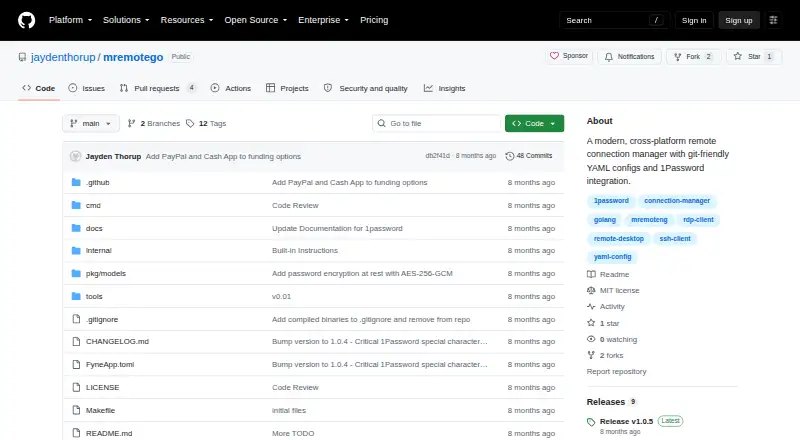
What MremoteGO is
MremoteGO is a free, open-source remote connection manager for Windows, Linux, and macOS. It supports SSH, RDP, VNC, HTTP/HTTPS, and Telnet connections. Its desktop interface provides a connection tree, folders, search, quick actions, and filters; a CLI can list, connect to, add, edit, delete, and export connections. Connection settings are stored in YAML, a format the project describes as suitable for diffing, merging, and review with git. Import from mRemoteNG XML is listed as completed. MremoteGO supports 1Password vault references in op://Vault/Item/field form, and its README says biometric unlock is supported. Local password encryption uses AES-256-GCM with PBKDF2 at 100,000 iterations and requires a master password at startup. Plain-text password storage is available for testing, but the README advises against committing those credentials to git. The project is MIT licensed and credits Jayden Thorup as its maker. Its releases page lists version 2.0.5-alpha as a pre-release. There are no mobile apps or session recording.
Who it suits
MremoteGO suits desktop users who manage connections across SSH, RDP, VNC, HTTP/HTTPS, or Telnet. Its YAML configuration and CLI may also suit users who want to review or manage connections with git and command-line operations.
What it does well
- Supports five connection protocols.
- GUI includes folders, search, quick actions, and filters.
- CLI supports connection management and export.
- YAML configurations can be reviewed with git.
- Local password encryption requires a startup master password.
What to know first
- Version 2.0.5-alpha is listed as a pre-release.
- No mobile apps are listed.
- Session recording is not available.
Limits
The project has no mobile apps or session recording. Plain-text password storage is available for testing, and the README advises against committing those passwords to git.
Plans
| Plan | Billed and limits | Price |
|---|---|---|
| MremoteGO | Open source; MIT licensed | Free |
As github.com lists them, read 3 Oct 2026. The maker's own page has the final word.
Getting started
- Open the MremoteGO GitHub project page.
- Choose a Windows, Linux, or macOS build.
- Start MremoteGO and set a master password for local password encryption.
- Add connections through the GUI or CLI, or import mRemoteNG XML.
- Organize connections in folders and use search or filters to find them.
MremoteGO is a cross-platform desktop manager for SSH, RDP, VNC, web, and Telnet endpoints. It best suits technical users who want GUI organization alongside scriptable connection administration. Its open-source, Git-friendly design is compelling for desktop teams, while the alpha release and lack of mobile and recording features limit it for organizations seeking a fully mature access suite.
Overview
MremoteGO consolidates SSH, RDP, VNC, HTTP/HTTPS, and Telnet connections in one application for Windows, Linux, and macOS. The GUI combines a connection tree with nested folders, search, filtering, and quick actions, so a large endpoint list can be organized by hierarchy and narrowed quickly. Team connection sharing is supported, and a credential vault is included.
A command-line mode can list, connect to, add, edit, delete, and export connections. That range makes routine administration practical from scripts or terminal sessions instead of requiring every change through the GUI. Completed import from mRemoteNG XML also gives existing mRemoteNG users a direct migration path.
Configuration is stored in YAML. YAML files can be diffed, merged, and reviewed with Git, making connection changes visible in normal code-review workflows and allowing teams to manage configuration as text. The project is MIT licensed, with support handled through GitHub Issues and Discussions. The maker is Jayden Thorup.
Key features
Desktop organization and automation
The connection tree and nested folders provide a clear structure for separating environments or systems, while search and filtering reduce the effort of finding a specific endpoint. Quick actions keep common launches close at hand. The CLI complements that visual workflow with explicit lifecycle operations, including export for moving or backing up connection data.
Credentials and security
1Password integration accepts references such as op://Vault/Item/field, and biometric unlock is supported. This lets 1Password users retrieve credentials without embedding them directly in connection definitions and can simplify shared-vault workflows. Local password encryption uses AES-256-GCM with PBKDF2 key derivation at 100,000 iterations; a master password is required when the application starts.
Plain-text password storage exists for testing, but it should not be committed to Git. That option may help temporary evaluation while creating a serious repository-exposure risk if it enters a shared configuration. MremoteGO does not provide session recording, so it is not suited to workflows that require an auditable playback of remote sessions.
Pricing
MremoteGO has one free plan at free. It is open source under the MIT License and includes the desktop connection manager, supported protocols, GUI and CLI operation, YAML configuration, team connection sharing, and credential-vault capabilities. There are no paid tiers, seat charges, or stated usage quotas to weigh against the free edition.
The trade-off is scope rather than price. The product has no mobile apps or session recording, and its current release is a pre-release, so teams requiring those capabilities or a more established release channel should consider another tool.
Platforms
Desktop builds are provided for Windows, Linux, and macOS, including AMD64 and ARM64 variants. There are no mobile applications, so users who need native Android or iOS access cannot use MremoteGO as their sole connection manager.
Who it's for
MremoteGO is a strong fit for administrators, developers, and small teams managing mixed remote protocols from desktop systems. It is particularly suitable when connection definitions need Git review, merging, and history, or when CLI automation matters as much as a visual inventory. Existing mRemoteNG users also have a practical import route.
It is a weaker choice for mobile-first operations, compliance programs that require session recordings, or organizations unwilling to standardize on pre-release software. Users who do not use YAML, Git, a terminal, or 1Password may find its distinctive advantages less relevant.
Pros and cons
- Pro: Supports SSH, RDP, VNC, HTTP/HTTPS, and Telnet in one desktop manager, covering varied infrastructure.
- Pro: YAML files can be diffed, merged, and reviewed with Git, which suits version-controlled team workflows.
- Pro: CLI commands cover listing, connection, editing, deletion, addition, and export for automation.
- Pro: 1Password references and biometric unlock reduce the need to place credentials directly in connection files.
- Con: The listed v2.0.5-alpha release is a pre-release, a concern for production standardization.
- Con: No mobile apps restrict access to Windows, Linux, and macOS desktops.
- Con: No session recording means it cannot provide playback-based auditing.
- Con: Plain-text credentials are available for testing but create a repository risk if mishandled.
Alternatives
Choose BURSU Connection Manager if Android, iOS, web access, or optional BURSUcloud synchronization and team sharing matter more than MremoteGO's YAML-and-CLI approach.
Conduit is the better fit for a freemium service with unlimited connections, a 50-tool-call-per-day MCP allowance on its free plan, and a one-day cloud backup; its Pro plan costs 10.
Pick Devolutions Remote Desktop Manager when you need a free edition designed for individual use, including commercial use, without connection or credential sharing.
electerm is an alternative free, open-source client with Android, iOS, web, and desktop platforms.
Nexterm suits users seeking an MIT-licensed open-source option with Android, iOS, API, self-hosted, web, and desktop availability.
Remote Commander is another MIT-licensed free choice for Linux, macOS, and Windows.
Choose Royal TS if a freemium product with mobile and extension support is preferable; its Lite plan allows up to 10 connections, 10 credentials, and one document.
uniTerm is a free Apache 2.0 option spanning Android, Linux, macOS, and Windows.
For a broader category comparison, browse Remote Connection Manager Software.
Verdict
Choose MremoteGO if you want a free MIT-licensed desktop manager whose YAML configurations, CLI, and 1Password references fit Git-centered administration. Look elsewhere if mobile access, session recording, or a stable non-pre-release release is essential.
Verdict
MremoteGO combines a searchable desktop connection manager with CLI operations and YAML configuration. It is free and MIT licensed, but its listed release is still a pre-release and it lacks mobile apps and session recording.
Questions
Is MremoteGO free?
Yes. Its listed plan is free, and the project is MIT licensed.
Which operating systems does it support?
It lists Windows, Linux, and macOS builds, including AMD64 and ARM64.
Which connection protocols does it support?
It supports SSH, RDP, VNC, HTTP/HTTPS, and Telnet.
Does MremoteGO integrate with a credential vault?
It supports 1Password vault references using op://Vault/Item/field. Its README says biometric unlock is supported.
Can teams share connections, and does it record sessions?
Team connection sharing is listed as supported. Session recording is not supported.
Who makes MremoteGO, and where can users get support?
The repository credits Jayden Thorup as maker. The README directs users to GitHub Issues and GitHub Discussions.
Facts from MremoteGO's own pages
- 1Password
- It supports 1Password vault references in the form op://Vault/Item/field, and the README says biometric unlock is supported. · github.com, 2 Oct 2026
- CLI
- The executable supports CLI operations to list, connect, add, edit, delete, and export connections. · github.com, 2 Oct 2026
- Configuration
- Connection configurations use YAML, which the project describes as easy to diff, merge, and review with Git. · github.com, 3 Oct 2026
- Development status
- The releases page lists v2.0.5-alpha as a pre-release. · github.com, 2 Oct 2026
- Encryption
- Local password encryption uses AES-256-GCM with PBKDF2 key derivation and 100,000 iterations. · github.com, 3 Oct 2026
- GUI
- The GUI includes a connection tree, search, quick actions, folders, and filtering. · github.com, 2 Oct 2026
- Import
- The README lists importing connections from mRemoteNG XML as a completed feature. · github.com, 3 Oct 2026
- Integration
- It integrates with 1Password through op:// references for retrieving and sharing passwords. · github.com, 3 Oct 2026
- Interface
- The GUI includes a connection tree, search, and quick actions, and the project also provides a CLI mode. · github.com, 3 Oct 2026
- License
- The project states that it is licensed under the MIT License. · github.com, 3 Oct 2026
- Maker
- The repository credits Jayden Thorup as its maker. · github.com, 2 Oct 2026
- Maturity
- The releases page lists version 2.0.5-alpha as a pre-release. · github.com, 3 Oct 2026
- Organization
- Connections can be organized into nested folders and filtered through search. · github.com, 3 Oct 2026
- Plain-text credentials
- Plain-text password storage is supported for testing but the README says it is not recommended and should not be committed to Git. · github.com, 3 Oct 2026
- Platform builds
- The README lists Windows, Linux, and macOS builds, including AMD64 and ARM64. · github.com, 3 Oct 2026
- Platforms
- The README lists Windows, Linux, and macOS builds for AMD64 and ARM64. · github.com, 2 Oct 2026
- Protocols
- It supports SSH, RDP, VNC, HTTP/HTTPS, and Telnet connections. · github.com, 3 Oct 2026
- Purpose
- MremoteGO is a cross-platform remote connection manager with Git-friendly YAML configurations and 1Password integration. · github.com, 3 Oct 2026
- Support
- The project directs users to GitHub Issues and Discussions for support and feedback. · github.com, 3 Oct 2026