Freedom251 › Remote Connection Manager Software

Connect-rs
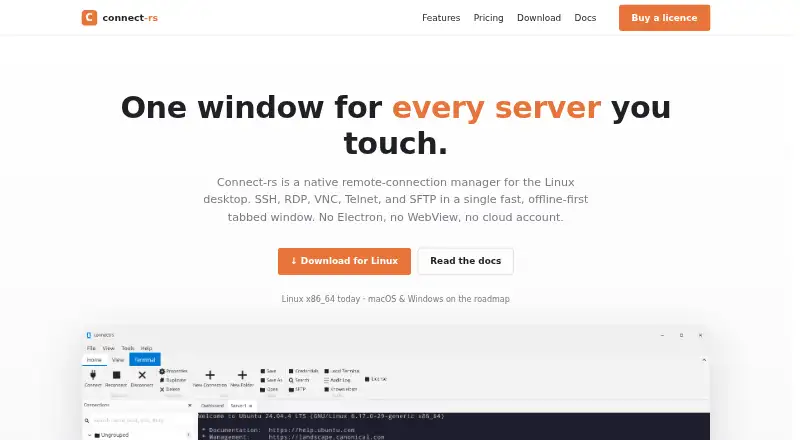
What Connect-rs is
Connect-rs is a native Linux desktop app for managing SSH, RDP, VNC, Telnet, SFTP, and local connections in a tabbed window. Its SSH terminal supports VT100 and ANSI, 24-bit colour, scrollback, and broadcasting across tabs. Native RDP offers RemoteFX, NLA/CredSSP, fullscreen, pop-out windows, and direct mouse and keyboard routing. A dual-pane SFTP browser handles recursive transfers and synchronization with a diff preview, while SSH sessions can use local, remote, and dynamic SOCKS forwards. The app can import Royal TS, PuTTY, WinSCP, CSV, and Ansible inventories.
Connections, credentials, audit log, and settings stay on the user's machine; the app has no account, sync, or cloud service. Credentials are encrypted at rest, and application data is not sent to a Connect-rs server. Pro installations send an approximately seven-day heartbeat with licence and device details, excluding saved connections, keystrokes, and audit events. Free keeps all features unlocked and permits five saved non-template connections. Pro costs $39 per user per year for unlimited saved connections. Both plans include email support, and Pro supports offline activation.
Who it suits
Connect-rs suits Linux users who manage remote systems across several protocols and want terminal, file transfer, and forwarding tools together. It also fits users who prefer local storage and need to import connection data from supported tools or formats.
What it does well
- Manages SSH, RDP, VNC, Telnet, SFTP, and local connections.
- SSH terminal supports tab broadcasting and 24-bit colour.
- SFTP includes recursive transfers and sync with diff preview.
- Imports Royal TS, PuTTY, WinSCP, CSV, and Ansible inventories.
- Offline activation is available on Pro.
What to know first
- Free permits only five saved non-template connections.
- Native desktop availability is Linux only.
- Pro sends a licence and device heartbeat approximately every seven days.
Limits
Free allows up to five saved non-template connections; templates, Quick connections, and tabs do not count. All features remain unlocked on Free. Pro provides unlimited saved connections for $39 per user per year.
Plans
| Plan | Billed and limits | Price |
|---|---|---|
| Free | $0 / forever · 5 saved connections · Every protocol · Tunnels & port forwarding · Folders, tags, search · Import / export · Themes · Audit log · Updates · Email support | Free |
| Pro | Per user, paid annually · Unlimited saved connections · Every protocol · Tunnels & port forwarding · Folders, tags, search · Import / export · Themes · Audit log · Updates · Email support · Offline activation supported | $39 a year |
As connectrs.app lists them, read 8 Oct 2026. The maker's own page has the final word.
Getting started
- Visit https://connectrs.app/.
- Choose the Linux download for x86_64 or ARM64, or use the Debian package for Debian 12+ and Ubuntu 22.04+.
- Start with the Free plan or choose Pro, billed annually per user.
- Create connections or import Royal TS, PuTTY, WinSCP, CSV, or Ansible inventories.
- For Pro offline activation, create a request blob on a connected machine and paste back the signed blob.
Verdict
Choose Connect-rs if you want a Linux connection manager that combines multiple protocols, SFTP, SSH forwarding, and imports in one app. Free retains all features but limits saved non-template connections to five; Pro removes that limit for $39 per user per year. Look elsewhere if you need a native desktop app for a platform other than Linux.
Questions
How much does Connect-rs cost?
The Free plan costs nothing. Pro costs $39 per user per year, billed annually.
What does the free plan include?
Free includes every protocol and feature, plus email support, but allows up to five saved non-template connections. Templates, Quick connections, and tabs do not count toward the limit.
Which platforms does Connect-rs support?
The native desktop app is for Linux. Downloads are listed for Linux x86_64 and ARM64, with a Debian package for Debian 12+ and Ubuntu 22.04+.
Does Connect-rs require an account or cloud service?
No. Connections, credentials, audit log, and settings stay on the user's machine, with no account, sync, or cloud service.
What data does Pro send?
Pro installations send an approximately seven-day heartbeat with licence and device details. It excludes saved connections, keystrokes, and audit events.
Can I use Pro offline?
Yes. Pro supports offline activation using a request blob signed on a connected machine and then pasted back into the app.
Facts from Connect-rs's own pages
- Credential security
- The privacy policy says credentials are encrypted at rest and application data is never sent to a Connect-rs server. · connectrs.app, 8 Oct 2026
- Free tier limit
- Free allows up to five saved non-template connections; templates, Quick connections, and tabs do not count, and all features remain unlocked. · connectrs.app, 8 Oct 2026
- Imports
- It can import Royal TS, PuTTY, WinSCP, CSV, and Ansible inventories. · connectrs.app, 8 Oct 2026
- Linux availability
- Downloads are listed for Linux x86_64 and ARM64, plus a Debian package for Debian 12+ and Ubuntu 22.04+. · connectrs.app, 8 Oct 2026
- Offline activation
- Pro supports offline activation through a request blob signed on a connected machine and then pasted back into the app. · connectrs.app, 8 Oct 2026
- Offline storage
- The app says connections, credentials, audit log, and settings stay on the user's machine, with no account, sync, or cloud service. · connectrs.app, 8 Oct 2026
- Other platforms
- The download page says a native Windows 10/11 build is on the roadmap; the homepage says macOS and Windows are also on the roadmap. · connectrs.app, 8 Oct 2026
- Pro heartbeat
- Pro installations send an approximately seven-day heartbeat with licence and device details; the policy says it excludes saved connections, keystrokes, and audit events. · connectrs.app, 8 Oct 2026
- Purpose
- Connect-rs is a native Linux desktop remote-connection manager for SSH, RDP, VNC, Telnet, and SFTP in one tabbed window. · connectrs.app, 8 Oct 2026
- RDP
- Native RDP supports RemoteFX, NLA/CredSSP, fullscreen, pop-out windows, and direct mouse and keyboard routing. · connectrs.app, 8 Oct 2026
- Refunds
- Pro purchases are eligible for a 14-day refund. · connectrs.app, 8 Oct 2026
- SFTP and tunnels
- The dual-pane SFTP browser supports recursive transfers and sync with diff preview, while SSH sessions can use local, remote, and dynamic SOCKS forwards. · connectrs.app, 8 Oct 2026
- SSH
- Its SSH terminal supports VT100/ANSI, 24-bit colour, scrollback, and broadcasting across tabs. · connectrs.app, 8 Oct 2026
- Support
- Both Free and Pro include email support. · connectrs.app, 8 Oct 2026
Where Connect-rs stands on Freedom251
- Remote Connection Manager Software#10 of 29