Freedom251 › Remote Connection Manager Software
1Remote
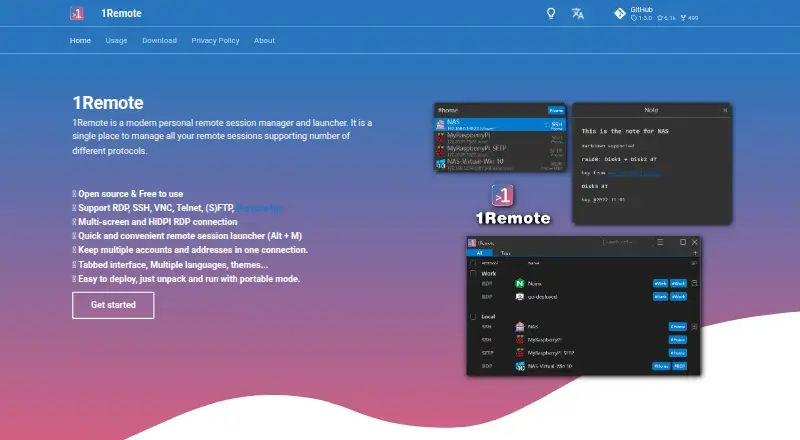
What 1Remote is
1Remote is a free, open-source Windows application for organizing and launching remote sessions. It supports RDP, SSH, VNC, Telnet, FTP, SFTP, RemoteApp, NoMachine, and other applications. Its launcher opens with Alt+M by default, letting users search for a saved connection and start it. A connection can hold multiple accounts and addresses, while RDP connections support multi-screen and high-DPI displays.
Custom runners can open sessions through external command-line tools such as WinSCP, FileZilla, KiTTY, TightVNC, and UltraVNC. The App protocol can launch executable programs with configured parameters. Server information can be synchronized through SQLite with file-sync tools or through MySQL databases. Experimental team sharing uses MySQL permissions for read-only or full access, without individualized permissions for each team member.
The maker says account and password data receive basic string encryption and recommends disk encryption such as BitLocker. The app does not lock a database during concurrent edits, so changing the same database on two devices at once may cause data loss. It requires Windows 10 version 17763 or later. Preview, Stable EXE, and Microsoft Store builds are each free; the Store build includes automatic updates.
Who it suits
1Remote suits Windows users who want to keep remote connections across several protocols in one launcher. It may also suit users who need to synchronize connection information or start sessions through external command-line tools.
What it does well
- Supports RDP, SSH, VNC, Telnet, FTP, SFTP, and RemoteApp
- Launcher provides search and connection start through Alt+M
- Connections can store multiple accounts and addresses
- Supports multi-screen and high-DPI RDP sessions
- Offers SQLite and MySQL synchronization options
- Preview, Stable EXE, and Store builds are free
What to know first
- Requires Windows 10 version 17763 or later
- Concurrent edits to the same database may cause data loss
- Team sharing is experimental and lacks per-member individualized access control
- Account and password data use basic string encryption
Limits
The free builds require Windows 10 version 17763 or later. The Microsoft Store build includes automatic updates. Concurrent edits to the same database on two devices may cause data loss.
Plans
| Plan | Billed and limits | Price |
|---|---|---|
| Preview build | Free · Windows 10 version 17763 or later | Free |
| Stable EXE build | Free · Windows 10 version 17763 or later | Free |
| Microsoft Store build | Free · Auto update · Windows 10 version 17763 or later | Free |
As 1remote.github.io lists them, read 5 Oct 2026. The maker's own page has the final word.
Getting started
- Choose the Preview, Stable EXE, or Microsoft Store build
- Install or open the build on Windows 10 version 17763 or later
- Add connection details, including accounts and addresses
- Use Alt+M to search for and start a connection
- Set up SQLite with file-sync tools or MySQL if you want to synchronize server information
Verdict
Choose 1Remote if you need a free Windows session manager for its supported protocols, launcher, and connection organization. Look elsewhere if you need support for older Windows versions or safe simultaneous editing of the same database across devices.
Questions
How much does 1Remote cost?
The Preview build, Stable EXE build, and Microsoft Store build each cost nothing.
Which operating systems does it support?
It supports Windows 10 version 17763 or later. It does not support Windows 7, Windows 8, Windows Server 2008, or Windows Server 2012.
Is 1Remote open source?
Yes. It is an open-source application.
Which protocols can it manage?
It supports RDP, SSH, VNC, Telnet, FTP, SFTP, RemoteApp, NoMachine, and other applications.
Can teams share connections?
Experimental team sharing uses MySQL permissions for read-only or full access. It does not provide individualized access control for each team member.
How does it protect account and password data?
The maker says the database uses basic string encryption for account and password data and recommends disk encryption such as BitLocker.
Facts from 1Remote's own pages
- Access control
- Experimental team sharing uses MySQL permissions for read-only or full access and is not designed for individualized access control per team member. · 1remote.github.io, 5 Oct 2026
- Compatibility
- The app requires Windows 10 version 17763 or later and does not support Windows 7, Windows 8, Windows Server 2008, or Windows Server 2012. · 1remote.github.io, 5 Oct 2026
- Connection settings
- Users can store multiple accounts and addresses in one connection. · 1remote.github.io, 5 Oct 2026
- Data editing limit
- The app does not use concurrency locks, so editing the same database on two devices at once may cause data loss. · 1remote.github.io, 5 Oct 2026
- Display
- The product supports multi-screen, high-DPI RDP connections. · 1remote.github.io, 5 Oct 2026
- Integrations
- Custom runners can open sessions through external command-line tools including WinSCP, FileZilla, KiTTY, TightVNC, and UltraVNC. · 1remote.github.io, 5 Oct 2026
- Launcher
- The launcher opens with the default Alt+M shortcut and lets users search for and start connections. · 1remote.github.io, 5 Oct 2026
- Other apps
- The App protocol can launch external executable programs with configured parameters. · 1remote.github.io, 5 Oct 2026
- Product
- 1Remote is an open source personal remote session manager and launcher for managing sessions across protocols. · 1remote.github.io, 5 Oct 2026
- Protocols
- It supports RDP, SSH, VNC, Telnet, FTP, SFTP, and RemoteApp. · 1remote.github.io, 5 Oct 2026
- Security
- The maker says the database uses basic string encryption for account and password data, and recommends disk encryption such as BitLocker. · 1remote.github.io, 5 Oct 2026
- Support
- The maker invites questions and suggestions by email at [email protected]. · 1remote.github.io, 5 Oct 2026
- Synchronization
- Server information can be synchronized using SQLite with file sync tools or through MySQL databases. · 1remote.github.io, 5 Oct 2026