Freedom251 › Remote Connection Manager Software
Remote Commander
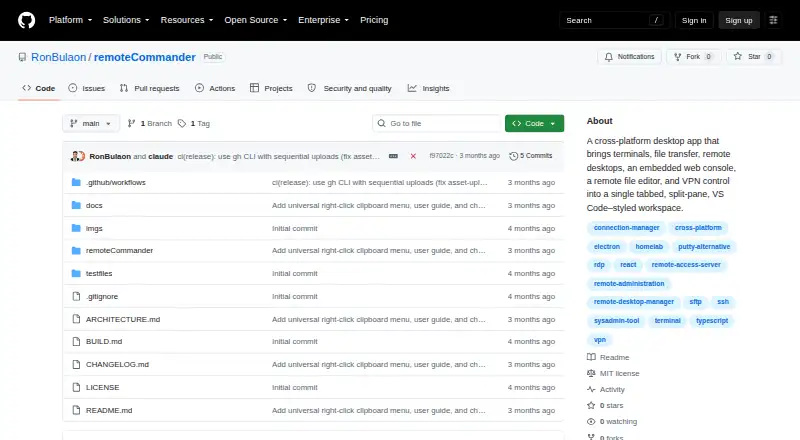
What Remote Commander is
Remote Commander is a free, MIT-licensed desktop app that brings several remote-access protocols into a tabbed workspace. It supports SSH, SFTP, RDP, VNC, OpenVPN, WireGuard, and a web console, and runs on Windows, macOS, and Linux. SSH includes jump-host support and automatic reconnect; SFTP provides a dual-pane file manager with drag-and-drop transfers. RDP can run in an app tab through guacd or use an external FreeRDP window, while VNC runs in-app through noVNC. The web console supports isolated sessions for each profile, proxies, bookmarks, and viewing PDF, JSON, and Markdown files. Connections can be organized into profiles and groups, split across panes, and saved as workspaces. Credentials use the OS keychain or an encrypted-file fallback, and profile exports use password-protected AES-256-GCM encryption. The project warns that the fallback may be only base64-encoded on systems without an OS keychain. RDP and VPN features require system tools, and the local terminal needs an optional native module. The project lists the app as active development at v0.1.0.
Who it suits
Remote Commander suits engineers and homelabbers who want to organize multiple remote protocols in one desktop app. Users should be prepared to install system tools for RDP and VPN features.
What it does well
- Supports SSH, SFTP, RDP, VNC, OpenVPN, and WireGuard.
- SSH supports jump hosts and automatic reconnect.
- Workspaces can be saved and split into panes.
- Profile exports use password-protected AES-256-GCM.
- MIT license permits commercial use.
What to know first
- RDP and VPN features require system tools.
- Local terminal needs an optional native module.
- Remote file editor is limited to text files up to 5 MB.
- Fallback credential storage may use base64 encoding.
Limits
The remote file editor handles text files up to 5 MB. RDP and VPN features require system tools, and the local terminal requires an optional native module.
Plans
| Plan | Billed and limits | Price |
|---|---|---|
| Remote Commander | MIT-licensed; use, modify, and redistribute, including commercially | Free |
As github.com lists them, read 10 Oct 2026. The maker's own page has the final word.
Getting started
- Open the project repository at https://github.com/RonBulaon/remoteCommander.
- Choose the build for Windows, macOS, or Linux.
- Organize connections into profiles and groups.
- Configure the required system tools for RDP or VPN features you plan to use.
- Store credentials using the OS keychain where available.
Remote Commander is a free, open-source desktop manager for SSH, file transfer, remote desktops, VPN connections, and browser-based administration. It is best suited to engineers and homelabbers who regularly move between several protocols. Its breadth is impressive, but version 0.1.0 and its system-dependent credential fallback call for caution in higher-stakes deployments.
Overview
One tabbed workspace covers SSH, SFTP, RDP, VNC, OpenVPN, WireGuard, and an embedded web console. Profiles and groups organize endpoints, while split panes and saved workspaces preserve a working layout across sessions. CSV export of connection history is useful for keeping an operational record or moving connection data elsewhere.
SSH adds jump-host support and automatic reconnect, features that matter when reaching segmented networks or tolerating brief outages. SFTP uses a dual-pane file manager with drag-and-drop transfers, making routine file movement more approachable than command-line copying. RDP can run inside an application tab through Guacamole (guacd) or fall back to an external FreeRDP window; VNC stays in the app through noVNC. The coverage is broad, although RDP and VPN workflows rely on external system tools.
Key features
Web console
Per-profile isolated sessions, proxy support, and bookmarks make the embedded browser practical for administering multiple services without mixing their state. Its document viewer opens PDF, JSON, and Markdown files, useful when operational notes or API output sit alongside a web interface. Sessions run without Node access, and invalid TLS certificates are trusted only for the current session unless a profile explicitly opts in to permanent trust.
VPN-linked connections
OpenVPN and WireGuard profiles can be managed by the app and connected before a session opens. That can remove a manual step for private infrastructure, but it does not remove the need to install and configure the underlying system tools.
Workspace and credential handling
Connection profiles, groups, split panes, saved workspaces, and history export favor users managing a varied estate rather than a handful of hosts. Credentials use the operating-system keychain where available, with an encrypted-file fallback; profile exports use password-protected AES-256-GCM encryption. On systems without an OS keychain, including WSL2, the project warns that the fallback may be base64-encoded rather than strongly encrypted. That limitation is material for sensitive environments.
Editing and local access
The remote editor is convenient for quick changes but accepts text files only up to 5 MB, so it is not a substitute for a full remote development environment. The local terminal requires an optional native module.
Pricing
| Plan | Price | Includes |
|---|---|---|
| Remote Commander | free | MIT-licensed software; use, modification, and redistribution, including commercial use |
There is no trial or paid tier to evaluate. The zero-cost MIT license suits individuals, labs, and organizations that can operate desktop software themselves and value the right to modify or redistribute it. It does not provide a hosted service, cloud profile synchronization, or a centrally managed commercial support plan; cloud profile sync is explicitly descoped.
Platforms
Desktop builds target Windows, macOS, and Linux. RDP and VPN features require their respective system tools, and the local terminal depends on an optional native module, so platform support still involves local setup.
Who it's for
Choose Remote Commander if you are an engineer or homelabber consolidating SSH, SFTP, mixed remote-desktop protocols, VPN access, and web consoles on one machine. It is especially appealing when jump hosts, reconnect behavior, profile organization, and reusable workspaces matter.
Look elsewhere if your team needs mature release engineering, automatic updates, cloud synchronization, or a credential fallback that remains strongly encrypted on every operating system. Active development at v0.1.0 means the feature set is ambitious but not yet a finished enterprise platform.
Pros and cons
- Pros: One free MIT-licensed app spans seven connection types, including OpenVPN and WireGuard.
- Pros: Jump hosts, automatic SSH reconnect, dual-pane SFTP transfers, isolated web sessions, and saved workspaces address real multi-system routines.
- Pros: AES-256-GCM protects exported profiles, while keychain storage is used when the operating system supports it.
- Cons: The no-keychain fallback may be only base64-encoded, which is unsuitable for some sensitive deployments.
- Cons: RDP, VPN, and terminal capabilities depend on external tools or an optional native module.
- Cons: The 5 MB text-editor ceiling limits larger remote-file work, and auto-update is not yet wired.
Alternatives
For a broader directory of comparable tools, see Remote Connection Manager Software.
- BURSU Connection Manager is a free desktop app across Windows, macOS, Linux, mobile, and web, with optional BURSUcloud sync and team sharing.
- Conduit suits readers wanting a freemium cross-platform option with unlimited connections, a 50-tool-calls-per-day MCP allowance, and a one-day cloud backup on its free plan.
- Devolutions Remote Desktop Manager is a freemium choice for individual users who need a free edition that permits commercial use without shared connections or credentials.
- electerm is another free, open-source client spanning desktop, mobile, and web platforms.
- Nexterm is a free MIT-licensed open-source alternative with self-hosted and web availability.
- MremoteGO is a free MIT-licensed option for Windows, macOS, and Linux.
- Royal TS fits readers who prefer a freemium product with a limited free tier of 10 connections, 10 credentials, and one document, plus a paid single-user license.
- uniTerm is a free Apache 2.0 alternative for Windows, macOS, Linux, and Android.
Verdict
Remote Commander is a strong pick for technically minded users who want one no-cost workspace for heterogeneous remote access and VPN-linked sessions. Its main reason to choose it is protocol breadth combined with useful organization features; its main reason to look elsewhere is the early release status and potentially weak credential fallback on systems without an OS keychain.
Verdict
Remote Commander brings protocol management, file transfer, and a web console into one desktop workspace. The project is at v0.1.0 and warns that credential fallback security varies by system.
Questions
How much does Remote Commander cost?
The Remote Commander plan is free.
Is it open source?
Yes. It is released under the MIT License, which permits use, modification, and redistribution, including commercially.
Which desktop platforms does it support?
It supports Windows, macOS, and Linux.
Which remote protocols can it manage?
It supports SSH, SFTP, RDP, VNC, OpenVPN, and WireGuard, along with a web console.
Does it have a free trial?
No. The facts list no free trial; the app itself is free.
How are credentials protected?
Credentials use the OS keychain or an encrypted-file fallback. The project warns that systems without an OS keychain may use a base64-encoded fallback.
Facts from Remote Commander's own pages
- Audience
- The project describes the app as a unified remote-access manager for engineers and homelabbers. · github.com, 4 Oct 2026
- Credentials
- Credentials are stored encrypted at rest using the OS keychain or an Electron safeStorage-encrypted file fallback; the README notes the fallback may be base64-encoded on systems without an OS keychain. · github.com, 10 Oct 2026
- Credential security
- Credentials are stored encrypted using the OS keychain or an encrypted-file fallback, and profile exports use password-protected AES-256-GCM encryption. · github.com, 4 Oct 2026
- File editor limit
- The remote file editor supports text files up to 5 MB. · github.com, 10 Oct 2026
- Intended users
- The project describes itself as a unified remote-access manager for engineers and homelabbers. · github.com, 10 Oct 2026
- License
- The app is released under the MIT License, which the project says permits use, modification, and redistribution, including commercially. · github.com, 4 Oct 2026
- License and development
- The project is MIT-licensed and lists its status as active development at v0.1.0. · github.com, 10 Oct 2026
- Project status
- The repository identifies the app as active development at v0.1.0 and lists auto-update as not yet wired and cloud profile sync as descoped. · github.com, 4 Oct 2026
- Protocols
- It supports SSH, SFTP, RDP, VNC, VPN, and web console connections. · github.com, 10 Oct 2026
- Purpose
- Remote Commander combines terminals, file transfer, remote desktops, an embedded web console, remote file editing, and VPN control in one tabbed, split-pane desktop app. · github.com, 10 Oct 2026
- Remote desktop
- RDP can run in a tab through Guacamole with an external FreeRDP fallback, and VNC runs in-app through noVNC. · github.com, 10 Oct 2026
- Remote desktops
- RDP can run in an app tab through guacd or fall back to an external FreeRDP window; VNC runs in the app through noVNC. · github.com, 4 Oct 2026
- Runtime requirements
- RDP and VPN features require system tools, and the local terminal needs an optional native module. · github.com, 4 Oct 2026
- Security limitation
- The project warns that on systems without an OS keychain, such as WSL2, the fallback may be base64-encoded rather than strongly encrypted. · github.com, 4 Oct 2026
- SSH and SFTP
- SSH includes an xterm.js terminal, jump-host support, and automatic reconnect, while SFTP provides dual-pane file transfers and a transfer queue. · github.com, 10 Oct 2026
- System requirements
- RDP and VPN features require external system tools, and the local terminal needs an optional native module. · github.com, 10 Oct 2026
- VPN integrations
- The app manages OpenVPN and WireGuard profiles and can connect a profile's VPN before opening a session. · github.com, 10 Oct 2026
- Web console
- A sandboxed embedded browser opens device and cloud management interfaces, with per-profile sessions, proxy settings, and bookmarks. · github.com, 10 Oct 2026
- Web security
- Web consoles run without Node access in isolated sessions, and invalid TLS certificates prompt for trust limited to the session unless a profile opts in permanently. · github.com, 10 Oct 2026
- Workspace features
- Users can organize connections into profiles and groups, split panes, save workspaces, and export connection history as CSV. · github.com, 4 Oct 2026
Where Remote Commander stands on Freedom251
- Remote Connection Manager Software#13 of 29