Freedom251 › Remote Connection Manager Software

Nexterm
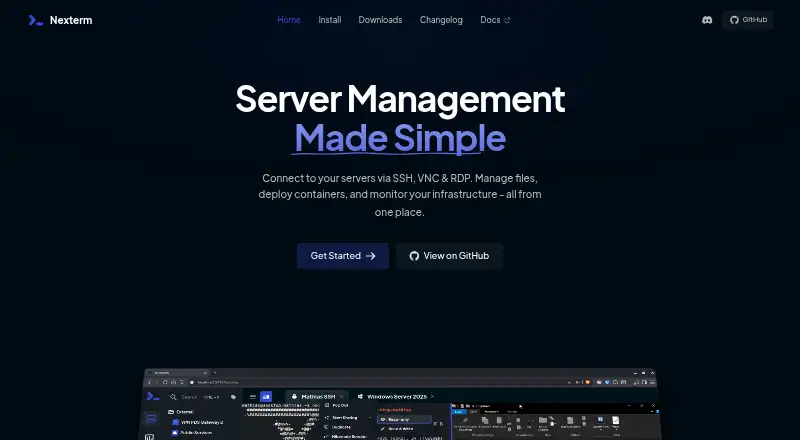
What Nexterm is
Nexterm is open-source software for managing servers through SSH, VNC, RDP, and Telnet connections. It also provides SFTP file management, real-time CPU, memory, and process monitoring, and tools for deploying applications with Docker and managing Proxmox LXC and QEMU containers. Teams can share server access through organizations, organize command snippets, and automate recurring work with customizable scripts. Authentication options include two-factor authentication and OIDC single sign-on, with LDAP and Active Directory covered in the documentation. Nexterm documents server-side encryption for passwords and private keys and requires an encryption key for secure data storage. It offers all-in-one, server-only, and engine-only Docker images, including split deployments for distributed setups. Connector downloads are listed for Windows, macOS, Linux, Android, and iOS, and the software can also be self-hosted. Nexterm is free and distributed under the MIT License. Its installation documentation identifies it as beta software and advises regular data backups.
Who it suits
Nexterm suits administrators and teams managing remote servers who need shared access, file management, monitoring, or Docker and Proxmox tools. Its desktop, mobile, web, and self-hosted options support different deployment preferences.
What it does well
- Connects over SSH, VNC, RDP, and Telnet
- Includes SFTP file management and live monitoring
- Organizations support shared server access
- Offers multiple Docker deployment options
- Free under the MIT License
What to know first
- Installation documentation says it is still in beta
- Secure data storage requires an encryption key
Plans
| Plan | Billed and limits | Price |
|---|---|---|
| Nexterm | Open source · MIT License | Free |
As nexterm.dev lists them, read 30 Sept 2026. The maker's own page has the final word.
Getting started
- Visit the Nexterm website and choose a deployment approach.
- Deploy an all-in-one, server-only, or engine-only Docker image, or use a split server and engine setup.
- Install a connector for Windows, macOS, Linux, Android, or iOS.
- Configure an encryption key for secure data storage.
- Connect to servers using SSH, VNC, RDP, or Telnet.
Overview
Nexterm is open-source software for connecting to and managing remote servers, with tools for files, monitoring, and team access. It suits operators who want a self-hosted workspace that brings routine server tasks together. The breadth is attractive at no cost, but beta status makes it a cautious choice for critical infrastructure.
Key features
Connections cover SSH, VNC, RDP, and Telnet, with a credential vault and session recording. SFTP file management lets users handle remote files alongside their connections, while real-time CPU, memory, and process monitoring supplies a view of server activity. This combination is useful for day-to-day administration, though the monitoring described is focused on server resources rather than broad infrastructure observability.
Organizations can share server access with team members. Two-factor authentication and OIDC single sign-on are listed, and the documentation covers LDAP and Active Directory authentication. Server-side encryption protects passwords and private keys; secure data storage requires an encryption key, so deployment planning must include managing that key safely.
Command snippets and customizable scripts support repeatable work. Nexterm also describes deploying applications through Docker and managing Proxmox LXC and QEMU containers, a useful extension for teams working with those environments. All-in-one, server-only, and engine-only Docker images support different deployment arrangements, including distributed server-and-engine setups.
Nexterm is MIT-licensed, with downloads for Windows, macOS, Linux, Android, and iOS. Its installation documentation identifies the project as beta, advises regular backups, and directs users to GitHub for issue reports. That warning matters for anyone considering it as the primary access layer to important systems.
Pricing
Nexterm costs nothing. Its free, open-source MIT plan includes the product's server-management capabilities, including team connection sharing, a credential vault, session recording, and mobile apps. There are no paid tiers or stated usage caps to weigh against those features. The trade-off is operational rather than financial: teams must be comfortable deploying beta software and planning for backups and encryption-key custody.
Platforms
Nexterm supports Windows, macOS, Linux, Android, iOS, and web access, alongside self-hosted deployment. The range suits mixed-device teams, while the Docker deployment choices allow operators to keep the service in their own environment. An API platform is also identified.
Who it's for
Nexterm is a strong fit for technically capable individuals or teams that want a self-hosted, MIT-licensed place to connect to servers, share access, transfer files, and check basic resource activity. Its authentication options and deployment flexibility are especially relevant to organizations integrating it into existing environments. It is less suitable for teams that cannot accept beta software in infrastructure workflows or that need a broader monitoring platform.
Pros and cons
- Pros: SSH, VNC, RDP, and Telnet connections sit alongside SFTP, monitoring, a credential vault, and session recording, reducing the need to separate these routine tasks across tools.
- Pros: Organization sharing and multiple authentication options make it relevant to team deployments, not just individual server access.
- Pros: MIT licensing, free pricing, and multiple Docker deployment patterns give self-hosting operators flexibility without a subscription cost.
- Cons: Beta status and the recommendation to back up regularly make it a riskier choice for critical access workflows.
- Cons: Secure data storage depends on an encryption key, adding a key-management responsibility to deployment.
Alternatives
Remote Connection Manager Software is the broader category to explore when comparing products for remote access management.
BURSU Connection Manager is another free option across desktop, mobile, and web platforms; its desktop app is free, with optional BURSUcloud sync and team sharing.
Conduit is worth considering for readers who want a free tier with unlimited connections and an MCP server, subject to a 50-tool-call daily allowance, plus a one-day cloud backup.
Devolutions Remote Desktop Manager has a free edition for individual use, including commercial use, and is a better fit for users who do not need connection or credential sharing.
electerm is a free, open-source client alternative; its free AI service may have usage limits.
MremoteGO offers a free, MIT-licensed open-source alternative for Linux, macOS, and Windows.
Royal TS has a free Lite tier capped at 10 connections, 10 credentials, and one document, which suits users whose needs fit those limits.
uniTerm is a free, Apache 2.0 option for Android and desktop platforms.
RustConn is a free, GPL-3.0 desktop application for Linux, macOS, and Windows.
Verdict
Choose Nexterm if you want a free, self-hosted, open-source workspace that combines server connections with file handling, team sharing, and practical administration tools. Its breadth and deployment choices are the main reasons to pick it; its beta status and encryption-key responsibility are the reasons to look elsewhere when infrastructure reliability cannot tolerate extra operational risk.
Verdict
Nexterm brings remote connections, server monitoring, file management, and team sharing into one open-source server management tool. Its beta status and encryption-key requirement are important to account for when planning a deployment.
Questions
Is Nexterm free?
Yes. The listed Nexterm plan is free, and the software is open-source under the MIT License.
Which connection protocols does Nexterm support?
It supports SSH, VNC, RDP, and Telnet.
Which platforms can run Nexterm connectors?
Connector downloads are listed for Windows, macOS, Linux, Android, and iOS. The project also lists web and self-hosted among its platforms.
Can teams share server access?
Yes. Organizations let users share server access with team members.
What deployment options are available?
Nexterm provides all-in-one, server-only, and engine-only Docker images. Split server and engine deployments are supported for distributed setups.
Is Nexterm production-ready?
The installation documentation says Nexterm is still in beta and advises regular backups and reporting issues on GitHub.
Facts from Nexterm's own pages
- API authentication and examples
- API endpoints use bearer-style session authorization and provide cURL, JavaScript, PHP and Python examples. · docs.nexterm.dev, 15 Oct 2026
- Authentication
- The project lists two-factor authentication and OIDC single sign-on, and its documentation also covers LDAP and Active Directory authentication. · github.com, 30 Sept 2026
- Automation scripts
- Scripts can run on servers and support steps, prompts, confirmations, progress indicators and structured summaries through Nexterm directives. · docs.nexterm.dev, 15 Oct 2026
- Beta status
- The installation documentation labels Nexterm beta software and advises regular backups. · docs.nexterm.dev, 15 Oct 2026
- Company listing
- A LinkedIn page named NexTerm Technologies lists a privately held engineering-services company headquartered in Bangalore, with 2–10 employees and a 2025 founding year. · in.linkedin.com, 15 Oct 2026
- Credential protection
- The project documents server-side encryption for passwords and private keys and requires an encryption key for secure data storage. · docs.nexterm.dev, 30 Sept 2026
- Custom sources
- Scripts and snippets can be synchronized from public Git repositories hosted on GitHub, GitLab or other Git services. · docs.nexterm.dev, 15 Oct 2026
- Deployment options
- Nexterm provides all-in-one, server-only, and engine-only Docker images, with split server and engine deployments supported for distributed setups. · docs.nexterm.dev, 30 Sept 2026
- Desktop and mobile builds
- The v1.2.2-BETA release lists connector downloads for Windows, macOS, Linux and Android, plus an iOS IPA. · github.com, 15 Oct 2026
- Desktop and mobile downloads
- The latest listed release provides connector downloads for Windows, macOS, Linux, Android, and iOS. · github.com, 30 Sept 2026
- Developer identity
- The Google Play listing identifies Mathias Wagner as the developer and gives Germany as the developer location. · play.google.com, 15 Oct 2026
- Docker and Proxmox
- The project describes deploying applications via Docker and managing Proxmox LXC and QEMU containers. · github.com, 30 Sept 2026
- Docker deployment
- The project documents Docker-based application deployment and supplies all-in-one, server-only and engine-only images. · docs.nexterm.dev, 15 Oct 2026
- Encryption key requirement
- Every installation requires an ENCRYPTION_KEY generated with a command such as openssl rand -hex 32 to protect stored credentials and keys. · docs.nexterm.dev, 15 Oct 2026
- File management
- It provides SFTP file management for remote servers. · github.com, 30 Sept 2026
- Folders and tabs
- Servers are organized in folders and connections are handled in a tabbed interface. · docs.nexterm.dev, 15 Oct 2026
- Google Play listing
- The Android listing identifies the app as a prototype mobile client requiring a hosted Nexterm service version 1.0.6 or newer and shows 500+ downloads. · play.google.com, 15 Oct 2026
- LDAP integration
- LDAP and Active Directory authentication can be configured with LDAP or LDAPS, bind credentials and directory search filters. · docs.nexterm.dev, 15 Oct 2026
- Licence
- The repository and documentation state that Nexterm is distributed under the MIT License. · github.com, 15 Oct 2026
- License
- Nexterm is distributed under the MIT License. · docs.nexterm.dev, 30 Sept 2026
- Limit: Android SFTP
- An open GitHub bug report says SFTP-only connections could remain stuck loading in the Android client after version 1.2.2. · github.com, 15 Oct 2026
- Limit: beta maturity
- The maker and community discussion characterize Nexterm as preview or beta software and caution against relying on it for production-critical deployments. · reddit.com, 15 Oct 2026
- Limit: connection reliability
- A 2026 Reddit discussion reported repeated unexplained server disconnects and described the development pace as slow. · reddit.com, 15 Oct 2026
- Limit: legacy SSH algorithms
- A GitHub feature request reports that devices requiring deprecated ssh-rsa or ssh-dss algorithms may fail because the default environment does not enable them. · github.com, 15 Oct 2026