Freedom251 › Minecraft Backup Software
MineBackup
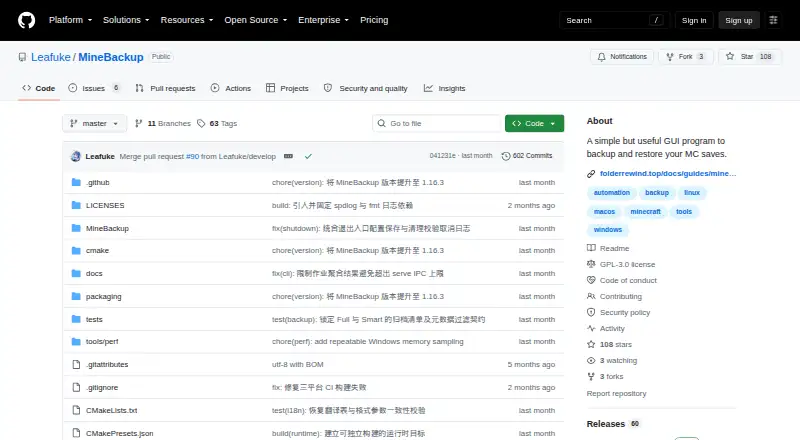
What MineBackup is
MineBackup is a free, open-source program for backing up and restoring Minecraft saves, and it can also back up any folder on a PC. It stores backups locally and offers Full and Smart incremental modes; Smart mode is intended to reduce time and storage use. Users can restore from a local backup or a .7z archive, with compression handled by a built-in 7-Zip core. A hotkey can start a live backup, and exit detection can trigger one when Minecraft closes. First-run setup can find supported Minecraft locations and launcher data, including HMCL, Prism Launcher, and Modrinth App. KnotLink allows communication with mods or other tools to request a save before backup; hot restore requires the MineBackup companion mod, version 3.0.0 or newer. Its headless CLI can create backups, verify archive chains, and perform confirmed cold restores. Desktop builds cover Windows x64, Linux x86_64, and Apple Silicon macOS 15 or later; server assets are offered for Windows and Linux. The project uses GPL-3.0 and directs support requests to GitHub Issues.
Who it suits
MineBackup suits Minecraft players who want local save backups, as well as users backing up other PC folders. Its CLI and server packages may also suit people setting up server backup jobs.
What it does well
- Full and Smart incremental backup modes.
- Can back up folders beyond Minecraft saves.
- Hotkey and game-exit backup triggers are available.
- CLI can verify archive chains and restore backups.
What to know first
- Incremental detection may miss changes preserving size and modification time.
- Hot restore requires a companion mod.
- macOS build is not notarized.
- Windows Service Mode cannot be newly installed or started.
Limits
Smart incremental detection is not guaranteed to find changes that preserve both file size and modification time. Windows Service Mode cannot be newly installed or started. The listed free plan has no stated usage limits.
Plans
| Plan | Billed and limits | Price |
|---|---|---|
| MineBackup | Free software; no paid plans or usage limits stated | Free |
As github.com lists them, read 9 Oct 2026. The maker's own page has the final word.
Getting started
- Open the MineBackup GitHub project page.
- Choose the release package for Windows x64, Linux x86_64, or Apple Silicon macOS 15 or later.
- Verify downloaded assets against SHA256SUMS.
- Use first-run setup to discover supported Minecraft locations and launcher data.
- Create Full or Smart backups in the GUI, or use the headless CLI for backup and restore tasks.
- For server scheduling, use the documented systemd guidance on Linux or Task Scheduler guidance on Windows.
MineBackup is a free, open-source tool for backing up Minecraft saves and other PC folders, with both a desktop interface and a headless command-line tool. It suits players who want local world backups and server operators comfortable with CLI jobs. Its breadth is useful, but Smart backups have a detection caveat that makes Full backups the safer choice when completeness matters most.
Overview
MineBackup combines a desktop backup and restore workflow with a CLI for servers and other headless setups. It supports both Minecraft editions, stores backups locally, and restores at world level. That makes it a practical fit for protecting individual worlds, not a substitute for remote storage or a broader backup service.
The free software has no paid plans or stated usage limits. The project is GPL-3.0 licensed, and its maker says critical bug and security fixes will continue, though updates may lag behind FolderRewind, its second-generation product.
Key features
- Full and Smart backups: Full backups offer a straightforward option; Smart Mode uses Git-like incremental backups intended to save time and storage. The trade-off is that changes preserving both file size and modification time are not guaranteed to be detected. Choose Full backups if those changes are plausible in your workflow and an unnoticed change would matter.
- Automatic capture: A hotkey can start a live backup, and exit detection can trigger one when Minecraft closes. These can reduce reliance on memory, but desktop scheduled backups are not supported.
- Save coordination and restore: KnotLink lets MineBackup communicate with mods or other tools to request a save before backup. Hot restore requires the MineBackup companion mod, version 3.0.0 or newer. The app can also restore from a local backup or a .7z archive, using its built-in 7-Zip core for compression.
- Launcher discovery: First-run setup can discover supported Minecraft locations and launcher data, including HMCL, Prism Launcher, and Modrinth App. That can shorten setup for users of those launchers.
- Headless operation: The CLI can create Full or Smart backups, verify archive chains, and perform confirmed cold restores without launching the GUI. Server packages are available for Windows and Linux, with documented scheduling through systemd on Linux or Task Scheduler on Windows. Windows Service Mode is deprecated and cannot be newly installed or started, so it is not a viable route for new service-based setups.
- Integrity and diagnostics: The README instructs users to verify downloaded assets against SHA256SUMS; the macOS build is not notarized. Logging defaults to an Info-level rotating log, and diagnostics can be exported with known paths redacted. Bug reports and feature requests go through GitHub Issues.
Pricing
MineBackup: free. The free plan is open-source software with no paid plans or stated usage limits. There is no free trial because the software is free. No seat or storage quota is stated, and backups use local storage, so users provide their own destination rather than choosing among paid storage tiers.
Platforms
The desktop release supports Windows x64, Linux x86_64, and Apple Silicon macOS 15 or later. Linux downloads include deb and AppImage packages. The project also offers server CLI assets for Windows and Linux. macOS users should account for the build not being notarized.
Who it's for
MineBackup is a good fit for Minecraft players who want local, world-level backups alongside the option to protect other folders, and for server operators who can set up CLI jobs with systemd or Task Scheduler. Launcher discovery and save coordination add useful conveniences for supported setups.
Look elsewhere if you need remote backup destinations, scheduled backups within the desktop app, or a newly installable Windows service. Users who depend on detecting every file change should favor Full backups over Smart Mode where file size and modification time may both remain unchanged.
Pros and cons
- Pro: Desktop and headless workflows cover both personal saves and server jobs without requiring the GUI for CLI operations.
- Pro: Full and Smart modes, archive-chain verification, and restore from local backups or .7z archives provide several ways to manage backup and recovery.
- Pro: The free GPL-3.0 software has no stated usage caps or paid tiers.
- Con: Smart detection is not guaranteed to catch changes that preserve both file size and modification time, which can make it unsuitable as the sole protection for those workflows.
- Con: Desktop backups are not scheduled, storage is local, and Windows Service Mode is unavailable for new installations.
- Con: Updates may trail FolderRewind, and the macOS build is not notarized.
Alternatives
Minecraft Backup Software is the broader category to compare if MineBackup's local-storage or scheduling limits do not fit.
- InstantBackup is another free, open-source option across Linux, macOS, self-hosted, and Windows; its stated packaging is a Minecraft server mod, so consider it when a mod-based server approach suits better than MineBackup's GUI and CLI combination.
- FastBack is a free Minecraft backup mod for Linux, macOS, and Windows, distributed under GNU GPL version 2; choose it if a mod-based tool is preferable.
- Just Enough Backups is a free, open-source Fabric mod for server-side world backups on Linux, macOS, and Windows; it fits readers seeking that server-side mod format.
- BtrBack is a free Minecraft backup plugin for Linux and self-hosted use that requires a Btrfs subvolume; choose it if that storage requirement matches your server setup.
- CaCl2Backup is a free self-hosted Fabric server mod requiring Minecraft 26.0+, Fabric Loader 0.15.0+, Fabric API, and Java 25+; it is an option for setups that meet those prerequisites.
- FolderRewind is a free, open-source Windows 10/11 product and MineBackup's second-generation successor; consider it if you want the newer Windows-focused direction.
- Minecraft Backup is a free Linux and self-hosted Minecraft server backup script.
- ServerBackup is a free Minecraft server backup plugin for Linux and self-hosted use.
Verdict
Choose MineBackup if you want a no-cost local backup tool that can serve both desktop players and CLI-oriented server operators, especially when launcher discovery and multiple restore paths matter. Its main draw is that range of workflows in one GPL-3.0 project. Look elsewhere if you need scheduled desktop backups, remote storage, or dependable Smart detection for changes that leave file size and modification time untouched.
Verdict
MineBackup offers both desktop and headless backup workflows, with local restores and incremental backups. Note the stated incremental-detection limitation, and verify downloaded assets against SHA256SUMS as the README instructs.
Questions
How much does MineBackup cost?
The listed MineBackup plan costs nothing. It is open source, with no paid plans stated.
Which platforms does it support?
Desktop releases cover Windows x64, Linux x86_64, and Apple Silicon macOS 15 or later. Server CLI assets are offered for Windows and Linux.
Can MineBackup back up folders other than Minecraft saves?
Yes. It can back up any folder on a PC, and its listed storage destination is local.
Does it support scheduled backups?
Scheduled backups are listed as unavailable for the plan. Server use includes guidance for scheduling jobs with systemd on Linux or Task Scheduler on Windows.
What does it use for compression and restore?
MineBackup includes a 7-Zip core for compression. It can restore from a .7z archive or a local backup.
What license does MineBackup use?
The repository identifies the project as GPL-3.0.
Facts from MineBackup's own pages
- Automation
- Alt+Ctrl+S triggers a live backup, and DetectOnExit can back up when Minecraft closes. · github.com, 9 Oct 2026
- Backup modes
- Smart Mode creates Git-like incremental backups to save time and storage. · github.com, 9 Oct 2026
- Backup types
- It supports Full and Smart incremental backups, with Smart backups intended to save time and storage. · github.com, 8 Oct 2026
- CLI
- The headless CLI can create Full or Smart backups, verify archive chains, and perform confirmed cold restores without starting the GUI. · github.com, 8 Oct 2026
- Compression
- The program uses a built-in 7-Zip core for compression. · github.com, 8 Oct 2026
- Compression and restore
- The app includes a 7-Zip core and can restore from a .7z file or a local backup. · github.com, 9 Oct 2026
- Desktop platforms
- The project lists Windows x64, Linux x86_64, and Apple Silicon macOS 15 or later; Linux downloads include a deb package and AppImage. · github.com, 9 Oct 2026
- Integration
- KnotLink lets MineBackup communicate with mods or other tools, and hot restore requires the MineBackup companion mod. · github.com, 8 Oct 2026
- Integrations
- KnotLink lets MineBackup communicate with mods or other tools to request a save before backup; the companion mod must be version 3.0.0 or newer. · github.com, 9 Oct 2026
- Integrity checks
- The README instructs users to verify downloaded assets against SHA256SUMS, and says the macOS build is not notarized. · github.com, 9 Oct 2026
- Launcher discovery
- The setup wizard can discover game directories for HMCL, Prism Launcher, Modrinth App, NetEase Minecraft on Windows, and PCL2/PCLCE. · github.com, 9 Oct 2026
- License
- The repository identifies its license as GPL-3.0. · github.com, 9 Oct 2026
- Limit
- The release notes say changes that preserve both file size and modification time are not guaranteed to be detected by incremental change detection. · github.com, 8 Oct 2026
- Limits
- Windows Service Mode is deprecated and cannot be newly installed or started. · github.com, 9 Oct 2026
- Logging
- Logging defaults to an Info-level rotating log, and the app can export diagnostics with known paths redacted. · github.com, 9 Oct 2026
- Maintenance
- The maker says MineBackup will continue receiving critical bug and security fixes, but updates may lag behind FolderRewind, its second-generation product. · github.com, 9 Oct 2026
- Platforms
- The project lists Windows x64, Linux x86_64, and macOS 15 or later on arm64; its macOS build is not notarized. · github.com, 8 Oct 2026
- Purpose
- MineBackup is a GUI program for backing up and restoring Minecraft saves, and it can also back up any folder on a PC. · github.com, 9 Oct 2026
- Restore
- Users can restore from a .7z archive or a local backup. · github.com, 8 Oct 2026
- Security and integrity
- The README instructs users to verify downloads against SHA256SUMS; the latest release says its commit has GitHub’s verified signature. · github.com, 8 Oct 2026
- Server CLI
- The headless minebackup-cli can create Full or Smart backups, verify archive chains, and perform confirmed cold restores; server assets are offered for Windows and Linux. · github.com, 9 Oct 2026
- Server use
- The release includes CLI server packages and documents using systemd on Linux or Task Scheduler on Windows for scheduled jobs. · github.com, 8 Oct 2026
- Support
- The project directs users to GitHub Issues to report bugs or request features. · github.com, 9 Oct 2026
Where MineBackup stands on Freedom251
- Minecraft Backup Software#8 of 30