Freedom251 › Minecraft Backup Software
InstantBackup
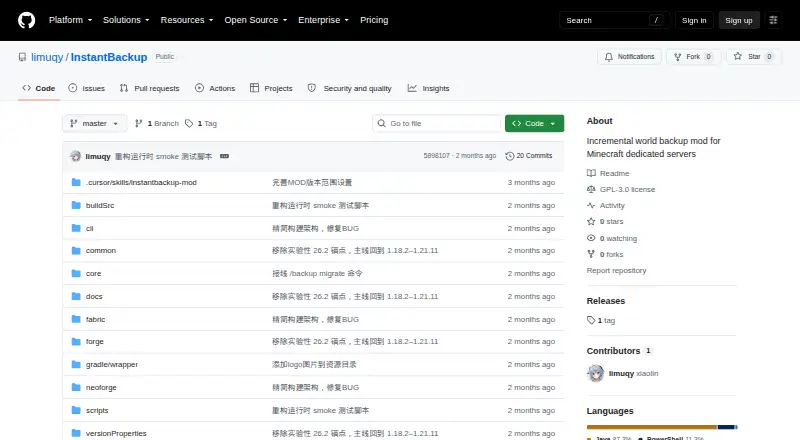
What InstantBackup is
InstantBackup is a free incremental world-backup mod for Minecraft Java dedicated servers. It uses XXHash64 to detect changes and backs up only new or modified files. Identical content is shared between backup versions, and ZSTD compression runs on a dedicated thread pool. Backups can be started manually, scheduled, or managed through an offline command-line interface after the server shuts down. In-game commands cover creating, listing, exporting, deleting, and configuring backups. Scheduled backups support configurable intervals, checks for online players, and exclusion of Carpet fake players. The mod supports Fabric, Forge, and NeoForge for listed Minecraft versions from 1.18.2 through 1.21.11. All in-game commands require OP level 2. There is no one-click in-game restore: the recommended approach is to export a ZIP, stop the server, replace the world directory, and restart. The default retention limit is 30 versions; setting it to 0 means unlimited. The project is GPL-3.0-or-later, and its listed 1.0.0-beta release is a pre-release.
Who it suits
InstantBackup suits operators of Minecraft Java dedicated servers who need scheduled or manual world backups. It is a fit for people comfortable managing restores through exported ZIPs and server directory replacement.
What it does well
- Backs up only new or modified files
- Shares identical content across backup versions
- Supports scheduled and offline CLI management
- Works with Fabric, Forge, and NeoForge
What to know first
- No one-click in-game restore
- In-game commands require OP level 2
- Listed 1.0.0-beta release is a pre-release
Limits
In-game commands require OP level 2. There is no one-click in-game restore; restoration uses an exported ZIP and a stopped server. By default, retention is capped at 30 versions, while zero sets it to unlimited.
Plans
| Plan | Billed and limits | Price |
|---|---|---|
| InstantBackup | GPL-3.0-or-later open-source Minecraft server mod | Free |
As github.com lists them, read 30 Sept 2026. The maker's own page has the final word.
Getting started
- Open the InstantBackup GitHub repository.
- Use a Minecraft Java server with Fabric, Forge, or NeoForge on a listed supported version.
- Install the mod on the server.
- Use in-game backup commands with OP level 2, or configure scheduled backups.
- Enable offline scripts if you want interactive Windows, Linux, or macOS commands after shutdown.
Overview
InstantBackup is a free Minecraft Java dedicated-server mod for backing up worlds. It is best suited to operators running supported Fabric, Forge, or NeoForge setups who want incremental local snapshots and control both in-game and after shutdown. Its storage design and scheduling are useful; restoring a world is a manual server-side process, not a one-click action.
The scope is deliberately narrow: it backs up worlds to local storage, rather than providing a broader server backup or off-site copy. XXHash64 change detection limits each incremental backup to new or modified files, while sharing identical content between versions and compressing blobs with ZSTD help limit repeated storage. Compression runs on a dedicated thread pool rather than the game’s main thread.
Operators can create, list, export, delete, and configure backups with in-game commands, or use an offline CLI after stopping the server. Scheduled backups support configurable intervals, checks for online players, and exclusion of Carpet fake players. All in-game commands require OP level 2, which keeps backup management behind the server’s operator permissions.
Key features
Incremental backups and retention
Change detection and shared storage make successive versions more practical than storing a full independent copy each time. The default limit is 30 retained versions; setting it to 0 allows unlimited retention. That suits operators who want a built-in cap or prefer to manage retention themselves, but unlimited versions can keep accumulating on the same local storage.
Scheduling and offline management
Scheduled runs reduce reliance on remembering manual backups, and player checks let operators account for whether the server is occupied. The offline CLI is useful for maintenance windows because it can manage the same backup database after shutdown. Enabling offline scripts generates an interactive Windows .cmd script and a Linux/macOS .sh script.
Restore workflow
Restoring requires exporting a ZIP, stopping the server, replacing the world directory, and restarting. This provides a route back to a saved world, but it asks the operator to handle the replacement process directly; anyone who needs an in-game one-click recovery should look elsewhere.
Pricing
InstantBackup is free: the InstantBackup plan costs nothing and is a GPL-3.0-or-later open-source Minecraft server mod. There is no free trial because the plan is free. The plan covers world-level backups to local storage, with a custom retention policy; it is not a service with remote storage or broader server coverage.
Platforms
InstantBackup targets Minecraft Java dedicated servers and supports Fabric, Forge, and NeoForge for listed Minecraft versions from 1.18.2 through 1.21.11. Its supported environments include Linux, macOS, Windows, and self-hosted setups. In-game commands require OP level 2.
Who it's for
Choose InstantBackup if you operate a compatible Java server and want incremental local world backups, scheduled runs, and management that remains possible after shutdown. It is less suitable if you need off-site storage, backups beyond worlds, or a streamlined restore that avoids manual directory replacement.
Pros and cons
- Pros: Incremental detection, shared blobs, and ZSTD compression reduce duplication across versions.
- Pros: Scheduling includes online-player checks and Carpet fake-player exclusion.
- Pros: In-game commands and an offline CLI provide management during normal operation and after shutdown.
- Cons: Backups stay on local storage and cover worlds only.
- Cons: Restore requires a ZIP export, server shutdown, directory replacement, and restart.
- Cons: In-game command access is restricted to OP level 2.
Alternatives
For other options, browse Minecraft Backup Software. Consider CaCl2Backup if you want a free self-hosted Fabric server mod and meet its Minecraft 26.0+, Fabric Loader 0.15.0+, Fabric API, and Java 25+ requirements. FolderRewind is another free, open-source option for Windows 10 or 11.
Minecraft Backup, Chronos Backups, FastBack, mcwrapper, and Better Backups are also free alternatives. FastBack is another free option.
Verdict
InstantBackup is a strong fit for Java server operators who want free, incremental local world backups with scheduling and post-shutdown management. Its main reason to choose it is the combination of shared, compressed backup storage and flexible management; its main reason to look elsewhere is the manual restore procedure, compounded by its local-only, worlds-only scope.
Verdict
InstantBackup offers incremental backups, retention settings, scheduling, and offline management for supported server setups. Restoring a world requires a manual ZIP and directory-replacement process rather than a one-click in-game action.
Questions
How much does InstantBackup cost?
The listed InstantBackup plan is free.
Is InstantBackup open source?
Yes. It is licensed under GNU General Public License version 3.0 or later.
Which Minecraft server loaders does it support?
It supports Fabric, Forge, and NeoForge for listed Minecraft versions from 1.18.2 through 1.21.11.
Can it restore a world in game with one click?
No. The recommended process exports a ZIP, stops the server, replaces the world directory, and restarts the server.
Can backups be scheduled?
Yes. Scheduled backups support configurable intervals, online-player checks, and exclusion of Carpet fake players.
Who makes InstantBackup?
The project author welcomes questions and suggestions through the repository’s GitHub Issues.
Facts from InstantBackup's own pages
- Access control
- All in-game commands require OP level 2. · github.com, 30 Sept 2026
- Access requirement
- All in-game backup commands require OP level 2. · github.com, 29 Sept 2026
- Backup options
- Backups can be triggered manually, scheduled, or managed through an offline CLI after server shutdown. · github.com, 29 Sept 2026
- Compression
- A dedicated thread pool compresses backups with ZSTD without blocking the game main thread. · github.com, 30 Sept 2026
- Incremental backups
- It uses XXHash64 change detection to back up only new or modified files. · github.com, 30 Sept 2026
- Integrations
- Scheduled backups can check whether players are online and exclude Carpet fake players. · github.com, 29 Sept 2026
- License
- The project is licensed under GNU GPL version 3.0 or later. · github.com, 30 Sept 2026
- Management
- In-game commands include creating, listing, exporting, deleting, and configuring backups. · github.com, 30 Sept 2026
- Offline CLI
- An offline CLI can manage backups after server shutdown and shares the database with in-game features. · github.com, 30 Sept 2026
- Offline scripts
- When enabled, the server generates a Windows .cmd script and a Linux/macOS .sh script for an interactive command interface. · github.com, 29 Sept 2026
- Purpose
- InstantBackup is an incremental world backup mod for Minecraft dedicated servers. · github.com, 30 Sept 2026
- Release status
- The repository's releases page lists version 1.0.0-beta as a pre-release. · github.com, 29 Sept 2026
- Restore limitation
- The mod does not provide an in-game one-click restore; its recommended restore procedure exports a ZIP and replaces the world directory while the server is stopped. · github.com, 30 Sept 2026
- Retention setting
- The default maximum retention is 30 backup versions, and setting it to 0 means unlimited versions. · github.com, 30 Sept 2026
- Scheduling
- Scheduled backups support configurable intervals, online-player checks, and Carpet bot exclusion. · github.com, 30 Sept 2026
- Server loaders
- The project supports Fabric, Forge, and NeoForge, with listed Minecraft anchors from 1.18.2 through 1.21.11. · github.com, 29 Sept 2026
- Storage
- Identical content is shared across backup versions, and blobs are compressed with ZSTD. · github.com, 29 Sept 2026
- Storage savings
- Blob deduplication shares identical content across backup versions to save disk space. · github.com, 30 Sept 2026
- Support
- The author invites questions and suggestions through the repository's GitHub Issues. · github.com, 30 Sept 2026
- Supported loaders
- The project supports Fabric, Forge, and NeoForge for listed Minecraft versions from 1.18.2 through 1.21.11. · github.com, 30 Sept 2026
Where InstantBackup stands on Freedom251
- Minecraft Backup Software#6 of 30