Freedom251 › Minecraft Backup Software
BtrBack
What BtrBack is
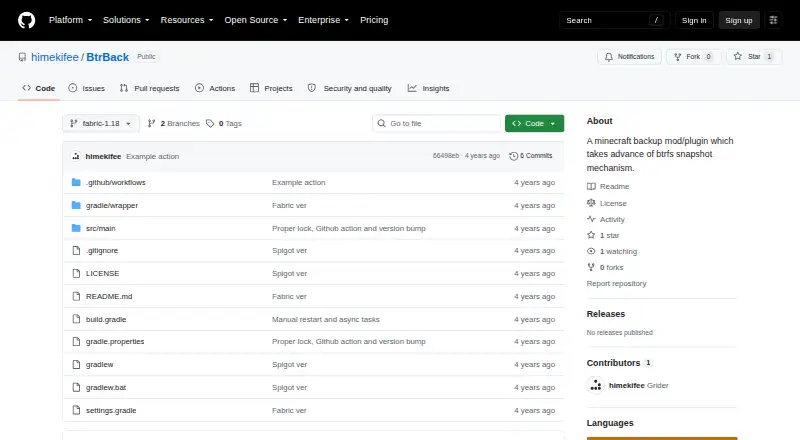
BtrBack is a free Minecraft Java server plugin for creating scheduled, full-server backups with Btrfs snapshots. It stores backups locally and offers full-backup restoration with a custom retention policy. Operators can use `/btrback [backup/rollback]` to create a backup or begin a rollback. Normal backups appear in the `backupSnapshots` section of `backups.json`. Before restoring, the plugin also snapshots the current server state and records it separately under `rollbackSnapshots`, rather than adding it to the normal backup list. A rollback reboots the server twice: first to restore the selected backup, then to start the server normally. Setup requires putting the server directory in a Btrfs subvolume and mounting the root subvolume with `user_subvol_rm_allowed`. The documented setup is for operators whose Minecraft server directory is on Btrfs. The public repository includes the Good Luck With That Public License, which permits copying, distribution, modification, merging, selling, publishing, and sublicensing at the user's own risk. The repository page shows no releases and zero open issues.
Who it suits
BtrBack suits operators of Minecraft Java servers whose server directory is on Btrfs and who want local, scheduled full-server backups.
What it does well
- Free and open source.
- Supports scheduled full-server backups.
- Stores backups locally.
- Snapshots the current state before rollback.
What to know first
- Requires a Btrfs subvolume and specific mount option.
- Rollback reboots the server twice.
- Repository page shows no releases.
Limits
The free plan is for a Minecraft backup plugin and requires a Btrfs subvolume. A rollback reboots the server twice.
Plans
| Plan | Billed and limits | Price |
|---|---|---|
| Free | Minecraft backup plugin · requires a Btrfs subvolume | Free |
As github.com lists them, read 7 Oct 2026. The maker's own page has the final word.
Getting started
- Use a Minecraft Java server.
- Place the server directory in a Btrfs subvolume.
- Mount the root subvolume with `user_subvol_rm_allowed`.
- Put the plugin in the server’s plugins folder.
- Run `/btrback [backup/rollback]` to create a backup or start a rollback.
BtrBack is a free Minecraft Java server plugin for operators who already run their server directory on Btrfs. Its local snapshot approach is narrowly suited to that setup, while the filesystem prerequisites and reboot-based restore make it a poor fit for many other servers.
Overview
Install the plugin in the server’s plugins folder and use /btrback [backup/rollback] to create or restore a backup. The server directory must be inside a Btrfs subvolume, and the root subvolume must be mounted with user_subvol_rm_allowed. That requirement is central to the choice: BtrBack is not a general-purpose Minecraft backup plugin that can be dropped onto any server filesystem.
Normal backups cover the full server and are recorded in the backupSnapshots section of backups.json. Before rollback, BtrBack also snapshots the current state, recording it under rollbackSnapshots rather than in the normal backup list. That separate safety copy gives operators a way to preserve the state they are replacing, though it does not change the restore’s full-backup scope.
Key features
Scheduled, local snapshots
BtrBack supports scheduled backups, local storage and custom retention. Those choices suit an operator who wants snapshots kept with the server and control over how long they are retained. The documented backup and restore scope is the full server, so it is not the right option for selectively restoring a single world or narrower set of files.
Rollback with a restart cost
A rollback reboots the server twice: once to restore the selected backup and once more to start normally. The pre-rollback snapshot is a useful safeguard, but the two-reboot sequence adds downtime and makes recovery less suitable where a short, predictable interruption matters.
Pricing
BtrBack is free: its Free plan costs nothing and covers the Minecraft backup plugin, with a Btrfs subvolume required. There is no trial because the software is already free. The repository includes the Good Luck With That Public License, which permits copying, modifying, distributing, selling and sublicensing the software at the user’s own risk.
Platforms
BtrBack is for Linux and self-hosted Minecraft Java servers. Its filesystem requirement further narrows that platform fit to servers whose directory is on a Btrfs subvolume. The project’s public GitHub repository shows no releases, so operators should be prepared to install from the repository rather than select a published release.
Who it's for
Choose BtrBack if you operate a Minecraft Java server on Btrfs, want local full-server snapshots, and can accommodate its two-reboot rollback. Look elsewhere if your server uses a different filesystem, needs finer-grained restores, or cannot tolerate the restore interruption.
Pros and cons
- Pros: Scheduled full-server backups and custom retention support a locally managed backup routine.
- Pros: A separate snapshot is taken before rollback, preserving the state that would otherwise be replaced.
- Cons: The Btrfs subvolume and mount-option requirements exclude servers that cannot meet them.
- Cons: Full-server restore scope and two reboots limit its usefulness for targeted recovery or minimal downtime.
- Cons: No published releases are shown, which may make adoption less convenient for operators seeking a packaged release.
Alternatives
For more Minecraft backup options, browse Minecraft Backup Software. InstantBackup is another free Minecraft server mod, with Linux, macOS, Windows and self-hosted platform support; choose it if you need those broader platform options rather than BtrBack’s Btrfs-specific setup. MineBackup is also free and spans Linux, macOS, Windows and self-hosted use, making it a broader-platform alternative.
FastBack is a free Minecraft backup mod for Linux, macOS and Windows; consider it if you want a mod across those platforms. Just Enough Backups is a free Fabric server-side world-backup mod for Linux, macOS and Windows, so it is the alternative to consider when world backups are the priority. CaCl2Backup is a free self-hosted Fabric server mod, but it requires Minecraft 26.0+, Fabric Loader 0.15.0+, Fabric API and Java 25+.
FolderRewind is a free, open-source option for Windows 10 and 11. Minecraft Backup is a free Linux server backup script, while ServerBackup is a free Minecraft server backup plugin for Linux and self-hosted use.
Verdict
BtrBack is a sensible choice for Minecraft Java operators already using Btrfs who want scheduled, local full-server snapshots and a pre-rollback safety copy. Its filesystem and mount requirements are restrictive, and the two-reboot restore carries a real downtime cost; choose another backup tool if either constraint is incompatible with your server.
Verdict
BtrBack provides local Btrfs-based backups and a separate snapshot of the current state before restoration. Its setup requirements and two-reboot rollback behavior are important considerations for server operators.
Questions
How much does BtrBack cost?
The listed plan is free.
Which Minecraft edition does it support?
The listed edition is Minecraft Java.
Where are backups stored?
Backups are stored locally. Normal backup records appear in the `backupSnapshots` section of `backups.json`.
What happens before a rollback?
BtrBack snapshots the current state and records it under `rollbackSnapshots` in `backups.json`, outside the normal backup list. The rollback then reboots the server twice.
What does setup require?
The server directory must be in a Btrfs subvolume, and the root subvolume must be mounted with `user_subvol_rm_allowed`. The plugin goes in the server’s plugins folder.
Is BtrBack open source?
Yes. The repository includes the Good Luck With That Public License, which permits copying, distribution, modification, merging, selling, publishing, and sublicensing at the user's own risk.
Facts from BtrBack's own pages
- Availability
- The GitHub repository is public and its page shows no releases. · github.com, 7 Oct 2026
- Backup records
- Normal backups are listed in the `backupSnapshots` section of `backups.json`. · github.com, 7 Oct 2026
- Commands
- The plugin is used with `/btrback [backup/rollback]`. · github.com, 7 Oct 2026
- Install
- The README instructs users to put the plugin in the server's plugins folder. · github.com, 7 Oct 2026
- Intended users
- The documented setup is for operators of Minecraft servers whose server directory is on Btrfs. · github.com, 7 Oct 2026
- License
- The repository includes the Good Luck With That Public License, which permits copying, distribution, modification, merging, selling, publishing, and sublicensing at the user's own risk. · github.com, 7 Oct 2026
- Project owner
- The GitHub profile identifies the project owner as Grider, with the username himekifee. · github.com, 7 Oct 2026
- Purpose
- BtrBack is a Minecraft backup plugin that uses Btrfs snapshots. · github.com, 7 Oct 2026
- Release availability
- The repository page showed no releases when viewed. · github.com, 7 Oct 2026
- Repository activity
- The repository page shows zero open issues. · github.com, 7 Oct 2026
- Rollback behavior
- A rollback reboots the server twice: once to restore the backup and again to launch the server normally. · github.com, 7 Oct 2026
- Rollback safety
- Before rollback, BtrBack also snapshots the current state, recorded under `rollbackSnapshots` in `backups.json`. · github.com, 7 Oct 2026
- Rollback snapshot
- Before rollback, the current state is also snapshotted and recorded under `rollbackSnapshots` in `backups.json`, rather than appearing in the backup list. · github.com, 7 Oct 2026
- Setup
- The server directory must be a Btrfs subvolume, and the root subvolume must be mounted as `user_subvol_rm_allowed`. · github.com, 7 Oct 2026
Where BtrBack stands on Freedom251
- Minecraft Backup Software#7 of 30