Freedom251 › Mind Mapping Software
Mind Elixir App
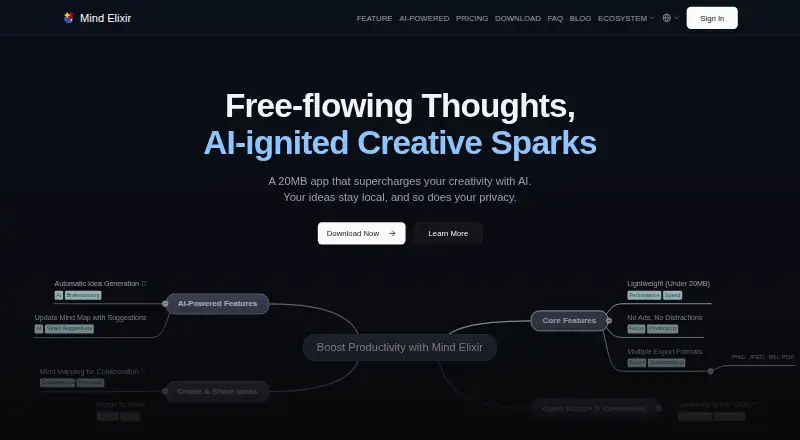
What Mind Elixir App is
Mind Elixir App is a mind-mapping app for Windows, macOS, Linux, iOS, and Android. It has a free plan that allows 24 maps, as well as Annual and Lifetime plans that allow unlimited mind maps. The app is listed as freemium, and the Free plan costs nothing.
The app works offline and includes AI assistance. Users can export maps in JSON, PNG, JPEG, or WEBP format. Its platform range includes desktop operating systems and mobile systems, so a user can choose among the listed options for their device. Real-time collaboration is marked No, so simultaneous work with others is not among the app’s listed capabilities. The plan details distinguish the free allowance of 24 maps from the unlimited map allowances in both the Annual and Lifetime plans. These facts make the map limit the clearest plan distinction described, alongside the offline mode, AI assistance, platform support, and export choices. Mind Elixir App is suited to individual mind-mapping workflows across supported devices, including workflows that need offline access or exports in one of the listed formats.
Who it suits
Mind Elixir App suits people who want to create mind maps on desktop or mobile, including when working offline. It may also suit users who want AI assistance and several export formats, with a choice between a 24-map free plan and plans allowing unlimited maps.
What it does well
- Available on Windows, macOS, Linux, iOS, and Android.
- Works offline.
- Includes AI assistance.
- Exports maps as JSON, PNG, JPEG, and WEBP.
- Annual and Lifetime plans allow unlimited mind maps.
What to know first
- The Free plan is limited to 24 maps.
- Real-time collaboration is not supported.
Limits
The Free plan allows 24 maps. The Annual and Lifetime plans allow unlimited mind maps.
Plans
| Plan | Billed and limits | Price |
|---|---|---|
| Free | 100% Private Storage · Outline Mode · All Export Formats · AI Content Generation · Ad-free Experience | Free |
| Annual | annually · 100% Private Storage · Outline Mode · All Export Formats · AI Content Generation · Ad-free Experience · Unlimited Mind Maps · Watermark-Free Export | $19 a year |
| Lifetime | once · 100% Private Storage · Outline Mode · All Export Formats · AI Content Generation · Ad-free Experience · Unlimited Mind Maps · Watermark-Free Export · Priority Customer Support · Pay Once, Updates Forever | $39, paid once |
| Lifetime | once · Lifetime access · Unlimited mind maps · Lifetime updates · All AI features · Native MCP support · Outline mode + 6 exports · Local-first privacy · Cross-platform desktop · Self-hosted S3 sync | $39, paid once |
As app.mind-elixir.com lists them, read 15 Oct 2026. The maker's own page has the final word.
Getting started
- Open the Mind Elixir App website.
- Choose the supported platform you want to use: Windows, macOS, Linux, iOS, or Android.
- Start with the Free plan for up to 24 maps, or choose Annual or Lifetime for unlimited maps.
- Use the app offline or with an internet connection.
- Export maps as JSON, PNG, JPEG, or WEBP when needed.
Mind Elixir App is a lightweight mind-mapping tool for turning ideas into structured maps, with AI assistance and editing features that suit creative work. It is a strong fit for people who want to work offline across desktop and mobile, while its lack of real-time collaboration and 24-map Free cap make it a weaker choice for shared projects or large personal libraries.
Overview
The app combines flexible tags and an Outline Mode with Markdown rich text, plus support for LaTeX formulas and chemical equations inside nodes. That range makes it useful for more than simple brainstorming: users can organize and annotate technical or academic material within a map. Imports from tools such as M10C and exports to JSON, PNG, JPEG, and WEBP offer practical ways to move maps in and out of the app.
Offline use is a meaningful advantage for focused work or unreliable connections. Mind maps and related data are stored locally, and the privacy policy says they are not uploaded without explicit consent. Device syncing is possible through a user’s own S3-compatible storage, which offers control over the sync destination but requires the user to provide that storage.
AI is optional. When a user submits content to an AI feature, it is temporarily sent to AI service providers and is not permanently stored, according to the privacy policy. The app also supports MCP integration and AI API connections. Those capabilities will appeal to users who want AI in their mapping workflow, though AI use involves transmitting the submitted content to a provider.
Key features
- Flexible mapping and editing: Tags and Outline Mode help organize ideas, while Markdown rich text and embedded formulas or chemical equations support more detailed notes.
- Offline work and user-managed sync: Maps are stored locally and can be synchronized across devices using the user’s own S3-compatible storage. This is a good fit for people who value local control and are comfortable setting up their own sync service.
- AI connections: AI assistance, MCP integration, and AI API connections give users options for bringing AI into their work. Submitted content is temporarily transmitted to AI service providers when an AI feature is used.
- Multiple export formats: JSON, PNG, JPEG, and WEBP cover both editable data and image sharing, making the app more flexible when maps need to leave the workspace.
- Related tools: The maker also offers an eBook tool that turns EPUB and PDF books into mind maps, and an M10C browser extension that extracts content from videos and web pages.
Pricing
Mind Elixir uses a freemium model. The Free plan costs nothing and allows up to 24 maps. That is enough room to explore the app or keep a modest set of active projects, but users with a growing archive will need a paid plan.
The Annual plan has custom pricing and includes unlimited mind maps and watermark-free export. It is the natural upgrade for regular users who want to remove the map cap and export cleanly, without paying for the lifetime option.
The Lifetime plan also has custom pricing and includes unlimited maps and watermark-free export, plus priority customer support and updates forever. It suits users who expect to rely on Mind Elixir over the long term and value those added support and update terms. The Free plan gives up unlimited maps and watermark-free export; the paid-plan descriptions do not state other quotas or seat limits.
Platforms
Mind Elixir supports Windows, macOS, Linux, iOS, Android, and the web, giving it broad reach across desktop, mobile, and browser workflows. Desktop downloads are listed for Windows 10+, macOS 10.15+, Ubuntu, Debian, and Fedora; mobile downloads require iOS 15.0+ or Android 8.0+.
Who it's for
Mind Elixir is best for individual users who want a flexible, offline-capable mapping tool with AI options, technical note support, and several export formats. It is also a sensible choice for people who prefer local storage and want to control cross-device syncing through their own S3-compatible service.
Teams that need to edit maps together in real time should look elsewhere: Mind Elixir does not support real-time collaboration. Users who need more than 24 maps should also plan for a paid tier, whose prices are custom.
Pros and cons
- Pro: Offline use and local storage suit people who want to work without a connection and keep map data on their device.
- Pro: Six supported platforms and four export formats make it easier to use the app across devices and share maps in different forms.
- Pro: Markdown, Outline Mode, tags, and embedded formulas give maps more structure and room for detailed subject matter.
- Con: No real-time collaboration limits its usefulness for teams building or editing maps together.
- Con: The Free plan stops at 24 maps, so users with larger collections must move to a custom-priced plan.
- Con: Cross-device sync relies on the user’s own S3-compatible storage, adding setup and account requirements.
- Con: Using AI transmits submitted content temporarily to AI service providers, which may not suit users who want to keep all work local.
Alternatives
Browse mind-mapping software for more options. Consider EdrawMind if you want a free plan with 100 MB of storage and a 100-topic allowance, plus a free trial and broad platform support. GoMind is another freemium option, with a free tier covering core mapping, rich notes, layouts, and import and export workflows across desktop, mobile, and web.
MindMapVault may suit users who prioritize encrypted storage, active shares, published maps, or self-hosting; its Cloud Free plan includes 25 MB encrypted storage, 3 active shares, and 5 published maps. Choose Mindomo if its free plan and free trial better fit your needs. Thortspace is worth considering if a free license with public spheres fits your use, though its free tier limits the number of public spheres.
Xmind offers a free plan for exploring classic and essential mind-mapping features, with 10 online maps and a 3-day version history. Comapping is an alternative with a one-user Personal Edition Online plan at $25 a year, or a desktop license at $49 a month. Rytica is a free option whose Beta plan includes all features and unlimited locally stored mind maps.
Verdict
Choose Mind Elixir App if you want offline mind mapping with AI assistance, broad platform support, and exports that cover both structured data and images. Its local storage and technical editing features make it particularly appealing for individual creative or research workflows. Look elsewhere if real-time collaboration is essential, or if a 24-map free allowance is too small and custom-priced plans are not a fit.
Verdict
Choose Mind Elixir App if offline use, AI assistance, broad platform support, or its export formats matter to your mind-mapping workflow. Look elsewhere if you need real-time collaboration or want more than 24 maps on the Free plan.
Questions
Is Mind Elixir App free?
Yes. The Free plan costs nothing and allows 24 maps.
Which platforms does Mind Elixir App support?
It is available on Windows, macOS, Linux, iOS, and Android.
Can I use it offline?
Yes, offline mode is supported.
What export formats are available?
Maps can be exported as JSON, PNG, JPEG, or WEBP.
Does Mind Elixir App support real-time collaboration?
No, real-time collaboration is marked as unsupported.
What do the Annual and Lifetime plans include?
Both plans allow unlimited mind maps.
Facts from Mind Elixir App's own pages
- AI assistance
- Yes · app.mind-elixir.com, 20 Sept 2026
- AI connections
- The app says it supports MCP integration and AI API connections. · app.mind-elixir.com, 11 Oct 2026
- AI integration
- The app connects to AI services through MCP and AI API connections. · app.mind-elixir.com, 15 Oct 2026
- AI processing
- When users choose AI features, the content they submit is temporarily transmitted to AI service providers and is not stored permanently, according to the privacy policy. · app.mind-elixir.com, 11 Oct 2026
- AI providers
- M10C documents support for OpenAI, Gemini, Claude, OpenRouter, and OpenAI-compatible APIs. · app.mind-elixir.com, 15 Oct 2026
- App Store rating
- The Apple App Store page says the app has insufficient ratings or reviews to display an overview. · apps.apple.com, 15 Oct 2026
- Company size
- AppSumo lists Mind Elixir as a 1–10 person startup. · appsumo.com, 15 Oct 2026
- Data rights
- The privacy policy says users can access, correct, or request deletion of server-side personal data through support, with requests handled within 30 calendar days. · app.mind-elixir.com, 11 Oct 2026
- Desktop requirements
- Downloads require Windows 10+, macOS 10.15+, or Ubuntu, Debian, or Fedora Linux. · app.mind-elixir.com, 15 Oct 2026
- Developer API
- The JavaScript API exposes MindElixir constructors, map initialization, getData, refresh, node operations, themes, arrows, undo, and events. · docs.mind-elixir.com, 15 Oct 2026
- Developer installation
- The open-source core is installed with npm using the package mind-elixir. · docs.mind-elixir.com, 15 Oct 2026
- Document AI import
- Version 1.10.4 added AI map generation from DOCX, PPTX, HTML files, and web-page URLs. · app.mind-elixir.com, 15 Oct 2026
- Documentation depth
- Official docs include installation, usage, interactions, data export/update, TypeScript support, guides, and generated API reference pages. · docs.mind-elixir.com, 15 Oct 2026
- Downloads
- The download page lists Windows 10+, macOS 10.15+, Ubuntu, Debian, Fedora, iOS 15.0+, and Android 8.0+ downloads. · app.mind-elixir.com, 11 Oct 2026
- Export formats
- The product supports exports including JSON, PNG, JPEG, WebP, PDF, HTML, Markdown, and plaintext. · appsumo.com, 15 Oct 2026
- Founded
- AppSumo lists January 1, 2026 as the founding date. · appsumo.com, 15 Oct 2026
- Free plan
- Yes · app.mind-elixir.com, 20 Sept 2026
- Google Play listing
- Google Play lists the Android app as Mind Elixir: AI Mind Map by Time Record and reports no data shared with third parties and no data collected. · play.google.com, 15 Oct 2026
- Headquarters
- AppSumo lists Guangzhou, China as the company location. · appsumo.com, 15 Oct 2026
- Import and export
- The app describes importing from tools such as M10C and exporting to multiple formats. · app.mind-elixir.com, 11 Oct 2026
- License
- The mind-elixir core package is open source under MIT for versions 0.9.1 and later, with ISC used by earlier versions. · security.snyk.io, 15 Oct 2026
- Limit: annual cancellation
- The terms say annual subscriptions renew automatically and unused-period refunds are not provided after cancellation. · app.mind-elixir.com, 15 Oct 2026
- Limit: early-stage maturity
- AppSumo categorizes Mind Elixir as an early-stage Radar product and says it has not fully vetted every claim or result. · appsumo.com, 15 Oct 2026
- Limit: support evidence
- AppSumo shows no user reviews for the product, so independent reviewer praise or recurring complaints are not established there. · appsumo.com, 15 Oct 2026
Where Mind Elixir App stands on Freedom251
- Mind Mapping Software#1 of 72
- Mind mapping tools#1 of 72