
Ayoa
by Ayoa
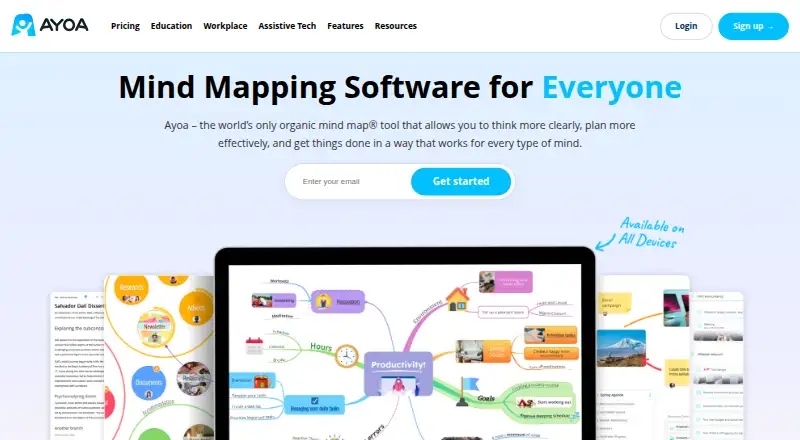
What Ayoa is
Ayoa is a mind-mapping app that brings together task management, whiteboards, AI assistance and real-time collaboration. It is available on the web, Android and iOS, and includes a presentation mode for showing mapped work. Users can export their work in JPG, PNG, PDF, TXT, HTML, DOCX and OPML formats. Ayoa follows a freemium model: its Free plan costs nothing and includes 10 mind maps, and a 7-day trial is also offered. The AYOA Monthly and AYOA Annual plans include mind mapping, task management, AI features, whiteboards and collaboration. Ayoa does not have an offline mode. The product is made by Ayoa, founded in 2019 and headquartered in Wales, United Kingdom. Its combination of maps, related tasks and collaborative tools suits people who want to organize ideas and work on them with others, with presentation and export options for sharing the result.
Who it suits
Ayoa suits individuals or groups who want to organize ideas as mind maps and manage related tasks, whiteboards and collaboration in one product. Its presentation mode and broad export formats can help people share mapped work.
What it does well
- Combines mind mapping with task management and whiteboards.
- Supports real-time collaboration.
- Includes AI assistance and presentation mode.
- Exports to JPG, PNG, PDF, TXT, HTML, DOCX and OPML.
- Free plan includes 10 mind maps.
What to know first
- Offline mode is unavailable.
- The Free plan is limited to 10 mind maps.
Limits
The Free plan includes 10 mind maps. A 7-day trial is offered.
Plans
| Plan | Billed and limits | Price |
|---|---|---|
| Free | 10 mind maps | Free |
| AYOA Monthly | Mind mapping · Task management · AI features · Whiteboards · Collaboration | On request |
| AYOA Annual | Mind mapping · Task management · AI features · Whiteboards · Collaboration | On request |
As ayoa.com lists them, read 22 Sept 2026. The maker's own page has the final word.
Getting started
- Visit https://www.ayoa.com/.
- Choose web, Android or iOS access.
- Start with the Free plan, which includes 10 mind maps.
- Use the offered 7-day trial if you want to try a trial plan.
- Choose AYOA Monthly or AYOA Annual for mind mapping, task management, AI features, whiteboards and collaboration.
Ayoa combines mind mapping with task management, whiteboards and collaborative workspaces in one freemium app. It is best suited to teams and individuals who want to move from visual planning into shared execution, with AI help and presentation-ready exports. Its broad toolset is compelling, but the lack of offline mode and the Free plan’s 10-map ceiling matter for people who work without a connection or build large libraries.
Overview
Made by Ayoa, founded in 2019 and headquartered in Wales, United Kingdom, the app treats a mind map as more than a brainstorming canvas. Paid subscriptions combine mind mapping, task management, AI features, whiteboards and collaboration, while real-time co-editing supports group planning. Presentation mode turns a map into a guided visual walkthrough, and exports cover JPG, PNG, PDF, TXT, HTML, DOCX and OPML. That combination makes Ayoa a practical bridge between ideation and project follow-through rather than a single-purpose diagram tool.
The trade-off is connectivity: Ayoa has no offline mode. Anyone who needs to capture or review maps during travel, in unreliable coverage, or on a restricted network should treat that as a fundamental limitation.
Key features
Mind mapping, tasks and whiteboards
Ayoa’s central strength is the breadth around its maps. Task management gives a plan a route toward execution, while whiteboards provide a less structured space for visual collaboration. This suits workshops, project planning and personal organisation where ideas need to become assigned work. Users seeking only a lightweight map editor may find the wider workspace unnecessary.
Collaboration and AI
Real-time collaboration is useful when several people need to shape the same plan without passing files back and forth. AI assistance adds help during planning, although the published feature set does not define a separate AI quota or specific AI operations. It should therefore be viewed as an enhancement to the mapping workflow, not a reason to assume unlimited automated generation.
Presentation and export
Presentation mode helps turn a finished map into a narrative for meetings or reviews. Export to seven formats is unusually flexible: image files work for quick sharing, PDF and DOCX suit documents, TXT and HTML support text-based reuse, and OPML helps move structured outlines into compatible tools. Export breadth is valuable for teams that must circulate work outside Ayoa.
Pricing
| Plan | Price | Includes | Best for |
|---|---|---|---|
| Free | free | 10 mind maps | Trying the core mapping workflow |
| AYOA Monthly | Custom pricing | Mind mapping, task management, AI features, whiteboards and collaboration | Users who need the full workspace without an annual commitment |
| AYOA Annual | Custom pricing | Mind mapping, task management, AI features, whiteboards and collaboration | Teams prepared to commit annually |
Ayoa offers a seven-day trial, giving prospective subscribers a short period to assess the expanded workspace before paying. The Free plan is genuinely usable for a small number of projects, but 10 maps can become restrictive for students, consultants or teams retaining an archive of work. The paid plans add the features that make Ayoa more than a map editor; because prices are custom, buyers should obtain a quote before budgeting. No seat allowance, renewal term or additional quota is published, so organisations should confirm those commercial terms directly.
Platforms
Ayoa runs on the web and has apps for Android and iOS. That coverage supports work across desktop browsers and major mobile platforms, but there is no offline mode on any of them. Mobile access is therefore best for connected review and editing rather than dependable field use without internet.
Who it's for
Ayoa fits project teams, facilitators and individual planners who want one place for maps, tasks, whiteboards and live collaboration. Presentation mode and broad exports also suit people who regularly turn visual plans into briefings or documents. The Free plan works for experimentation and a limited set of active maps. Choose a different category of tool if you need desktop operating-system apps, guaranteed offline work or a very generous free archive.
Pros and cons
Pros
- Combines mind mapping, task management and whiteboards, reducing the need to connect separate planning tools.
- Real-time collaboration supports simultaneous group planning.
- AI assistance and presentation mode extend maps into ideation and communication workflows.
- JPG, PNG, PDF, TXT, HTML, DOCX and OPML exports make sharing and migration practical.
- Web, Android and iOS access covers common desktop and mobile use.
Cons
- No offline mode makes connected access essential.
- The Free plan allows only 10 mind maps, a meaningful cap for long-term or multi-project use.
- Paid plans use custom pricing, making costs harder to compare before contacting Ayoa.
- Published plan information does not state seat limits or other usage quotas, so larger buyers must clarify them.
Alternatives
EdrawMind is the better fit for users needing native Linux, macOS or Windows apps alongside web and mobile access; its Free Plan allows 100 topics and 100 MB of storage, while Individual costs $4.90 a month when billed annually.
Mindomo is another freemium choice with Android, iOS, Linux, macOS, web and Windows support, useful when broad operating-system coverage matters.
Xmind suits readers who want classic mind mapping with a Free plan offering 10 online maps and a 3-day version trial.
Mapify is aimed at AI-led conversion of source material, with a Free plan including 30 one-time AI credits, five PDF or document conversions and five YouTube-video conversions.
MindMap Chat is a no-cost option with no paid tier, trial or account requirement.
AmyMind offers an iOS, macOS and web workflow; its Pro plan costs $45 a year and includes 500 AI actions per day, unlimited files and 500 MB of storage.
mapifast is for heavier AI usage, with a Pro plan at $19 a month, 500 tokens monthly, unlimited high-quality mind maps and access to GPT-4o and Claude 3.5.
Mapify provides a Free plan with 30 one-time AI credits, five PDF or document inputs and five YouTube videos, while Basic costs $5.99 a month.
Verdict
Ayoa is a strong choice for connected users who want visual thinking, actionable tasks, whiteboards and collaborative presentation in one service. Its exports and platform coverage reinforce that all-in-one appeal. Look elsewhere if offline access is non-negotiable, if ten free maps will not cover your archive, or if you need transparent published pricing before committing.
Verdict
Choose Ayoa if you want mind mapping alongside task management, whiteboards and real-time collaboration, with presentation and export options. Look elsewhere if offline access is essential or if the Free plan's 10-map allowance is too small.
Questions
Is Ayoa free?
Yes. Its Free plan costs nothing and includes 10 mind maps. A 7-day trial is also offered.
Which platforms support Ayoa?
Ayoa is available on the web, Android and iOS.
Can people collaborate in Ayoa in real time?
Yes. Ayoa supports real-time collaboration.
Can Ayoa be used offline?
No. Offline mode is unavailable.
What can Ayoa export?
JPG, PNG, PDF, TXT, HTML, DOCX and OPML.
Who makes Ayoa?
Ayoa is made by Ayoa, founded in 2019 and headquartered in Wales, United Kingdom.
Facts from Ayoa's own pages
- AI assistance
- Yes · ayoa.com, 22 Sept 2026
- Export formats
- JPG,PNG,PDF,TXT,HTML,DOCX,OPML · ayoa.com, 22 Sept 2026
- Founded
- 2019 · ayoa.com, 28 Sept 2026
- Free plan
- Yes · ayoa.com, 22 Sept 2026
- Headquarters
- Wales, United Kingdom · ayoa.com, 28 Sept 2026
- Offline mode
- No · ayoa.com, 22 Sept 2026
- Supported platforms
- web,ios,android · ayoa.com, 22 Sept 2026
- Presentation mode
- Yes · ayoa.com, 22 Sept 2026
- Real-time collaboration
- Yes · ayoa.com, 22 Sept 2026
Where Ayoa stands on Freedom251
- Mind Map Tool#1 of 27
- Mind Mapping Software#5 of 72
- AI Mind Map Tools#3 of 29
- Mind mapping tools#31 of 72