Freedom251 › Mind mapping tools

Mindomo
by Mindomo
What Mindomo is
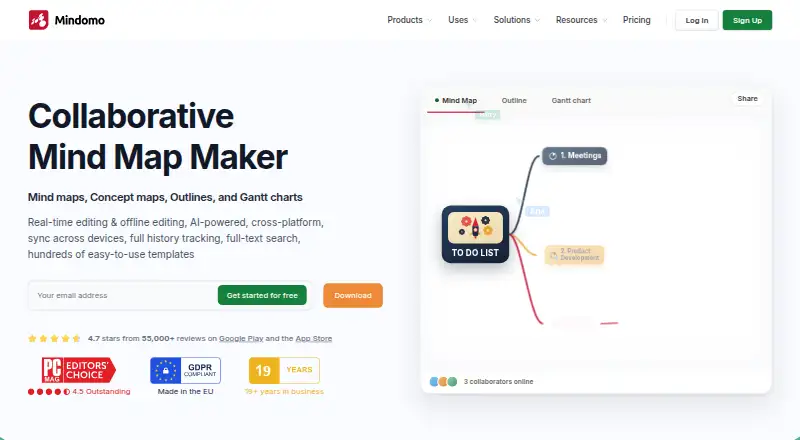
Mindomo is a mind-mapping and diagramming app for organizing ideas, notes, and plans. It supports real-time collaboration, AI assistance, and presentation mode on web, Windows, macOS, Linux, iOS, and Android. You can work offline, then have edits update when the device reconnects; its mobile apps also support capturing and editing notes with automatic synchronization. Sharing permissions let you provide view-only access, allow editing, or let someone work on a separate copy. Integrations include Microsoft Teams, Google Classroom, LTI, Google Calendar, Outlook, Google Drive, OneDrive, and Dropbox. Mindomo offers hundreds of templates, plus video tutorials, a help center, and a forum. The free plan includes three diagrams, unlimited collaborators, and one AI credit to try Mindomo AI; free mobile syncing is also limited to three diagrams. Premium costs €6.00 per month and includes unlimited diagrams and 50 monthly AI credits. Professional costs €13.50 per month for one user and five guests. A free trial is available.
Who it suits
Mindomo suits individuals and groups organizing ideas visually, especially when they need collaboration, offline editing, or presentation mode. Its free plan may suit people who can work within a three-diagram limit.
What it does well
- Supports real-time collaboration and presentation mode.
- Offline edits update when you reconnect.
- Free plan includes unlimited collaborators.
- Offers hundreds of templates.
- Integrates with Teams, Google Classroom, and cloud storage.
What to know first
- Free accounts are limited to three diagrams.
- Free mobile syncing covers only three diagrams.
- Free plan includes one AI credit.
- Professional supports one user plus five guests.
Limits
The free plan includes three diagrams, one AI credit, and mobile syncing for three diagrams. Premium costs €6 a month and includes 50 AI credits per month; Professional costs €13.50 a month and supports one user plus five guests.
Plans
| Plan | Billed and limits | Price |
|---|---|---|
| Free | Shown as USD 0 per free on our read (localised); USD price not displayed to our checker · 3 diagrams | Free |
| Premium | billed monthly · 50 AI credits/month · 10 export formats · 14 import formats | €6 a month |
| Professional | 1 user + 5 guests · 1 user · 5 guests · 20 export formats · 14 import formats · 60 AI credits/month | €13.50 a month |
As mindomo.com lists them, read 27 Sept 2026. The maker's own page has the final word.
Getting started
- Open the Mindomo website.
- Choose the free plan or review the Premium and Professional plans.
- Use the free trial if you want to try a paid plan.
- Use Mindomo on the web or select an Android, iOS, Windows, macOS, or Linux platform.
Overview
Mindomo is a diagramming and mind-mapping app for people who want to work across devices and share diagrams with others. It is strongest for teams and learners who value templates, offline editing, and collaboration alongside AI features. The free plan is a useful starting point, but its three-diagram cap is restrictive for anyone building a larger library.
Key features
Diagrams, sharing, and collaboration
Hundreds of templates give users a ready-made starting point for different scenarios, while presentation mode makes diagrams usable beyond the editing stage. Real-time collaboration and free-plan support for unlimited collaborators are clear advantages for shared work. Sharing permissions can be limited to viewing, allow editing, or let recipients make a separate copy, giving owners practical control over how others contribute.
Offline and mobile work
Mindomo supports offline editing and applies changes when the connection returns, which suits work on the move or in places with unreliable access. Android and iOS apps support capturing and editing notes with automatic synchronization. The free plan’s mobile sync covers only three diagrams, however, so users who need a wider cross-device library may need to pay.
AI, integrations, and exports
Mindomo AI can generate or translate diagrams in more than 30 or 50 languages, depending on the feature. Free users get one AI credit to try it; Premium includes 50 credits per month and Professional includes 60, so regular AI use is better matched to a paid plan. Integrations include Microsoft Teams, Google Classroom, LTI, Google Calendar, Outlook, Google Drive, OneDrive, and Dropbox. Export options span formats such as PDF, DOCX, PPTX, PNG, HTML, OPML, and XML; paid plans include defined export-format allowances.
Security and support
Security controls include SAML SSO, audit logs, access controls, guest editing controls, and password-protected diagrams. Video tutorials, a help center, and a forum provide support resources. These features make Mindomo more suitable for structured organizational use than a basic solo mapping tool.
Pricing
Mindomo uses a freemium model. Free costs nothing and includes three diagrams, unlimited collaborators, sharing, free templates, trial AI credits, and iOS and Android apps. It is a sensible way to try collaborative mapping, but the diagram cap and three-diagram mobile-sync limit make it a poor fit for users who need a substantial working archive.
Premium costs €6 a month, billed monthly. It adds cloud, mobile, and desktop access, unlimited diagrams, 50 AI credits per month, attachments, printing, 10 export formats, Teams integration, and API access. This is the better fit for an individual who needs room to grow beyond the free cap and wants a monthly AI allowance.
Professional costs €13.50 a month for 1 user + 5 guests. It includes Premium features plus guest editing, premium sharing, Gantt Charts, 20 export formats, and business templates; its allowance is 60 AI credits per month. The defined guest count makes it relevant to a small team, but larger groups should account for the one-user, five-guest structure.
Platforms
Mindomo is available on the web, Windows, macOS, Linux, iOS, and Android. That range, together with offline editing and mobile synchronization, suits people who move between desktop and mobile devices.
Who it's for
Mindomo suits students, individual planners, and small teams that need shared diagrams, reusable templates, presentation mode, and access across desktop and mobile. It is less compelling for someone who needs only a handful of simple maps and has no use for collaboration or AI, since the free tier is capped and paid plans add features that such a user may not need.
Pros and cons
- Pro: Unlimited collaborators on the free plan make shared diagrams possible without immediately paying per collaborator.
- Pro: Offline editing, mobile apps, and automatic synchronization support work across locations and devices.
- Pro: Multiple sharing permissions, security controls, and integrations support more controlled team workflows.
- Con: Free accounts are limited to three diagrams, constraining ongoing use without an upgrade.
- Con: Free mobile sync is also limited to three diagrams, which narrows the cross-device benefit for larger libraries.
- Con: Free AI access is only one credit, so meaningful continued use requires a paid allowance.
Alternatives
Choose EdrawMind if a free plan with 100 MB of storage and 100 topics better suits a bounded personal mapping project. Xmind is another freemium option for exploring classic and essential mind-mapping features, with its free plan capped at 10 online maps.
Mapify is worth considering when the stated free allowance of 30 AI credits and five PDF or document-to-mind-map conversions better matches the task. AmyMind is another freemium alternative.
Ayoa may suit readers seeking a combination of mind mapping, task management, AI features, whiteboards, and collaboration; its free plan allows 10 mind maps. mapifast is an option for readers comparing a freemium tool with a Pro plan priced at $19 a month.
MindMap AI may appeal to readers who prioritize a free allowance of 50 AI credits per month and exports to PDF, PNG, Markdown, and project file. MindMap Chat is a free alternative with no paid tier and no account required.
For broader discovery, browse AI Mind Map Tools or Mind Mapping Software.
Verdict
Mindomo is a strong choice for people who need collaborative diagrams that remain editable offline and work across desktop and mobile, with templates and AI available as part of the same tool. Its main drawback is the free plan’s three-diagram ceiling; choose a paid tier if your library will grow, and look elsewhere if you need a free tool for keeping many diagrams.
Verdict
Mindomo pairs diagramming with collaboration, offline editing, templates, and AI assistance. Check the free diagram and mobile-sync limits against your needs; paid plans add more diagrams and AI credits.
Questions
Is Mindomo free?
Yes. The free plan costs nothing and includes three diagrams, unlimited collaborators, and one AI credit.
How much do the paid plans cost?
Premium costs €6 a month. Professional costs €13.50 a month and supports one user plus five guests.
Which platforms does Mindomo support?
Mindomo supports web, Windows, macOS, Linux, iOS, and Android.
Can I use Mindomo offline?
Yes. Users can edit without a network connection, and changes update when they are online again.
Which services does Mindomo integrate with?
Integrations include Microsoft Teams, Google Classroom, LTI, Google Calendar, Outlook, Google Drive, OneDrive, and Dropbox.
Is there a free trial?
Yes, Mindomo offers a free trial.
Facts from Mindomo's own pages
- AI assistance
- Yes · mindomo.com, 20 Sept 2026
- AI language support
- Mindomo AI can generate or translate diagrams in more than 30 or 50 languages, depending on the feature. · mindomo.com, 27 Sept 2026
- Export formats
- Professional includes 20 export formats, including PDF, Word, PowerPoint, Project, Excel, HTML, images, Markdown, and MindManager. · mindomo.com, 27 Sept 2026
- Founded
- 2007 · mindomo.com, 23 Sept 2026
- Free AI credit
- The free plan includes 1 AI credit for testing Mindomo AI. · mindomo.com, 27 Sept 2026
- Free collaborators
- The free plan includes unlimited collaborators. · mindomo.com, 27 Sept 2026
- Free diagram limit
- Free accounts include 3 diagrams. · mindomo.com, 27 Sept 2026
- Free mobile sync
- Free mobile syncing is limited to 3 diagrams for cross-device access. · mindomo.com, 27 Sept 2026
- Free plan
- Yes · mindomo.com, 20 Sept 2026
- Headquarters
- Timisoara, Romania · mindomo.com, 23 Sept 2026
- Supported integrations
- Integrations include Microsoft Teams, Google Classroom, LTI, Google Calendar, Outlook, Google Drive, OneDrive, and Dropbox. · mindomo.com, 27 Sept 2026
- Mobile apps
- Android and iOS apps support capturing and editing notes with automatic synchronization. · mindomo.com, 27 Sept 2026
- Offline editing
- Mindomo supports editing without a network connection and updates changes when online. · mindomo.com, 27 Sept 2026
- Offline mode
- Yes · mindomo.com, 20 Sept 2026
- Supported platforms
- web,Windows,macOS,Linux,iOS,Android,API · mindomo.com, 20 Sept 2026
- Presentation mode
- Presenter mode turns diagrams into structured slideshow presentations. · mindomo.com, 27 Sept 2026
- Professional guests
- Professional supports 1 user plus 5 guests per month. · mindomo.com, 27 Sept 2026
- Real-time collaboration
- Multiple users can co-edit diagrams simultaneously from any location. · mindomo.com, 27 Sept 2026
- Security controls
- Security features include SAML SSO, audit logs, access controls, guest editing controls, and password-protected diagrams. · mindomo.com, 27 Sept 2026
- Sharing permissions
- Sharing permissions include view only, view and edit, or copy to edit separately. · mindomo.com, 27 Sept 2026
- Supported platforms
- Mindomo is available on web, desktop, and mobile apps, including Windows, macOS, Linux, Android, and iOS. · mindomo.com, 27 Sept 2026
- Support resources
- Support resources include video tutorials, a help center, and a forum. · mindomo.com, 27 Sept 2026
- Template library
- Mindomo offers hundreds of templates for different scenarios. · mindomo.com, 27 Sept 2026
Where Mindomo stands on Freedom251
- Mind mapping tools#3 of 72
- Google Workspace Creative Tools#5 of 27
- Mind Mapping Software#23 of 72
- AI Mind Map Tools#14 of 29
- Mind Map Tool#14 of 27