Freedom251 › Mind Mapping Software

CloudMindMaps
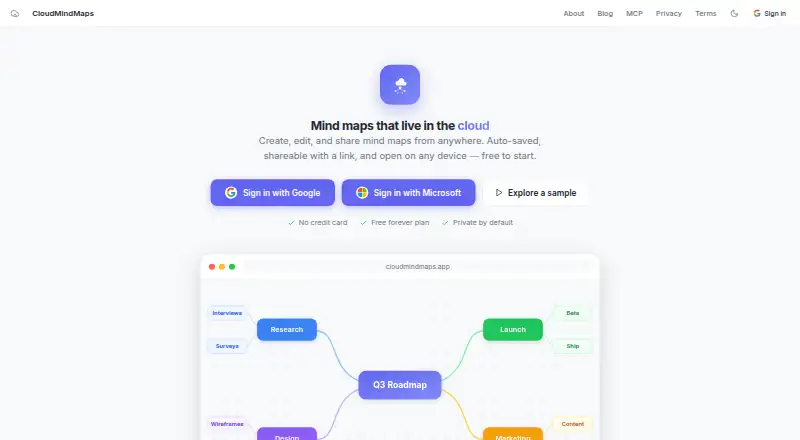
What CloudMindMaps is
CloudMindMaps is browser-based software for creating, editing, and sharing mind maps. Maps save automatically and sync across devices, and you can invite collaborators to edit together in real time, share read-only links, or embed live maps. AI tools can turn URLs, meeting notes, and submitted files into maps; an API key can also connect Claude, ChatGPT, or another MCP client to create maps in your account. The service imports and exports FreeMind .mm files, and also exports images and outlines. It runs in modern desktop, tablet, and phone browsers without installation. Maps are private to your account by default, and you decide whether to share them. The Free plan costs nothing and includes map creation, editing, export, cloud sync, sharing, collaboration, and AI-assisted generation. The privacy policy says Google Gemini processes content submitted for optional AI features to return a map.
Who it suits
It suits students, teams, writers, and product people who want to create or collaborate on maps in a browser. It may also suit people who need to work with FreeMind .mm files.
What it does well
- Automatically syncs maps across devices.
- Supports real-time collaborative editing.
- Exports .mm files, images, and outlines.
- AI can make maps from URLs and notes.
- Maps are private by default.
What to know first
- Requires a browser; no installation option is listed.
- Optional AI content is processed by Google Gemini.
Limits
The Free forever plan costs nothing and includes creation, editing, export, cloud sync, sharing, collaboration, and AI-assisted generation. It has no node limits or export paywalls.
Plans
| Plan | Billed and limits | Price |
|---|---|---|
| Free | Free forever plan · Create, edit, and export mind maps · Cloud sync and sharing · Real-time collaboration · AI-assisted map generation | Free |
| Free forever plan | Create, edit, and export mind maps for free; no node limits or export paywalls | Free |
As cloudmindmaps.app lists them, read 20 Sept 2026. The maker's own page has the final word.
Getting started
- Open https://cloudmindmaps.app/ in a modern desktop, tablet, or phone browser
- Create an account to use the cloud service
- Create, edit, or import a FreeMind .mm map
- Invite collaborators, publish a read-only link, or embed a live map
- Export the map as .mm, an image, or an outline
Verdict
CloudMindMaps combines mind-map editing, sharing, collaboration, and AI generation in a free browser-based service. Its FreeMind support and multiple export formats may be useful for people moving maps between tools.
Questions
What does CloudMindMaps cost?
The Free plan costs nothing and is described as free forever.
Which platforms does it support?
It runs in modern desktop, tablet, and phone browsers. The listed platforms are android, api, ios, and web.
Can it import FreeMind files?
Yes. CloudMindMaps imports and exports FreeMind .mm files.
Does it support collaboration?
Yes. Users can invite others to edit in real time, publish read-only links, or embed live maps.
How does its AI work?
AI can turn URLs, meeting notes, and submitted files into maps. An API key can connect Claude, ChatGPT, or another MCP client.
Are cloud maps private?
Maps are private to the account by default, and the user chooses whether to share them.
Facts from CloudMindMaps's own pages
- Account deletion
- The privacy policy says account data is wiped from active systems immediately after account deletion and purged from routine backups within 30 days. · cloudmindmaps.app, 11 Oct 2026
- AI assistance
- Yes · cloudmindmaps.app, 20 Sept 2026
- AI assistant access
- An API key can connect Claude, ChatGPT, or another MCP client to create mind maps in the user’s account. · cloudmindmaps.app, 11 Oct 2026
- AI data handling
- The privacy policy says Google Gemini processes only content submitted for optional AI features to return a map. · cloudmindmaps.app, 11 Oct 2026
- AI tools
- AI features can turn URLs, meeting notes, and submitted files into mind maps. · cloudmindmaps.app, 11 Oct 2026
- Cloud sync
- Maps save automatically and sync across devices. · cloudmindmaps.app, 11 Oct 2026
- Collaboration
- Users can invite collaborators to edit maps in real time, publish read-only links, or embed live maps. · cloudmindmaps.app, 11 Oct 2026
- Data collection
- The privacy policy says account data includes email and name, stored maps, and basic anonymous usage data. · cloudmindmaps.app, 11 Oct 2026
- Export formats
- .mm,image,outline · cloudmindmaps.app, 20 Sept 2026
- FreeMind format
- The app imports and exports FreeMind .mm files. · cloudmindmaps.app, 11 Oct 2026
- Free plan
- Yes · cloudmindmaps.app, 20 Sept 2026
- Integrations
- The site describes connecting Fireflies.ai to automatically generate mind maps from meetings. · cloudmindmaps.app, 11 Oct 2026
- Platform and install
- The service runs in modern desktop, tablet, and phone browsers without installation. · cloudmindmaps.app, 11 Oct 2026
- Supported platforms
- web · cloudmindmaps.app, 20 Sept 2026
- Privacy defaults
- Cloud maps are private to the account by default, and users choose whether to share them. · cloudmindmaps.app, 11 Oct 2026
- Real-time collaboration
- Yes · cloudmindmaps.app, 20 Sept 2026
- Security
- The privacy policy states that the service uses industry-standard encryption. · cloudmindmaps.app, 11 Oct 2026
- Support
- The privacy policy lists [email protected] for privacy questions. · cloudmindmaps.app, 11 Oct 2026
- What it does
- CloudMindMaps is browser-based software for creating, editing, and sharing mind maps. · cloudmindmaps.app, 11 Oct 2026
- Who it is for
- The about page names students, teams, writers, product people, and people with FreeMind .mm files as intended users. · cloudmindmaps.app, 11 Oct 2026
Where CloudMindMaps stands on Freedom251
- Mind Mapping Software#2 of 72
- Mind mapping tools#22 of 72