Freedom251 › Mind Mapping Software
GoMind
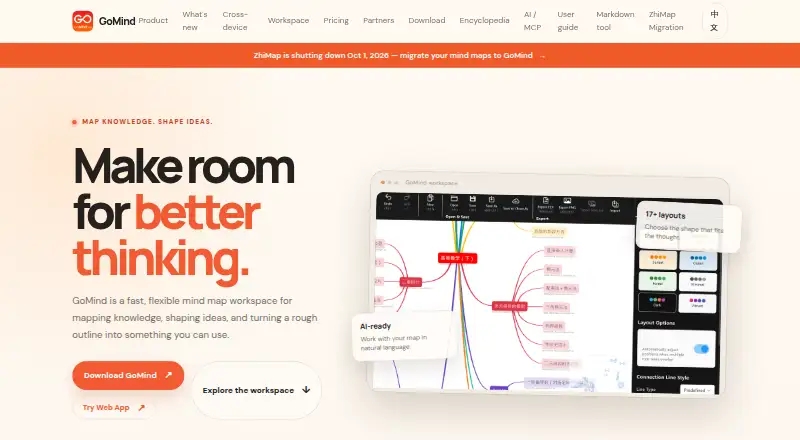
What GoMind is
GoMind is a mind map workspace for organizing knowledge, shaping ideas, and developing outlines into usable results. It offers more than 17 layouts and imports XMind, Markdown, YAML, OPML, FreeMind, and plain text. Maps can contain multiple pages, cross-page links, custom connections, branch memos, and focus history. Node notes support Markdown, HTML, LaTeX, code blocks, and Mermaid. Maps can be exported as PNG, JPG, SVG, PDF, Markdown, or OPML. AI workflows can create, edit, organize, read, and inspect maps; listed connections include OpenAI-compatible services, MCP, and OpenClaw. GoMind describes itself as local-first and lists autosave recovery, document-level undo and redo, and complete import and export. It supports web, Windows, macOS, Linux, iOS, and Android, and offline mode is available. The Free plan includes core mapping, notes, layouts, and import and export. Paid plans include Plus at $9.90 a month as a one-time unlock and Pro at $1.99 a month. Enterprise options support deployment on internal networks or private infrastructure.
Who it suits
GoMind suits individuals who want mind maps with rich notes, import and export workflows, and offline access. Its Enterprise deployment option is intended for organizations that need maps kept on internal or private infrastructure.
What it does well
- Offers more than 17 layouts.
- Imports six named formats, including XMind and Markdown.
- Offline mode is available.
- Notes support LaTeX, code blocks, and Mermaid.
What to know first
- Real-time collaboration is not available.
- Presentation mode is not available.
- Enterprise customer-operated infrastructure has no uptime SLA.
Limits
The free plan covers core mind mapping, rich notes and layouts, and import and export workflows. Watermark-free PDF and PNG export and additional visual assets and capabilities are included with Plus; Pro adds advanced features and higher limits.
Plans
| Plan | Billed and limits | Price |
|---|---|---|
| Free | $0 forever · Core mind mapping · rich notes and layouts · import and export workflows | Free |
| Pro | $1.99 per month · Everything in Plus · more usage and advanced features · Pro-only visual assets | $1.99 a month |
| Pro yearly | $19.9 per year; $9.9 for the first year and eligible education users · Everything in Plus · Pro features and higher limits · annual subscription | $19.90 a year |
| Enterprise base service | $1,000 / year per deployment · Security updates · basic support · applies to each private deployment | $1,000 a year |
| Enterprise deployment license | $6,000 / license · One production deployment · up to 50 seats · internal deployment included | $6,000, paid once |
| Plus | $9.9 one time · Everything in Free · watermark-free PDF and PNG export · more visual assets and capabilities | $9.90, paid once |
As gomind.app lists them, read 15 Oct 2026. The maker's own page has the final word.
Getting started
- Open https://gomind.app/ in a web browser.
- Choose the free plan for core mind mapping, notes, layouts, and import and export.
- Use GoMind on web, Windows, macOS, Linux, iOS, or Android.
- Import a map from XMind, Markdown, YAML, OPML, FreeMind, or plain text.
- Choose a paid personal plan for additional visual assets, capabilities, or Pro features.
- Contact GoMind about Enterprise deployment for an internal network or private infrastructure.
GoMind is a mind-mapping workspace for developing connected ideas into notes and reusable files. It suits individuals who need flexible map structures, offline access, and broad import and export options, as well as organizations seeking private deployment. Its main weakness is the absence of real-time collaboration and presentation mode.
Overview
GoMind goes beyond single-page diagrams: maps can span multiple pages, link across pages, and use custom connections, branch memos, and focus history. These tools suit projects that evolve and accumulate relationships; for quick, isolated sketches, they may be more structure than necessary. The local-first approach, autosave recovery, document-level undo and redo, and complete import and export support favor users who want to retain control of their working documents and move them between tools.
Key features
The homepage describes more than 17 layouts, giving users different ways to shape a map around its material. GoMind imports XMind, Markdown, YAML, OPML, FreeMind, and plain text, which makes it useful for bringing existing maps and outlines into a new workspace. Exports span PNG, JPG, SVG, PDF, Markdown, OPML, DOCX, and XLSX, serving both visual sharing and document or structured-text workflows. Plus adds watermark-free PDF and PNG export, a practical reason to upgrade if those formats are part of regular sharing.
Node notes support Markdown, HTML, LaTeX, code blocks, and Mermaid diagrams, so maps can keep formatted explanations, formulas, code, or diagrams alongside their branches. AI workflows can create, edit, organize, read, and inspect maps. GoMind AI Relay, OpenAI-compatible services, MCP, and OpenClaw connections extend those workflows, though the product is not a fit for readers who specifically need live co-editing: real-time collaboration is absent. There is also no presentation mode, so users who need to present directly from a map should look elsewhere.
Offline mode and support for Windows, macOS, Linux, iOS, Android, and web make GoMind a flexible choice across desktop and mobile. The download page gives minimum versions: Windows 10, macOS 10.14, Android 6.0, iOS 12.0, and 64-bit Linux with GTK 3.0 or later.
Pricing
The Free plan costs nothing, billed forever. It includes core mind mapping, rich notes and layouts, and import and export workflows. That makes it a sensible starting point for individuals, but watermark-free PDF and PNG export and the additional visual assets and capabilities are reserved for paid plans.
Plus costs $9.90 a month, billed as a one-time unlock. It includes everything in Free, watermark-free PDF and PNG export, and more visual assets and capabilities. The one-time term makes it distinct from a recurring subscription; it suits individuals who want those additions without a monthly plan.
Pro costs $1.99 a month, billed per month, and includes everything in Plus, more usage and advanced features, and Pro-only visual assets. Pro yearly costs $19.90 a year, billed per year; the first year is $9.9 for eligible education users. It includes everything in Plus, Pro features, higher limits, and an annual subscription. These plans target individuals who need more usage or advanced capabilities; the yearly option adds higher limits but renews annually, while monthly Pro avoids an annual term.
Enterprise is for organizations that need deployment on an internal network or private infrastructure rather than a public hosted workspace. The Enterprise deployment license is $6,000 a month, billed per standard production deployment, and covers up to 50 seats. The Enterprise base service costs $1,000 a year, billed per deployment per year, and includes security updates and basic support. Customer-operated infrastructure has no uptime SLA, an important constraint for teams that need a contractual availability commitment.
Platforms
GoMind supports web, Windows, macOS, Linux, iOS, and Android. Desktop and mobile downloads have minimum operating-system requirements, while offline mode supports work away from a connection. Platform breadth is useful for individuals switching devices, but does not add the real-time collaboration that distributed teams may expect.
Who it's for
GoMind is best for individuals building substantial maps, especially when they need rich node notes, multiple layouts, offline access, or a route from existing outlines to exported documents. Its free plan gives individuals a way to start without a subscription. Organizations that need maps kept within their own environment can consider Enterprise deployment, provided its per-deployment costs and lack of an uptime SLA on customer-operated infrastructure fit their needs. Teams that depend on simultaneous editing or presenting from maps should choose a different tool.
Pros and cons
- Pros: Multiple pages, cross-page links, custom connections, memos, and focus history support connected projects that outgrow a basic diagram.
- Pros: Imports and exports cover common map, outline, image, document, and structured-text formats, making it easier to bring material in and reuse it elsewhere.
- Pros: Offline mode, local-first features, and autosave recovery suit users who value access to working documents without relying entirely on a hosted workflow.
- Cons: No real-time collaboration rules it out for teams that need to edit together live.
- Cons: No presentation mode means users cannot rely on GoMind for presenting a map directly.
- Cons: Enterprise deployment has substantial deployment and annual service charges, and customer-run infrastructure has no uptime SLA.
Alternatives
For a wider comparison, browse Mind Mapping Software. Choose EdrawMind instead if its free plan's 100 MB storage and 100-topic allowance better match a small project; it also has a free trial. MindMapVault is another freemium option, with a cloud free plan that provides 25 MB encrypted storage, three active shares, and five published maps. Consider Mindomo if you want a freemium option with a free trial. Thortspace may suit users comfortable with a free license limited to public spheres. Xmind offers a free plan for classic and essential mind mapping, with 10 online maps and a three-day version history. Mapify is worth considering when AI credits and turning PDFs, documents, or YouTube videos into maps are central: its free plan includes 30 one-time AI credits and five conversions of each type. Mind Elixir App offers a free plan limited to 24 maps, while its annual and lifetime plans provide unlimited maps. Ayoa may be a better fit for users who want a free plan capped at 10 mind maps and a product that combines mapping with task management, AI features, whiteboards, and collaboration on its paid plan.
Verdict
Choose GoMind if you are an individual who needs flexible, connected maps, rich notes, offline access, and multiple ways to import and export work. Its strongest case is the combination of map depth and file flexibility, with a free plan to start and private deployment for organizations. Look elsewhere if live collaboration or presentation mode is essential, or if Enterprise's deployment costs and support terms do not suit your organization.
Verdict
GoMind combines flexible map structures and exports with AI workflows and local-first features. Individuals can start with the free plan, while organizations can consider private deployment.
Questions
Is GoMind free?
Yes. The Free plan costs nothing, billed forever, and includes core mind mapping, rich notes and layouts, and import and export workflows.
How much do paid plans cost?
The pricing note says paid plans start at $9.90. Listed plans include Plus at $9.90 a month, billed as a one-time unlock; Pro at $1.99 a month; Pro yearly at $19.90 a year; and Enterprise options.
Which platforms does GoMind support?
GoMind supports web, Windows, macOS, Linux, iOS, and Android. The download page lists Windows 10 or later, macOS 10.14 or later, 64-bit Linux with GTK 3.0+, Android 6.0 or later, and iOS 12.0 or later.
Can GoMind be deployed privately?
Yes. Enterprise deployment is intended for organizations using an internal network or private infrastructure, with up to 50 seats. The annual Enterprise base service includes security updates and basic support; customer-operated infrastructure has no uptime SLA.
Can GoMind export to PDF?
Yes. PDF is an export format. The Plus plan specifically includes watermark-free PDF and PNG export.
Facts from GoMind's own pages
- AI
- AI workflows can create, edit, organize, read, and inspect maps, and the release notes list GoMind AI Relay, OpenAI-compatible services, MCP, and OpenClaw connections. · gomind.app, 3 Oct 2026
- AI assistance
- The AI sidebar can create, edit, organize, read and inspect maps using natural-language instructions. · gomind.app, 15 Oct 2026
- Apple App Store compatibility
- The current Apple listing requires iOS 15 or later, iPadOS 15 or later and macOS 12 or later. · apps.apple.com, 15 Oct 2026
- Apple App Store pricing
- The Apple listing shows GoMind Plus at $9.99, Pro Monthly at $1.99 and Pro Yearly at $9.99 as in-app purchases. · apps.apple.com, 15 Oct 2026
- Apple App Store privacy
- Apple displays the developer declaration that GoMind collects no data, while noting the declaration is unverified by Apple. · apps.apple.com, 15 Oct 2026
- Audience
- The pricing page offers personal plans for individuals and private deployment for organizations that need maps kept within their organization. · gomind.app, 3 Oct 2026
- Canvas editing
- Users can detach nodes, position branches freely, resolve collisions and preserve chosen positions. · gomind.app, 15 Oct 2026
- Data handling
- The product page describes GoMind as local-first and lists autosave recovery, document-level undo and redo, and complete import and export. · gomind.app, 3 Oct 2026
- Documentation
- The user manual covers getting started, editing, documents and pages, import/export, layouts, cloud and AI integrations, shortcuts and troubleshooting. · gomind.app, 15 Oct 2026
- Download options
- Windows offers Store, installer, portable ZIP and MSIX packages; macOS offers App Store, DMG and ZIP; Linux offers DEB, RPM and AppImage; Android offers an Arm64 APK. · gomind.app, 15 Oct 2026
- Enterprise support
- The annual Enterprise base service includes security updates and basic support; the page says customer-operated infrastructure has no uptime SLA. · gomind.app, 3 Oct 2026
- Export
- GoMind can export maps as PNG, JPG, SVG, PDF, Markdown, or OPML. · gomind.app, 3 Oct 2026
- Export formats
- Documented exports include PNG, JPG, SVG, PDF, Markdown and OPML. · gomind.app, 15 Oct 2026
- Free plan
- Yes · gomind.app, 20 Sept 2026
- Google Play developer
- Google Play identifies the developer as POSH GROUP LIMITED and gives a Kowloon, Hong Kong address. · play.google.com, 15 Oct 2026
- Google Play features
- Google Play lists 17 layouts, XMind compatibility, Markdown/HTML notes, LaTeX, stickers, images, relationships, hyperlinks, cloud file management and 17 languages. · play.google.com, 15 Oct 2026
- Google Play privacy declaration
- Google Play shows the developer declaration as no data shared with third parties and no data collected. · play.google.com, 15 Oct 2026
- Google Play update
- The Google Play listing says the app was updated on September 2, 2026. · play.google.com, 15 Oct 2026
- Import
- GoMind can import XMind, Markdown, YAML, OPML, FreeMind, and plain text. · gomind.app, 3 Oct 2026
- Import formats
- Supported imports include XMind, Markdown, YAML, OPML, FreeMind and plain text, with web-page import also documented. · gomind.app, 15 Oct 2026
- Layouts
- The product advertises more than 17 layout algorithms, including mind maps, timelines, fishbone diagrams and organization charts. · gomind.app, 15 Oct 2026
- License
- The opened official pages describe pricing, downloads and features but do not state an open-source license. · gomind.app, 15 Oct 2026
- Limit: import reliability
- The troubleshooting guide warns that large or malformed files may not map cleanly into a tree. · gomind.app, 15 Oct 2026
- Limit: large-map sharing
- The troubleshooting guide says mobile sharing may be limited for very large maps and recommends exporting a file first. · gomind.app, 15 Oct 2026
Where GoMind stands on Freedom251
- Mind Mapping Software#8 of 72
- Mind mapping tools#16 of 72