Freedom251 › PC Optimization Software
Microsoft PC Manager
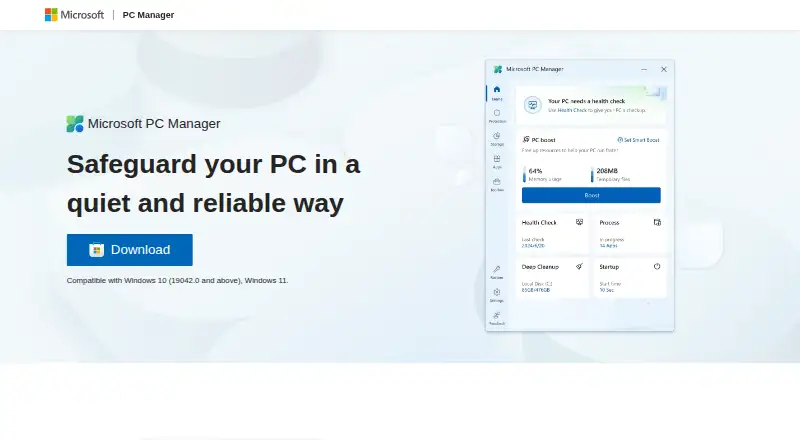
What Microsoft PC Manager is
Microsoft PC Manager is a free Windows utility for cleaning up a PC, managing storage, and addressing system issues. It supports Windows 10 and 11. Its health checkup finds and fixes issues, while cleanup tools remove junk and free space. Users can manage large files and use Storage Sense to reclaim storage. The software also includes a startup manager, built-in Windows tools, and a Toolbox with a Mini toolbar. It can reduce ads and app pop-up interruptions, and scan for and clear threats with one click. Microsoft presents it as a way to safeguard a PC. The listed languages include English, Chinese, Japanese, Korean, Spanish, Indonesian, Portuguese, Russian, and Turkish, as well as Traditional Chinese and regional variants of English, Spanish, and Portuguese. Microsoft provides a Discord channel link and contact email, along with links to privacy information and legal notices.
Who it suits
Microsoft PC Manager suits people using Windows 10 or 11 who want free cleanup and storage tools. Its listed features also address users who want startup management or a one-click threat scan.
What it does well
- Free to download and use on a PC.
- Supports Windows 10 and 11.
- Includes Storage Sense and large-file management.
- Offers a health checkup and one-click threat scanning.
- Lists multiple languages and regional variants.
What to know first
- Available only for Windows.
- The stated support is limited to Windows 10 and 11.
Plans
| Plan | Billed and limits | Price |
|---|---|---|
| Free plan | — | On request |
As pcmanager.microsoft.com lists them, read 27 Sept 2026. The maker's own page has the final word.
Getting started
- Open the Microsoft PC Manager website.
- Download the software for a PC.
- Use it on a PC running Windows 10 or 11.
Overview
Microsoft PC Manager brings routine Windows cleanup, storage controls, startup management, and system tools together in one utility. It is best for Windows 10 and 11 users who want basic PC upkeep without paying for a separate maintenance app. Its breadth is useful for everyday housekeeping, though users on other platforms will need another option.
Key features
Junk cleanup, performance boosting, and startup management cover common maintenance needs: the app can clear unwanted files, free space, and help control what runs when Windows starts. A health checkup finds issues and offers quick fixes. That makes PC Manager a practical place to begin routine tune-ups, but the stated functions are aimed at maintenance rather than a wider system-administration toolkit.
Storage management includes tools for large files and Windows Storage Sense, giving users options for reclaiming disk space. The Toolbox and Mini toolbar surface built-in Windows tools and may save time for people who use those shortcuts regularly. Pop-up management reduces ads and app interruptions, while one-click threat scanning can scan for and clear threats. Microsoft presents PC Manager as a quiet way to safeguard a PC; users seeking a dedicated security product should choose one for that purpose rather than treating these maintenance features as a substitute.
Pricing
PC Manager has a Free plan and can be downloaded and used at no charge on a PC. It combines its cleanup, storage, startup, health-check, threat-scanning, and Windows-tool functions without a paid tier to weigh against them. There is no per-seat or usage cap attached to this free offer in the plan description, making it a straightforward choice for users who want these tools without a subscription.
For comparison, CCleaner also has a free tier, with standard privacy protection, standard cleaning, and a basic Health Check; its Professional plan is $44.95 a year, billed Then $44.9. Advanced SystemCare's free tier covers cleaning, startup optimization, and resource optimization, while its Pro options are described for one or two PCs plus one free PC. Wise Care 365 Free includes one-click checkup, cleaning and speed optimization, hardware inventory, privacy protection, real-time monitoring, and automatic updates. Glary Utilities Free covers computer speed, problem repair, privacy protection, and manual updates; its Professional plan is $39.95 a year for 3 PCs. Those free alternatives may suit users prioritizing their stated feature sets, while PC Manager's main pricing advantage is that its Windows maintenance bundle costs nothing.
Platforms
PC Manager supports Windows 10 and Windows 11 only. Its listed languages include English, Chinese, Japanese, Korean, Spanish, Indonesian, Portuguese, Russian, and Turkish, as well as Traditional Chinese and regional variants of Spanish, Portuguese, and English. That language range helps serve users in many regions, but it does not offset the Windows-only limit for households or workplaces using other systems.
Who it's for
PC Manager suits Windows users who want familiar maintenance tasks—cleanup, storage management, startup control, and quick system checks—in one free utility. It is a reasonable fit for basic upkeep when a compact set of tools is enough. It is not the right choice for macOS, Linux, mobile, or web users, or for anyone looking primarily for a broader platform-independent utility.
Pros and cons
- Pro: The free plan brings cleanup, storage management, startup controls, health checks, and Windows tools together, avoiding a paid maintenance tier.
- Pro: Large-file management and Storage Sense give users more than one route to reclaim disk space.
- Con: Support is limited to Windows 10 and 11, excluding users who need an option across platforms.
- Con: The stated feature set centers on routine maintenance and does not establish PC Manager as a dedicated security or system-administration suite.
Alternatives
PC Optimization Software is the broader category to explore when comparing maintenance utilities. Choose CCleaner if you need listed Android, iOS, macOS, and Windows support or its paid Professional tier. Choose Advanced SystemCare if its free cleaning, startup, and resource optimization functions better match your priorities. Wise Care 365 is an alternative free Windows utility with listed hardware inventory, privacy protection, real-time monitoring, and automatic updates. Glary Utilities offers a free tier with manual updating and a paid Professional plan for 3 PCs. Kudu is worth considering if you want a free desktop app with core maintenance tools, no account requirement, and an MIT-licensed open-source basis. Auslogics BoostSpeed is another alternative. Process Lasso is another Windows option. Snappy Driver Installer Origin is a free Windows alternative, with driver packs not included in its application ZIP.
Verdict
Choose Microsoft PC Manager if you use Windows 10 or 11 and want a free, consolidated set of cleanup, storage, startup, and basic system tools. The no-cost bundle is its clearest reason to choose it; its Windows-only reach and maintenance-focused scope are the main reasons to look elsewhere.
Verdict
Microsoft PC Manager combines cleanup, storage management, and system tools at no charge. It is a Windows-only option, so it does not suit users on other platforms.
Questions
How much does Microsoft PC Manager cost?
It is free to download and use on a PC.
Which Windows versions does it support?
The listed support covers Windows 10 and Windows 11.
What can it do?
It can clean junk, help manage storage and startup programs, run a health checkup, reduce pop-up interruptions, and scan for and clear threats.
Which languages are listed?
The page lists English, Chinese, Japanese, Korean, Spanish, Indonesian, Portuguese, Russian and Turkish. It also lists Traditional Chinese and regional variants of English, Spanish and Portuguese.
Who makes Microsoft PC Manager?
The product is presented under the Microsoft brand.
Facts from Microsoft PC Manager's own pages
- Discord community
- Microsoft PC Manager provides a Discord channel link. · pcmanager.microsoft.com, 27 Sept 2026
- Company identity
- The product is presented under the Microsoft brand. · pcmanager.microsoft.com, 27 Sept 2026
- Copyright year
- The page shows Microsoft copyright for 2025. · pcmanager.microsoft.com, 27 Sept 2026
- Email support
- A Microsoft PC Manager contact email is provided. · pcmanager.microsoft.com, 27 Sept 2026
- Free download
- The software is available to download and use for free on a PC. · pcmanager.microsoft.com, 27 Sept 2026
- Free plan
- Yes · pcmanager.microsoft.com, 21 Sept 2026
- Health checkup
- It finds and fixes issues quickly through a health checkup. · pcmanager.microsoft.com, 27 Sept 2026
- Junk cleanup
- Yes · pcmanager.microsoft.com, 21 Sept 2026
- More languages
- It also lists Traditional Chinese and regional variants of Spanish, Portuguese, and English. · pcmanager.microsoft.com, 27 Sept 2026
- Legal notices
- The page links to terms, third-party software notices, and trademarks. · pcmanager.microsoft.com, 27 Sept 2026
- Mini toolbar
- It offers a Toolbox and Mini toolbar to improve computer-use efficiency. · pcmanager.microsoft.com, 27 Sept 2026
- Performance boost
- It cleans up the system, frees space, and boosts PC performance. · pcmanager.microsoft.com, 27 Sept 2026
- Pop-up management
- It reduces ads and app pop-up interruptions. · pcmanager.microsoft.com, 27 Sept 2026
- Privacy information
- The page links to Microsoft Privacy and Consumer Health Privacy information. · pcmanager.microsoft.com, 27 Sept 2026
- Security positioning
- Microsoft describes it as a quiet and reliable way to safeguard a PC. · pcmanager.microsoft.com, 27 Sept 2026
- Startup manager
- Yes · pcmanager.microsoft.com, 21 Sept 2026
- Storage management
- It helps manage large files and use Storage Sense to free storage. · pcmanager.microsoft.com, 27 Sept 2026
- Supported languages
- The page lists English, Chinese, Japanese, Korean, Spanish, Indonesian, Portuguese, Russian, and Turkish. · pcmanager.microsoft.com, 27 Sept 2026
- Threat scanning
- It can scan and clear threats with one click. · pcmanager.microsoft.com, 27 Sept 2026
- Windows support
- Compatible with Windows 10 version 19042.0 and above, and Windows 11. · pcmanager.microsoft.com, 27 Sept 2026
- Windows support
- windows 10 and 11 · pcmanager.microsoft.com, 21 Sept 2026
- Windows tools
- It includes a variety of built-in Windows tools. · pcmanager.microsoft.com, 27 Sept 2026
Where Microsoft PC Manager stands on Freedom251
- PC Optimization Software#7 of 97
- PC optimisers#10 of 104