Freedom251 › PC Optimization Software
Glary Utilities
What Glary Utilities is
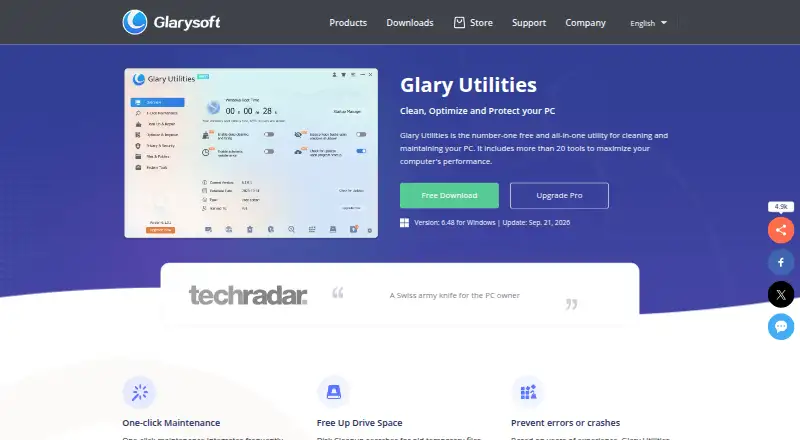
Glary Utilities is Windows software for cleaning and maintaining PCs, with more than 20 included tools. Its functions include junk cleanup, startup management, driver updates, scheduled maintenance, and restore-point tools. The startup manager can identify and disable unnecessary programs that use system resources, while its software update feature helps find newer versions. Privacy tools can find and delete browsing records and permanently delete files. File recovery can help locate accidentally deleted items, including files removed after the Recycle Bin was emptied. The free version is available for Windows PCs; the Pro plan costs $39.95 a year for up to 3 PCs. Support listings include Windows 11, 10, 8, 7, 2000, XP, and Vista in 32- and 64-bit versions, while another listing specifically names Windows 10 and 11. The software is available in 44 languages. The listed version is 6.48, updated September 21, 2026; release 6.48.0.52 improves Uninstall Manager, Empty Folder Finder, and Startup Manager.
Who it suits
It suits Windows PC users who want a collection of cleanup, maintenance, startup, privacy, and file recovery tools. The Pro plan may suit users covering up to 3 PCs.
What it does well
- Includes more than 20 tools
- Free version is available
- Can recover accidentally deleted files
- Available in 44 languages
What to know first
- Windows-only platform support
- Pro costs $39.95 a year
- Pro covers up to 3 PCs
Plans
| Plan | Billed and limits | Price |
|---|---|---|
| Free | Faster Computer · Problems Repairing · Privacy Protection · Manual updating | Free |
| Professional | 3 PCs · 3 PCs | $39.95 a year |
| Glary Utilities Free | — | Free |
| Glary Utilities Technician | billed annually at $169 | $169 a year |
| Glary Utilities Pro | billed annually at $39.95 | $39.95 a year |
As glarysoft.com lists them, read 20 Sept 2026. The maker's own page has the final word.
Glary Utilities is a broad Windows maintenance suite for users who want cleanup, optimization, privacy controls, and recovery in one installation. It is strongest for households or individuals managing several Windows PCs; readers wanting a narrowly focused cleaner or a clearly capped free plan may prefer another tool. The central decision is whether that breadth justifies an annual subscription once the free edition no longer meets your needs.
Overview
More than 20 utilities cover common PC upkeep: junk cleanup, scheduled maintenance, startup management, software-update discovery, restore-point tools, privacy protection, and file recovery. The suite can remove browsing records, permanently delete files, and help recover accidentally deleted data, including files removed after the Recycle Bin was emptied.
Glary Utilities supports Windows 11, 10, 8, 7, 2000, XP, and Vista in 32- and 64-bit versions, with 44 language options. For current Windows use, Windows 10 and 11 are the stated support. Version 6.48 was updated September 21, 2026; release 6.48.0.52 improves Uninstall Manager, Empty Folder Finder, and Startup Manager.
Key features
Cleanup and scheduled upkeep
Junk cleanup handles routine removal of unnecessary files, while scheduled maintenance is suited to users who want recurring attention rather than occasional manual scans. Restore-point tools provide a safeguard around system changes, making the package more useful for maintenance-conscious users than a basic disk cleaner.
Startup and software management
The startup manager identifies programs consuming system resources and lets you disable those considered unnecessary. That gives experienced users control over boot-time load, but it still requires judgment before switching off an unfamiliar entry. Software-update discovery helps locate newer versions, reducing the need to check every installed application separately.
Privacy and recovery
Privacy tools delete browsing records and can permanently erase files when ordinary deletion is not enough. File recovery adds a practical rescue option for accidental deletions, even after the Recycle Bin has been emptied. These functions make Glary Utilities more than a speed-focused cleaner, although recovery is most valuable when used promptly after a mistake.
Pricing
The Free plan costs nothing and covers faster-computer work, problem repair, privacy protection, and manual updating. Glary Utilities Free is also offered at no cost as a free version for Windows PCs. The free offering suits users who want to assemble their own maintenance routine, but no specific free-tier caps are stated, so its practical ceiling is difficult to judge in advance.
Professional costs $39.95 a year, billed for 3 PCs. Glary Utilities Pro is priced at $39.95 a year, billed annually at $39.95, for up to 3 PCs. That is the sensible tier for a household or individual maintaining multiple computers; someone with one lightly used PC may find the free tools sufficient and gain little from upgrading. The store provides a 90-day money-back guarantee, and no trial is stated.
The Technician plan costs $169 a year, billed annually at $169, and is an optimization tool for service providers. Its price and positioning make sense for professionals working across client machines, not for ordinary home use. Purchases are stated to be secure and encrypted, and technical support is available 24/7.
Platforms
Glary Utilities is a Windows application, with 32- and 64-bit support across Windows 11, 10, 8, 7, 2000, XP, and Vista. It is available in 44 languages. Readers seeking Android, macOS, iOS, Linux, or web support need a different product.
Who it's for
Choose Glary Utilities if you want one Windows package for cleanup, startup control, privacy housekeeping, update discovery, restore points, and file recovery. The three-PC Pro allowance particularly suits families, enthusiasts, and small setups. It is less compelling for users who need only disk cleaning, who prefer a platform-neutral tool, or who require transparent limits on a free edition before installing.
Pros and cons
- Pros: More than 20 tools consolidate cleanup, maintenance, privacy, startup control, updates, restore points, and recovery.
- Pros: Pro covers up to three PCs for $39.95 a year, which fits multi-PC households better than a single-device license.
- Pros: Recovery can address files deleted after the Recycle Bin was emptied, while permanent deletion adds a stronger privacy option.
- Cons: The free plan has no stated usage caps, making it hard to know when an upgrade will become necessary.
- Cons: It is Windows-only, so mixed-device households cannot use one installation across operating systems.
- Cons: The broad toolkit demands care when changing startup entries; disabling the wrong program can create avoidable problems.
Alternatives
For a wider device mix and a simpler cleaning focus, choose CCleaner; its free plan covers standard privacy protection, standard cleaning, and a basic Health Check across Android, iOS, macOS, and Windows. Avira System Speedup is a better fit if you want a free trial and cross-platform availability, with essential cleaning and speed optimization in its free tier.
Windows users seeking a similarly broad freemium optimizer can compare Advanced SystemCare, whose free plan includes PC cleaning, startup optimization, and resource optimization. Microsoft PC Manager is the straightforward choice for a free Windows utility without a paid tier.
Wise Care 365 suits readers who want one-click checkups, cleaning, hardware inventory, privacy protection, real-time monitoring, and automatic updates in its free plan. Auslogics BoostSpeed is worth considering for diagnostics, essential optimization, junk and registry cleanup, and disk defragmentation. Kudu offers a free desktop app with core maintenance tools and no account requirement. Wise Disk Cleaner is the simpler free Windows option when disk cleanup is all you need. Browse the broader PC Optimization Software list for more choices.
Verdict
Glary Utilities is a strong choice for Windows users who value a single, unusually wide maintenance toolkit and need coverage for up to three PCs. Its main reason to look elsewhere is uncertainty around the free edition’s limits, especially when a focused free cleaner or a cross-platform alternative may be enough. Choose Pro when the combined privacy, recovery, startup, and maintenance tools justify $39.95 a year; stay free or switch products if your needs are narrower.
Verdict
Glary Utilities combines system cleanup, maintenance, privacy, and recovery functions for Windows PCs. The free version offers a way to use the utility, while Pro is listed at $39.95 a year for up to 3 PCs.
Facts from Glary Utilities's own pages
- Device limit
- 3 · glarysoft.com, 20 Sept 2026
- Driver updates
- Yes · glarysoft.com, 20 Sept 2026
- File recovery
- Helps find and restore accidentally deleted files, including after the Recycle Bin is emptied. · glarysoft.com, 28 Sept 2026
- Free plan
- Yes · glarysoft.com, 20 Sept 2026
- Free tier
- A free all-in-one utility for cleaning and maintaining Windows PCs. · glarysoft.com, 28 Sept 2026
- Free tier limits
- The page does not state specific limits for the free version. · glarysoft.com, 28 Sept 2026
- Junk cleanup
- Cleans temporary files, installation files, logs, history, cache, and error reports. · glarysoft.com, 28 Sept 2026
- Latest version
- The listed version is 6.48, updated September 21, 2026. · glarysoft.com, 28 Sept 2026
- Platform support
- Supports Windows 11, 10, 8, 7, 2000, XP, and Vista, with 32/64-bit versions. · glarysoft.com, 28 Sept 2026
- Privacy protection
- Finds and deletes browsing records and can permanently delete files. · glarysoft.com, 28 Sept 2026
- Pro pricing
- The Pro version costs $39.95 per year for up to 3 PCs. · glarysoft.com, 28 Sept 2026
- Refund policy
- The store offers a 90-day money-back guarantee. · glarysoft.com, 28 Sept 2026
- Release updates
- Version 6.48.0.52 improves Uninstall Manager, Empty Folder Finder, and Startup Manager. · glarysoft.com, 28 Sept 2026
- Restore-point tools
- Yes · glarysoft.com, 20 Sept 2026
- Scheduled maintenance
- Yes · glarysoft.com, 20 Sept 2026
- Purchase security
- The store states that purchases are secure and encrypted. · glarysoft.com, 28 Sept 2026
- Provider plan
- A Technician optimization plan is offered for service providers at $169 per year. · glarysoft.com, 28 Sept 2026
- Software updates
- Helps discover and update newer software versions. · glarysoft.com, 28 Sept 2026
- Paid from
- 39.95 · glarysoft.com, 20 Sept 2026
- Startup management
- Identifies and disables unnecessary startup programs that use system resources. · glarysoft.com, 28 Sept 2026
- Startup manager
- Yes · glarysoft.com, 20 Sept 2026
- Support availability
- The store states that technical support is available 24/7. · glarysoft.com, 28 Sept 2026
- Supported languages
- Available in 44 languages. · glarysoft.com, 28 Sept 2026
- Included tools
- Includes more than 20 tools to maximize computer performance. · glarysoft.com, 28 Sept 2026
Where Glary Utilities stands on Freedom251
- PC Optimization Software#10 of 97
- PC optimisers#11 of 104