DriversCloud
by DriversCloud
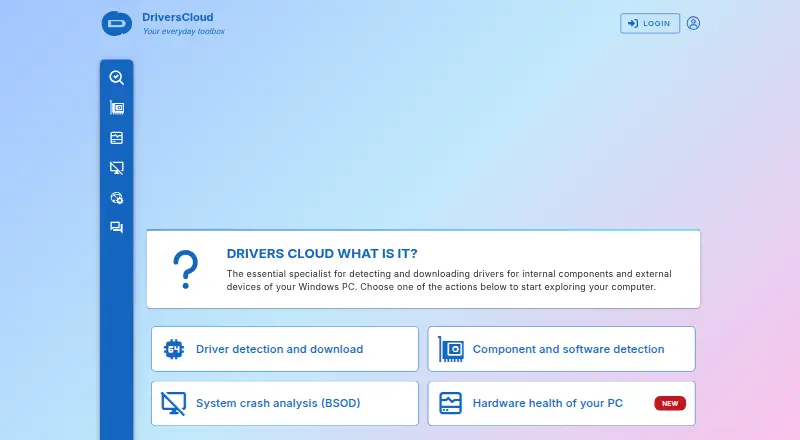
What DriversCloud is
DriversCloud is a free software service for finding and managing computer drivers. It runs on the web and supports Windows and Linux. Its driver tools include backup and rollback, so users can save drivers and return to an earlier driver state when needed. Offline scanning is also supported. For Windows users, the stated support covers Windows 10, Windows 11, and later versions. DriversCloud is made by DriversCloud, a company founded in 2004 and headquartered in Cannes, France. The service’s free plan makes its driver functions available without a listed paid tier. Its web availability gives users a browser-based access route, while the Windows and Linux platforms cover desktop use. These capabilities make it relevant to people who need to identify, preserve, or revert drivers on supported systems. The listed facts do not describe a particular driver catalog or other maintenance tools, so the clearest reasons to consider it are its backup, rollback, and offline scanning support.
Who it suits
DriversCloud suits Windows 10, Windows 11, and later users who want driver backup or rollback options, including when scanning offline. Linux users may also consider it, as Linux is a supported platform.
What it does well
- Free plan is available.
- Supports driver backup and rollback.
- Offline scanning is supported.
- Available on web, Windows, and Linux.
- Windows support includes Windows 10, 11, and later versions.
What to know first
- Windows support details cover Windows 10, 11, and later versions only.
Plans
| Plan | Billed and limits | Price |
|---|---|---|
| DriversCloud | Completely free service · Free to use with or without an account · free account stores configurations, history, and preferences without a time limit · disposable account expires after 30 days | Free |
As driverscloud.com lists them, read 11 Oct 2026. The maker's own page has the final word.
DriversCloud is a free driver and PC diagnostics service from a French maker founded in 2004. It combines driver identification with reporting and troubleshooting tools, but its main agent and machine-dependent services are Windows-only.
Its breadth is the draw: driver backup and rollback sit alongside crash analysis, sensor monitoring, and offline scanning. That makes it more useful for support and diagnosis than a driver updater alone, though the 10-configuration account limit narrows its fit for larger fleets.
Overview
DriversCloud inventories a PC’s hardware, software, drivers, and network configuration, and can turn that information into a downloadable PDF report. It also identifies matching drivers for download. Those drivers come from manufacturers’ official websites and are distributed without modification or an added installer, a meaningful safeguard for users who want to avoid repackaged downloads.
The service reaches beyond driver maintenance. It can back up and restore drivers, analyze Windows blue-screen minidump files to help identify crash causes, and graph temperatures, fan speeds, and voltages with alerts. Taken together, these tools make it a practical troubleshooting aid, not just a way to find drivers.
Key features
Offline scanning is a useful option for disconnected PCs: a dedicated application creates a .dc configuration file that can be uploaded through the service. That helps with machines that cannot scan online directly, although the offline application still requires Windows.
Privacy controls offer four levels. Identifying details such as serial numbers are excluded unless the highest level is deliberately enabled. The maker says configurations are encrypted, are not sold or shared with third parties, and can be exported or deleted. The agent uses an outgoing authenticated HTTPS connection through a client WebSocket; its local service opens no port or listener, a sensible design for users concerned about exposing a machine to inbound connections.
An account can retain reports for up to 10 configurations. That is a workable ceiling for an individual or small support workload, but a constraint for teams tracking a larger inventory.
Pricing
DriversCloud costs nothing and is described as a completely free service. It can be used with or without an account. A free account retains configurations, history, and preferences without a time limit; a disposable account expires after 30 days. There is no free trial because the service is free.
The no-cost model is a strong fit for individual users and small teams that need reports and driver tools without a subscription. The trade-off is not a paid feature tier but the 10-configuration account cap, which may be too restrictive for broader fleet management.
Platforms
DriversCloud is offered for Windows, Linux, and the web, but the operating-system coverage needs careful interpretation. The agent and machine-dependent services run on Windows 10 and Windows 11, while the dedicated offline application also supports Windows 7 SP1 and Windows 8. The maker says there is no macOS or Linux agent, so Linux availability should not be taken to mean that the full Windows diagnostic workflow runs on Linux.
Who it's for
DriversCloud suits Windows users who want driver downloads from manufacturer sources plus backup, rollback, crash analysis, and hardware monitoring in one service. Its PDF reports and offline workflow are also useful for technical services, network managers, and computer hotlines. The maker’s support forum is the channel for technical assistance; the contact form is for site remarks, suggestions, and commercial enquiries, not computer problems.
It is less suitable for macOS users or anyone seeking a cross-platform agent, and support teams with more than 10 configurations to retain may need a different fit.
Pros and cons
Pros
- Broad diagnostic toolkit: Driver backup and rollback, minidump analysis, sensor graphs, and alerts add real troubleshooting value beyond driver matching.
- Unmodified manufacturer downloads: Drivers are sourced from official manufacturer websites without an added installer.
- Useful offline path: A dedicated application can capture a .dc configuration for a computer without internet access.
- Clear privacy controls: Four privacy levels and export or deletion options give users control over configuration data.
Cons
- Windows-dependent agent: Linux and web availability do not provide a Linux or macOS agent; machine-dependent services require Windows 10 or 11.
- Small account ceiling: Accounts can hold reports for only 10 configurations, limiting larger support operations.
- Technical help is forum-based: The contact form is not intended for computer troubleshooting.
Alternatives
Driver Updater Software is the broader category to compare if you want to weigh other driver tools. For general PC maintenance rather than driver and diagnostics work, browse PC Optimization Software.
Choose CCleaner instead if you want cleaning and a basic Health Check, with standard privacy protection on its free plan; it also spans Windows, macOS, Android, and iOS. Its Professional plan is $44.95 a year.
AVG Secure Browser is a better match for browser privacy features such as ad blocking, anti-tracking, private browsing, and web protection, rather than PC driver diagnostics.
Driver Genius is another Windows option with a free edition covering outdated-driver updates, backup and restore, offline updates, hardware information, and temperature monitoring. Consider it when you want a dedicated driver utility with that feature set.
Driver Talent X offers a free Windows plan with automatic detection, driver updates and uninstall, plus backup and restore. It is an alternative for users focused on those driver-management tasks.
DriverHub is worth comparing if automatic restore-point creation and automated driver downloads, installation, and updates are priorities.
DriverMax offers paid Windows plans with unlimited driver installs, including a $4.95 a month option for one computer. It may suit someone willing to pay for that stated install allowance.
DriverPack Solution is another free Windows choice, with online and offline driver packages.
Intel VTune Profiler is a free Linux, Windows, or self-hosted option for users who need a standalone profiling tool or one included with Intel oneAPI Toolkit.
Verdict
DriversCloud is a strong free choice for Windows users who want driver maintenance and meaningful diagnostic tools in one place, especially backup, rollback, offline scanning, and crash analysis. Its manufacturer-sourced downloads and privacy controls strengthen the case. Look elsewhere if you need a Linux or macOS agent, or if a 10-configuration account cannot cover your support workload.
Verdict
Choose DriversCloud if you need a free driver utility with backup, rollback, or offline scanning. It is also available for Linux and through the web. The stated Windows coverage is Windows 10, Windows 11, and later versions.
Questions
Is DriversCloud free?
Yes. It has a free plan.
Which platforms does DriversCloud support?
Web, Windows, and Linux.
Which Windows versions are supported?
Windows 10, Windows 11, and later versions.
Can DriversCloud back up or roll back drivers?
Yes. Both driver backup and driver rollback are supported.
Does DriversCloud support offline scanning?
Yes, offline scanning is supported.
Who makes DriversCloud?
DriversCloud is made by DriversCloud, headquartered in Cannes, France. The maker was founded in 2004.
Facts from DriversCloud's own pages
- Account limit
- The about page says an account can hold reports for up to 10 configurations. · driverscloud.com, 11 Oct 2026
- Compatibility
- The agent and machine dependent services run on Windows 10 and 11, while the offline application also runs on Windows 7 SP1 and Windows 8; the maker says there is no macOS or Linux agent. · driverscloud.com, 11 Oct 2026
- Connection security
- The agent opens an outgoing authenticated HTTPS connection using a client WebSocket, and its local service opens no port or listener. · driverscloud.com, 11 Oct 2026
- Crash analysis
- The service analyzes Windows blue-screen minidump files to help identify the cause of system crashes. · driverscloud.com, 11 Oct 2026
- Data handling
- The maker says stored configurations are encrypted, data is not sold or shared with third parties, and users can export or delete their configurations. · driverscloud.com, 11 Oct 2026
- Driver backup
- Users can back up and restore their drivers through the service and its agent. · driverscloud.com, 11 Oct 2026
- Driver sources
- Drivers are collected from manufacturers’ official websites and distributed without modification or an added installer. · driverscloud.com, 11 Oct 2026
- Founded
- 2004 · driverscloud.com, 23 Sept 2026
- Free plan
- Yes · driverscloud.com, 20 Sept 2026
- Hardware monitoring
- The monitoring service graphs sensor readings including temperatures, fan speeds, and voltages, and supports alerts. · driverscloud.com, 11 Oct 2026
- Headquarters
- Cannes, France · driverscloud.com, 23 Sept 2026
- Intended users
- The maker describes the service as intended for beginners and professionals, including network managers, technical services, and computer hotlines. · driverscloud.com, 11 Oct 2026
- Offline use
- For a computer without internet access, the FAQ describes using a dedicated offline application and uploading a .dc configuration file. · driverscloud.com, 11 Oct 2026
- PC diagnostics
- Its configuration report can inventory hardware, software, drivers, and network configurations, and can be downloaded as a PDF. · driverscloud.com, 11 Oct 2026
- Privacy controls
- The agent offers four privacy levels, and identifying information such as serial numbers is in the highest level and is not sent unless explicitly enabled. · driverscloud.com, 11 Oct 2026
- Purpose
- DriversCloud detects Windows PC hardware and software, helps identify matching drivers, and provides driver downloads. · driverscloud.com, 11 Oct 2026
- Support
- The site provides a technical assistance forum, and its contact form is for site remarks, suggestions, and commercial enquiries rather than computer problems. · driverscloud.com, 11 Oct 2026
Where DriversCloud stands on Freedom251
- PC optimisers#6 of 104
- PC Optimization Software#6 of 97
- Driver Updater Software#6 of 28
- Driver updaters#16 of 37