Process Lasso
What Process Lasso is
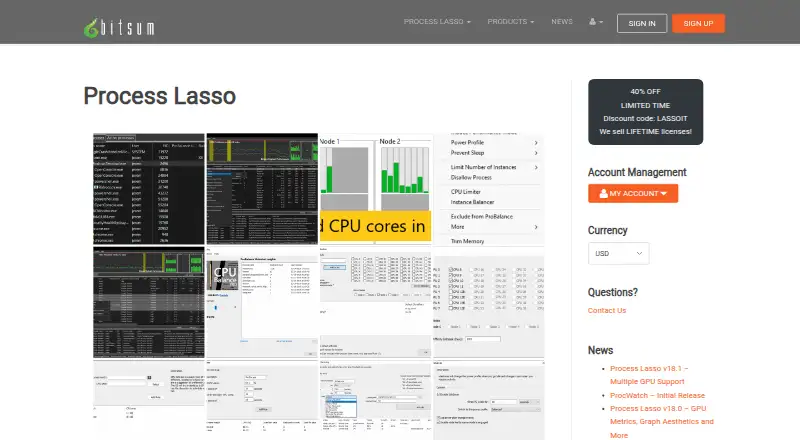
Process Lasso is Windows software for automating process management and tuning how programs use system resources. Its ProBalance feature adjusts running programs’ priorities during high CPU loads to help keep the system responsive. You can save CPU affinities, CPU sets, and priorities so they apply when a process starts, and create rules for those settings, power profiles, or other actions based on thresholds and other criteria. Power plan automation can respond to selected processes or system idle time; Keep Awake can prevent sleep for a chosen period or while selected processes run. Listed algorithms include CPU Limiter, Instance Balancer, and Group Extender. It can also record process launches and other selected system activity. A background service called Process Governor enforces rules and algorithms, with the graphical interface optional. The free plan is available indefinitely for most users, but some features are trial-limited and commercial use requires purchase within 30 days of deployment. Paid plans start at $4.95 a month. Compatibility is listed for Windows 7–11 and Windows Server 2012–2025.
Who it suits
Process Lasso suits Windows users who want automated control over process priorities, CPU settings, or power plans. It also offers options for logging activity and running its background service without the graphical interface.
What it does well
- Adjusts process priorities during high CPU loads.
- Persists CPU affinities, CPU sets, and priorities.
- Automates power plans based on processes or idle time.
- Can log process launches and selected activity.
What to know first
- Windows only.
- Some free-plan features are trial-limited.
- Commercial use requires purchase within 30 days of deployment.
Limits
Most users may use the free plan indefinitely, but some features, including CPU Limiter, Instance Balancer, and power plan automation, are trial-only in Free and available in Pro. Commercial use requires purchase within 30 days of deployment.
Plans
| Plan | Billed and limits | Price |
|---|---|---|
| Single PC Monthly | Recurring subscription; cancel at any time · 1 PC | $4.95 a month |
| Single PC Annual | Recurring subscription; cancel at any time · 1 PC | $24.95 a year |
| Single PC Lifetime | 1 PC | $39.95 a month |
| Entire Home Monthly | Recurring subscription; cancel at any time · 5 PCs | $5.95 a month |
| Entire Home Annual | Recurring subscription; cancel at any time · 5 PCs | $36.95 a year |
| Entire Home Lifetime | 5 PCs | $59.95 a month |
| Process Lasso Free | Most users may use it indefinitely; some features are limited by a trial period; commercial use requires purchase within 30 days of deployment | Free |
| Process Lasso Pro Single PC Annual | discounted from $24.95 annually · 1 PC · home or commercial use | $14.97 a year |
The first 8 of 19 plans, as bitsum.com lists them, read 21 Sept 2026. The maker's own page has the final word. Every plan
Getting started
- Visit the Process Lasso website.
- Download the version for a supported Windows system.
- Start with the free plan or use the 30-day trial.
- Choose a Pro plan for paid features and the PC coverage that fits your use.
Verdict
Process Lasso combines process controls, resource-related rules, and power management in a Windows utility. The free plan has limits, while listed paid plans start at $4.95 a month.
Questions
Is Process Lasso free?
Yes. The free plan is listed as free and can be used indefinitely by most users, though some features are trial-limited.
How much does Process Lasso Pro cost?
The Single PC Monthly plan is $4.95 a month. Other listed plan prices vary, including a Single PC Annual plan at $24.95 a year and an Entire Home Annual plan at $36.95 a year.
Which operating systems does Process Lasso support?
Compatibility is listed for Windows 7–11 and Windows Server 2012–2025.
What does the free plan limit?
Some features, including CPU Limiter, Instance Balancer, and power plan automation, are trial-only in Free and available in Pro. Commercial use requires purchase within 30 days of deployment.
Can Process Lasso run without its graphical interface?
Yes. The Process Governor background service enforces algorithms and process rules, and the graphical interface is optional.
Does Process Lasso have a trial?
Yes. A 30-day trial is listed.
Facts from Process Lasso's own pages
- Activity logging
- Process Lasso can log and audit process launches and other selected system activity. · bitsum.com, 30 Sept 2026
- Algorithms
- Listed algorithms include CPU Limiter, Instance Balancer, and Group Extender. · bitsum.com, 30 Sept 2026
- API and extensibility
- The documented extensibility surface is command-line installation, imported INI rules, executable deployment and external-command Watchdog actions; no public SDK is listed. · bitsum.com, 14 Oct 2026
- Automation
- Rules can automate CPU affinities, priorities, power profiles, and actions based on process thresholds or other criteria. · bitsum.com, 30 Sept 2026
- Background engine
- The Process Governor enforces algorithms and rules as a stand-alone background service while the graphical interface remains optional. · bitsum.com, 14 Oct 2026
- Background service
- A stand-alone background service called Process Governor enforces algorithms and process rules, and the graphical interface is optional. · bitsum.com, 30 Sept 2026
- Changelog news
- Version 18.4.0 was released October 1, 2026 with an ARM64 build and fixes; the revision page also lists multi-GPU support, GPU metrics and consolidated rules as recent work. · bitsum.com, 14 Oct 2026
- Company
- Bitsum LLC, doing business as Bitsum Technologies, is a Tennessee software company founded in 2002 by Jeremy Collake and based in Talbott, Tennessee. · cn.bitsum.com, 14 Oct 2026
- Configuration profiles
- Separate configuration profiles store their own prolasso.ini files and can be switched from the File menu. · bitsum.com, 14 Oct 2026
- CPU affinity automation
- Persistent CPU-affinity rules can assign selected applications to chosen processor cores whenever they start. · bitsum.com, 14 Oct 2026
- CPU Limiter
- CPU Limiter rules trigger after a process exceeds a selected CPU threshold and temporarily remove a specified number of cores from its affinity. · bitsum.com, 14 Oct 2026
- CPU Sets
- The product supports persistent CPU Sets, described as a softer preferred-core mechanism than hard affinity. · bitsum.com, 14 Oct 2026
- Documentation depth
- The public manual covers algorithms, interface columns, deployment, configuration-file keys and detailed rule syntax with thresholds and actions. · bitsum.com, 14 Oct 2026
- Efficiency Mode
- Process Lasso can control and persist Windows 11 Efficiency Mode on a per-process basis. · bitsum.com, 14 Oct 2026
- Enterprise deployment
- Administrators can run processgovernor.exe as a service, deploy silently, import an INI configuration and use binaries from a network share. · bitsum.com, 14 Oct 2026
- Free and Pro limits
- The feature comparison lists CPU Limiter, Instance Balancer, power plan automation, Process Watchdog, and several other features as trial-only in Free and available in Pro. · bitsum.com, 30 Sept 2026
- Free plan
- Yes · bitsum.com, 21 Sept 2026
- Headquarters
- Talbott, Tennessee, United States · bitsum.com, 28 Sept 2026
- Instance Balancer
- Instance Balancer distributes matching process instances across cores or NUMA nodes and supports regular-expression matching. · bitsum.com, 14 Oct 2026
- License model
- The EULA allows indefinite Free Edition use but disables some advanced features after a 30-day commercial trial and offers paid perpetual or subscription licenses. · bitsum.com, 14 Oct 2026
- Limit: advanced features paywall
- The Free-versus-Pro comparison says CPU Limiter, Watchdog, Hard Throttling, Instance Balancer, Keep Running and several automation features become trial-only or Pro features. · cn.bitsum.com, 14 Oct 2026
- Limit: AlternativeTo expertise
- An AlternativeTo reviewer said the product works as promised but is not magic and requires know-how. · alternativeto.net, 14 Oct 2026
- Limit: SnapFiles learning curve
- SnapFiles reviewers repeatedly described the software as complex, requiring system knowledge and having a steep learning curve. · snapfiles.com, 14 Oct 2026
- Limit: Windows-only
- AlternativeTo lists Windows as the only supported platform, excluding macOS, Linux, iOS and Android. · alternativeto.net, 14 Oct 2026
Where Process Lasso stands on Freedom251
- PC optimisers#9 of 104
- PC Optimization Software#13 of 97
- Process Monitoring Software#18 of 26