Freedom251 › Meeting Management Software

MeetingNotes by SmartKit
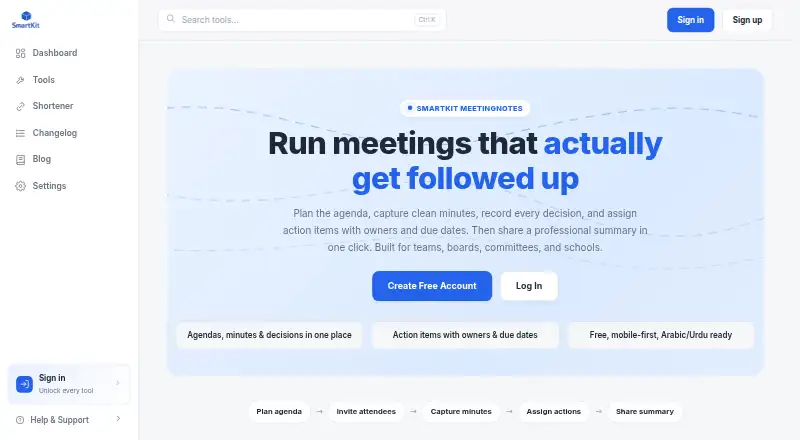
What MeetingNotes by SmartKit is
MeetingNotes by SmartKit helps teams plan agendas, capture minutes and decisions, assign follow-up work, and share meeting summaries. Agendas can divide a meeting into timed topics with owners, and discussion notes can be attached to each agenda item. Its decision register records who made a decision and when. Action items can include an owner and due date, with open items carried into the next meeting automatically. Users can track invitees, attendees, and apologies, then share a summary or create a printable PDF. The tool supports Arabic and Urdu text with right-to-left layouts and Unicode-safe rendering. SmartKit presents it for teams, boards, committees, schools, standups, and recurring reviews. The product is described as mobile-first and available through SmartKit; its page does not identify a separate downloadable app. SmartKit says meeting content remains in the creator’s workspace and is shared through that workspace’s selected access controls. The free plan is listed as free, with no specific usage limits stated.
Who it suits
MeetingNotes suits groups that run structured or recurring meetings and need to track decisions and assigned follow-up. It is presented for teams, boards, committees, schools, standups, and reviews.
What it does well
- Agendas support timed topics and named owners.
- Decisions record who made them and when.
- Open action items can carry to the next meeting.
- Supports Arabic and Urdu right-to-left text.
- Summaries can be shared or printed as PDFs.
What to know first
- No separate downloadable app is identified.
- No specific usage limits are stated for the free plan.
Limits
The Free plan is listed as free, and the page states no specific usage limits. No other plan limits are provided in the listed facts.
Plans
| Plan | Billed and limits | Price |
|---|---|---|
| Free | Free to use; page states no specific usage limits | Free |
As smartkit.cc lists them, read 9 Oct 2026. The maker's own page has the final word.
Getting started
- Open https://smartkit.cc/meetingnotes.
- Use MeetingNotes through SmartKit on Android, iOS or the web.
- Choose the Free plan, listed as free.
- Create an agenda with time-boxed topics and owners.
- Capture minutes, decisions, attendance and action items during the meeting.
- Share the meeting summary or create a printable PDF.
MeetingNotes by SmartKit brings agendas, minutes, decisions, attendance, and follow-up work into a shared meeting record. It is best suited to teams and committees that want a repeatable process without paying for the core tool. Its strength is the continuity from agenda to carried-forward action items; its main trade-off is that mobile access comes through SmartKit rather than a separately identified downloadable app.
Overview
MeetingNotes treats a meeting as more than a set of notes: teams can plan topics, capture discussion against them, record decisions, and assign work with owners and due dates. That structure is useful for recurring reviews, boards, schools, and standups where it matters to know what was agreed and who is responsible afterward.
Open action items can carry into the next meeting automatically, which helps prevent follow-up from disappearing between sessions. SmartKit says content remains in the creator’s workspace and is shared through that workspace’s selected access controls. That provides a clear sharing model, though teams should ensure their workspace permissions match the sensitivity of their meetings.
Key features
From agenda to follow-up
Agendas can give each topic a time box and an owner. During the meeting, notes can be attached to individual agenda items, while the decision register records who made a decision and when. Action items also take an owner and due date. Together, these features make the record more useful than free-form minutes when a team needs to revisit both the reasoning and the resulting work.
Attendance tracking distinguishes invitees, attendees, and apologies. Agenda templates and recurring-meeting support suit groups that follow a regular format; teams with highly variable meetings may benefit less from that consistency.
Sharing and language support
Meeting summaries can be shared in a professional format and made into printable PDFs, useful when participants need a durable record beyond the workspace. Arabic and Urdu text are supported with right-to-left layouts and Unicode-safe rendering, an important practical advantage for teams working in those languages.
Pricing
The Free plan costs free. It includes agenda templates, decision tracking, and recurring meetings, and the plan states no specific usage limits. That makes it an unusually straightforward starting point for a team that wants structured records without budgeting for a subscription. There is no published paid tier to compare, so teams seeking a different support or capacity arrangement should confirm whether the free offering fits their needs before standardizing on it.
Platforms
MeetingNotes is available on Android, iOS, and the web. It is described as mobile-first and accessed through SmartKit; a separate downloadable MeetingNotes app is not identified. SmartKit provides a Help & Support link in its site navigation.
Who it's for
Choose MeetingNotes if your group needs a free, organized record of recurring discussions, decisions, attendance, and assigned follow-up. Its agenda-linked minutes and automatic carry-forward are especially relevant to committees, boards, schools, and teams that revisit open work. It is less compelling for buyers who specifically require a standalone mobile app or a range of paid plans to assess.
Pros and cons
- Pros: Open action items can carry forward automatically, keeping follow-up connected to the next meeting.
- Pros: Owners and time boxes for agenda topics, plus notes tied to those topics, give meetings a clear structure.
- Pros: Arabic and Urdu right-to-left support serves multilingual teams without compromising text layout.
- Cons: Mobile access is through SmartKit, not a separately identified downloadable app.
- Cons: The free plan has no stated usage caps, but there is no published paid-plan choice for teams that need to compare service levels or capacity options.
Alternatives
Fellow is worth considering if you want a freemium option with a free trial and broader platform coverage, including desktop apps and browser extensions; its free plan is limited to five AI notes per user for life.
AgreeDo may suit teams that prefer a freemium service with a stated Basic allowance of four meetings per month, three participants per meeting, and one attachment per meeting.
Decisions offers a free plan with 100 AI credits per month and a paid Basic plan at $8 a month, billed annually per user, for teams comparing defined AI allowances and paid pricing.
GovClerk Minutes is a better fit when a group needs a clearly bounded free allowance that includes one meeting of up to 240 minutes, one seat, audio upload and recording, and Word and PDF export.
Geekbot is an alternative for teams seeking a web-based or API-accessible freemium service centered on standups.
Parabol is worth a look if open-source code and self-hosting are priorities; it is web-based and self-hostable.
4Minitz is another free, open-source choice for teams prepared to self-host.
Magic Minutes is a web-based alternative with a free plan for meeting attendees to view and download minutes, upload reports, access meeting packs, and comment on or close actions.
Browse more options in Meeting Management Software and Meeting Notes Software.
Verdict
MeetingNotes is a strong fit for teams that want free, structured minutes with decisions and follow-up built into the same recurring workflow. Its best reason to choose it is the connection between agenda topics and actions that carry into the next meeting. Look elsewhere if a standalone downloadable mobile app or more defined plan choices are essential.
Verdict
MeetingNotes provides a structured way to capture meeting discussion, decisions, attendance, and follow-up work. Its mobile-first access is through SmartKit rather than a separately identified downloadable app.
Questions
How much does MeetingNotes by SmartKit cost?
Its Free plan is listed as free.
Are there usage limits on the free plan?
The page states no specific usage limits for the Free plan.
Which platforms can I use MeetingNotes on?
Android, iOS and web are listed. The product is described as mobile-first and available through SmartKit.
Is there a separate MeetingNotes app to download?
The product page does not identify a separate downloadable app.
Can MeetingNotes track decisions and follow-up work?
Yes. It records decisions with who made them and when, and action items can have owners and due dates. Open items can carry forward to the next meeting automatically.
How does MeetingNotes handle meeting content?
SmartKit says content stays in the creator’s workspace and is shared through that workspace’s selected access controls.
Facts from MeetingNotes by SmartKit's own pages
- Action-item tracking
- Yes · smartkit.cc, 20 Sept 2026
- Action tracking
- Action items can have an owner and due date, and open items can carry forward to the next meeting automatically. · smartkit.cc, 9 Oct 2026
- Attendance
- Users can track invitees, attendees, and apologies. · smartkit.cc, 9 Oct 2026
- Decision register
- The tool records decisions with who made them and when. · smartkit.cc, 9 Oct 2026
- Format
- MeetingNotes is described as mobile-first and available through SmartKit; the page does not identify a separate downloadable app. · smartkit.cc, 9 Oct 2026
- Free plan
- Yes · smartkit.cc, 20 Sept 2026
- Intended users
- The product is presented for teams, boards, committees, schools, standups, and recurring reviews. · smartkit.cc, 9 Oct 2026
- Languages
- MeetingNotes supports Arabic and Urdu text with right-to-left layouts and Unicode-safe rendering. · smartkit.cc, 9 Oct 2026
- Minutes
- Discussion notes can be captured against agenda items during a meeting. · smartkit.cc, 9 Oct 2026
- Privacy
- SmartKit says meeting content stays in the creator's workspace and is shared only through that workspace's selected access controls. · smartkit.cc, 9 Oct 2026
- Purpose
- MeetingNotes helps teams plan agendas, capture minutes, record decisions, assign action items, and share meeting summaries. · smartkit.cc, 9 Oct 2026
- Sharing
- Users can share a professional meeting summary and create a printable PDF. · smartkit.cc, 9 Oct 2026
- Structured agendas
- Users can create agendas with time-boxed topics and owners. · smartkit.cc, 9 Oct 2026
- Support
- SmartKit provides a Help & Support link in its site navigation. · smartkit.cc, 9 Oct 2026
Where MeetingNotes by SmartKit stands on Freedom251
- Meeting Management Software#10 of 36
- Meeting Notes Software#46 of 112