Freedom251 › Kiosk Management Software
KioskSide
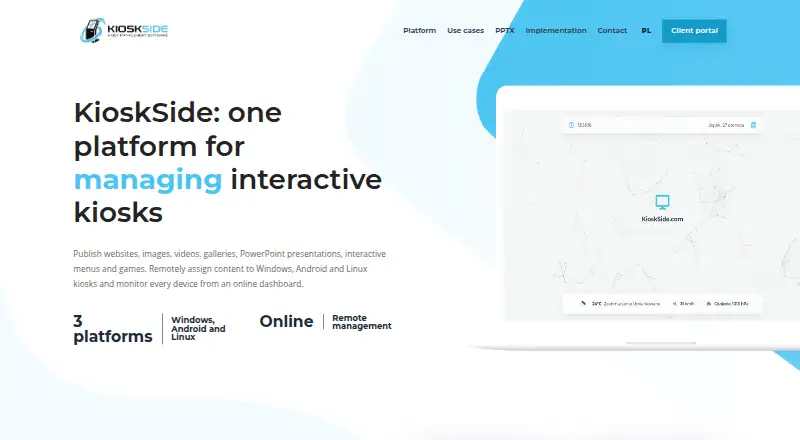
What KioskSide is
KioskSide pairs kiosk applications with a cloud dashboard for publishing content, managing settings, and monitoring devices. Administrators can upload assets and assign them to individual kiosks or share a view across a fleet, with updates delivered to connected devices. Supported content includes websites, HTML ZIP packages, images, galleries, video, interactive PowerPoint presentations, button menus, and touch games. Its applications support Windows, Android, and Linux terminals. The Android app uses an embedded browser engine and does not require Google Chrome. Controls include autostart, restricted navigation, trusted domains, scheduled refresh, remote commands, browser and app lockdown, remote reboot, and remote configuration; what is available varies by operating system, permissions, and hardware. The dashboard shows device connectivity, while supported Linux devices can report system and hardware information. Supported applications may also provide diagnostics, selected service commands, and authorised screen previews. Security options include trusted-domain restrictions, PIN-protected settings or exit actions, and role-based operator permissions. Compatibility depends on the device model, operating system, hardware, drivers, and content, so the maker recommends testing the target device before rollout. Pricing is on request.
Who it suits
KioskSide is presented for government and public institutions, schools, showrooms, retail, hotels, offices, and exhibitions. It may suit operators who need to publish content and manage multiple kiosks remotely.
What it does well
- Publish content to selected kiosks from a dashboard.
- Supports Windows, Android, and Linux terminals.
- Offers browser and app lockdown controls.
- Dashboard shows device connectivity.
- Supported Linux devices can report hardware information.
What to know first
- Pricing is available on request.
- Compatibility depends on device, drivers, and content.
- Some PowerPoint effects may need adjustment.
Limits
Compatibility depends on the device model, operating system version, hardware, drivers, and content. Some advanced PowerPoint effects may need adjustment, and available controls and diagnostics vary by platform version, permissions, and hardware.
Getting started
- Visit the KioskSide website.
- Contact the maker with your device count, operating system, model, resolution, and content.
- Discuss a device test or implementation scope with the company.
- Install the kiosk application on supported Windows, Android, or Linux terminals.
- Upload assets to the dashboard and assign content to selected kiosks or a shared fleet view.
KioskSide is a cloud-managed kiosk platform that combines content publishing with controls for connected terminals. It suits organizations operating displays or interactive stations across multiple sites, especially where Linux monitoring and remote administration matter. The main qualification is hardware dependence: capabilities vary by operating system, permissions, drivers and content, so deployment should be scoped around the exact terminal.
Overview
KioskSide brings kiosk applications and an online dashboard into one operating model. Administrators upload assets once, assign them to individual devices or a shared fleet view, and push updates without copying files at each location. That approach fits public institutions, schools, showrooms, retail and hospitality venues, offices, and exhibitions that need centrally managed screens.
It is more than a content player. The service combines publishing, kiosk lockdown, device status and remote support, making it relevant when a distributed estate needs ongoing administration rather than a single unattended display. Its cloud deployment also means the practical value depends on reliable connectivity and on the supported application running correctly on each target device.
Key features
Content support covers websites, HTML ZIP packages, images, galleries, video, interactive PowerPoint presentations, button menus and touch games. This range accommodates informational signage, guided interfaces and interactive exhibits. PowerPoint conversion is not identical to desktop PowerPoint, however, so presentations using advanced effects may need adjustment before they are suitable for public playback.
Remote publishing lets operators select content per kiosk or distribute one view across a fleet. Dashboard updates are delivered to connected kiosks, while the dashboard shows each device's online status. This reduces site visits and gives operators a way to identify disconnected terminals before an on-site complaint.
Kiosk controls include autostart, controlled navigation, trusted-domain lists, scheduled refresh and remote commands. Browser and app lockdown, remote configuration and remote reboot are also supported. These are useful for preventing users from leaving the intended experience and for recovering or changing devices centrally, but the exact control set varies with operating system, permissions and hardware.
Security guidance combines trusted-domain restrictions with PIN-protected maintenance or exit actions, restricted accounts and role-based operator permissions. The maker also points to operating-system and physical-security measures, so software controls should be part of a broader kiosk hardening plan rather than treated as a complete security boundary.
Supported applications can provide remote screen preview, diagnostics and selected service commands when platform version and device permissions allow it. Linux hardware with support for telemetry can report load, memory, temperatures, storage health, network information and service status. The Linux architecture is described as ready for potential printer and sensor integrations, but each peripheral workflow still requires driver and process testing.
Pricing
KioskSide uses paid, custom pricing, with quotes requested from the company. Prospective customers are asked to provide device count, operating system, model, resolution and content so a device test or implementation scope can be proposed. This sales-led approach is suited to estates that need deployment guidance, but it gives smaller buyers no published entry price for quick self-service comparison.
Platforms
KioskSide lists Android, Linux, web and Windows availability, with kiosk applications stated for Windows, Android and Linux terminals. The Android application uses an embedded browser engine and does not require Google Chrome. Compatibility still depends on the exact model, operating-system version, hardware, drivers and content; testing the target device before rollout is recommended.
Who it's for
Choose KioskSide when a government body, school, retailer, hotel, showroom, office or exhibition operator needs centralized publishing and remote kiosk administration across supported hardware. It is particularly relevant for teams that value Linux telemetry, fleet-wide content assignment and remote recovery controls. A single low-complexity kiosk, or an estate built from unverified hardware, is a weaker fit because pricing is custom and compatibility work is part of the rollout conversation.
Pros and cons
Pros
- Broad content support: websites, media, HTML packages, PowerPoint, menus and touch games cover both signage and interactive use cases.
- Centralized fleet operations: assign views, publish updates, configure devices and reboot terminals remotely instead of servicing each location manually.
- Useful Linux visibility: supported devices can expose hardware and service telemetry alongside connectivity status.
- Layered kiosk protection: browser and app lockdown, trusted domains, PIN actions and operator permissions help restrict misuse.
Cons
- Custom pricing: buyers must request a quote, making budget comparison difficult without sharing project and device details.
- Compatibility is conditional: controls, diagnostics and telemetry depend on platform version, permissions, drivers and hardware.
- Presentation caveat: advanced PowerPoint effects may not survive browser conversion unchanged.
- Peripheral work is not turnkey: printer and sensor use requires driver and workflow testing.
Alternatives
For a broader category search, see Kiosk Management Software.
Kiosk is a free, open-source PDF reader for Android, iOS, Linux, macOS, self-hosted and web environments, so it fits readers seeking a no-cost reader rather than a managed fleet platform. SureAsset is a free asset-lifecycle tool with hardware and software license tracking plus API automation, better when inventory management is the priority. KioskCore offers a free tier for up to two devices with seven-day metric history and limited captures and alerts, making it a smaller-estate starting point. OpenKiosk is a free MPL-licensed open-source option for Linux, macOS and Windows. Libki is a free open-source kiosk management system for Linux, self-hosted, web and Windows. Atashi Kiosk Management Platform provides paid custom deployments for API, web and Windows environments. Kiosker offers Android and iOS subscriptions with a seven-day trial. Moki is a paid Android, iOS and web MDM with per-device billing, API limits and account-user limits.
Verdict
KioskSide is a strong choice for organizations that need one cloud workflow for varied kiosk content, lockdown, fleet publishing and remote device oversight. Its Linux telemetry and operational controls strengthen the case for larger or distributed estates. Look elsewhere if you need transparent pricing, guaranteed uniform behavior across mixed hardware, or a simple free kiosk tool; KioskSide's value depends on a successful target-device test and a project-specific quote.
Verdict
KioskSide combines content publishing with remote kiosk controls and device monitoring. Check compatibility on the exact target hardware, as features vary by platform and setup.
Questions
How much does KioskSide cost?
Pricing is on request. The maker asks prospective customers to provide device and project details to discuss a test or implementation proposal.
Which operating systems are supported?
KioskSide states that its kiosk applications support Windows, Android, and Linux terminals.
What content can I publish?
Supported formats include websites, HTML ZIP packages, images, galleries, video, interactive PowerPoint presentations, button menus, and touch games.
Does KioskSide have a cloud dashboard?
Yes. The dashboard is used to publish content, manage settings, and monitor devices. Updates are delivered to connected kiosks.
Can it monitor kiosk devices remotely?
The dashboard shows device connectivity. Supported Linux devices can report system and hardware telemetry; supported applications may also provide diagnostics, selected service commands, and authorised screen previews.
Who makes KioskSide?
The site identifies IQ CORPORATION P.S.A. as the controller of personal data submitted through its enquiry form.
Facts from KioskSide's own pages
- Android requirement
- The Android app uses an embedded browser engine and does not require Google Chrome to be installed. · kioskside.com, 3 Oct 2026
- Company
- The site identifies IQ CORPORATION P.S.A. as the controller of personal data submitted through its enquiry form. · kioskside.com, 2 Oct 2026
- Compatibility limit
- Compatibility depends on the device model, operating-system version, hardware, drivers, and content, and the maker recommends testing on the target device. · kioskside.com, 2 Oct 2026
- Content formats
- It supports websites, HTML ZIP projects, images, galleries, video, PowerPoint presentations converted to interactive HTML, menus and touch games. · kioskside.com, 3 Oct 2026
- Device management
- Kiosks can be configured individually or assigned a shared view, and connected devices show their online status in the dashboard. · kioskside.com, 3 Oct 2026
- Hardware compatibility
- Compatibility depends on the operating system, hardware, drivers and content, so KioskSide recommends testing the exact device before rollout. · kioskside.com, 3 Oct 2026
- Integrations
- The Linux page describes a peripheral-ready architecture for potential printer and sensor integrations, subject to driver and workflow testing. · kioskside.com, 2 Oct 2026
- Intended users
- KioskSide describes use cases including government and public institutions, schools, showrooms, retail, hotels, offices and exhibitions. · kioskside.com, 3 Oct 2026
- Kiosk controls
- Features include autostart, controlled navigation, trusted domains, scheduled refresh, and remote commands, with controls varying by operating system, permissions, and hardware. · kioskside.com, 2 Oct 2026
- Linux monitoring
- Supported Linux hardware can report system load, memory, temperatures, storage health, network information and service status. · kioskside.com, 3 Oct 2026
- Maker
- The site identifies IQ CORPORATION P.S.A. as the controller of personal data submitted through its enquiry form. · kioskside.com, 3 Oct 2026
- Monitoring
- The dashboard shows device connectivity, and supported Linux devices can report system and hardware telemetry such as temperatures, storage, and network quality. · kioskside.com, 2 Oct 2026
- Platforms
- KioskSide supports Windows, Android, and Linux terminals. · kioskside.com, 2 Oct 2026
- PowerPoint limitation
- Some advanced PowerPoint effects may need adjustment because browser conversion does not necessarily reproduce desktop PowerPoint exactly. · kioskside.com, 3 Oct 2026
- Product
- KioskSide combines kiosk applications with an online dashboard for publishing content, managing settings and monitoring devices. · kioskside.com, 3 Oct 2026
- Remote diagnostics
- Supported applications can accept remote commands, report diagnostic data and provide an authorised screen preview, depending on platform version and device permissions. · kioskside.com, 3 Oct 2026
- Remote management
- Administrators can assign content per device or share a view across a fleet, with dashboard updates delivered to connected kiosks. · kioskside.com, 2 Oct 2026
- Remote publishing
- Users can upload assets to a dashboard and assign them to selected kiosks without manually copying files at each location. · kioskside.com, 3 Oct 2026
- Remote support
- Supported applications can provide remote screen preview, diagnostics, and selected service commands, subject to platform version and device permissions. · kioskside.com, 2 Oct 2026
- Security
- The security guidance recommends trusted-domain lists, PIN-protected maintenance actions, restricted accounts, and operating-system and physical security measures. · kioskside.com, 2 Oct 2026
- Security controls
- Kiosk protection includes trusted-domain restrictions, PIN-protected settings or exit actions, and role-based operator permissions. · kioskside.com, 3 Oct 2026
- Support and deployment
- The company asks prospective customers to provide device count, operating system, model, resolution and content so it can recommend a device test or implementation scope. · kioskside.com, 3 Oct 2026
- Support and sales
- The maker asks prospective customers to provide device and project details to discuss a test or implementation proposal; it lists [email protected]. · kioskside.com, 2 Oct 2026
- Supported operating systems
- KioskSide states that its kiosk applications support Windows, Android and Linux terminals. · kioskside.com, 3 Oct 2026
Where KioskSide stands on Freedom251
- Kiosk Management Software#23 of 27