Freedom251 › Kiosk Management Software

KioskCore
What KioskCore is
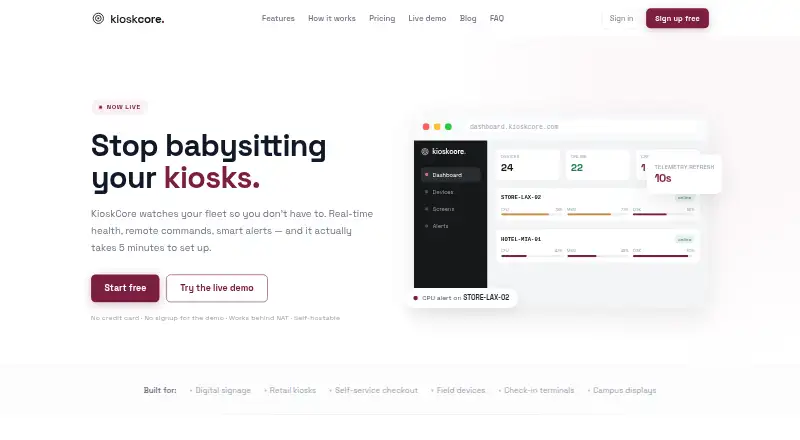
KioskCore monitors kiosk fleets through a dashboard with real-time device health information, remote commands, and alerts. It charts CPU, memory, disk, and network metrics for each device, with history determined by the plan. Operators can reboot devices, restart apps, upload logs, and schedule commands from a browser. Alerts can go to email, Slack, webhooks, or mobile push, with configurable thresholds and optional automatic restarts. Screen captures can be requested or scheduled, and a fleet screen wall brings kiosk displays into one view. Commands and telemetry are queued locally during connectivity loss and sync when a connection returns. The iOS and Android app shows device status, alerts, and captures, and supports notifications and remote commands. The agent connects outbound over HTTPS using token authentication; screen capture is off by default, and the site says keystrokes are not logged. The .NET backend can be self-hosted behind an operator’s reverse proxy or tunnel. The Free plan costs nothing and covers up to two devices, seven-day metric history, and on-demand captures retained for 24 hours.
Who it suits
It suits operators responsible for kiosk fleets who need remote monitoring and commands. Self-hosting is available for operators who want the backend behind their own reverse proxy or tunnel.
What it does well
- Tracks CPU, memory, disk, and network metrics
- Remote commands include rebooting and app restarts
- Alerts support email, Slack, webhooks, and mobile push
- Offline commands and telemetry sync after reconnection
What to know first
- Free plan covers up to two devices
- Free plan metric history lasts seven days
- Free on-demand screen captures have 24-hour retention
Limits
The Free plan covers up to two devices, with seven-day metric history, on-demand screen captures retained for 24 hours, and three email alerts per device per day. Starter is listed at €4 a month, billed annually at €48/device/yr, and includes 30-day metric history and scheduled captures retained for 14 days.
Plans
| Plan | Billed and limits | Price |
|---|---|---|
| Free | Up to 2 devices · 7-day metric history · on-demand screen capture (24h retention) · 3 email alerts/device/day · community support | Free |
| Business | billed annually · €120/device/yr · 1-year metric history · 90-day screenshot retention · 10 GB images/device · audit log export · priority support | €10 a month |
| Starter | billed annually · €48/device/yr · 30-day metric history · scheduled capture (14-day retention) · 1 GB images/device · unlimited email, Slack & webhook alerts · mobile app + push notifications · email support | €4 a month |
| Pro | billed annually · €84/device/yr · 90-day metric history · 30-day screenshot retention · 3 GB images/device · wrong-app detection · fleet screen wall · uptime CSV reports · priority email support | €7 a month |
| Enterprise | Volume pricing from €3/device · custom retention and image storage · SSO/SAML and on-premise option (roadmap) · dedicated support and SLA | On request |
As kioskcore.com lists them, read 30 Sept 2026. The maker's own page has the final word.
Getting started
- Open the KioskCore website.
- Choose a plan, including the Free plan if it fits.
- Install the agent on a device.
- Enter the dashboard pairing code to connect it.
- Use the browser dashboard or the iOS or Android app to view and manage devices.
KioskCore is a monitoring and remote-operations tool for kiosk fleets, best suited to operators who need visibility and intervention rather than lockdown. Its combination of health metrics, alerts, screen views, and queued commands is compelling for distributed devices, but it will not restrict kiosk users to approved apps or pages.
Overview
The browser dashboard brings together CPU, memory, disk, and network metrics, with charts and history for each device. Operators can reboot devices, restart apps, upload logs, and schedule commands remotely. That can reduce trips to unattended sites, though KioskCore’s focus is keeping devices observable and manageable, not enforcing how they are used.
Commands and telemetry queue locally when a device loses connectivity and sync after it reconnects. The agent is described as a lightweight Electron process with a SQLite buffer. Connecting a device involves installing the agent and entering a dashboard pairing code; the maker says this takes about five minutes.
Key features
Alerts can be sent by email, Slack, webhook, or mobile push. Operators can set thresholds and enable optional auto-restart, making the system useful both for surfacing trouble and responding to some conditions automatically. Screen captures are available on demand or on a schedule, and a fleet screen wall lets operators view kiosk displays together.
The iOS and Android apps show device status, alerts, and screen captures, send push notifications, and support remote commands. For operators who need to check a fleet away from a desk, that extends the dashboard’s monitoring and control beyond the browser.
Security measures include an outbound HTTPS connection with token authentication. Screen capture is off by default, and the site says KioskCore does not log keystrokes. The .NET backend can be self-hosted behind an operator’s reverse proxy or tunnel, which gives organizations an alternative to relying entirely on a hosted service.
Two important omissions shape the fit: KioskCore has no browser lockdown or app lockdown. It can monitor and manage kiosk devices, but it is not the right choice when the core requirement is preventing users from leaving a designated experience. AI insights, teams and role-based access, OTA updates, a public API, and SSO/SAML are roadmap items, not current capabilities.
Pricing
The Free plan costs nothing and covers up to two devices, seven-day metric history, on-demand screen captures with 24-hour retention, and three email alerts per device per day. Community support is included. It is a practical way to cover a very small fleet, but the device cap and short history limit its usefulness for larger deployments or longer-term diagnosis.
Starter costs €4 a month, billed annually at €48/device/yr. It adds 30-day metric history, scheduled captures with 14-day retention, 1 GB of images per device, unlimited email, Slack, and webhook alerts, the mobile app with push notifications, and email support. It suits operators who need routine captures and broader alerting, but its history and image allocation remain modest.
Pro costs €7 a month, billed annually at €84/device/yr. It extends metric history to 90 days and screenshot retention to 30 days, raises image storage to 3 GB per device, and adds wrong-app detection, the fleet screen wall, uptime CSV reports, and priority email support. This is the stronger fit for teams that need fleet-wide screen visibility and reporting, rather than just basic remote operations.
Business costs €10 a month, billed annually at €120/device/yr. It provides one-year metric history, 90-day screenshot retention, 10 GB of images per device, audit log export, and priority support. Choose it when longer records, more image storage, or exported audit logs justify the higher per-device cost.
Enterprise has custom pricing, with volume pricing from €3/device, custom retention and image storage, dedicated support, and an SLA. SSO/SAML and an on-premise option are described as roadmap items, so they should not be treated as current Enterprise features. The listed per-month plan prices are billed annually; the annual commitment is a material consideration even though the tiers are presented with monthly prices.
Platforms
KioskCore lists Android, iOS, self-hosted, web, and Windows support, with hybrid deployment. The platform coverage field specifically identifies Windows. Remote reboot and remote configuration are supported.
Who it's for
KioskCore is a good match for operators responsible for distributed kiosks who need health telemetry, alerts, remote commands, and screen visibility without visiting each location. The free tier can serve a two-device setup, while paid tiers suit fleets that need longer histories, scheduled captures, more image storage, or stronger support. Organizations requiring browser or app restrictions should choose a kiosk lockdown product instead.
Pros and cons
- Pros: Offline queuing lets commands and telemetry sync after connectivity returns, useful for devices on unreliable networks.
- Pros: Multiple alert channels, configurable thresholds, and optional auto-restart support both notification and response.
- Pros: Self-hosting and screen capture off by default provide deployment and privacy choices for operators.
- Cons: The free plan stops at two devices, with only seven days of metrics and 24-hour capture retention.
- Cons: No browser or app lockdown means it cannot enforce a restricted kiosk experience.
- Cons: The listed monthly prices require annual billing, and several anticipated capabilities, including SSO/SAML and OTA updates, remain on the roadmap.
Alternatives
Kiosk Management Software is the broader category to browse when comparing kiosk tools. Choose SureAsset instead if asset lifecycle management, hardware and software license tracking, and API access and automation are the priorities; its free plan supports Android, macOS, Linux, web, Windows, and iOS.
KioskSide is a paid alternative for Android, Linux, web, and Windows. Moki is worth considering for its paid per-device MDM plan and free trial; its API is limited to 500 calls per hour per account, and accounts allow up to 10 users before additional users cost $15 per user per month.
Kiosker is a freemium Android and iOS option with a free plan and trial; its listed subscriptions are $6.99 a month or $24.99 a year, each with a 7-day free trial. Kiosk is another free option, supporting web, Windows, macOS, iOS, and Android.
Quantem Kiosk Software is a paid alternative with a free trial and coverage across Android, iOS, Linux, macOS, web, and Windows. Trio Kiosk Management is also paid and offers a free trial across those platforms; its Essentials plan starts with 20 devices at $5 a month per device, while Secure is $8 a month. Atashi Kiosk Management Platform is another option for web and Windows.
Verdict
Choose KioskCore if your priority is keeping a kiosk fleet visible and remotely manageable, especially when offline queuing, flexible alerts, and screen monitoring matter. Its free tier makes a small deployment accessible, and higher plans add useful history and retention. Look elsewhere if lockdown is essential, or if your team needs roadmap capabilities such as SSO/SAML today.
Verdict
KioskCore combines fleet health monitoring with remote controls, alerts, and screen captures. Its free tier is limited to two devices, while the listed paid plans provide longer histories and retention.
Questions
Is KioskCore free?
Yes. The Free plan costs nothing and supports up to two devices.
What does the Free plan include?
It includes seven-day metric history, on-demand screen capture with 24-hour retention, three email alerts per device per day, and community support.
What platforms does KioskCore support?
The listed platforms are Android, iOS, self-hosted, web, and Windows.
Can I host KioskCore myself?
Yes. Its .NET backend can be self-hosted behind the operator’s reverse proxy or tunnel.
What does Starter cost?
Starter is €4 a month, billed annually at €48/device/yr.
Does KioskCore lock down browsers or apps?
No. Browser lockdown and app lockdown are both listed as unavailable.
Facts from KioskCore's own pages
- Agent
- The agent is described as a lightweight Electron process with a SQLite buffer. · kioskcore.com, 30 Sept 2026
- Alerts
- Alerts support email, Slack, webhooks, and mobile push, with configurable thresholds and optional auto-restart. · kioskcore.com, 30 Sept 2026
- Mobile app
- The iOS and Android app shows device status, alerts, and screen captures, sends push notifications, and supports remote commands. · kioskcore.com, 30 Sept 2026
- Offline operation
- Commands and telemetry queue locally and sync when connectivity returns. · kioskcore.com, 30 Sept 2026
- Planned features
- AI insights, teams and role-based access, OTA updates, a public API, and SSO/SAML are listed as coming soon or roadmap items. · kioskcore.com, 30 Sept 2026
- Purpose
- KioskCore monitors kiosk fleets with real-time health information, remote commands, and alerts. · kioskcore.com, 30 Sept 2026
- Remote actions
- Operators can reboot devices, restart apps, upload logs, and schedule commands from a browser. · kioskcore.com, 30 Sept 2026
- Screen monitoring
- Operators can capture screens on demand or on a schedule, and use a fleet screen wall to view kiosk displays. · kioskcore.com, 30 Sept 2026
- Security and privacy
- The agent connects outbound over HTTPS with token authentication; screen capture is off by default, and the site says it does not log keystrokes. · kioskcore.com, 30 Sept 2026
- Self-hosting
- The .NET backend can be self-hosted behind the operator’s own reverse proxy or tunnel. · kioskcore.com, 30 Sept 2026
- Setup
- The maker says a device can be connected by installing the agent and entering a dashboard pairing code, with setup taking about five minutes. · kioskcore.com, 30 Sept 2026
- Support
- The Free plan includes community support, Starter includes email support, and higher tiers list priority or dedicated support. · kioskcore.com, 30 Sept 2026
- Telemetry
- It displays CPU, memory, disk, and network metrics with per-device charts and history. · kioskcore.com, 30 Sept 2026
Where KioskCore stands on Freedom251
- Kiosk Management Software#2 of 27