Freedom251 › Android Kiosk Software

SignMDM
What SignMDM is
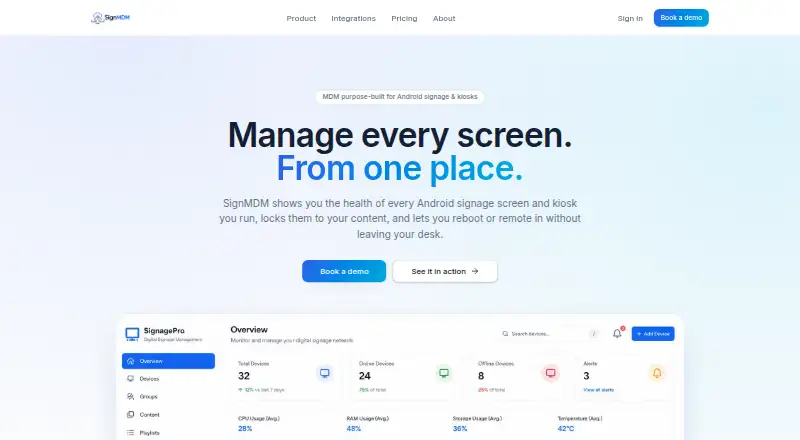
SignMDM is a web dashboard for managing Android digital-signage screens and touchscreen or ticketing kiosks. It gives operators device status, kiosk controls, remote support, and app deployment tools in one fleet view. For each device, it reports CPU, RAM, storage, temperature, battery, network, signage app version, and last-seen time. It flags storage above 90%, temperature above 60 °C, high CPU, and a signage app that is not running.
Kiosk controls can keep a device in one app with LockTask, hide the status and navigation bars, disable safe mode and factory reset, lock orientation, and allow exit by PIN or remotely. Operators can reboot devices, restart the signage app, capture screenshots, and use live remote view and control. App management supports silent installation, version enforcement, and staged OTA rollout from a canary device through groups to the full fleet.
SignMDM supports Android 7 through 14, rooted Rockchip and MediaTek players, and no-root reboot for MediaTek/MOKA (TCL) and ViewSonic commercial panels. Panel-maker reboot APIs are live. Pricing is quoted per screen, with volume pricing from 50 devices; each estate needs a short call because self-serve signup is unavailable. The maker offers a 30-minute walkthrough and onboarding help for large estates.
Who it suits
SignMDM suits digital-signage and kiosk operators who manage Android screens across retail, hospitality, transport, healthcare, or event sites. It may also fit teams that need remote device support and staged app rollouts across a fleet.
What it does well
- Reports CPU, memory, storage, temperature, battery, network, app version, and last-seen time.
- Flags high CPU, storage above 90%, temperature above 60 °C, and stopped signage apps.
- Offers single-app kiosk lockdown and PIN or remote exit.
- Supports remote reboot, screenshots, and live view and control.
- Stages OTA rollouts from a canary device through groups to the fleet.
What to know first
- Pricing requires a per-screen quote, and self-serve signup is unavailable.
- Volume pricing starts at 50 devices.
- Odoo tickets, outbound webhooks, and a REST API are roadmap items.
- Role-based access and multi-user accounts are not yet shipped.
Plans
| Plan | Billed and limits | Price |
|---|---|---|
| Per-screen quote | Quoted per device; annual commitments are cheaper per screen. · Volume pricing from 50 devices upwards · Hardware mix, number of sites, remote support, and onboarding affect the quote | On request |
As signmdm.com lists them, read 8 Oct 2026. The maker's own page has the final word.
Getting started
- Visit the SignMDM website.
- Arrange the required short call to discuss your estate and per-screen quote.
- Use the offered 30-minute walkthrough to get oriented.
- Discuss enrollment help and profile setup if you manage a large estate.
- Enroll supported Android devices and manage them from the web dashboard.
Verdict
Choose SignMDM if you operate Android signage or kiosks and need fleet monitoring, lockdown, remote support, and staged app deployment. Expect to arrange a call for pricing and onboarding; teams that need role-based access or multi-user accounts now should note those capabilities are not yet shipped.
Questions
What does SignMDM cost?
Pricing is quoted per screen and depends on hardware mix, number of sites, remote support, and onboarding. Annual commitments are cheaper per screen, and volume pricing starts at 50 devices.
Can I sign up online?
No. Each estate must have a short call; self-serve signup is not available.
Which devices does SignMDM support?
It supports Android 7 through 14, rooted Rockchip and MediaTek players, and no-root reboot on MediaTek/MOKA (TCL) and ViewSonic commercial panels.
What integrations are available?
Panel-maker APIs for rebooting supported commercial displays are live. Odoo helpdesk tickets, outbound webhooks, and a REST API are roadmap items.
Does it support remote kiosk management?
Yes. Operators can manage kiosk lockdown, reboot devices, restart signage apps, capture screenshots, and use live remote view and control.
Facts from SignMDM's own pages
- App management
- App and APK management includes silent installation, version enforcement, and staged OTA rollout from a canary device to a group and then the fleet. · signmdm.com, 8 Oct 2026
- Compatibility
- SignMDM supports Android 7 through 14, rooted Rockchip and MediaTek players, and MediaTek/MOKA (TCL) and ViewSonic commercial panels for no-root reboot. · signmdm.com, 8 Oct 2026
- Health flags
- Devices flag storage above 90%, temperature above 60 °C, high CPU, or a signage app that is not running. · signmdm.com, 8 Oct 2026
- Integrations
- Helpdesk tickets through Odoo, outbound webhooks, and a REST API are on the roadmap; panel-maker APIs for rebooting supported commercial displays are already live. · signmdm.com, 8 Oct 2026
- Intended users
- The maker says it built SignMDM for digital-signage and kiosk operators serving retail, hospitality, transport, healthcare, and events across the UK and Ireland. · signmdm.com, 8 Oct 2026
- Kiosk controls
- Kiosk lockdown supports single-app LockTask, hidden status and navigation bars, disabled safe mode and factory reset, orientation lock, and PIN or remote exit. · signmdm.com, 8 Oct 2026
- Pricing and signup
- Pricing is quoted per screen, volume pricing starts at 50 devices, and every estate must have a short call because self-serve signup is not available. · signmdm.com, 8 Oct 2026
- Purpose
- SignMDM manages Android digital-signage screens and touchscreen or ticketing kiosks from a fleet dashboard. · signmdm.com, 8 Oct 2026
- Remote support
- Operators can reboot devices, restart the signage app, capture screenshots, and use live remote view and control. · signmdm.com, 8 Oct 2026
- Security roadmap
- Role-based access, multi-user accounts, and per-device MQTT authentication hardening are listed as not yet shipped. · signmdm.com, 8 Oct 2026
- Support and onboarding
- The maker offers a 30-minute walkthrough and says onboarding support can include enrollment help and profile setup for large estates. · signmdm.com, 8 Oct 2026
- Telemetry
- The dashboard reports CPU, RAM, storage, temperature, battery, network, signage app version, and last-seen timestamps for each device. · signmdm.com, 8 Oct 2026
Where SignMDM stands on Freedom251
- Android Kiosk Software#12 of 17
- Kiosk Management Software#25 of 27