Freedom251 › Nonprofit Program Management Software
Kindora
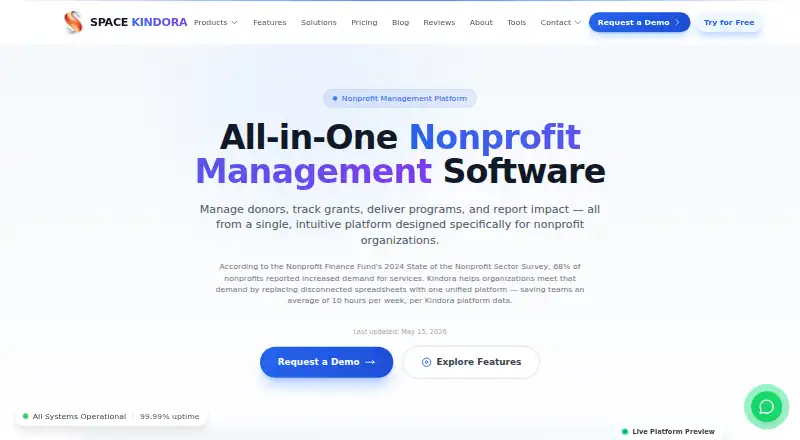
What Kindora is
Kindora brings nonprofit donor management, grant tracking, client programs, finances, and volunteer management into one web platform. Donor profiles can include giving history, contact details, and engagement statistics; users can log donations or send email. Grant tools cover tracking from prospect to award, funder relationships, receipt records, deadline reminders, and cost allocation. For program services, teams can handle client intake and enrollment, service delivery, and outcome tracking. Dashboards and reports include PDF reports, Excel exports, and grant compliance exports. Built-in email supports templates, bulk sending, and communication logs. Starter is free, billed forever free, for up to five team members with core modules and basic exports. Professional has custom pricing and supports up to 25 team members with all modules. Enterprise has custom pricing, unlimited team members, and custom integrations. Kindora's responsive design works on phones and tablets through a modern browser, without an app installation.
Who it suits
Kindora is designed for small to mid-sized nonprofits, including social service agencies, community organizations, youth-serving nonprofits, housing assistance organizations, food banks, and educational nonprofits. It suits teams seeking a shared place for donor, grant, and program records.
What it does well
- Tracks donors, grants, client programs, finances, and volunteers.
- Grant tools include deadline reminders and cost allocation.
- Reports include PDF, Excel, and grant compliance exports.
- Starter is free, billed forever free.
- Responsive design works on phones and tablets in a browser.
What to know first
- Starter is limited to five team members.
- Starter includes core modules only.
- Professional and Enterprise prices are custom, not listed.
Limits
Starter is free forever for up to five team members and includes core modules and basic export options. Professional is limited to 25 team members; Enterprise supports unlimited team members. Professional and Enterprise pricing is custom.
Plans
| Plan | Billed and limits | Price |
|---|---|---|
| Starter | Forever free · Up to 5 team members · Core modules only · Basic export options · Email support · Community resources | Free |
| Professional | Custom · Nonprofit-friendly pricing · Up to 25 team members · All modules · Priority email support | On request |
| Enterprise | Custom · Volume pricing available · Unlimited team members · Custom integrations · Dedicated support manager · Data migration assistance · SLA guarantee · Advanced security options | On request |
As spacenexus.net lists them, read 8 Oct 2026. The maker's own page has the final word.
Getting started
- Visit https://spacenexus.net/kindora.
- Choose the free Starter plan or contact the maker about custom-priced Professional or Enterprise plans.
- Set up access for the team; the maker says setup takes under 30 minutes.
- Open Kindora in a modern browser on a computer, phone, or tablet.
Kindora is a web-based nonprofit management system for organizations coordinating donor records, grants, client services, finances, and volunteers. It suits small and mid-sized nonprofits that want these functions in one place rather than a collection of narrow tools. The free entry tier is useful for a small team, while broader access depends on custom-priced plans.
Overview
Kindora combines fundraising administration, grant oversight, program-service workflows, reporting, and communications. That scope fits social-service agencies, community and youth organizations, housing-assistance providers, food banks, and educational nonprofits particularly well. Organizations needing only one specialist function may find the all-in-one approach broader than necessary.
The platform runs in a modern web browser and uses responsive design on phones and tablets, so staff can work without installing a mobile app. The maker says setup takes under 30 minutes and that accounts can be cancelled at any time. It also states 99.9% uptime across plans and 24/7 support; the level of direct support differs by tier.
Key features
Donor and grant management
Donor profiles hold contact information, giving history, and engagement statistics. Staff can log donations and send email from the same records, giving fundraisers a shared view of constituent activity instead of separate spreadsheets and inboxes.
Grant tools follow opportunities from prospect through award. Funder relationship records, receipt tracking, deadline reminders, and cost allocation connect administrative tasks that are often scattered across files. This is a practical fit for nonprofits managing several grants at once, although it is aimed at grant administration rather than general project management.
Client programs and outcomes
Service organizations can handle client intake, program enrollment, service delivery, and outcome tracking. That makes Kindora relevant to agencies that must connect individual services with program-level results, not just maintain donor accounts.
Reporting and communications
Dashboards support ongoing monitoring, while PDF reports, Excel exports, and grant-compliance exports cover common internal and funder-facing needs. Starter provides only basic export options, so teams with demanding reporting requirements should assess whether a higher tier is necessary.
The built-in email system offers templates, bulk sending, and communication logging.
Access and security
Kindora uses session-based authentication with configurable timeouts and role-based access control. Two-factor authentication infrastructure can be activated on request. Enterprise adds advanced security options, making that tier more relevant to organizations with stricter access or governance requirements.
Pricing
Starter
Starter costs free and is billed Forever free. It supports up to five team members, core modules, basic export options, email support, and community resources. This is a sensible starting point for a very small nonprofit validating whether a shared system fits its workflows. The five-seat ceiling and core-module restriction are significant: growing teams or organizations needing every module will outgrow it.
Professional
Professional uses custom pricing and is billed Custom, with nonprofit-friendly pricing. It supports up to 25 team members, all modules, and priority email support. This is the likely step for a small or mid-sized organization that needs the complete feature set without unlimited staffing, but the eventual cost must be established directly.
Enterprise
Enterprise also uses custom pricing, billed Custom, with volume pricing available. It adds unlimited team members, custom integrations, a dedicated support manager, data-migration assistance, an SLA guarantee, and advanced security options. Those additions target larger nonprofits or complex deployments; smaller organizations may not need the operational overhead they address.
A free trial is offered, alongside the permanently free Starter plan. The published plans do not state a trial duration.
Platforms
Kindora is a web application. Its responsive interface works on phones and tablets through a modern browser, with no separate app installation required.
Who it's for
Choose Kindora when a nonprofit needs donor, grant, program-service, outcome, reporting, and email workflows connected in one system. It is especially well matched to small and mid-sized social-service, community, youth, housing, food-bank, and educational organizations. A team with more than five users should treat Starter as an evaluation tier and budget for Professional or Enterprise.
Pros and cons
- Pro: Donors, grants, client services, outcomes, reporting, and email share one platform, reducing the need to coordinate separate core systems.
- Pro: The Forever-free Starter plan gives teams of up to five a no-cost way to begin.
- Pro: Browser access on phones and tablets avoids a separate mobile installation.
- Pro: Enterprise includes migration help, a support manager, custom integrations, and an SLA for complex organizations.
- Con: Starter is limited to five team members, core modules, and basic exports.
- Con: Professional and Enterprise prices are custom, so budgeting requires a quote.
- Con: The built-in communications focus on email, and named third-party integrations are not provided.
Alternatives
Alleviate ImpactOps OS is worth considering if you want a freemium web tool with a free Starter plan and a published Growth price of $150 a month; its Growth plan covers three programmes and 25 funding alerts monthly.
eSuivi fits teams needing API, self-hosted, or web deployment. Its free Starter allows up to two users and one project with basic reporting; Seed costs $229 a year for up to five users and four projects.
Kinaki is another freemium web option with a free plan and a focus on impact-measurement work.
KoNote suits organizations prepared to run their own Linux, self-hosted, web-based MIT-licensed instance.
FORMNA is a self-hosted, web-based open-source option with all features included for qualifying organizations under its AGPL-3.0 plan.
Salesforce Nonprofit Cloud may appeal to eligible nonprofits that can use the Power of Us Program's 10 free licenses.
OpenSPP SP-MIS is a free platform available across web, self-hosted, API, and desktop environments.
TraxSolutions is a paid alternative available on Android, iOS, and the web.
For a broader comparison, see Nonprofit Program Management Software.
Verdict
Kindora is a strong choice for a small or mid-sized nonprofit that wants donor, grant, service, outcome, reporting, and email work together in a single browser-based system. Its permanent free tier lowers the barrier to adoption, and Professional provides the full module set when a team grows. Look elsewhere if you need a clearly published paid price, a narrowly focused tool, or integrations beyond the custom options reserved for Enterprise.
Verdict
Kindora brings several nonprofit management tasks together, with reports, built-in email, and mobile browser access. The free Starter plan is limited to five team members and core modules; broader plans use custom pricing.
Questions
Does Kindora have a free plan?
Yes. Starter is free, billed forever free, for up to five team members.
What do the paid plans cost?
Professional and Enterprise have custom pricing. The maker describes Professional pricing as nonprofit-friendly and says volume pricing is available for Enterprise.
What platforms can I use?
Kindora is web-based and has responsive design for phones and tablets through a modern browser. No app installation is required.
Does Kindora offer a free trial?
Yes, a free trial is listed.
Does Kindora integrate with other services?
Enterprise includes custom integrations. The pricing page does not name specific third-party integrations.
What support and security options are listed?
Starter includes email support and Professional includes priority email support; Enterprise has a dedicated support manager. Kindora lists session-based authentication, configurable timeouts, and role-based access control, with two-factor authentication infrastructure available on request.
Facts from Kindora's own pages
- Communications
- Its built-in email system supports templates, bulk sending, and communication logging. · spacenexus.net, 8 Oct 2026
- Donor management
- Donor profiles include giving history, contact information, engagement statistics, and options to log donations or send email. · spacenexus.net, 8 Oct 2026
- Grant management
- Kindora supports grant lifecycle tracking from prospect to award, funder relationship management, receipt records, deadline reminders, and cost allocation. · spacenexus.net, 8 Oct 2026
- Integrations
- The Enterprise plan includes custom integrations; the pricing page does not name specific third-party integrations. · spacenexus.net, 8 Oct 2026
- Intended users
- The product is designed for small to mid-sized nonprofits, including social service agencies, community organizations, youth-serving nonprofits, housing assistance organizations, food banks, and educational nonprofits. · spacenexus.net, 8 Oct 2026
- Mobile access
- Kindora has a responsive design that can be accessed on phones and tablets using a modern browser, without installing an app. · spacenexus.net, 8 Oct 2026
- Program services
- The platform supports client intake, program enrollment, service delivery, and outcome tracking. · spacenexus.net, 8 Oct 2026
- Purpose
- Kindora is an all-in-one nonprofit management platform for donors, grants, client programs, finances, and volunteers. · spacenexus.net, 8 Oct 2026
- Reporting
- Kindora offers dashboards and reporting, including PDF reports, Excel exports, and grant compliance exports. · spacenexus.net, 8 Oct 2026
- Security
- The pricing page says Kindora uses session-based authentication with configurable timeouts and role-based access control, and that two-factor authentication infrastructure can be activated on request. · spacenexus.net, 8 Oct 2026
- Setup and cancellation
- The maker says setup takes under 30 minutes and users can cancel anytime. · spacenexus.net, 8 Oct 2026
- Support and availability
- The maker lists 99.9% uptime across plans and 24/7 support on its product page; Starter includes email support, while Professional includes priority email support. · spacenexus.net, 8 Oct 2026