Freedom251 › Nonprofit Program Management Software
KoNote
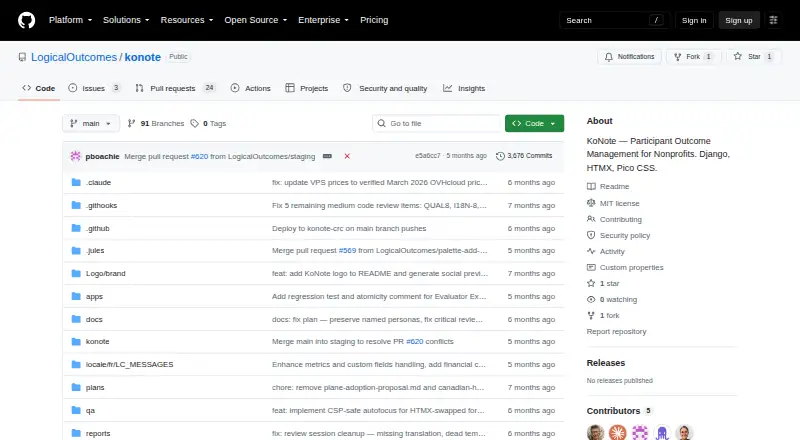
What KoNote is
KoNote is a free, web-based participant outcome management system for nonprofits. Each organization operates its own instance on its infrastructure or local network, so the organization is responsible for configuring and securing that environment. The system provides encrypted client records, custom intake fields, program enrollment tracking, and role-based client search. Teams can set targets and goals, attach measurable metrics, follow revisions, and reuse plan templates. Notes may be quick or structured with templates; they can record metrics and be backdated with audit trails. KoNote supports SMS through Twilio and email through SMTP, with consent tracking, and calendar subscriptions through iCal feeds. Authentication can use Azure AD single sign-on or local Argon2 authentication. Security measures include field-level personal information encryption, a separate immutable audit database, role-based access, and configurable session timeouts. Optional AI can help suggest goals, metrics, note structures, and outcome narratives, with personal information scrubbed before data leaves the server. The software is MIT-licensed, and participant portals, forms, surveys, and reporting dashboards are listed as available.
Who it suits
KoNote suits nonprofits that need to track participant records, program enrollment, goals, and outcomes. It is for organizations prepared to host and secure their own instance.
What it does well
- Custom intake fields and program enrollment tracking.
- Tracks goals, metrics, and revisions over time.
- Supports structured notes with audit trails.
- Offers SMS and email messaging with consent tracking.
- MIT-licensed and free to run.
What to know first
- Each organization must run its own instance.
- Organizations configure and secure their own infrastructure.
- Mobile access is not available.
Limits
The self-hosted plan is priced at $0 and requires the organization to run its instance and configure and secure its infrastructure. Mobile access is none.
Plans
| Plan | Billed and limits | Price |
|---|---|---|
| Self-hosted MIT-licensed KoNote | run your own instance · organization configures and secures infrastructure | Free |
| Self-hosted KoNote | No subscription price is published; hosting infrastructure is separate · Run on your own infrastructure · Python 3.12+ · PostgreSQL 16+ · Git · Docker-capable deployment | Free |
As github.com lists them, read 30 Sept 2026. The maker's own page has the final word.
Getting started
- Open the KoNote project website.
- Choose the self-hosted MIT-licensed KoNote plan at no cost.
- Run an instance on your own infrastructure or local network.
- Configure and secure the organization's infrastructure.
- Use Azure AD single sign-on or local Argon2 authentication.
Overview
KoNote is a self-hosted web system for nonprofits managing participant records and outcomes. It best fits organizations with people able to operate their own infrastructure and configure the system around their programs. The MIT-licensed software costs nothing, but the organization takes on deployment and security responsibilities.
Key features
Participant records combine encrypted client information, custom intake fields, program enrollment tracking, and role-based search. This gives teams room to reflect different program needs and access rules; organizations must configure and secure their own instance rather than rely on a hosted service.
Outcome plans support goals, targets, quantifiable metrics, revisions, and reusable templates. Quick and structured progress notes can record metrics, and backdated entries retain audit trails. Together, these tools connect routine documentation to measurable plans, which is useful for teams that need to follow progress over time rather than only store contact records.
KoNote supports SMS through Twilio and email through SMTP, with consent tracking. Calendar subscriptions work through iCal feeds in Outlook, Google Calendar, or Apple Calendar. Authentication can use Azure AD single sign-on or local accounts with Argon2.
Security measures include field-level PII encryption, role-based access, configurable session timeouts, HSTS, CSP, CSRF protection, and a separate immutable audit database. Privacy workflows include selectable CSV/PDF exports for PIPEDA, multi-manager erasure approval for PIPEDA/GDPR, export monitoring, and secure download links. These controls are relevant to organizations handling sensitive participant information, though self-hosting means they remain responsible for their own infrastructure.
Optional AI can help build goals, suggest metrics and note structures, and draft outcome-insight narratives; PII is scrubbed before data leaves the server. KoNote also offers a participant portal, forms and surveys, and reporting dashboards. Mobile access is not offered, which may be a drawback for teams that need a mobile workflow.
Pricing
The Self-hosted MIT-licensed KoNote plan costs nothing. It includes the software under the MIT License, which permits use, copying, modification, distribution, sublicensing, and sale. There are no paid tiers in the stated pricing model; the organization runs its own instance and configures and secures the infrastructure. The software has no stated seat or usage cap, but operating it is the organization’s responsibility.
Platforms
KoNote is available for Linux, as self-hosted software, and on the web. It is not available for mobile access.
Who it's for
KoNote is a strong fit for nonprofits that want configurable participant records, outcome plans, notes, and reporting without paying a software license fee, and that have the capacity to manage a self-hosted deployment. It is a weaker fit for organizations seeking a hosted service or mobile access, or those without the technical capacity to secure and maintain their own infrastructure.
Pros and cons
- Pro: Custom intake, role-based search, outcome metrics, and reusable templates can accommodate varied nonprofit programs.
- Pro: Field-level encryption, immutable audit records, and privacy workflows support careful handling of participant information.
- Pro: The MIT license allows organizations to use and adapt the software without a software fee.
- Con: Each organization must deploy, configure, and secure its own instance, so free software does not mean zero operating effort.
- Con: Mobile access is absent, limiting its fit for teams that need to work from phones or tablets.
Alternatives
Nonprofit Program Management Software is a useful starting point for comparing options across the category.
- Alleviate ImpactOps OS is worth considering for a web-based alternative with a free plan and a Growth tier at $150 a month.
- eSuivi may suit teams wanting a free plan capped at two users and one project, with basic reporting and email support, or a paid Seed tier.
- Kinaki is another web-based option with a free plan.
- FORMNA may suit qualifying organizations seeking self-hosted open-source software with all features included under its free plan.
- Kindora offers a web-based free Starter plan for up to five team members, with core modules and basic exports.
- Salesforce Nonprofit Cloud may fit eligible nonprofits seeking ten free licenses through its Power of Us Program.
- OpenSPP SP-MIS is another free option with Linux and self-hosted support.
- TraxSolutions may suit readers looking for a paid option with Android and iOS support.
Verdict
Choose KoNote if your nonprofit needs flexible participant records and outcome tracking, values control over its data and templates, and can run its own deployment. Its no-cost MIT license is compelling, but organizations that need managed hosting or mobile access should look elsewhere.
Verdict
KoNote offers outcome tracking and participant record tools in a self-hosted system. It may suit nonprofits that can manage their own deployment and want control over templates, notes, and reporting.
Questions
How much does KoNote cost?
The Self-hosted MIT-licensed KoNote plan is free.
Is KoNote open source?
KoNote is released under the MIT License. The license permits use, copying, modification, publication, distribution, sublicensing and sale of copies.
Where can KoNote run?
It is web-based and self-hosted. Each organization runs its own instance on its infrastructure or local network; listed platforms are Linux, self-hosted and web.
Does KoNote have a participant portal and reporting dashboards?
Yes. A participant portal, forms and surveys, and reporting dashboards are supported.
What authentication options does KoNote support?
It supports Azure AD single sign-on or local authentication using Argon2.
Who makes KoNote?
LogicalOutcomes, a Canadian nonprofit focused on evaluation consulting and building organizational learning capacity, is the maker focus listed for KoNote.
Facts from KoNote's own pages
- Access control
- Role-based access is program-scoped, with middleware, decorators and view filtering enforcing restrictions. · github.com, 15 Oct 2026
- Accessibility
- The README says KoNote follows WCAG 2.2 AA practices including semantic HTML, labels, keyboard navigation, contrast and screen-reader support. · github.com, 15 Oct 2026
- AI features
- Optional AI tools suggest goals, metrics, note structures and outcome narratives; personally identifying information is scrubbed before external processing. · github.com, 15 Oct 2026
- API and SDK status
- The public repository describes integrations and AI API-key configuration but does not publish a standalone REST API, SDK or API reference. · github.com, 15 Oct 2026
- Authentication
- Authentication can use local Argon2 credentials or Azure AD single sign-on. · github.com, 15 Oct 2026
- Automatic security checks
- Production startup blocks when encryption keys, secret keys or security middleware are unsafe; demo mode only warns. · github.com, 15 Oct 2026
- Calendar integration
- Meetings can publish privacy-safe iCal feeds for Outlook, Google Calendar and Apple Calendar and send reminders. · github.com, 15 Oct 2026
- Calendar integrations
- Users can subscribe to iCal feeds in Outlook, Google Calendar, or Apple Calendar. · github.com, 30 Sept 2026
- Client records
- It stores encrypted participant records, agency-defined intake fields, program enrolments and role-controlled search. · github.com, 15 Oct 2026
- Company facts
- LinkedIn lists LogicalOutcomes as a Toronto nonprofit with 11–50 employees founded in 2013. · bg.linkedin.com, 15 Oct 2026
- Company finances
- LogicalOutcomes' 2021 annual report says revenue was under $1 million and therefore did not require a statutory financial audit. · salamander-wolverine-sfm2.squarespace.com, 15 Oct 2026
- Customisation
- Administrators can change terminology, enable feature toggles, define custom fields, build templates and configure programs. · github.com, 15 Oct 2026
- Deployment model
- Each organization runs its own KoNote instance on its own infrastructure or local network. · github.com, 30 Sept 2026
- Deployment requirements
- The documented prerequisites are Python 3.12 or newer, PostgreSQL 16 or newer and Git; Docker Compose is supplied for deployment. · github.com, 15 Oct 2026
- Documentation
- Repository documentation is organized into deployment, administration, frontline usage and technical-reference guides, with a separate backup and restore runbook. · github.com, 15 Oct 2026
- Founded
- 2013 · github.com, 28 Sept 2026
- Headquarters
- Toronto, Ontario, Canada · github.com, 28 Sept 2026
- Independent history
- Canadian Healthcare Technology reports that Gotlib launched KoNote in 2014 after finding existing mental-health EMRs too structured. · canhealth.com, 15 Oct 2026
- Licence
- The repository is released under the MIT License, allowing use, modification, distribution and sublicensing subject to the license notice. · github.com, 15 Oct 2026
- License
- KoNote is released under the MIT License, which grants permission free of charge to use, copy, modify, publish, distribute, sublicense, and sell copies. · github.com, 30 Sept 2026
- Limit: audit storage
- The security documentation warns that the audit database grows continuously and requires periodic archival planning. · github.com, 15 Oct 2026
- Limit: demo security
- The Docker demo uses default keys and is explicitly unsuitable for real client data. · github.com, 15 Oct 2026
- Limit: encrypted search
- Encrypted PII cannot be searched in SQL; the documented in-memory search approach is considered acceptable only up to about 2,000 clients. · github.com, 15 Oct 2026
- Limit: external documents
- When documents link to SharePoint or Google Drive, access control on those external systems is separate from KoNote. · github.com, 15 Oct 2026