Freedom251 › Product Adoption Software
iorad
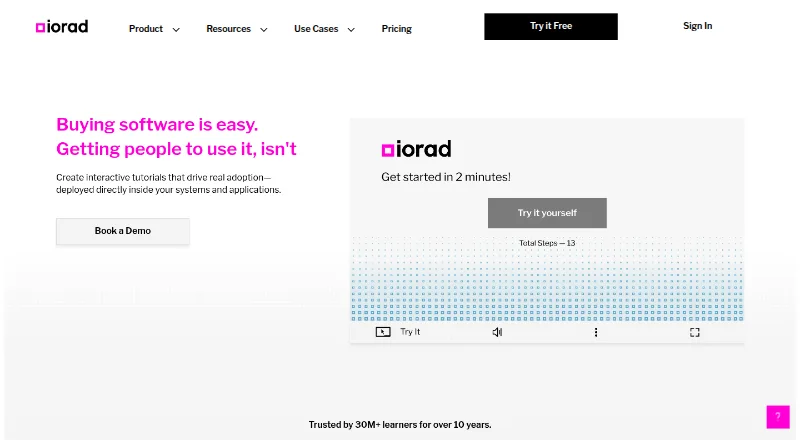
What iorad is
iorad captures software workflows and turns them into interactive tutorials, articles, videos, PDFs, and SCORM files. Learners can use six modes: Try It, View It, Watch It, Print It, Do It, and Quiz Mode. Its desktop capture tool supports Windows and Mac applications and workflows involving iOS and Android devices, while the Chrome or Edge extension captures browser content. iorad says it connects with more than 50 learning management systems, including Workramp, Lessonly, Canvas, and Cornerstone. Help by iorad can place tutorials inside Google Workspace apps and Salesforce. The free plan includes unlimited tutorials, public tutorials, and learners. Individual costs $200 a month for one creator and unlimited private tutorials; Team costs $500 a month with one creator included and extra seats at $50 a month each. Desktop-captured tutorials cannot be shared in the extension or widget, except through the widget's Web Library. The product describes users in learning and development, customer training, and IT and documentation teams.
Who it suits
iorad suits learning and development, customer training, and IT or documentation teams creating software guidance. Its capture tools cover desktop applications and browser content, with mobile-device workflows also listed.
What it does well
- Creates tutorials in six learner modes.
- Integrates with more than 50 learning management systems.
- Places guidance inside Google Workspace and Salesforce.
- Free plan includes unlimited tutorials and learners.
What to know first
- Desktop-captured tutorials have restricted extension and widget sharing.
- Individual plan includes one creator.
- Team charges $50 a month for each extra seat.
Limits
The Free plan includes public tutorials; unlimited private tutorials are listed with Individual at $200 a month. Tutorials captured with the desktop tool cannot be shared in the extension or widget except through the widget's Web Library.
Plans
| Plan | Billed and limits | Price |
|---|---|---|
| Free | Unlimited tutorials · Free public tutorials · Unlimited learners | Free |
| Individual | $200 / month · 1 creator · Unlimited private tutorials | $200 a month |
| Team | $500 / month · 1 creator included · Extra seats $50 / month each | $500 a month |
| Enterprise | Custom quote · 20+ creators | On request |
As iorad.com lists them, read 29 Sept 2026. The maker's own page has the final word.
Getting started
- Visit the iorad website and choose a plan or start the listed free trial.
- Use the Chrome or Edge extension to capture browser content, or use the desktop capture tool for supported applications and device workflows.
- Create a tutorial from the captured workflow.
- Choose a learner mode such as Try It, Watch It, or Quiz Mode.
- Share tutorials through a supported learning management system or, for desktop captures, the widget's Web Library.
Overview
iorad is a workflow-capture and tutorial authoring tool for teams teaching people how to use software. It is best suited to learning and development, customer training, and IT or documentation teams. Its strongest case is turning one captured workflow into several learning formats; its desktop sharing restriction and creator costs are real trade-offs.
Key features
Capture and learning formats
iorad captures software workflows and turns them into interactive tutorials, articles, videos, PDFs, and SCORM files. Learners can use six modes: Try It, View It, Watch It, Print It, Do It, and Quiz Mode. That flexibility helps teams reuse a process for guided practice, viewing, or reference rather than preparing each format separately.
The desktop capture tool supports Windows and Mac applications and workflows involving iOS and Android devices. For browser content, the Chrome or Edge extension is the capture option. One important boundary: tutorials captured with the desktop tool cannot be shared through the extension or widget, except through the widget's Web Library. Teams that distribute guidance through those channels should account for that constraint when deciding how to capture.
In-app guidance and integrations
iorad integrates with more than 50 learning management systems, including Workramp, Lessonly, Canvas, and Cornerstone. Help by iorad places tutorials inside Google Workspace apps and Salesforce, allowing users to find instructions without leaving those applications. In-app guides, contextual prompts, adoption reporting, and audience segmentation extend its use beyond tutorial creation into product guidance and adoption work.
Security
iorad's browser extension security overview states that it maintains SOC 2 Type 2 certification and describes role-based access, audit logging, and encryption key management. Those controls are relevant to organizations assessing an extension for workplace use.
Pricing
The Free plan costs nothing and includes unlimited tutorials, free public tutorials, and unlimited learners. It is useful for trying the workflow or sharing public material, but private tutorials require a paid plan.
Individual costs $200 a month, billed $200 / month, for one creator and unlimited private tutorials. It suits a solo author who needs private content, but not a group that needs multiple authors.
Team costs $500 a month, billed $500 / month, with one creator included; each extra seat costs $50 / month. This fits teams that need shared creation, although the per-seat charge makes a growing author group more expensive. Enterprise has custom pricing, a 20+ creator threshold, a private Slack channel, and prioritized support, making it the option for larger teams that need those support features.
A free trial is available. For a single creator who needs private tutorials, Individual is the direct paid option; teams should weigh the Team base price and added-seat cost against their author count.
Platforms
iorad supports Android, iOS, macOS, Windows, web, and browser extensions. Its desktop capture coverage and browser extension provide distinct routes for capturing desktop applications and browser content.
Who it's for
iorad is a strong fit for learning and development teams producing reusable software training, customer training teams supporting users across multiple formats, and IT or documentation teams capturing procedures. Organizations already using an LMS may benefit from its broad integration set. It is a weaker fit when creators need to publish desktop-captured tutorials directly through an extension or widget, or when several creators make the paid seat costs impractical.
Pros and cons
- Pros: One captured workflow can become tutorials, articles, videos, PDFs, or SCORM files, supporting different learner needs.
- Pros: Six tutorial modes, more than 50 LMS integrations, and in-app help in Google Workspace and Salesforce support varied training and guidance contexts.
- Pros: The free plan permits unlimited tutorials and learners, making it possible to start with public materials without a tutorial or learner cap.
- Cons: The free plan only includes public tutorials; private tutorials start at $200 a month for one creator.
- Cons: Team includes one creator at $500 a month, with each additional seat costing $50 / month.
- Cons: Desktop-captured tutorials cannot be shared in the extension or widget, apart from the widget's Web Library.
Alternatives
For a broader comparison, browse Product Adoption Software.
Choose Whatfix if its listed platform coverage, including API and self-hosted options, better matches your deployment needs. Consider Pendo Analytics if its free plan's 500 monthly active users and product analytics suit a smaller audience. Stonly is another freemium alternative.
Told may suit a small team that can work within its free plan's one seat, one source, one survey or product tour, and 500 monthly views. Driver.js offers a free plan with unlimited projects and personal or commercial use. Wakeline may be worth considering for a small team whose needs fit its free-plan limits of three flows, 1,000 monthly active users, and one teammate.
Candu is a freemium alternative with a free plan limited to overlays and three live experiences. StepBeam is another freemium option, with a free plan covering up to 1,000 monthly active users, three team seats, and one application.
Verdict
Choose iorad if your team needs to capture software processes and reuse them across interactive training, reference formats, LMS delivery, and in-app guidance. Its breadth is the main reason to choose it. Look elsewhere if desktop capture must flow directly into extension or widget sharing, or if the cost of private tutorials and additional creator seats does not fit your team.
Verdict
iorad turns captured workflows into multiple learning formats and supports integrations with learning platforms and in-app help. Note the desktop tutorial sharing restriction and per-seat charge for extra Team creators.
Questions
Is there a free plan?
Yes. The Free plan costs nothing and includes unlimited tutorials, free public tutorials, and unlimited learners.
How much do the paid plans cost?
Individual costs $200 a month. Team costs $500 a month, with extra seats at $50 a month each. Enterprise is priced by custom quote.
Is a free trial available?
Yes, a free trial is listed.
What platforms can it capture?
The desktop capture tool supports Windows and Mac applications and workflows involving iOS and Android devices. The Chrome or Edge extension captures browser content.
Which learning management systems does it integrate with?
iorad says it integrates with more than 50 learning management systems, including Workramp, Lessonly, Canvas, and Cornerstone.
How are desktop-captured tutorials shared?
They cannot be shared in the extension or widget, except through the widget's Web Library.
Facts from iorad's own pages
- Audience
- iorad describes its users as including learning and development, customer training, and IT and documentation teams. · learning.iorad.com, 29 Sept 2026
- Browser extensions
- The getting-started guide says the Chrome or Edge extension captures browser content. · iorad.com, 29 Sept 2026
- Desktop and mobile capture
- The desktop capture tool supports Windows and Mac applications and workflows involving iOS and Android devices. · learning.iorad.com, 29 Sept 2026
- In-app help
- Help by iorad places tutorials inside Google Workspace apps and Salesforce so users can find guidance without leaving the application. · learning.iorad.com, 29 Sept 2026
- Integrations
- iorad says it integrates with more than 50 learning management systems, including Workramp, Lessonly, Canvas, and Cornerstone. · learning.iorad.com, 29 Sept 2026
- Notable limit
- The desktop capture guide says tutorials captured with the desktop tool cannot be shared in the extension or widget, except through the widget's Web Library. · iorad.com, 29 Sept 2026
- Security
- iorad's browser extension security overview states that it maintains SOC 2 Type 2 certification and describes role-based access, audit logging, and encryption key management. · learning.iorad.com, 29 Sept 2026
- Support
- iorad lists a private Slack channel and prioritized support among its enterprise plan features. · capterra.com, 29 Sept 2026
- Tutorial modes
- Learners can use six modes: Try It, View It, Watch It, Print It, Do It, and Quiz Mode. · learning.iorad.com, 29 Sept 2026
- What it does
- iorad captures software workflows and turns them into interactive tutorials, articles, videos, PDFs, and SCORM files. · learning.iorad.com, 29 Sept 2026
Where iorad stands on Freedom251
- Product Adoption Software#3 of 32
- Software Tutorials#5 of 28