Freedom251 › Game Controller Mapper Software
InputConfig
What InputConfig is
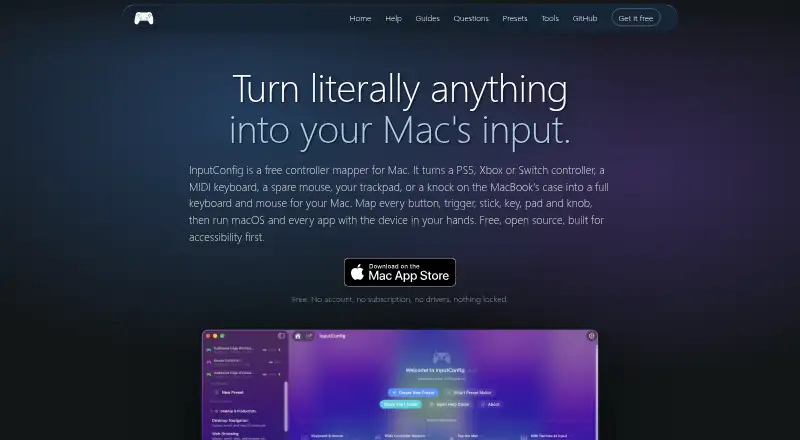
InputConfig is a free macOS app that maps controllers and a Mac’s keyboard, mouse, and trackpad to keyboard and mouse actions across apps. Supported controllers include DualSense, DualSense Edge, DualShock 4, Xbox, Switch Pro, Joy-Cons, Stadia, 8BitDo, Steam Controller, and MFi or HID gamepads. Mappings can trigger keys, clicks, pointer movement, scrolling, typed phrases, macros, MIDI notes, and system functions, with hold, double-tap, chord, and turbo actions. The app can send MIDI notes, control changes, and pitch bend through a virtual MIDI port for GarageBand, Logic, and other DAWs. The maker describes accessibility support for adaptive controllers, one-stick driving, spoken feedback, dictation, and zoom. More than 450 ready-made presets are listed for games, apps, and workflows. InputConfig is open source under the MIT license and requires macOS 14 or later on Apple silicon or Intel Macs. Its privacy policy says settings, presets, calibration data, and usage statistics stay on the Mac, with no network calls in normal use. Virtual-controller output is not available.
Who it suits
It suits Mac users who want to remap supported controllers or built-in input devices, including for MIDI workflows or accessibility needs.
What it does well
- Free and open source under MIT license.
- Supports many listed controller types.
- Includes more than 450 ready-made presets.
- Supports MIDI output through a virtual MIDI port.
What to know first
- Requires macOS 14 or later.
- Virtual-controller output is unavailable.
- Tap the Mac did not work on an M1 Pro in maker testing.
Plans
| Plan | Billed and limits | Price |
|---|---|---|
| Free | macOS 14 or later · Mac App Store | Free |
As inputconfig.com lists them, read 5 Oct 2026. The maker's own page has the final word.
Getting started
- Visit the InputConfig website.
- Get the app through the Mac App Store.
- Use a Mac running macOS 14 or later.
- Grant Accessibility and Input Monitoring permissions for keyboard and mouse actions.
- Connect a controller using Bluetooth or USB, if needed.
InputConfig is a free macOS remapping tool for controllers, MIDI gear, and the Mac’s own input devices. It is best for Mac users adapting controls for games, creative software, desktop workflows, or accessibility needs. Its unusually broad action set is compelling, provided you run a recent Mac and do not need a virtual gamepad.
Overview
InputConfig translates controller, MIDI, keyboard, mouse, and trackpad input into actions throughout macOS applications. A single control can become a keystroke, pointer movement, click, scroll, typed phrase, macro, system command, or MIDI event. That makes it more versatile than a game-only remapper: it can support repetitive desktop tasks and creative setups as well as games.
The trade-off is a strict platform and output boundary. It runs on macOS 14 or later and cannot present mappings as virtual-controller input. It is therefore a strong fit for applications that accept keyboard, mouse, or MIDI commands, but a poor match when software specifically expects a virtual gamepad.
Key features
Broad device and action support
Supported controllers include DualSense, DualSense Edge, DualShock 4, Xbox and Switch Pro controllers, Joy-Cons, Stadia, 8BitDo, Steam Controller, and MFi or HID gamepads. Controls can trigger keys, clicks, pointer movement, scrolling, typed phrases, macros, MIDI notes, and system functions. Hold, double-tap, chord, and turbo behaviors let one physical control perform different jobs, although those layers require deliberate profile design to avoid accidental commands.
Profiles and presets
Per-app profiles and profile switching keep mappings appropriate as you move between games and applications. More than 450 ready-made presets cover games, apps, and workflows, giving newcomers a starting point instead of requiring every assignment from scratch. The value of those presets depends on whether your particular software and controller combination is represented.
MIDI and accessibility
InputConfig sends MIDI notes, control changes, and pitch bend through a virtual MIDI port to GarageBand, Logic, and other DAWs. That makes a conventional controller useful as a compact music interface, while musicians who need virtual-controller output should look elsewhere. The maker also describes adaptive-controller support, one-stick driving, spoken feedback, dictation, and zoom. These options make the app relevant to users who cannot rely on standard two-stick or keyboard control, though the exact suitability will depend on an individual access setup.
Privacy, permissions, and hardware caveat
Settings, presets, calibration data, and usage statistics remain on the Mac, and normal operation makes no network calls. Accessibility permission allows keyboard and mouse events; Input Monitoring reads keyboard, mouse, and trackpad input; Bluetooth and USB permissions connect controllers. InputConfig is open source under the MIT license. Tap the Mac did not work on an M1 Pro in the maker’s testing, and desktop and Intel Macs lack the motion sensor it uses, so motion-dependent setups need particular caution.
Pricing
Free — free. The plan includes the macOS 14-or-later Mac App Store version, with per-app profiles, profile switching, macros, and keyboard-and-mouse remapping. There are no paid tiers, seat quotas, renewal charges, or trial deadlines described. It is an unusually complete fit for individuals who want the full mapping tool without a subscription; organizations seeking formal support should note that questions are directed to the project’s issue tracker.
Platforms
InputConfig supports macOS 14 or later on both Apple silicon and Intel Macs. It has no Windows, Linux, Android, or iOS version, and the motion-sensor limitation affects some desktop and Intel hardware.
Who it's for
Choose InputConfig for Mac gaming setups that translate controllers into keyboard and mouse commands, for DAW users who want controller-driven MIDI, or for accessibility-focused configurations involving adaptive controls, dictation, spoken feedback, or zoom. It also suits anyone building app-specific shortcuts with profiles and macros. Look elsewhere if you need Windows or Linux support, a virtual gamepad, or motion features on hardware without the required sensor.
Pros and cons
Pros
- Wide input coverage: It handles major console controllers, MFi/HID pads, MIDI devices, and built-in Mac controls.
- Deep action vocabulary: Chords, turbo, phrases, macros, system functions, and MIDI messages support complex workflows.
- Useful starting library: More than 450 presets reduce initial configuration work.
- Privacy-conscious design: Data stays local and normal use makes no network calls.
- No purchase barrier: The complete listed plan is free and MIT-licensed.
Cons
- Mac-only and current-OS dependent: macOS 14 or later excludes older Macs and every other platform.
- No virtual-controller output: Games or software requiring a gamepad device will not receive one from InputConfig.
- Motion hardware limits: Tap the Mac failed on an M1 Pro test, while desktop and Intel Macs lack its motion sensor.
- Issue-tracker support: There is no separate support channel described for users needing direct assistance.
Alternatives
PadLink is the better choice when you need Android, iOS, Windows, and macOS coverage, though its free Standard plan allows one active controller.
AntiMicroX, ControllerBuddy, JoyShockMapper, and JoyXoff are free alternatives for Linux or Windows users; JoyXoff is positioned as lightweight and ad-free.
ControllerMate is the macOS alternative to consider if an unregistered, no-time-limit edition meets your needs. Gamepad Mapper is another macOS option with a free download and in-app purchases.
DS4Windows is the Windows-specific free choice for users prepared to install its stated runtime and driver prerequisites.
Browse Controller Mapping Software and Game Controller Mapper Software for broader comparisons.
Verdict
InputConfig is an excellent no-cost choice for macOS users who want one remapper for controllers, MIDI, app profiles, and accessibility-oriented commands. Its main reason to choose it is the combination of broad mappings, presets, and local operation without a paid tier. Its main reason to look elsewhere is equally decisive: it cannot output a virtual controller, and it will not help users outside macOS 14-or-later hardware.
Verdict
InputConfig offers broad input remapping, MIDI output, and accessibility-oriented options for macOS users. Check the macOS 14 requirement and note that it does not provide virtual-controller output.
Questions
Is InputConfig free?
Yes. The Free plan costs nothing and is available through the Mac App Store.
Which Macs can run InputConfig?
It requires macOS 14 or later and supports Apple silicon and Intel Macs.
Is InputConfig open source?
Yes. The maker says it is open source under the MIT license.
Can it send MIDI to music software?
Yes. It sends MIDI notes, control changes, and pitch bend through a virtual MIDI port for GarageBand, Logic, and other DAWs.
Does it support virtual-controller output?
No. Virtual-controller output is unavailable.
Where does InputConfig keep settings and usage data?
Its privacy policy says settings, presets, calibration data, and usage statistics stay on the Mac, and the app makes no network calls in normal use.
Facts from InputConfig's own pages
- Accessibility
- The maker says the app was built with accessibility in mind and describes support for adaptive controllers, one-stick driving, spoken feedback, dictation, and zoom. · inputconfig.com, 5 Oct 2026
- Controller support
- It lists DualSense, DualSense Edge, DualShock 4, Xbox, Switch Pro, Joy-Cons, Stadia, 8BitDo, Steam Controller, and MFi or HID gamepads as supported controllers. · inputconfig.com, 5 Oct 2026
- License
- The maker says InputConfig is open source under the MIT license. · inputconfig.com, 5 Oct 2026
- Mapping features
- Controls can trigger keys, clicks, pointer movement, scrolling, typed phrases, macros, MIDI notes, and system functions, with hold, double-tap, chord, and turbo actions. · inputconfig.com, 5 Oct 2026
- MIDI
- InputConfig sends MIDI notes, control changes, and pitch bend through a virtual MIDI port for use with GarageBand, Logic, and other DAWs. · inputconfig.com, 5 Oct 2026
- Notable hardware limit
- The maker reports that Tap the Mac did not work on an M1 Pro in its testing and that desktop and Intel Macs lack the motion sensor it uses. · inputconfig.com, 5 Oct 2026
- Permissions
- The privacy policy says Accessibility permits sending keyboard and mouse events, Input Monitoring permits reading keyboards, mice, and trackpads, and Bluetooth and USB permit controller connections. · inputconfig.com, 5 Oct 2026
- Presets
- The site says the app includes more than 450 ready-made presets for games, apps, and workflows. · inputconfig.com, 5 Oct 2026
- Privacy
- The privacy policy says settings, presets, calibration data, and usage statistics stay on the Mac, and the app makes no network calls in normal use. · inputconfig.com, 5 Oct 2026
- Purpose
- InputConfig maps controllers, MIDI devices, and a Mac’s own keyboard, mouse, and trackpad to keyboard and mouse actions across macOS apps. · inputconfig.com, 5 Oct 2026
- Requirements
- InputConfig requires macOS 14 or later and supports Apple silicon and Intel Macs. · inputconfig.com, 5 Oct 2026
- Support
- The privacy policy directs questions to the project’s issue tracker. · inputconfig.com, 5 Oct 2026
Where InputConfig stands on Freedom251
- Game Controller Mapper Software#10 of 27
- Controller Mapping Software#12 of 29