Freedom251 › Controller Mapping Software
Gamepad Mapper
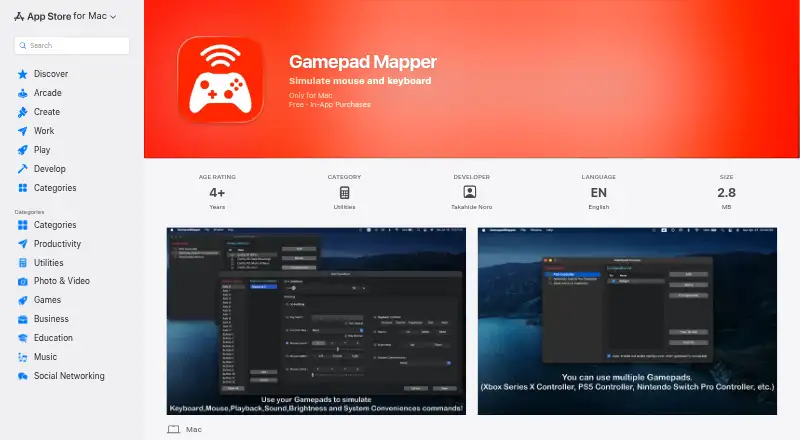
What Gamepad Mapper is
Gamepad Mapper lets users control a Mac and its applications by mapping gamepad or joystick inputs to mouse and keyboard actions. Mappings can move the cursor, click, scroll, drag, and double-click, with adjustable cursor and scroll speed. Keyboard mappings can assign keys, repeat presses, and use function keys F1–F12. The app also lists controls for playback, volume, mute, brightness, Mission Control, App Exposé, desktop switching, and Show Desktop. Its mapping combination feature can trigger several commands together, and macro support is listed. Supported controllers include Xbox Series X, PS5, Nintendo Switch Pro, Xbox One, DualShock 4 and 3, Xbox 360, Logitech, and SteelSeries Nimbus models, among others. Connections can use USB or Bluetooth, and users can adjust the axis dead zone. The app offers light and dark modes and can enable the last active configuration when a gamepad connects. It requires macOS 12.0 or later. The listing shows a free download with in-app purchases, including a monthly All Access plan for ₹299 a month and one-time purchases listed at 299.00 INR or 399.00 INR.
Who it suits
It suits Mac users who want to operate applications or system controls with a gamepad or joystick. It requires macOS 12.0 or later and supports USB and Bluetooth controller connections.
What it does well
- Maps controller inputs to mouse and keyboard actions.
- Lists system controls including brightness and desktop switching.
- Supports USB and Bluetooth connections.
- Offers adjustable axis dead zone.
- Can trigger multiple commands together.
What to know first
- For Mac only.
- Requires macOS 12.0 or later.
- Some features require in-app purchases.
Limits
The free app is a download with in-app purchases. The listed All Access plan costs ₹299 a month; one-time add-ons are also listed.
Plans
| Plan | Billed and limits | Price |
|---|---|---|
| Free app | Free download; in-app purchases | Free |
| Brightness Controls | In-app purchase; listing does not state billing frequency | ₹299, paid once |
| System Conveniences | In-app purchase; listing does not state billing frequency | ₹299, paid once |
| Function Key | In-app purchase; listing does not state billing frequency | ₹299, paid once |
| All Access - Monthly | ₹299 monthly · Unlocks listed add-ons and features for unlimited use in the app | ₹299 a month |
| Mappings Combination Function | In-app purchase; listing does not state billing frequency | ₹399, paid once |
| PS5 Controller Driver | In-app purchase; listing does not state billing frequency | ₹399, paid once |
| Auto Enable Configuration | In-app purchase; listing does not state billing frequency | ₹399, paid once |
The first 8 of 10 plans, as apps.apple.com lists them, read 7 Oct 2026. The maker's own page has the final word. Every plan
Getting started
- Open the Gamepad Mapper listing in the Mac App Store.
- Download the free app; in-app purchases are available.
- Connect a supported controller using USB or Bluetooth.
- Configure the controller mappings and adjust the axis dead zone if needed.
- Optionally enable automatic use of the last active configuration when a controller connects.
Gamepad Mapper translates gamepad and joystick inputs into mouse, keyboard, and system actions on a Mac. It is aimed at Mac users who want a controller for everyday navigation, application shortcuts, or games rather than a conventional mouse and keyboard. The wide mapping range is its strongest reason to choose it, while the add-on structure makes the final cost depend on the controls and drivers you need.
Overview
Gamepad Mapper turns a compatible controller into an input device for macOS applications and the desktop. It supports both USB and Bluetooth connections, and an adjustable axis dead zone helps reduce unwanted movement from analog sticks. The app includes macro support, but it does not provide virtual controller output, so it is designed to control the Mac rather than impersonate a controller for another device or service.
Compatibility is limited to Mac computers running macOS 12.0 or later. The named controller support is broad, covering Xbox Series X, PS5, Nintendo Switch Pro, Xbox One, DualShock 4 and DualShock 3, Xbox 360, Logitech, and SteelSeries Nimbus controllers, among others. That breadth is useful for households with different gamepads, although several named newer-controller drivers are sold separately.
Key features
Mouse mappings can move the cursor, click, scroll, drag, and double-click. Cursor and scroll speeds are adjustable, giving users some control over whether an analog stick behaves like a precise pointer or a faster navigation tool. Keyboard mappings assign individual keys, repeat key presses, and include F1 through F12. Together, these options make a controller viable for application shortcuts and desktop navigation, not just game input.
System mappings include media playback, volume, mute, brightness, Mission Control, App Exposé, desktop switching, and Show Desktop. The mapping-combination feature can trigger multiple commands simultaneously, which suits one-button workflows such as changing several settings at once. However, the combination function is a paid add-on, so the free download does not represent the complete feature set.
Light and dark modes address different desktop preferences. An auto-enable option can activate the last active configuration when a gamepad connects, reducing repeated setup for users who switch between controllers or applications. These conveniences matter most to people who maintain several profiles; occasional users may not need them enough to justify extra purchases.
Pricing
The free app costs nothing and is a free download with in-app purchases. The broader pricing model is freemium, with paid access from $2.99/mo, while the App Store purchase list uses Indian-rupee prices for individual items.
- Brightness Controls: ₹299, paid once. The listing does not state a billing frequency.
- System Conveniences: ₹299, paid once. The listing does not state a billing frequency.
- Function Key: ₹299, paid once. The listing does not state a billing frequency.
- Mappings Combination Function: ₹399, paid once. The listing does not state a billing frequency.
- PS5 Controller Driver: ₹399, paid once. The listing does not state a billing frequency.
- Auto Enable Configuration: ₹399, paid once. The listing does not state a billing frequency.
- Switch Pro Controller Driver: ₹399, paid once. The listing does not state a billing frequency.
- Xbox SeriesX Controller Driver: ₹399, paid once. The listing does not state a billing frequency.
- All Access - Monthly: ₹299 a month, billed ₹299 monthly, unlocking the listed add-ons and features for unlimited use in the app.
The free plan is appropriate for basic mappings that do not require a paid system function, combination feature, automatic configuration, or separately sold driver. Buying individual 299.00 INR or 399.00 INR items can cost less for a narrowly defined need, while All Access is more suitable when several add-ons are required and ongoing monthly billing is acceptable. The listing gives no seat limits or usage quotas.
Platforms
Gamepad Mapper is for macOS only and requires macOS 12.0 or later. Users on Windows, Linux, Android, or iOS need a different tool.
Who it's for
Choose it if you want to operate Mac software from a controller, build keyboard-and-mouse replacements, or bind system controls and macros to a gamepad. It is especially compelling for users with supported Xbox, PlayStation, Switch Pro, Logitech, or Nimbus hardware who value configurable profiles and Bluetooth or USB flexibility.
It is a weaker fit if you need virtual controller output, a non-Mac platform, or every listed feature without purchasing separate add-ons. Buyers should also account for the individual controller-driver charges before choosing a PS5, Switch Pro, or Xbox Series X setup.
Pros and cons
- Pros: Extensive mouse, keyboard, system, and macro mappings; adjustable cursor, scroll speed, and axis dead zone; USB and Bluetooth support; broad named-controller coverage; automatic restoration of the last configuration is available as an add-on.
- Cons: macOS-only compatibility; virtual controller output is absent; combination mappings, automatic configuration, brightness, function keys, system conveniences, and some controller drivers require paid purchases; All Access renews monthly at 299.00 INR.
Alternatives
Browse Controller Mapping Software for a wider category comparison. PadLink is the better choice when cross-platform coverage, including Android, iOS, macOS, and Windows, matters and one active controller on its free Standard plan is enough.
Pick AntiMicroX if you want free software for Linux or Windows. ControllerBuddy is another free, open-source Linux and Windows option. On macOS, ControllerMate offers a free, no-time-limit unregistered plan and a trial-based freemium model, while InputConfig is a free Mac App Store option for macOS 14 or later.
Windows users can choose DS4Windows for its free application package, or JoyXoff for a free, lightweight utility. JoyShockMapper is free on Windows and can be built from source on Linux.
Verdict
Gamepad Mapper is a strong choice for Mac users who want one controller to handle pointer movement, keyboard shortcuts, desktop controls, and macros across a wide range of gamepads. Its main drawback is the add-on pricing: specialized drivers and useful convenience functions can turn a free download into a recurring or cumulative purchase. Choose it for breadth and Mac-focused configuration; look elsewhere for virtual controller output, broader platform support, or a wholly free feature set.
Verdict
Gamepad Mapper offers a broad set of controller mappings for Mac, including mouse, keyboard, and system actions. The download is free, while the listing includes paid add-ons and a monthly All Access plan.
Questions
How much does Gamepad Mapper cost?
The app is a free download with in-app purchases. The All Access plan is ₹299 a month; listed one-time purchases range from 299.00 INR to 399.00 INR.
Which platforms does it support?
It is for Mac and requires macOS 12.0 or later.
Can it control both the mouse and keyboard?
Yes. Mappings can control cursor movement, clicks, scrolling and dragging, as well as assign and repeat keyboard keys.
Which controllers and connections are listed?
The listing names Xbox, PlayStation, Nintendo, Logitech and SteelSeries controllers, among others. USB and Bluetooth connections are supported.
Who develops the app?
The App Store identifies Takahide Noro as the developer. DEHIXLAB describes itself as an iOS and macOS developer with over 15 years of software development experience.
What does the privacy disclosure say?
Apple’s listing reports that the developer indicated the app does not collect data, and says Apple has not verified this information. The developer’s policy says requested personally identifiable information is retained on-device, while third-party services may collect identifying information and error log data.
Facts from Gamepad Mapper's own pages
- Appearance and configuration
- The listing includes light and dark modes and an option to auto-enable the last active configuration when a gamepad connects. · apps.apple.com, 7 Oct 2026
- Combined mappings
- The listing says multiple commands can be triggered simultaneously through its mappings combination feature. · apps.apple.com, 7 Oct 2026
- Compatibility
- The App Store listing says the app requires macOS 12.0 or later and is for Mac only. · apps.apple.com, 7 Oct 2026
- Connections
- The app supports USB and Bluetooth connections and allows adjustment of the axis dead zone. · apps.apple.com, 7 Oct 2026
- Developer/about
- The App Store identifies Takahide Noro as developer, and DEHIXLAB describes itself as an iOS and macOS developer with over 15 years of software development experience. · dehixlab.com, 7 Oct 2026
- Keyboard controls
- Users can assign keyboard keys, repeat key presses and use function keys F1–F12. · apps.apple.com, 7 Oct 2026
- Mouse controls
- Mappings can control cursor movement, clicks, scrolling, dragging and double-clicking, with adjustable cursor and scroll speed. · apps.apple.com, 7 Oct 2026
- Privacy disclosure
- Apple's listing reports the developer indicated that the app does not collect data; Apple says this information has not been verified by Apple. · apps.apple.com, 7 Oct 2026
- Privacy policy
- The developer's policy says requested personally identifiable information is retained on the device, while third-party services may collect identifying information and error log data. · dehixlab.com, 7 Oct 2026
- Purpose
- The app lets users control a Mac and its applications with a gamepad or joystick by simulating mouse and keyboard inputs. · apps.apple.com, 7 Oct 2026
- Security
- The developer's privacy policy says it strives to use commercially acceptable means to protect personal information but cannot guarantee absolute security. · dehixlab.com, 7 Oct 2026
- Supported controllers
- The listing names Xbox Series X, PS5, Nintendo Switch Pro, Xbox One, DualShock 4, DualShock 3, Xbox 360, Logitech and SteelSeries Nimbus controllers, among others. · apps.apple.com, 7 Oct 2026
- System controls
- The app lists playback controls, volume, mute, brightness, Mission Control, App Exposé, desktop switching and Show Desktop. · apps.apple.com, 7 Oct 2026
Where Gamepad Mapper stands on Freedom251
- Controller Mapping Software#11 of 29