Freedom251 › Controller Mapping Software

DSTX
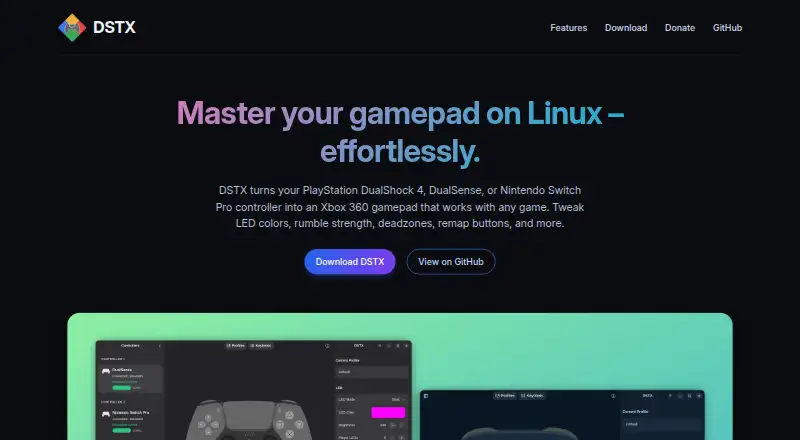
What DSTX is
DSTX is a Linux utility that makes a DualShock 4, DualSense, or Nintendo Switch Pro controller work as an Xbox 360 controller. It can connect as many as four controllers at once through USB or Bluetooth and send virtual controller output. For configuration, users can remap buttons, tune stick sensitivity and rumble, calibrate deadzones, invert the Y axis, and set LED effects. Custom profiles can be saved and loaded, including for switching between configurations.
The app provides a GTK4 graphical interface and a terminal interface. A background daemon keeps settings active after the window is closed. DSTX is free and open source under GPLv3, with public source code; the project says it does not use telemetry or tracking. Installation choices include Flatpak, Debian .deb, Fedora/RHEL .rpm, AppImage, a binary tarball, and building from source. The AppImage has the GUI only, so the core package is needed separately. Controller group permissions may take effect only after logging out and back in. The project credits André Lameira as developer and lists Ko-fi, PayPal, GitHub Sponsors, and PIX for donations.
Who it suits
DSTX suits Linux users who want to use supported PlayStation or Nintendo controllers as Xbox 360 controllers, including setups with several controllers. Its profile, remapping, and calibration options are useful for people who want to tailor controller behavior.
What it does well
- Supports up to four controllers over USB or Bluetooth.
- Remaps buttons and adjusts deadzones, sensitivity, rumble, and LEDs.
- Saves and loads custom profiles.
- Offers graphical, terminal, and background-daemon interfaces.
- Free and open source under GPLv3, with no telemetry or tracking reported.
What to know first
- Linux is the only supported platform.
- The AppImage includes the GUI but requires a separate core package.
- Controller group permissions may require logging out and back in.
Limits
The AppImage contains only the graphical interface; the core package must be installed separately. Controller group permissions may require logging out and back in after installation.
Plans
| Plan | Billed and limits | Price |
|---|---|---|
| DSTX | Free and open source under GPLv3 · no ads or paywalls | Free |
As dstxapp.org lists them, read 9 Oct 2026. The maker's own page has the final word.
Getting started
- Open the DSTX website.
- Choose an installation option: Flatpak, Debian .deb, Fedora/RHEL .rpm, AppImage, binary tarball, or source build.
- If choosing the AppImage, install the core package separately.
- After installation, log out and back in if controller group permissions need to take effect.
- Connect controllers over USB or Bluetooth and configure them in the graphical or terminal interface.
Verdict
Choose DSTX if you use Linux and want to turn supported DualShock, DualSense, or Switch Pro controllers into virtual Xbox 360 controllers with configurable profiles. Look elsewhere if you need a platform other than Linux or want an AppImage containing the core package as well as the GUI.
Questions
How much does DSTX cost?
DSTX is free: its plan is listed as free.
Which platforms does DSTX support?
Linux is the supported platform.
Which controllers can it use, and how many at once?
It emulates an Xbox 360 controller from DualShock 4, DualSense, or Nintendo Switch Pro controllers. It supports up to four controllers over USB or Bluetooth.
Is DSTX open source?
Yes. It is released under GPLv3, and source code is publicly available.
Who develops DSTX?
The site credits André Lameira as the developer.
What installation options are available?
The maker offers Flatpak, Debian .deb, Fedora/RHEL .rpm, AppImage, binary tarball, and source build options. The AppImage contains only the GUI, so the core package is separate.
Facts from DSTX's own pages
- Connection
- It supports up to four controllers at once over USB or Bluetooth. · dstxapp.org, 9 Oct 2026
- Controller settings
- It provides LED effects, rumble adjustment, deadzone calibration, stick sensitivity, Y-axis inversion, and button remapping. · dstxapp.org, 9 Oct 2026
- Developer
- The site credits André Lameira as the developer. · dstxapp.org, 9 Oct 2026
- Install formats
- The maker offers Flatpak, Debian .deb, Fedora/RHEL .rpm, AppImage, binary tarball, and source build options. · dstxapp.org, 9 Oct 2026
- Interfaces
- DSTX includes a GTK4 graphical interface, a terminal interface, and a background daemon that keeps settings active after the window closes. · dstxapp.org, 9 Oct 2026
- Package limitation
- The AppImage contains only the GUI, so the core package must be installed separately. · dstxapp.org, 9 Oct 2026
- Performance
- The maker describes DSTX as written in C with shared memory and real-time scheduling, and says its core binary is smaller than 1 MB. · dstxapp.org, 9 Oct 2026
- Permission requirement
- After installation, users may need to log out and back in for controller group permissions to take effect. · dstxapp.org, 9 Oct 2026
- Privacy and license
- DSTX says it has no telemetry or tracking and is released under GPLv3 with source code publicly available. · dstxapp.org, 9 Oct 2026
- Profiles
- Users can save and load custom controller profiles. · dstxapp.org, 9 Oct 2026
- Purpose
- DSTX emulates an Xbox 360 controller from DualShock 4, DualSense, or Nintendo Switch Pro controllers on Linux. · dstxapp.org, 9 Oct 2026
- Support
- The project lists Ko-fi, PayPal, GitHub Sponsors, and PIX as donation options. · dstxapp.org, 9 Oct 2026
Where DSTX stands on Freedom251
- Controller Mapping Software#10 of 29