Freedom251 › Controller Mapping Software
ControllerMate
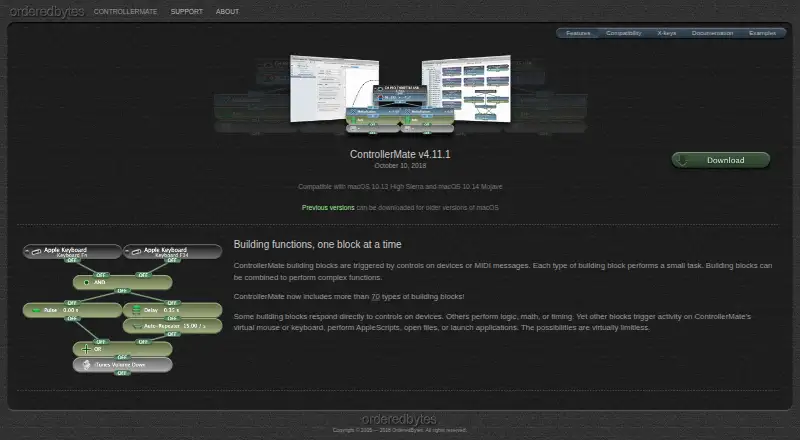
What ControllerMate is
ControllerMate is a macOS utility for mapping controls on input devices and MIDI messages to custom keyboard, mouse, and MIDI actions. Its programming uses more than 70 kinds of building blocks that can be combined into functions. Blocks can handle logic, math, and timing; generate keyboard or mouse activity; run AppleScripts; open files; or launch applications.
Users can remap or disable keyboard buttons and configure standard or custom mouse acceleration curves for devices using ControllerMate’s driver. MIDI notes, controller values, and patch changes can trigger blocks, and the software can send MIDI messages through a virtual MIDI source. It can also create virtual mouse, tablet, and joystick devices controlled by its programming. A helper application can monitor attached controllers and run current programming after the main application is closed.
Unregistered use has no time limit, but only 10 building blocks may generate output; input, logic, math, and timing blocks can be created without limit. A free edition for X-keys owners omits MIDI Source and MIDI Output blocks. OrderedBytes describes ControllerMate as used in audio and video editing, music production, gaming, and flight simulation. Support is available through documentation, its forum, and email. OrderedBytes introduced ControllerMate as its first product in 2005.
Who it suits
ControllerMate suits Mac users who want to remap input devices or build custom keyboard, mouse, and MIDI actions. Its stated uses include audio and video editing, music production, gaming, and flight simulation, and it supports virtual mouse, tablet, and joystick outputs.
What it does well
- More than 70 building block types can be combined into functions.
- Maps MIDI inputs to actions and sends MIDI through a virtual source.
- Can run AppleScripts, open files, and launch applications.
- Creates virtual mouse, tablet, and joystick devices.
- Unregistered use has no time limit.
- Helper can run programming after the main app is closed.
What to know first
- Available for macOS only.
- Unregistered use allows only 10 output-generating blocks.
- The free X-keys edition omits MIDI Source and MIDI Output blocks.
Limits
Unregistered use is unlimited in time but limited to 10 output-generating building blocks; input, logic, math, and timing blocks have no limit. The free ControllerMate for X-keys edition omits MIDI Source and MIDI Output building blocks.
Plans
| Plan | Billed and limits | Price |
|---|---|---|
| ControllerMate (unregistered) | No time limit · maximum 10 output-generating building blocks · unlimited input, logic, math, and timing blocks | Free |
As orderedbytes.com lists them, read 9 Oct 2026. The maker's own page has the final word.
Getting started
- Visit the OrderedBytes ControllerMate website.
- Install ControllerMate on macOS.
- Use the unregistered version with up to 10 output-generating blocks, or register for the full version.
- If you own an X-keys device, consider the free ControllerMate for X-keys edition.
ControllerMate is macOS software for turning controls on input devices and MIDI messages into custom keyboard, mouse, and MIDI actions. It suits people who want to build a tailored control setup for creative work, gaming, or simulation. Its breadth goes well beyond basic remapping, though its block-based approach asks for more configuration than a simple mapper.
Overview
ControllerMate builds functions from more than 70 types of blocks. That gives users room to connect physical controls to software actions and virtual outputs, rather than being limited to fixed button assignments. The trade-off is a toolkit for people who want to construct their own workflows, not a collection of ready-made mappings.
Key features
Blocks handle logic, math, and timing, as well as generating keyboard or mouse activity, running AppleScripts, opening files, and launching applications. This range makes ControllerMate useful when a button needs to trigger more than a keystroke, but the free-use limit can constrain larger programs.
Users can remap or disable keyboard buttons and configure standard or custom mouse acceleration curves for devices using ControllerMate’s driver. MIDI notes, controller values, and patch changes can trigger blocks; a virtual MIDI source can send messages out. The software can also create virtual mouse, tablet, and joystick devices controlled by its programming. This combination is particularly useful in setups that need physical controls to coordinate software actions and multiple kinds of output.
A helper application can keep track of attached controllers and run the current programming after the main application is closed. That is a practical fit for a configured setup intended to remain active without leaving the main app open.
Pricing
ControllerMate (unregistered): free. There is no time limit, and input, logic, math, and timing blocks are unlimited. The cap is 10 blocks that generate output, so users can explore the programming system without a deadline, but more involved setups may reach the limit quickly.
ControllerMate for X-keys is a separate free edition for X-keys owners. It omits MIDI Source and MIDI Output blocks, making it a narrower fit for users who need MIDI routing. ControllerMate also offers a free trial, though no trial length is stated. After purchase, registration-key information is sent by email; lost keys can be requested using the purchase email address.
Platforms
ControllerMate supports macOS. Its listed v4.11.1 release includes compatibility fixes for macOS 10.14 Mojave and X-keys hardware; the X-keys edition is listed as compatible with macOS 10.13 High Sierra and macOS 10.14 Mojave. This makes the listed compatibility relevant to older Mac setups, while the release notes do not establish support for later macOS versions.
Who it's for
OrderedBytes describes ControllerMate as used for audio and video editing, music production, gaming, and flight simulation. It is a strong fit for users in those areas who want to tailor mappings, combine logic with actions, or connect MIDI input and output. It is less suitable for anyone who needs software for a platform other than macOS or expects a complex setup to fit within the unregistered output-block allowance.
Pros and cons
- Pros: More than 70 block types support custom functions that combine logic, timing, keyboard and mouse activity, scripts, files, and application launches.
- Pros: MIDI triggers, virtual MIDI output, and virtual mouse, tablet, and joystick devices give it options beyond ordinary keyboard and mouse remapping.
- Pros: Unregistered use has no time limit, with no cap on input, logic, math, or timing blocks.
- Cons: Unregistered use allows only 10 output-generating blocks, which can restrict a larger workflow.
- Cons: The X-keys edition excludes MIDI Source and MIDI Output blocks, so it is not a substitute for the full MIDI feature set.
- Cons: macOS is the only supported platform, and the stated compatibility centers on older releases.
Alternatives
For other options, browse Controller Mapping Software. Choose PadLink if you need a controller-mapping option across Android, iOS, macOS, and Windows; it has a free plan and trial, with its Standard plan capped at one active controller. AntiMicroX is a free, GPL v3 desktop application for Linux and Windows, so it is the more relevant option when macOS is not your platform. ControllerBuddy is also free and open source under GNU GPL v3.0 for Linux and Windows.
DS4Windows is a free Windows application for Windows 10 or newer, with .NET 8.0 Desktop Runtime, Visual C++ Redistributable, and ViGEmBus driver requirements. Gamepad Mapper is another macOS freemium option, with a free app download and in-app purchases. InputConfig is free for macOS 14 or later through the Mac App Store. JoyShockMapper is free, with a Windows release and Linux builds from source. JoyXoff is a free, lightweight Windows option with no ads.
Verdict
Choose ControllerMate if you use macOS and want fine-grained control over remapping or programmable keyboard, mouse, and MIDI actions. Its extensive block system and virtual-device support are the main reasons to choose it. Look elsewhere if you need another platform or expect to build a larger output-heavy setup without registering.
Verdict
Choose ControllerMate if you use macOS and want detailed control remapping or programmable keyboard, mouse, and MIDI actions. Look elsewhere if you need another platform or more than 10 output-generating blocks without registering.
Questions
Which platform does ControllerMate support?
ControllerMate is for macOS. Its listed X-keys v4.11.1 compatibility includes macOS 10.13 High Sierra and macOS 10.14 Mojave.
Is ControllerMate free?
Unregistered use costs nothing and has no time limit, but output generation is limited to 10 building blocks. The free X-keys edition is for X-keys device owners.
What does the free version limit?
Unregistered ControllerMate limits output-generating blocks to 10, while input, logic, math, and timing blocks can be created without limit. The X-keys edition also omits MIDI Source and MIDI Output blocks.
Can ControllerMate send MIDI messages?
Yes. MIDI notes, controller values, and patch changes can trigger building blocks, and ControllerMate can send MIDI through a virtual MIDI source.
Who makes ControllerMate?
OrderedBytes makes ControllerMate. The company says it was founded in 2005 and introduced ControllerMate as its first product that year.
What support is available?
ControllerMate support is available through documentation, the OrderedBytes forum, and support email.
Facts from ControllerMate's own pages
- Actions
- Building blocks can perform logic, math, and timing, generate keyboard or mouse activity, run AppleScripts, open files, or launch applications. · orderedbytes.com, 8 Oct 2026
- Audience
- OrderedBytes describes ControllerMate as used for audio/video editing, music production, gaming, and flight simulation. · orderedbytes.com, 8 Oct 2026
- Background operation
- A helper application monitors attached controllers and runs the current programming when the main ControllerMate application is closed. · orderedbytes.com, 9 Oct 2026
- Block actions
- Blocks can perform logic, math, and timing, generate virtual keyboard or mouse activity, run AppleScripts, open files, and launch applications. · orderedbytes.com, 9 Oct 2026
- Building blocks
- Its visual building-block system combines small tasks into complex functions and includes more than 70 block types. · orderedbytes.com, 9 Oct 2026
- Compatibility
- The page lists ControllerMate for X-keys v4.11.1 as compatible with macOS 10.13 High Sierra and macOS 10.14 Mojave. · orderedbytes.com, 8 Oct 2026
- Driver configuration
- Users can remap or disable keyboard buttons and configure standard or custom mouse acceleration curves. · orderedbytes.com, 8 Oct 2026
- Driver settings
- Driver configurations can remap or disable keyboard buttons and create standard or custom mouse acceleration curves for devices using ControllerMate’s driver. · orderedbytes.com, 9 Oct 2026
- Founded
- 2005 · orderedbytes.com, 28 Sept 2026
- Free use limit
- Unregistered use has no time limit, but is limited to 10 building blocks that generate output; input, logic, math, and timing blocks can be created without limit. · orderedbytes.com, 8 Oct 2026
- Intended uses
- The maker says ControllerMate is used for audio/video editing, music production, gaming, and flight simulation. · orderedbytes.com, 9 Oct 2026
- Maker
- OrderedBytes says it was founded in 2005 and introduced ControllerMate as its first product that year. · orderedbytes.com, 8 Oct 2026
- MIDI
- MIDI notes, controller values, and patch changes can trigger blocks, and ControllerMate can send MIDI through a virtual MIDI source. · orderedbytes.com, 9 Oct 2026
- Purpose
- ControllerMate triggers custom keyboard, mouse, and MIDI actions from input devices. · orderedbytes.com, 9 Oct 2026
- Registration key help
- After purchase, ControllerMate key information is sent by email, and lost keys can be requested using the purchase email address. · orderedbytes.com, 9 Oct 2026
- Release and compatibility note
- The maker’s listed latest release is v4.11.1, whose notes mention compatibility fixes for macOS 10.14 Mojave and X-keys hardware. · orderedbytes.com, 9 Oct 2026
- Support
- Support is offered through documentation, the OrderedBytes forum, and email. · orderedbytes.com, 9 Oct 2026
- Virtual devices
- ControllerMate can create virtual mouse, tablet, and joystick devices controlled by its programming. · orderedbytes.com, 9 Oct 2026
- X-keys compatibility
- The maker lists compatibility with numerous X-keys models, including programmable keyboards, keypads, foot pedals, and switch interfaces. · orderedbytes.com, 9 Oct 2026
- X-keys edition
- The free ControllerMate for X-keys edition is for owners of X-keys devices and omits the MIDI Source and MIDI Output building blocks. · orderedbytes.com, 9 Oct 2026
Where ControllerMate stands on Freedom251
- Controller Mapping Software#8 of 29