Freedom251 › Controller Mapping Software

Keysticks
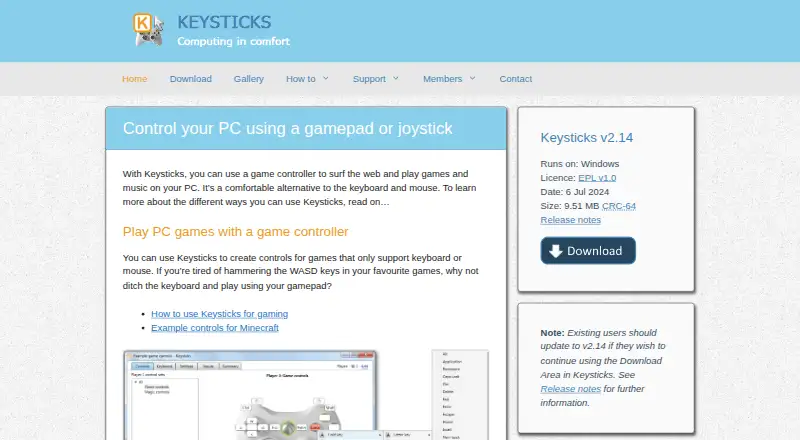
What Keysticks is
Keysticks lets users control a Windows PC with a gamepad or joystick, including replacing keyboard and mouse input for browsing, games, music, and other computer tasks. It works with correctly installed wired or wireless controllers using XInput or DirectInput. For games that accept keyboard or mouse input, users can create custom layouts and mappings. Configurable mouse-pointer controls and an on-screen keyboard with word prediction support everyday computer use; the keyboard and prediction work with multiple languages, although the interface is English only.
Sample profiles are included, and the Profile Browser lets users preview and download profiles created by others. Sharing through the Download Area requires an account and login. A profile can support up to four players, and the software supports per-app profiles and profile switching. Keysticks is free and open source under the Eclipse Public License v1.0, with source code linked on GitHub. The listed release is v2.14 for Windows, dated 6 July 2024; Windows 10, 8, 7, or Vista are suggested minimum operating systems.
Who it suits
Keysticks suits Windows users who want to operate a computer with a gamepad or joystick, including people seeking an alternative to keyboard and mouse controls. It may also suit players configuring controller layouts for games that accept keyboard or mouse input.
What it does well
- Works with wired and wireless XInput and DirectInput controllers.
- Custom layouts support games accepting keyboard or mouse input.
- Includes pointer controls and an on-screen keyboard.
- Profiles can support up to four players.
- Free and open source under EPL v1.0.
What to know first
- Some games block emulated input.
- Administrator-level tasks require matching administrator privileges.
- The interface is English only.
- Profile sharing requires an account and login.
Limits
Keysticks is free, with no time limitation stated. Some games block emulated input, and administrator-level tasks work only when Keysticks also runs with administrator privileges.
Plans
| Plan | Billed and limits | Price |
|---|---|---|
| Keysticks | Free software; no registration required · Windows · EPL v1.0 · no time limitation stated | Free |
| Free | Windows only · XInput or DirectInput controller · 30 MB disk space minimum | Free |
As keysticks.net lists them, read 8 Oct 2026. The maker's own page has the final word.
Getting started
- Visit the Keysticks website.
- Download Keysticks v2.14 for Windows.
- Install a compatible XInput or DirectInput gamepad or joystick.
- Choose a sample profile or create controls for a game that accepts keyboard or mouse input.
- Open the Profile Browser to preview and download profiles.
- Create an account and sign in if you want to share profiles through the Download Area.
Verdict
Keysticks offers controller-based computer controls, custom game mappings, and shared profiles at no cost. Check game input compatibility and administrator requirements before relying on it for a particular task.
Questions
How much does Keysticks cost?
Keysticks is free software, listed as free. No registration is required to use the software.
Is Keysticks open source?
Yes. It is released under the Eclipse Public License v1.0, and the maker links to source code on GitHub.
Which operating systems does it support?
Keysticks is listed for Windows. The download page suggests Windows 10, 8, 7 or Vista as minimum operating systems.
What controllers does Keysticks support?
It supports correctly installed wired or wireless gamepads and joysticks that use XInput or DirectInput.
Can I share or download profiles?
The Profile Browser lets users preview and download profiles made by others. Sharing profiles through the Download Area requires an account and sign-in.
What languages does Keysticks support?
The interface is English only. The on-screen keyboard and word prediction support multiple languages.
Facts from Keysticks's own pages
- Accessibility use
- The maker says Keysticks is designed to make computing more comfortable and describes using a controller instead of a mouse and keyboard. · keysticks.net, 8 Oct 2026
- Account security
- The members page says account names and email addresses are stored for login and profile sharing, while remembered passwords are stored locally in encrypted form. · keysticks.net, 15 Oct 2026
- Actions
- Actions include key presses, pointer control, window activation, program launching, profile loading and media or browser commands. · keysticks.net, 15 Oct 2026
- AlternativeTo listing
- AlternativeTo lists Keysticks as a free Windows application developed by T C Brogden Limited and written in C#. · alternativeto.net, 15 Oct 2026
- API and SDKs
- The repository documents internal use of the OpenAdaptxt API for word suggestions and the SlimDX API for gamepad input, without describing a public Keysticks API or SDK. · github.com, 15 Oct 2026
- Build requirements
- The repository documentation names the SlimDX SDK for .NET 4 x86, NSIS and Visual Studio Community 2019 as build prerequisites. · github.com, 15 Oct 2026
- Controller compatibility
- Supported controllers are correctly installed gamepads or joysticks using XInput or DirectInput. · keysticks.net, 15 Oct 2026
- Current release
- The site lists version 2.14 for Windows, dated 6 July 2024, with a 9.51 MB installer. · keysticks.net, 15 Oct 2026
- Developer source
- The public repository is a C# .NET WPF application with installer projects, a C++ WordPredictor COM wrapper and CHM help sources. · github.com, 15 Oct 2026
- Documentation
- The official help area covers installation, profiles, controls, keyboard features, options, Profile Designer tabs, advanced editing and action types. · keysticks.net, 15 Oct 2026
- Editorial review on Softpedia
- 4.5 out of 5 from the Softpedia reviewer. · softpedia.com, 15 Oct 2026
- Game controls
- Users can create controls for games that accept keyboard or mouse input, including custom layouts and input mappings. · keysticks.net, 8 Oct 2026
- Gaming
- Users can create controller mappings for games that only accept keyboard or mouse input. · keysticks.net, 15 Oct 2026
- Independent domain check
- Scam Detector reports an 86.5/100 authenticity score for keysticks.net and says the domain was registered on 23 April 2012. · scam-detector.com, 15 Oct 2026
- Independent safety check
- Gridinsoft reports a 79/100 trust score for keysticks.net with no malware or phishing detections in its scan. · gridinsoft.com, 15 Oct 2026
- Installer dependency
- The installer may request the SlimDX Runtime before installing Keysticks. · keysticks.net, 15 Oct 2026
- Language
- The user interface is English only, while the on-screen keyboard and word prediction support multiple languages. · keysticks.net, 8 Oct 2026
- Licence
- The maker states that Keysticks is open source under the Eclipse Public License 1.0. · keysticks.net, 15 Oct 2026
- License and source
- Keysticks is free and open source software released under the Eclipse Public License v1.0, and the maker links to its source code on GitHub. · keysticks.net, 8 Oct 2026
- Limit: account migration
- The 2.14 release required users who wanted profile sharing to create or re-register accounts because old accounts could not be migrated. · keysticks.net, 15 Oct 2026
- Limit: blocked games
- The FAQ warns that games requiring physical hardware or overriding emulated cursor input may not work with Keysticks. · keysticks.net, 15 Oct 2026
- Limit: configuration effort
- Softpedia says configuring presets for every application or game can take considerable time. · softpedia.com, 15 Oct 2026
- Limit: elevation
- Keysticks actions do not work in administrator-level tasks unless Keysticks is also run with administrator privileges. · keysticks.net, 15 Oct 2026
- Limit: language
- The user interface is English only, although the screen keyboard and word prediction support multiple languages. · keysticks.net, 15 Oct 2026
Where Keysticks stands on Freedom251
- Controller Mapping Software#4 of 29